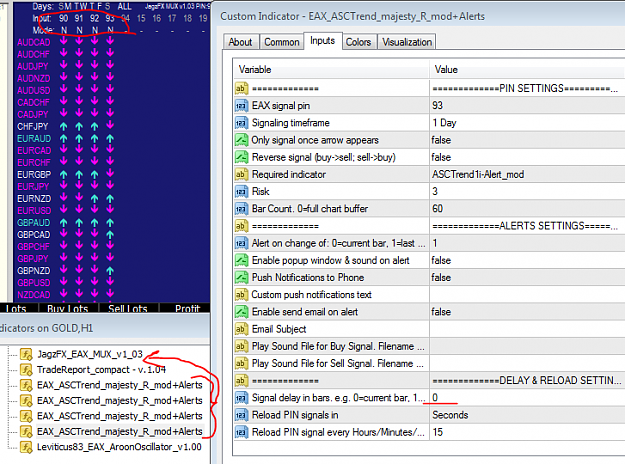
I used it with same only with 0 risk without Aaron, just RSI 13 - 15M Reverse = few green pips after a lot trade so I will check with SNR D1 + H4 and TDI H1 Trend
There are three strategies to select from the list:
CROSSING, TRENDING, SCALPING.
CROSSING strategy has two modes to select from another list:
1. Signaling of crosses in any Aroon Up Dn zone from 0 to 100,
2. Signaling only crosses which happen in Upper / Lower Thresholds zone, i.e. zones 0-25 and 75-100 (crosses happening in between 25-75 are ignored).
Aroon Up Dn PIN v1.00 for EAX There are three strategies to select from the list: CROSSING, TRENDING, SCALPING. CROSSING strategy has two modes to select from another list: 1. Signaling of crosses in any Aroon Up Dn zone from 0 to 100, 2. Signaling only crosses which happen in Upper / Lower Thresholds zone, i.e. zones 0-25 and 75-100 (crosses happening in between 25-75 are ignored). SCALPING is simplest when: AroonUp > AroonDn = LONG, AroonDn > AroonUp =SHORT. TRENDING modes I will explain later with screenshots. {file} {file}
Ignored
Thanks Levi, you are appreciated, i want to believe that crossing at thresholds would be most reliable. Would
Aroon Up Dn PIN v1.00 for EAX There are three strategies to select from the list: CROSSING, TRENDING, SCALPING. CROSSING strategy has two modes to select from another list: 1. Signaling of crosses in any Aroon Up Dn zone from 0 to 100, 2. Signaling only crosses which happen in Upper / Lower Thresholds zone, i.e. zones 0-25 and 75-100 (crosses happening in between 25-75 are ignored). SCALPING is simplest when: AroonUp > AroonDn = LONG, AroonDn > AroonUp =SHORT. TRENDING modes I will explain later with screenshots. {file} {file}
Ignored
Thank you Leviticus, very much appreciate The PINs you share.
Aroon Up Dn PIN v1.00 for EAX There are three strategies to select from the list: CROSSING, TRENDING, SCALPING. CROSSING strategy has two modes to select from another list: 1. Signaling of crosses in any Aroon Up Dn zone from 0 to 100, 2. Signaling only crosses which happen in Upper / Lower Thresholds zone, i.e. zones 0-25 and 75-100 (crosses happening in between 25-75 are ignored). SCALPING is simplest when: AroonUp > AroonDn = LONG, AroonDn > AroonUp =SHORT. TRENDING modes I will explain later with screenshots. {file} {file}
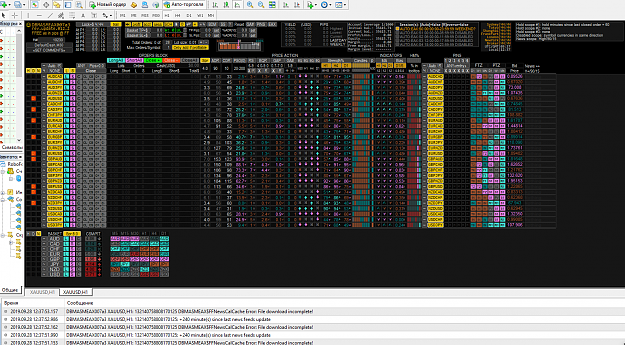
I'm a beginner. After the Dashboard EAX is installed, news indicators do not work. Constant Error: FFNewsCache Error: File download incomplete! "Please help me.
I'm a beginner. After the Dashboard EAX is installed, news indicators do not work. Constant Error: FFNewsCache Error: File download incomplete! "Please help me.
I'm a beginner. After the Dashboard EAX is installed, news indicators do not work. Constant Error: FFNewsCache Error: File download incomplete! "Please help me. I'm a beginner. After the Dashboard EAX is installed, news indicators do not work. Constant Error: FFNewsCache Error: File download incomplete! "Please help me. {image}
Ignored
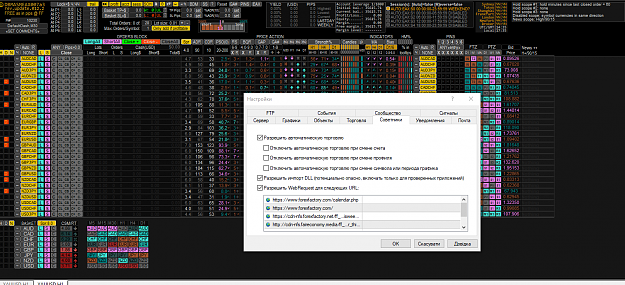
Hi mate. Not sure if this is related...but did you enable DLL imports?
..."make sure that you have "Allow DLL imports" enabled in the "Common" tab of the EA properties, required to grab news"
{quote} Hi mate. Not sure if this is related...but did you enable DLL imports? ..."make sure that you have "Allow DLL imports" enabled in the "Common" tab of the EA properties, required to grab news"
Ignored
I often experience this in my MT4 testing platform but not everytime. The dashboard would still display news countdown so I often ignore it.
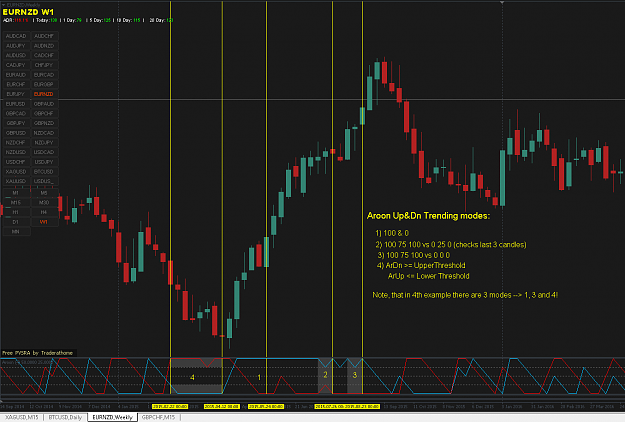
As promised I'm back with the Trending strategy explanation for Aroon Up&Dn pin. Let the screenshot speak by itself what I meant by Trending strategy and 4 different modes. In the example AroonPeriod=4. Exits from trending mode can be triggered by NoSignal mode.
As promised I'm back with the Trending strategy explanation for Aroon Up&Dn pin. Let the screenshot speak by itself what I meant by Trending strategy and 4 different modes. In the example AroonPeriod=4. Exits from trending mode can be triggered by NoSignal mode. {image}
Ignored
if is not enough you create the pin , you came and explain with a strategy as well , THIS IS CHRISTMAS ????