Seller what type of program do you use to take pictures of your screen?
I would like to show the trades without account info.
The last set you provided was on point for the 1hr, every trade came in on the green on a small live account.
Ignored
I do a Ctrl + Alt + PrtScr to the active window then open IrfanView(Free paint program) and paste it into IrfanView and then cut the portion I want if I don't want the entire window. Then clear the Paint Window and paste the cut image into the Paint program and then save it as a GIF.
I have difficulty setting the trading hours. My local time is (GMT +400) . So if I want to set the EA to trade the same hours as maxzeus set in the example above considering that my local time is EST +900:
1-12 will be 9-21 my local time or 9-12 and 12-21
12-16 will be 21-1 (the next day) my local time or 21-24 and 0-1 the next day.
I know it gets complicated or I am missing something. So I set my trading hours to:
9-12 and 12-24 but with that I miss one hour (0-1).
If my understanding is correct, then I suggest using GMT and 24 hours format...
Ignored
Dose anyone else have this problem with setting times??????
I have been using Gadwin Printscreen for years and love being able to quickly draw a box on the particular part of the screen I want to capture. It is freeware:
I do a Ctrl + Alt + PrtScr to the active window then open IrfanView(Free paint program) and paste it into IrfanView and then cut the portion I want if I don't want the entire window. Then clear the Paint Window and paste the cut image into the Paint program and then save it as a GIF.
Ignored
I do Ctrl + Alt + PrtScr then go to Paint, past there, crop it and save it as GIF and use it.
I do Ctrl + Alt + PrtScr then go to Paint, past there, crop it and save it as GIF and use it.
^Sam
Ignored
Actually, there is no need to press Ctrl + Alt. Just pressing PrtScr is enough to copy a screenshot to the clipboard. (Hooray for saving key strokes. )
I do a Ctrl + Alt + PrtScr to the active window then open IrfanView(Free paint program) and paste it into IrfanView and then cut the portion I want if I don't want the entire window. Then clear the Paint Window and paste the cut image into the Paint program and then save it as a GIF.
Ignored
well might as well this is what i use and it's all portable and free
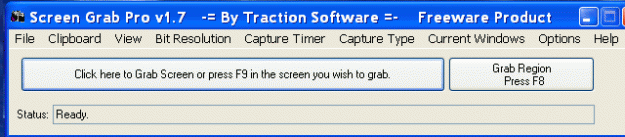
-Screen Grab Pro Is a "freeware" screen capture tool. It features One click grab of any screen or section for ease of use, Timer operation, Current window selection list and more. Screen Grab Pro copies a bitmap to clipboard ready for pasting in your favorite Picture Editor. http://www.traction-software.co.uk/s...pro/index.html
-GIMP Small picture Editing software with lots of features similar to Photoshop and it's Free www.gimp.org
i also use Snagit sometimes depending of my needs, because of the nice arrows/shapes/lines/forms etc.. i can use easily, but its not Free Good for posting Charts T.A
OK now back to the TMS v18 EA .., Good Job Seller9 again
Gonna post soon the Set File based on PBH's settings or very close to his settings.
Attached Image (click to enlarge)
Don't forget Practice + Patience + Persistence = Profits
I do a Ctrl + Alt + PrtScr to the active window then open IrfanView(Free paint program) and paste it into IrfanView and then cut the portion I want if I don't want the entire window. Then clear the Paint Window and paste the cut image into the Paint program and then save it as a GIF.
you just click on PrintScreen and it automatically freezes the screen, you just cut what you want to show, you can make arrows, squares, blablabla (like paint), then save it as a file and it's already jpeg. If you want to close it, you just click on Esc, and that's it.
Hello, Klau, I can keep up to date as it files your set, if you have found some improvement
tank I forgot this: 4h would be possible to enter immediately changes color when the candle "candle pattern 1 real
Two three false. Seeing first performance trends and the position and ema else could risk entering 1 st candle. At 4h there is less noise and you could make a few pips but good
you just click on PrintScreen and it automatically freezes the screen, you just cut what you want to show, you can make arrows, squares, blablabla (like paint), then save it as a file and it's already jpeg. If you want to close it, you just click on Esc, and that's it.
Pbh
Ignored
thats similar to an add-on i have in FIREFOX Pixlr
Don't forget Practice + Patience + Persistence = Profits
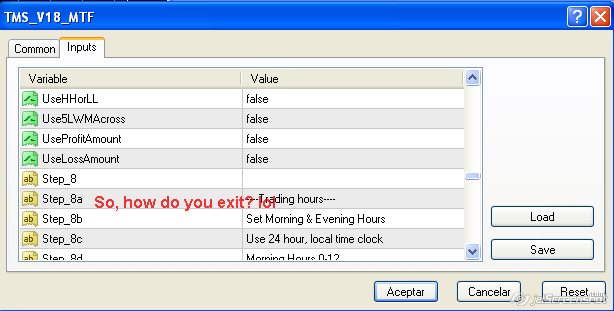
ok.. I finished with the 15min setfile BUT... still got one question before releasing it..
How do I exit?
I thought there would be a setting to exit a trade when a candle closed below/above the 13SMA... But now I see it's only the entry? am I mistaken?
If I'm right, seller9, would you mind adding that setting??
Thanks a lot
Pbh
PS:I'm going to church now, see ya'll one hour later
ok.. I finished with the 15min setfile BUT... still got one question before releasing it..
How do I exit?
I thought there would be a setting to exit a trade when a candle closed below/above the 13SMA... But now I see it's only the entry? am I mistaken?
If I'm right, seller9, would you mind adding that setting??
Thanks a lot
Pbh
PS:I'm going to church now, see ya'll one hour later
Ignored
im am in the process of typing the post and uploading the SET FILE
Don't forget Practice + Patience + Persistence = Profits
|
Joined Oct 2008
|
Status: Price Action, "TDI" & "HA"
|537 Posts
Quote
Disliked
Originally Posted by Pbh 15 min charts
Entry confirmations:
-candle closes, not opens, just closes. -only buy below middle band of the TMA and only sell above middle band of the TMA.
-Price Action (candle) has to close above 5 EMA shift 2,
-and also above 13 moving average (no exponential, no shift), -15 min TDI cross, I actually don't care about the number but anything that's not less than 3.0 would work (as I said before, closes),
-no stochs,
-no countertrend
Close confirmations:
I'm working on this one, but for the time being I only have candle close below 13 MAwith TDI on negative (green line below red one for longs, and green line above red one for shorts).
The ZONES are good for "Buying the DIP & Shorting the TIP" type strats or simply finding the best reversals.
so like i said in my previous post i checked with the 13sma and compared it with the CCi 22 trigger levels 0 or 50 or 100 it gives similar results, now since seller9 and his awesome EA work that he's sharing and released v18 we can add our own desired MA level for Entry (Thanks)
SO i made a SET FILE using the Zones and from PBH setup ideas along with some of my additions that i think it will help on confirming of Entries & Exits
Quote
Disliked
SETTINGS in the SET FILE
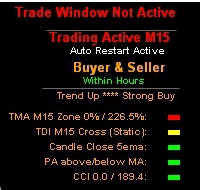
Entry confirmations (see pic)
A-UseTdiCross (Static) B-Use5emaCandleClose (confirmed price close above/below 5ema shift 2)
C-UseZone (TMA zone set at -0-)
D-UseMaCrossPA (Price Action Above/Below 12 Ma)
E-UseCCI (period 22 trigger line 0)
F-NO Stock or Stoch Slope or Range
G-NO Trend or TMA Trend or CandleTradeWindow
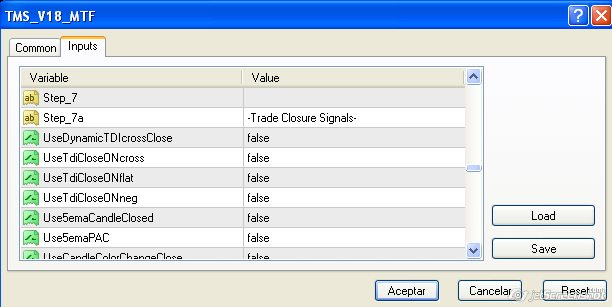
Close confirmations
1- Use5emaCandleClosed
2- UseCandleColorChangeClose
3- UseCandlestickTrailingStop "2 candles" (also good for safety in case of internet or MT4 crash)
4- Use5LWMAcross (has similar close than the 13sma but earlier EXITS giving you more pips before the reversal)
Each user just needs to change these depending on your broker or TimeZone
-Trading hours it's set at 24hrs
-CriminalECN is set to TRUE but may need to be FALSE
-Dashboard is FALSE so put it to TRUE if your using it
the above settings you can change example changing Zone or CCI levels to 50 or 100 or by replacing "D" above with "UseMaCrossCandleClose" instead, but test this SET FILE for a couple of days.
i tried to balance the entries after analyzing multiple charts, also with higher timeframes it would be recommended to use different levels, but i would not change "A" & "B" also a 2nd TDI confirmation when not using TRENDS like "TdiC1TimeFrame" could come in handy on higher TF's.
for other close confirmations that i like but not used here, for higher TF's or Targets desired could come in handy.
-UseTdiCloseONcross (static)
-UseProfitAmount or UseLossAmount
thats it, im testing this on 3 different pairs But if anyone else using the ZONES with different settings that is profitable feel free to post or test others settings like with stochastics or trends etc..
Actually, there is no need to press Ctrl + Alt. Just pressing PrtScr is enough to copy a screenshot to the clipboard. (Hooray for saving key strokes. )
Ignored
I have 4 monitors and if I do that all 4 go to the clip board as one big image. By using Ctrl + Alt I get just the active window. It is also nice if you have a pop up window that you want to capture and paste into a Word Doc, and don't want the entire screen. Then I just click the popup to make it active and only it will be copied to the clip board. This works nice when doing a Document in Word as now I go to Word and put the cursor where I want that pop up box displayed and paste. I still do a lot of old DOS stuff yet like using Ctrl + C and Ctrl + V.
Hard to teach an old DOS Dog new tricks.
IrfanView also does have a Hot Key to capture the screen that also launches the program and you can set it so you can select an area of interest so you don't copy the entire screen. If I am doing a lot of cut and paste I may do it with the Hot Key to save a few key clicks.
There are many Paint Programs and capture programs out there, its just a matter of getting use to one you like.
ok.. I finished with the 15min setfile BUT... still got one question before releasing it..
How do I exit?
I thought there would be a setting to exit a trade when a candle closed below/above the 13SMA... But now I see it's only the entry? am I mistaken?
If I'm right, seller9, would you mind adding that setting??
Thanks a lot
Pbh
PS:I'm going to church now, see ya'll one hour later
Ignored
I don't believe you mentioned you also wanted an exit using this. I can add it but I am going to watch the World Series first. Later on tonight I will add the same MA stuff to use as an exit, should be ready before the London open as I go to bed before London opens.
I don't believe you mentioned you also wanted an exit using this. I can add it but I am going to watch the World Series first. Later on tonight I will add the same MA stuff to use as an exit, should be ready before the London open as I go to bed before London opens.
Ignored
you might as well add a GMT shift or a 3rd Time to Trade
basically i trade 1 hour before Tokyo opens to London Close and some USD related pairs until US Close,
making me have Syndney/Tokyo overlap + Tokyo/London Overlap & London/US overlap
my timezone is GMT -5.00 or EST
start_hourm=1-12
start_houre=12-16
For AUD pairs i have 20-24 instead of 12-16
But it would be usefull maybe a 3rd Time settings because i can't put 12-16 for AUD pairs or others here can't replicate the hours some of us trades on
Don't forget Practice + Patience + Persistence = Profits
I don't believe you mentioned you also wanted an exit using this.I can add it but I am going to watch the World Series first. Later on tonight I will add the same MA stuff to use as an exit, should be ready before the London open as I go to bed before London opens.
Ignored
Originally Posted by Pbh (this is a Private message) Hello seller9[...]
And closed if the candle closed below the 13 MA. I'm working on the best close setting but for the time I had to see... when there's a strong fundamental trend, this seems to be the best exit in the 15 min chart[...]
No problems , thanks a lot for the time you are taking to make pips with this group. That's worth a thousand vouchs



 Trading Made Simple EA by Guess Whom




 (Thanks)