Hi everyone,
after many years spent in FF where I've learnt a lot I'd like to give back some.
This is my Christmas thought for the community and since it's a gift it's given as such for those who want it.
Attached are two versions of the same EA, one "Dashboard_Strength_Suffix" to be used with currency names with ".pro" suffix (e.g. AXI), another "Dashboard_Strength_No_Suffix" for currency names without suffix (e.g. ICMarkets).
Below in # Post 4 https://www.forexfactory.com/thread/...1#post15087871 there's a release of the EA that should work with or without suffix.
EDIT: also added here in post # Post 1
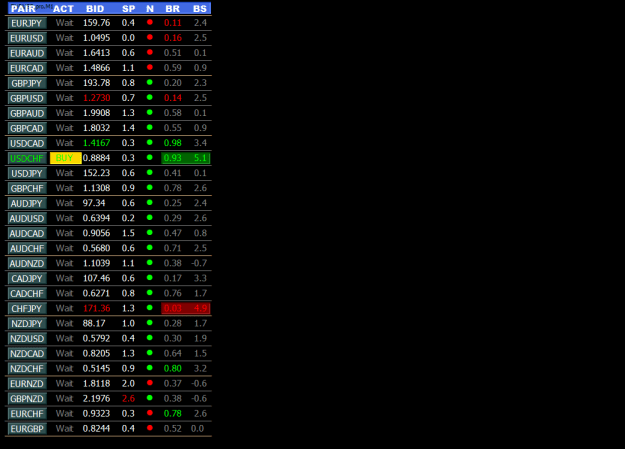
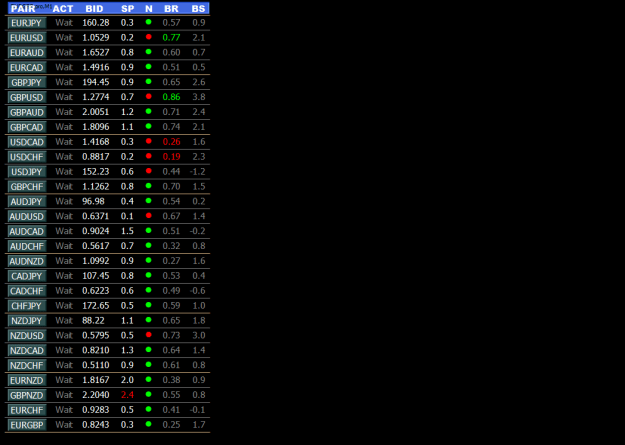
Choose the EA that works for you, apply the relevant template and you should see something similar to the image "Dashboard_Strength_Suffix_V1.png".
The dashboard gives a signal based on the balance of power between currencies showing the recommended action in the "ACT" column.
Obviously it doesn't mean that if for example there is a "BUY" signal you must slavishly open the chart and enter long on that pair.
It's simply an indication, then the trader must decide whether to open the position and manage it accordingly.
By clicking on a currency button, a chart opens with a default template containing indicators freely available here on FF which I put here for your convenience. Unzip and put them under Indicators folder.
They aren't absolutely necessary for the dashboard to function and you can of course use your favorite default template instead of this one.
Important Note: in order for the Dashboard to function correctly, the MT4 Market Watch window needs the 28 currency pairs contained in the "pairList1" and "pairList2" parameters to be present.
Column Headers Explained
PAIR: pair name.
ACT: suggested action as "Wait", "Buy", "BUY", "Sell", "SELL" where uppercase means more strength.
BID: bid price.
SP: pair spread in pips.
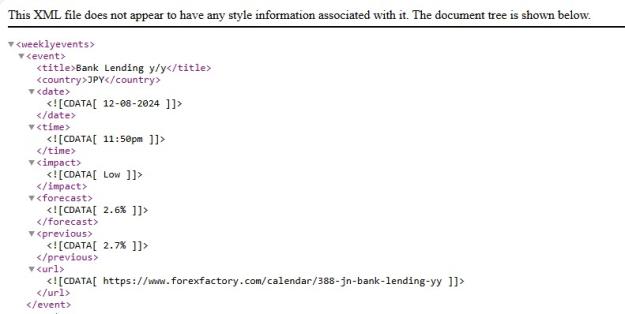
N: market news, if you want incoming news to be checked, download this https://nfs.faireconomy.media/ff_calendar_thisweek.xml every week and put it in MT4 /files folder. If you don't want news, leave parameter "flagEnableNews" set to false.
BR: bid ratio for this pair.
BS: buy/sell ratio for this pair.
EA Params Explained
Please, be aware that there's no ongoing support and questions will be answered when I have free time.
Take it or leave it and maybe make some money.
Best regards,
bubincka
after many years spent in FF where I've learnt a lot I'd like to give back some.
This is my Christmas thought for the community and since it's a gift it's given as such for those who want it.
Attached are two versions of the same EA, one "Dashboard_Strength_Suffix" to be used with currency names with ".pro" suffix (e.g. AXI), another "Dashboard_Strength_No_Suffix" for currency names without suffix (e.g. ICMarkets).
Below in # Post 4 https://www.forexfactory.com/thread/...1#post15087871 there's a release of the EA that should work with or without suffix.
EDIT: also added here in post # Post 1
Choose the EA that works for you, apply the relevant template and you should see something similar to the image "Dashboard_Strength_Suffix_V1.png".
The dashboard gives a signal based on the balance of power between currencies showing the recommended action in the "ACT" column.
Obviously it doesn't mean that if for example there is a "BUY" signal you must slavishly open the chart and enter long on that pair.
It's simply an indication, then the trader must decide whether to open the position and manage it accordingly.
By clicking on a currency button, a chart opens with a default template containing indicators freely available here on FF which I put here for your convenience. Unzip and put them under Indicators folder.
They aren't absolutely necessary for the dashboard to function and you can of course use your favorite default template instead of this one.
Important Note: in order for the Dashboard to function correctly, the MT4 Market Watch window needs the 28 currency pairs contained in the "pairList1" and "pairList2" parameters to be present.
Column Headers Explained
PAIR: pair name.
ACT: suggested action as "Wait", "Buy", "BUY", "Sell", "SELL" where uppercase means more strength.
BID: bid price.
SP: pair spread in pips.
N: market news, if you want incoming news to be checked, download this https://nfs.faireconomy.media/ff_calendar_thisweek.xml every week and put it in MT4 /files folder. If you don't want news, leave parameter "flagEnableNews" set to false.
BR: bid ratio for this pair.
BS: buy/sell ratio for this pair.
EA Params Explained
Inserted Code
extern bool flagEnableNews = false; // if enabled file "ff_calendar_thisweek.xml" must be under MT4 /files folder
extern bool flagSound = false;  // if enabled play a sound when there a market signal
extern bool    flagPut_USD_News_On_All = false; // leave it alone
extern bool flag_dPeriod = true;    // leave it alone
extern bool flag_xPeriod = true;    // leave it alone
extern bool flag_bs_flexi_ams = true;   // leave it alone
extern int startHeadersX = 20;  // self explanatory
extern int startHeadersY = 0;   // self explanatory
extern int startFieldsX = 10;   // self explanatory
extern int startFieldsY = 25;   // self explanatory
extern int startGridY = 12;     // self explanatory
extern int vertSpaceY = 25;     // self explanatory
extern int tf = PERIOD_M5;      // used for highlighting pair high/low and timeframe of opening template
extern int period_Sar_X_Over_Down = PERIOD_M5;  // not used
extern int dPeriod = PERIOD_D1; // main timeframe for strength calc
extern int xPeriod = PERIOD_H1; // secondary timeframe from strength calc
extern int minsBeforeNews = 30; // self explanatory
extern int minsAfterNews = 30;  // self explanatory
extern int readXmlFreq = 1440;  // read news file once a day
extern int textFontSize = 11;   // self explanatory
extern int highlightBarSize_2TF = 53; //leave it alone
extern int highlightBarSize_BR_BS_LBS = 122;    //leave it alone
extern int secondsSound = 60;   // time interval between sounds
extern double spreadAlert = 2.0;    // pips spread alert
extern double zoneHighLow = 50;     // points for high/low zone
extern double MeanCcyStrength = 4.5;    // leave it alone
extern double bs_limit_static = 2.25;   // leave it alone
extern color headersColor = clrWhite; // customize the colors as you like
extern color bidColor = clrWhite;
extern color upColor = clrLime;
extern color downColor = clrRed;
extern color upColorArrow = clrAqua;
extern color downColorArrow = clrMagenta;
extern color normalColor = clrWhite;
extern color neutralColor = clrGray;
extern color gridColor = clrGray;
extern color gridGroupSeparatorColor = clrBurlyWood;
extern color highlightLongColor = clrDarkGreen;
extern color highlightShortColor = clrMaroon;
extern color highlightClimaxLongColor = clrGold;
extern color highlightClimaxShortColor = clrPurple;
extern color bidRatioMaxColor = clrLime;
extern color bidRatioMinColor = clrRed;
extern color btnForegroundColor = clrWhite;
extern color btnBackgroundColor = clrDarkSlateGray;
extern color bidHighColor = clrLime;
extern color bidLowColor = clrRed;
extern color titleBarColor = clrMagenta;
extern string textFont = "Tahoma";  // leave it alone
extern string textFontHeader = "Arial Black";   // leave it alone
extern string pairList1 = "EURJPY.pro;EURUSD.pro;EURAUD.pro;EURCAD.pro;GBPJPY.pro;GBPUSD.pro;GBPAUD.pro;GBPCAD.pro;USDCAD.pro;USDCHF.pro;USDJPY.pro;GBPCHF.pro;AUDJPY.pro;AUDUSD.pro;"; // change pair names according to your broker
extern string pairList2 = "AUDCAD.pro;AUDCHF.pro;AUDNZD.pro;CADJPY.pro;CADCHF.pro;CHFJPY.pro;NZDJPY.pro;NZDUSD.pro;NZDCAD.pro;NZDCHF.pro;EURNZD.pro;GBPNZD.pro;EURCHF.pro;EURGBP.pro";  // change pair names according to your broker
extern string CurrencyPairs = "GU,UF,EU,UJ,UC,NU,AU,AN,AC,AF,AJ,CJ,CF,FJ,EG,EA,EF,EJ,EN,EC,GF,GA,GC,GJ,GN,NJ,NF,NC";    // leave it alone
extern string templateRun = "default.tpl"; // this file must be in MT4 /files and /templates folder; you can use your own template
Please, be aware that there's no ongoing support and questions will be answered when I have free time.
Take it or leave it and maybe make some money.
Best regards,
bubincka
Attached Image (click to enlarge)
Attached File(s)


Porta itineris dicitur longissima esse