After 3 weeks of trading h1-h4, have loss 20% of my account..coz MM its to different..so today i come back in m15 tf, and i think i will not change this tf never.
After 3 weeks of trading h1-h4, have loss 20% of my account..coz MM its to different..so today i come back in m15 tf, and i think i will not change this tf never. {image}
Ignored
Hi Shun,
Thanks for letting us know that the bigger TF with this Method does not work as good. That was a good catch you got there. Nice move.
Watch your BE and make sure you have a goof OFF SET pips as I can see on the pink indicator that you do not have an off set pips in place, that will mean that your BE in basket will still be a lose if price comes back and hit it. Think Seller can explain it better. It is what I noticed. BE in Basket is not the same as BE in single pairs trade.
Well done and now stick to only the TF that works and leave greed outside the door.
Born to rule my Economic World and Make a Difference!
Higher TF do work sharemaster. Plan your trade / trade your plan. Lower TF are personal preference in my opinion. If the currency moved 25 pips it will reflect the same on all time frames. Understand core pairs move on to crosses.
Happy pips everyone SMK
Higher TF do work sharemaster. Plan your trade / trade your plan. Lower TF are personal preference in my opinion. If the currency moved 25 pips it will reflect the same on all time frames. Understand core pairs move on to crosses. Happy pips everyone SMK {image}
How profitable is this EA, and what time frame is best, im going to try the EA. Is there any other setings to think about?
Ignored
How profitable is not a question that can be answered. Its a tool not a system. Seems most people here trade it in different ways, with different baskets, on different time frames. Experiment with it, and use it the way you feel most comfortable. It is not a plug in and play system. Took me a week just to get set up and not screw up the charts and EA (it is a bit complex for a mt4 idiot like me). Watch the videos in the first post on the EA and basket create.
Hi
i installed the EA and it sucessfully opened short trade for JPY 7 pairs. I created another basket for US 4 pairs and it remained on waiting for update status and not moving.
Help me resolve it please.
Hi Seller, is the templates, scripts and EA suitable for MT4 build 745? seems like i have problems in creating offline chart, something went wrong too when I put the script to load historical data too.
EDIT: I found that there was no problem in creating offline chart of H4, but all offline chart below H4 couldnt be created.
{quote} You can change your Magic number yourself. Check the EA properties.
Ignored
Guys:
My name is Edd, just downloaded the EAs two days ago and able to installed everything during the weekend ready to trade when the market opened Sunday afternoon. I also visited the video and learned a lot. However, I need some help because the EA with 3 baskets I created has yet to open a trades and it is not opening. I thought I may have done wrong. I guessed maybe why it is not opening a trade because there was a message which is showed as " No Entry Time No Exit Time ". I went back to the trading hours and the default time was selected (0-12,and 12-24) for the local time. I just need help from you guys if what I did is right.
Hi Seller, is the templates, scripts and EA suitable for MT4 build 745? seems like i have problems in creating offline chart, something went wrong too when I put the script to load historical data too. EDIT: I found that there was no problem in creating offline chart of H4, but all offline chart below H4 couldnt be created.
Ignored
Build 745 is OK, I am running it with no problems.
Offline charts require good and clean history to be built properly.
I use the script all the time when I create a new demo account and it always works just fine.
{quote} Guys: My name is Edd, just downloaded the EAs two days ago and able to installed everything during the weekend ready to trade when the market opened Sunday afternoon. I also visited the video and learned a lot. However, I need some help because the EA with 3 baskets I created has yet to open a trades and it is not opening. I thought I may have done wrong. I guessed maybe why it is not opening a trade because there was a message which is showed as " No Entry Time No Exit Time ". I went back to the trading hours and the default time was selected...
Ignored
That message just means it will trade 24 hours, which is OK.
Can you show a screen shot and also include your settings file.
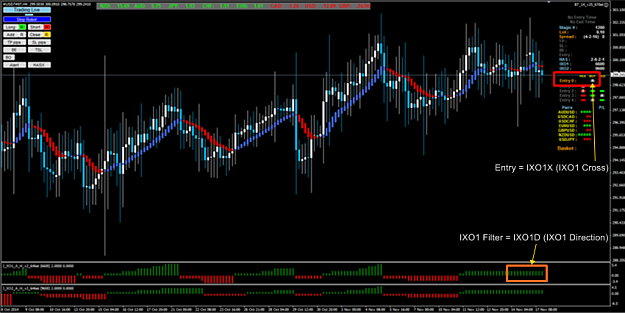
Your setup for trade entry is IXO1X or IXO1 Cross but base on your chart for today there is no IXO1 cross.
So the auto entry Live trade will not trigger because your IXO1 filter currently is IXO1D or IXO1 Direction.
FI5=- - - - Entries to use - - - - UseEntry0=true
UseEntry1=false
UseEntry2=false
UseEntry3=false
UseEntry4=false
FI4=- - - - Entry 0 Settings - - - -
UseHAScross=false
UseHASdirection=false UseIXO1cross=true
UseIXO1direction=false
UseIXO2cross=false
UseIXO2direction=false
Attached Image (click to enlarge)
I hope this will answer your doubt.
Best Regards
You do good, Good will come to you. Self deception never succeed.
{quote} Hi Edd, Your setup for trade entry is IXO1X or IXO1 Cross but base on your chart for today there is no IXO1 cross. So the auto entry Live trade will not trigger because your IXO1 filter currently is IXO1D or IXO1 Direction. FI5=- - - - Entries to use - - - - UseEntry0=true UseEntry1=false UseEntry2=false UseEntry3=false UseEntry4=false FI4=- - - - Entry 0 Settings - - - - UseHAScross=false UseHASdirection=false UseIXO1cross=true UseIXO1direction=false UseIXO2cross=false UseIXO2direction=false {image} I hope this will answer your doubt. Best...
My EA seems to have shut down. I have been using the EA for awhile now with NO issues including all the way up to this past Friday. Single pair trades and including all different baskets no problems what so ever. Today I tried to place a manual trade and nothing. Is MT4 mucking around with the platform again behind the scenes?