{quote} This is Paul - SMK away for next 2 weeks. I was speaking of HAS not H4. The entry is clearly visible on the chart. If you can't read the posted chart I will suggest you start from the basics.
Ignored
Hi Paul,
Heard a lot of good stuff about you from the Master. In anyevent why don't you want to get yourself an FF account, unless you are not allowed as an Intern.
All the Best
Born to rule my Economic World and Make a Difference!
{quote} Hi Paul, Heard a lot of good stuff about you from the Master. In anyevent why don't you want to get yourself an FF account, unless you are not allowed as an Intern. All the Best
Ignored
Thank you sharemaster.. I never thought about it I will ask SMK if I can create my own account.
{quote} Capital idea seller9. I think Sam's proposal of using revers pairs is defiantly worth pursuing.
Ignored
I am experimenting this week and next on the JPY7 pair basket on the H4 time frame letting the EA determine which way to trade each pair determined by the strength of each currency. For now the EA I am testing uses the currency strengths that are shown across the top of the chart that the EA calculates.
I will run 2 separate demos with same settings but one using the strengths and the other not using them for comparison.
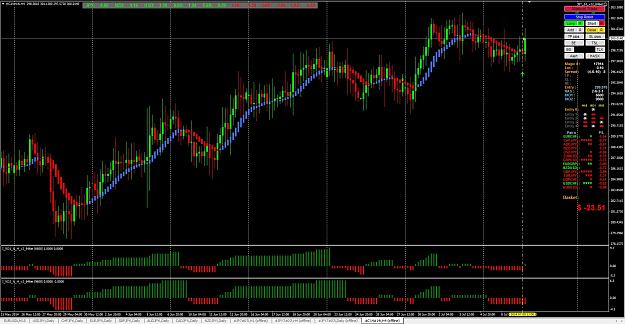
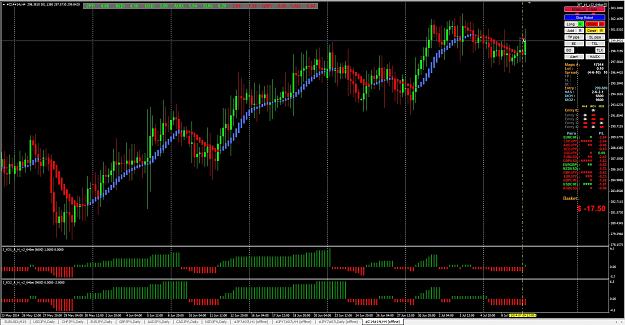
Below are 2 screen shots showing the C14 basket, one is a manual long and the other a manual short, just to show you the way the EA would have traded the 14 pairs.
You can tell by the color of the pair which way it was traded.
These are just examples and are not examples of a good trade, only used to show how EA calculates which way to trade a pair.
As you can see, either long or short basket trades would have had the same direction for each pair picked.
If anyone has a better idea to select direction for each pair,"I AM ALL EARS" these strengths do lag somewhat, it would be nice to have something that's a little quicker.
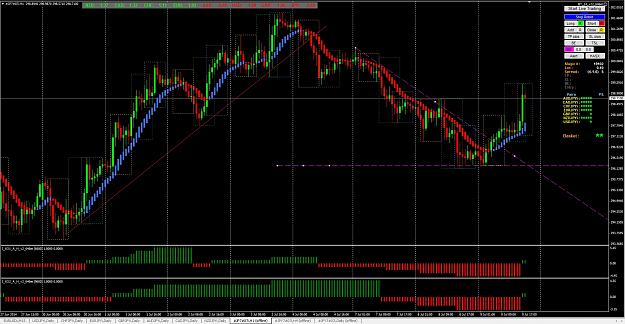
I don't understand how you guys are claiming that you're rocking JPY with HAS on H4 . Look at this chart waiting for HAS signal you left +254 on the table. Paul - The Intern {image}
Ignored
IXO1 not HAS. There is always pips left on the table, unless someone can see into the future and know the exact point a trend reverses. This last trend on the JPY7 4h maxed out at 281 pips, I got out with a 150 pip profit, so I left 130 on the table. I'm ok with that. For me its all about time, consistency and proper money management. Greed kills!!!
{quote} How did you determine the horizontal pivot point on the chart?
Ignored
The 2 purple lines are just the BO lines, if price closes above trend line it goes long and if it closes below the horizontal line it goes short.
Just eyeball placement of lines.
The dotted boxes are Tokyo, London, and NY sessions, they are just for my reference to show when the sessions open and close, they are not needed for anything.
{quote} IXO1 not HAS. There is always pips left on the table, unless someone can see into the future and know the exact point a trend reverses. This last trend on the JPY7 4h maxed out at 281 pips, I got out with a 150 pip profit, so I left 130 on the table. I'm ok with that. For me its all about time, consistency and proper money management. Greed kills!!!
Ignored
Consistency is what counts, no one can pick tops and bottoms, once your consistent than you can increase your lot size for more profit.
The robot is just a helper and not a Holy Grail, the way you have shown you use it along with manual help is the way to go, it can help you in not having to spend hours upon hours in front of the computer screen.
{quote} Consistency is what counts, no one can pick tops and bottoms, once your consistent than you can increase your lot size for more profit. The robot is just a helper and not a Holy Grail, the way you have shown you use it along with manual help is the way to go, it can help you in not having to spend hours upon hours in front of the computer screen. Good Luck
Ignored
Right on Seller, that's what I'm talking about! Many happy pips
Alert !!!!!!!! There is a bug in the new build of MT4 that affects the placement of the buttons on the right side of the chart, this is a MT4 bug that the new build has and will need to be fixed by the MT4 platform coders. Go back to build 646 until they fix this new bug. One easy way is to go back to a restore point the day before the upgrade was installed. If this is your first install then you will need to find the earlier build.
With Windows 7 you go to the Globe in the lower left of your screen and click it, then in the white box type "restore" and you should get a list of things to do.
Select "Restore your computer to an earlier time"
Then "Open System Restore" Button
Click "Next"
Check box "Show more restore points"
Highlight one that is just before your MT4 update took place.
Then Click "Next"
Follow directions, should only take a few minutes, and if you had a previous version of MT4 installed it will be restored.
When you start MT4 it should ask if you want to update, just say no.
Hope this helps, it worked for me and was painless.
{quote} With Windows 7 you go to the Globe in the lower left of your screen and click it, then in the white box type "restore" and you should get a list of things to do. Select "Restore your computer to an earlier time" Then "Open System Restore" Button Click "Next" Check box "Show more restore points" Highlight one that is just before your MT4 update took place. Then Click "Next" Follow directions, should only take a few minutes, and if you had a previous version of MT4 installed it will be restored. When you start MT4 it should ask if you want...
Ignored
thx-))
but i dont recive in the white box-restore-word..