{quote} DEAR SELLER9 CAN BE DONE? ALL THE BEST Dan
Ignored
Yes, it can be done, but then someone wants RSI, CCI, MACD, and the requests keep coming until you have 999 indicators, and then you have grid lock, I have been there, done that with other EAs and they are no longer.
The best idea is to go back to a plain PA chart and trade that, indicators cause confusion and decision overload.
{quote} Your EA icon in the top right corner is not smiling... that means the EA is not working either "online".Just mak a right click on the chart go to expert advisor, click on properties, go to the very first tab and enable live trading (check the box)Then the icon should smile and your EA should work.
Ignored
Thanks so much for the quick response, I knew it was going to be something simple and blatantly obvious lol
{quote} Yes, it can be done, but then someone wants RSI, CCI, MACD, and the requests keep coming until you have 999 indicators, and then you have grid lock, I have been there, done that with other EAs and they are no longer. The best idea is to go back to a plain PA chart and trade that, indicators cause confusion and decision overload.
Ignored
I UNDERSTAND SELLER9 ANYWAY , THANK YOU VERY MUCH FOR YOUR TIME. MY RESPECTS Dan
ok i tried basket writer v3 on finfx and it worked great! i managed to create the offline chart and everything..
but there is a small problem...when i load my offline chart it has no bars on it..just plain black..can anyone advise me on this?
yeah i looked at the txt files created and i noticed it could be the suffix "m" that is causing some issues...the test files i created had the pairs written with "m" added on the txt files like "AUDUSDm" and i think that causes some issues...
sellr9 any solution to this?
Hello Guys, ok i tried basket writer v3 on finfx and it worked great! i managed to create the offline chart and everything.. but there is a small problem...when i load my offline chart it has no bars on it..just plain black..can anyone advise me on this? yeah i looked at the txt files created and i noticed it could be the suffix "m" that is causing some issues...the test files i created had the pairs written with "m" added on the txt files like "AUDUSDm" and i think that causes some issues... sellr9 any solution to this? thanks again seller9 for...
{quote} Just a quick question, if I may ask. Are your baskets the ones the EA picks and if so are the default settings being used or are you doing a manual selection using the heat map? Thanks
Ignored
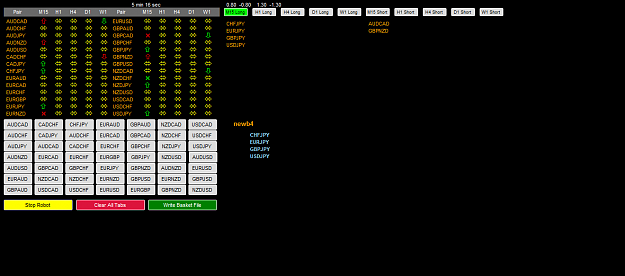
these are solely based on the pairs picked by the EA along with the time frame. Next time I will post screen shot of EA show pairs selected. Default settings being used with no adjustments. Takes a while to have more than 1 pair on the same time frame but it does work when you simply click on the time frame button and your chart is created.
{quote} these are solely based on the pairs picked by the EA along with the time frame. Next time I will post screen shot of EA show pairs selected. Default settings being used with no adjustments. Takes a while to have more than 1 pair on the same time frame but it does work when you simply click on the time frame button and your chart is created.
Ignored
Thanks
What I have done for a test, since I can't watch it all the time is I am taking a screen shot every 15 minutes when it updates to see what may be the best times to check it for a new basket. I will do this for a week and see what the results look like. It will be a lot of screen shots but may help in determining the best times.
{quote} Thanks What I have done for a test, since I can't watch it all the time is I am taking a screen shot every 15 minutes when it updates to see what may be the best times to check it for a new basket. I will do this for a week and see what the results look like. It will be a lot of screen shots but may help in determining the best times. Any particular time you are checking it? Good Luck
Ignored
30min is best time. but screen short should be taken after every 15min.
and before open trade please use last two screen shorts to compare the pairs.
* please post screen capturing ea, separately if you have.
{quote} 30min is best time. but screen short should be taken after every 15min. and before open trade please use last two screen shorts to compare the pairs. * please post screen capturing ea, separately if you have. Regards, hukam
Ignored
Hi Hukam -- Here is a screen capture script, I have not used it & do not know if or how it works. Hope it helps.
{quote} Thanks What I have done for a test, since I can't watch it all the time is I am taking a screen shot every 15 minutes when it updates to see what may be the best times to check it for a new basket. I will do this for a week and see what the results look like. It will be a lot of screen shots but may help in determining the best times. Any particular time you are checking it? Good Luck
Ignored
I have not been noting the time down when I check for any for baskets. Generally it is during London and us sessions because higher volatility and movement. And also that is when I am mostly awake too since I live in the UK time zone. But since updates every 15M what I have noticed though is that whatever is been picked prior is reset by the EA in order to put new found pairs in the trading zone. Or is it because those pairs previous picked are no longer within the indicator parameters and hence the pairs are no longer valid to trade in that particular direction. If this is the case then it is a good thing as it could probably indicate time to luck in profit or take a small loss since movement is no longer confirmed in the originally identified direction. Hope I made some sense there lol
{quote} I have not been noting the time down when I check for any for baskets. Generally it is during London and us sessions because higher volatility and movement. And also that is when I am mostly awake too since I live in the UK time zone. But since updates every 15M what I have noticed though is that whatever is been picked prior is reset by the EA in order to put new found pairs in the trading zone. Or is it because those pairs previous picked are no longer within the indicator parameters and hence the pairs are no longer valid to trade in...
Ignored
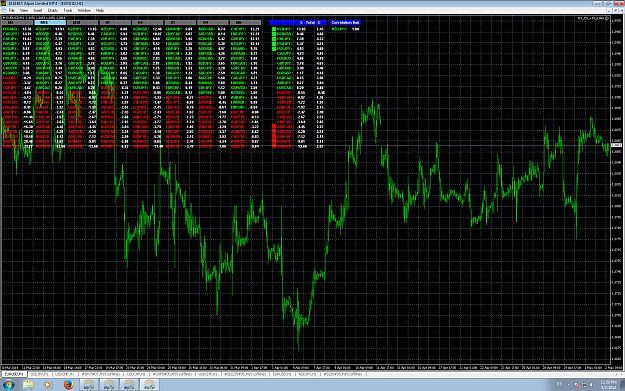
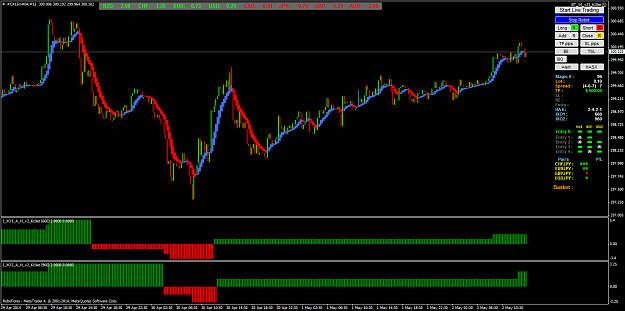
here is a chart created not long ago purely based on the Basket writer EA selection and time frame.
{quote} 30min is best time. but screen short should be taken after every 15min. and before open trade please use last two screen shorts to compare the pairs. * please post screen capturing ea, separately if you have. Regards, hukam
Ignored
I have just added a line of code for now in the EA like I have in the other EAs to capture the open and close of a trade, now it will take a screen shot after the baskets are updated every 15 minutes, will be interesting to see what the SCs look like at the end of next week using just the default settings.
I will post the results the end of the week if all goes well.
Since the strength chart lags some it may even work to use one time frame lower to look for a trade on the next higher time frame, so use the H1 baskets to enter in the H4, that is something else these screen shots will show me, the best times and maybe the best time frame to apply a basket to.
{quote} I have not been noting the time down when I check for any for baskets. Generally it is during London and us sessions because higher volatility and movement. And also that is when I am mostly awake too since I live in the UK time zone. But since updates every 15M what I have noticed though is that whatever is been picked prior is reset by the EA in order to put new found pairs in the trading zone. Or is it because those pairs previous picked are no longer within the indicator parameters and hence the pairs are no longer valid to trade in...
Ignored
The baskets are chosen if the signal is between the .8 and 1.3 levels for a long and -8 and -1.3 for a short and have to be moving in the proper direction. Once it passes out of that area of the curve it will no longer be in the basket. It could then either be going higher, which is good, or has done a reversal. One way to keep them in the basket longer or get an alert sooner is to change the 1.3 to a bigger number, or lower the .8 to widen this basket acceptance range, the only problem then is you could already be at the top of strength curve or in the noise at the bottom. Take a look at the video, I think I showed the indicator and the curve I am talking about.
What ever fits in this window (.8 to 1.3) default, and is going in the proper direction is added into the basket.
Try .1 and 4.0 and -.1 and -4.0 and you will see what I mean, lots of baskets, but they are not very good ones.
{quote} @Seller9 Found out that my broker does not offer the GBPNZD pair. Until I open an account with a broker that does, not Basket Writer V3 for me. Question (see screenshot): Will BT_CSv10_610et give me exactly the same pairs on a M15 timeframe as Basket Writer V3 (using the same parametres) ? {image}
Ignored
Just use a demo account with another Broker for the EA.
BT uses different calculations, so if may be a little different.