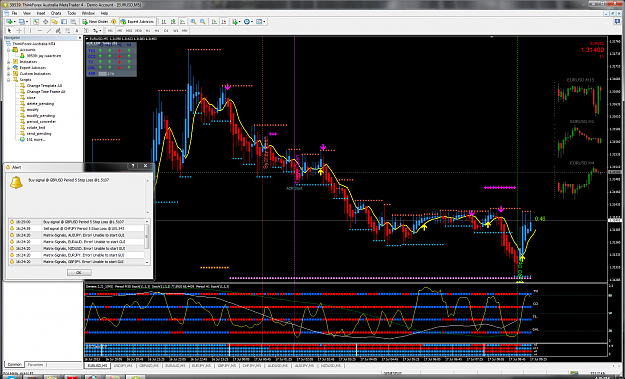
{quote} You are welcome. The GMTS Dash indicator is in the 'GMTS v1.02.zip' file.
Ignored
Yup, got it. Thanks again. Its a beautiful tool. I love how changing the text in the inputs makes it change to different timeframes. Absolutely wonderful. Great job Xaphod.
I also ask that someone can help me and if not understand yet I need one more chance to try to explain again. thank you very much jvbs Candle 1 - consider the first candle Candle 2 - yes at the closing of this candle to give the sound signal and the arrow, 2 candle swallowed the body of candle 1 Candle 3 - here not to give any sign, because the market changes direction but there is no candle body swallowing 2 Candle 4 - Yes the close of this candle to give the sound signal and arrow, 4 candle swallowed the body of the candle 3 Candle 5 - here not...
Ignored
Hi .. you can come back to see my http://www.forexfactory.com/showthread.php?t=433363 topic - I've been with Aristides in another forum and there he left this message (Hello all, I think I jvbs wants know what, I have it working on TradeStation MQL4 but I dont know (yet).
this pseudocode Should be good for a programmer:
If c [1]> o [1] then the prev_up_o = [1];
If c [1] <a [1] = the prev_d_o then [1];
if c> prev_d_o then bearish;
if c <prev_up_o then bullish;
c [1] is previous bar close
c is current bar close
cheers,
Aristides.
It was very good that can already do this with the indicator that I need.
Thanks in advance
And a thank you very much if you can help me
jvbs
Work very hard until you get there (excuse my english)
Firstly, thanks for all the great work you've done here. It's much appreciated.
Not sure if I should ask my question here or the main thread, but I wanted to know if there is any way I can increase how far back I get the arrow and MTF arrows on the charts, when scrolling back. I also have the ASTrend Indi on my charts and I've managed to increase the look back time by increasing the T3 8 Bar Count in the Genesis Matrix indi, but cannot find a way to do the same for the arrows! I realise that they both give the same information, but it would be nice to be able to see the arrows as well for the backtesting that I'm doing (I prefer this way to using a simulator to get the information I need).
Hello Ive been away from the thread awhile ,just 1 quick question does the asctrend indis replace the matrix ? or do we use it in addition to. im a little confused.
Look at something long enough, you will eventually get it.
@traco1
The trading system has not changed. See the first posts for details.
AscTrend is the same as the 'arrow' indicator.
@Trekker
You are welcome.
I did now write the arrow indicator you refer to. However, it draws a limited number of bars because the 'arrow' indicator it was based on used up a lot of computational resources on every tick. You could try to increase the number of bars in the code, but there could be complications. Don't know as I have not looked the code.
Tardy replies.... @Trekker You are welcome. I did now write the arrow indicator you refer to. However, it draws a limited number of bars because the 'arrow' indicator it was based on used up a lot of computational resources on every tick. You could try to increase the number of bars in the code, but there could be complications. Don't know as I have not looked the code.
Ignored
Hi Xaphod
It was just to make things visually easier for me, so no big deal that it can't be done. I did look at the code and couldn't see anything obvious that would increase the bar back count.
{quote} Hi Xaphod It was just to make things visually easier for me, so no big deal that it can't be done. I did look at the code and couldn't see anything obvious that would increase the bar back count. Thanks for getting back to me. Trekker
Ignored
You do not say which indicator you are using. Try Codys last version of the MTF arrow indicator. Links are posted in the first post of the Genesis thread.
{quote} You do not say which indicator you are using. Try Codys last version of the MTF arrow indicator. Links are posted in the first post of the Genesis thread.
Ignored
Switched to MTF Arrow v3.00 and it now gives arrows as far back as I need. Great.
{quote} It gives a better estimate of where the indicator is headed, some of the time at least. It gives a smoother line without abrupt steps. Linear interpolation can be described as a straight line drawn between 2 points. Most of the indicators on a chart are linearly interpolated. Ie. they draw a straight line from the value for one bar to the next. As the distance between bars is 1, it mostly looks like a smooth curve. When one is drawing higher time-frame indicators on a chart, the distance between two bars is no longer 1 bar but several bars....
Ignored
Hi Xaphod,
Is it possible to get a non interpolated MTF Stochastic indicator that paints candle by candle? For example if I have a H1 chart open with an H4 stoch, can the stoch lines paint a bit more with each H1 candle close, instead of waiting for the H4 to close and the stoch 'jumps' 4 hours and paints it all in one go. You would loose the nice curvature of the stoch but it would be helpful for exits. On the lower timeframes this is not an issue as the wait is only minutes.
Thank you for everything to date, you have given me so much already.
{quote} Hi Xaphod, Is it possible to get a non interpolated MTF Stochastic indicator that paints candle by candle? For example if I have a H1 chart open with an H4 stoch, can the stoch lines paint a bit more with each H1 candle close, instead of waiting for the H4 to close and the stoch 'jumps' 4 hours and paints it all in one go. You would loose the nice curvature of the stoch but it would be helpful for exits. On the lower timeframes this is not an issue as the wait is only minutes. Thank you for everything to date, you have given me so much already....
Ignored
Yes it is. Check zznbrm posts and you will find one.
Thanks for the great help with this system
I loaded all the indicators properlt as per instructions. When the error occurred I removed them all and reloaded them with fresh indicators.
Still no luck
any ideas
thanks
Jay
Hi Xaphod Thanks for the great help with this system I loaded all the indicators properlt as per instructions. When the error occurred I removed them all and reloaded them with fresh indicators. Still no luck any ideas thanks Jay {image}
Ignored
As you do not state what your problem is, I'm going to assume it is the Matrix signals indicator you want help with.
It is unable to start MatrixSignals.exe.
Copy these indicators to the ‘../experts/files/’ folder:
MatrixSignals.exe
MatrixAlert.wav
sorry I didnt check my message at the end to see if it made sense...I am a little brain cooked while i try to absorb the genesis thread of 814 pages......
Thank you for patience and advice as the change of settings in my mt4 it has helped many other gremlin issues i couldnt explain..
I have tried to reinstall the matrix signal again as well and check all the necessary files in the right places but to no avail......
I do have a new error that comes up now "Matrix-signals,EURUSD. error!EURJPY is not a valid symbol"....since installing again I havent changed the settings from the default.......
who knows I think Ill just turn off the matrix signals for now while I work the rest out......
Thanks for your help anyway
sorry I didnt check my message at the end to see if it made sense...I am a little brain cooked while i try to absorb the genesis thread of 814 pages...... Thank you for patience and advice as the change of settings in my mt4 it has helped many other gremlin issues i couldnt explain.. I have tried to reinstall the matrix signal again as well and check all the necessary files in the right places but to no avail...... I do have a new error that comes up now "Matrix-signals,EURUSD. error!EURJPY is not a valid symbol"....since installing again I havent...
Ignored
I do not know what settings you have changed in MT4 that have solved other issues.
You can only have one copy of the matrix signals on one chart. Trying to put it on multiple charts like you did the last time gives the error you got previously. It can only start one instance of the GUI.
- Make sure MT4 works correctly (Ex. install outside of the 'Program Files' folder)
- Make sure you have all the indicator files in the correct places.
- Put one instance of the matrix signals on one chart only.
- Enter the list of symbols comma separated and the timeframe you want to monitor. (TimeFrame.Settings, Symbol.Settings=EURUSD,AUDUSD)
- Enter broker symbol prefix/suffix if applicable. (Ex. EURUSDm will be Suffix=m)
Joined Feb 2009
|
Status: Hasta la victoria siempre - El Che
|19,542 Posts
Hiya X,
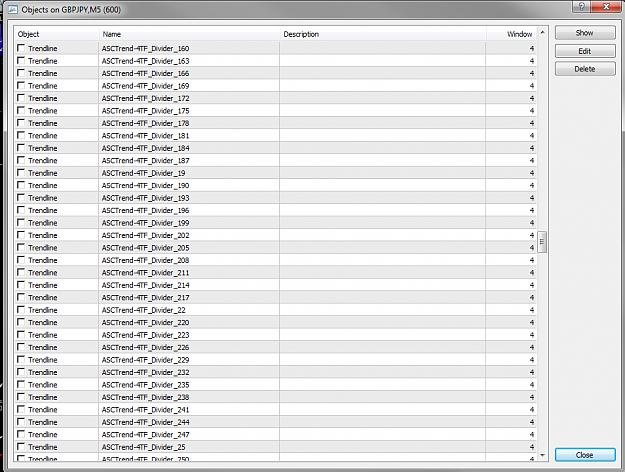
Just a couple of quick questions, attached is a screenshot of the Objects from one of my charts.
* Is the number of objects an issue at all?.....regarding resources used etc?
* If it IS an issue, what can we do about it other than deleting them one at a time, which would be tedious and I haven't found a way to 'Select All', and delete all objects with one click!!
What do you think?
Cheers,
RJ
Attached Image (click to enlarge)
Doing what you like is Freedom. Liking what you do is Happiness.
* Is the number of objects an issue at all?.....regarding resources used etc?
Ignored
I do not know what impact the number of objects has on the resources. If you are concerned, then less is better.
You can reduce or eliminate the said objects by setting the set the PDBars parameter to a lower value or to zero.
PDLine.Bars=PeriodDividerLine.Bars=Number of bars to draw period divider lines for.
Quote
Disliked
* If it IS an issue, what can we do about it other than deleting them one at a time, which would be tedious and I haven't found a way to 'Select All', and delete all objects with one click!! What do you think?
Ctrl-A selects all objects. Note you will delete ALL objects if you select. You can proceed to deselect the objects you want to keep by holding down the ctrl key and clicking the objects to be deselected.
Alternatively you can select a continuous range by selecting the first object and then press and hold shift and click the last object.
(All the above are standard windows shortcuts. Ctrl-A=Select-All, Shift+Click=Select Range. Ctrl+Click=Select Individual Items)
Tip.
One can delete all objects before saving a template so as to eliminate stray objects showing up on the charts when a template is loaded to a different Symbol/TF.
If some of the objects are tagged with the time-frame and/or symbol they may not be overwritten by the indicator on the new time-frame and/or symbol.
This will only affect indicators that show timeframe/symbol specific data.
Hi Xaphod Thank you very much for all of your hard work. The indies you provide are amazing! I have the Genisis system running at full throttle :-) ExcessFX (all the way from NZ)
Ignored
You are welcome. Hope you are making loads of pips...
{quote} I do not know what impact the number of objects has on the resources. If you are concerned, then less is better. You can reduce or eliminate the said objects by setting the set the PDBars parameter to a lower value or to zero. PDLine.Bars=PeriodDividerLine.Bars=Number of bars to draw period divider lines for. {quote} Ctrl-A selects all objects. Note you will delete ALL objects if you select. You can proceed to deselect the objects you want to keep by holding down the ctrl key and clicking the objects to be deselected. Alternatively you can...
Ignored
Ctrl-A........doh......of course!
Having the objects present is not really a problem, it just seems like there is no need for them all to be there so they may as well not be there. Perhaps I can make it part of my weekend PC cleanup......remembering Ctrl-A of course...
Doing what you like is Freedom. Liking what you do is Happiness.



 Additional Indicators for the Genesis Matrix Trading System