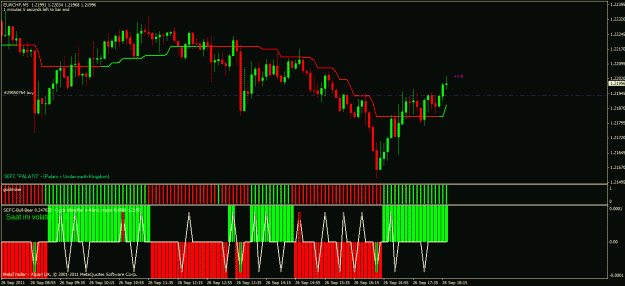
Example on a 15M chart :
- 17:00 : I take a BUY (all 4 signals are OK)
- 17:30 : I saw an extreme spike (down, so for exit the trade)
What should I do, close immediately or wait until the new candle close at 17:45 ?
Ignored
ihDT,
Exit Strategy states in all instances you would close the trade on the close of the candlestick. But these rules are really meant as guidelines and you have to do what you feel most confortable. Although, I must say if you exit when and extreme spike appears you are more likley to loose extra pips profit as the Cycle Indicator is more likley to repaint while trying to determine an extreme than waiting on the candlestick to close.
the system looks very promising so far thanks evaluator for this wonderful strategy
after a few trades today i think that the HMA-indi gives us a better entry compared to supertrend, what do you think guys?
Ignored
bullzeye,
You are most welcome and I am glad to see so many people are making positice pips and having little problem with getting into the groove of how it works. Maybe the hard works is paying off!
As to using HMA, I found it to be very sensitive in the 5min and will give you a false entry when the original indicator says to wait. This may open you up to bad trades. BECAREFUL!
If you are feeling adventurous you can modifiy the original Trendline indicator...see post #206. This may be what you are looking for in better entry point but again, beware you are making the indicator more sensitive which opens you up to false signals.
Banked 60 easy pips on long entry (could have held for more but exited after bear signal. And a current short that would have netted over 100 pips. Very good system. I will be live trading it tonight
Ignored
longfellow,
Welcome and glad to see you have success in using this system. I hope you enjoy and it helps you.
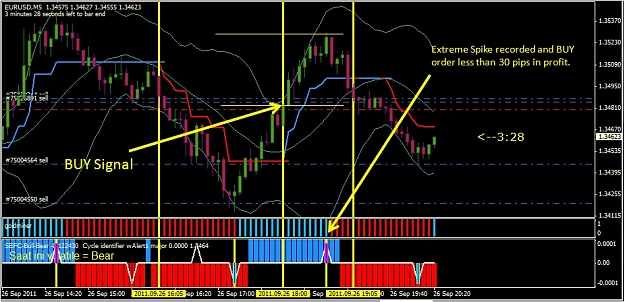
UPDATE:
30 pip in profit, per Order Account Balance Protection rules; moved stopploss to 3 pip profit.
UPDATE2:
Extreme Spike indicated. Per Exit Strategy (2) 1/2 order closed at 1.34536. 2/2 part of order will continue to run per Exit Strategy (2) waiting on trendline colour change.
FINAL UPDATE:
Strong reversal in price action hits stoploss. 2/2 of order only 3 pip profit.
tiger2009, it´s my pleasure . . . here you go.
install Renko in experts folder as an EA, and then in Mt4 M1 chart as an EA too.
Ignored
thanks for the indicators mate, im struggling with installing them, i have copied the renko into the experts folder, however when i open the template it doesn't appear, the chart is just normal??? pls assist cheers.
thanks for the indicators mate, im struggling with installing them, i have copied the renko into the experts folder, however when i open the template it doesn't appear, the chart is just normal??? pls assist cheers.
Hi tiger2009 hope this helps
Renko Chart in Metatrader 4 can be setup as an Offline chart. Step by step instructions: 1) place the EA file in your broker Metatrader "Experts" directory. 2) Restart Metatrader application. 3) Open any 1min chart. 4) Press and hold "Home" key on keyboard to get 1m history data of
currency pair as much as possible.
5) Drag the Expert Advisor on the chart, select "Allow live trading" and enable Expert Advisors. Also enable "Allow DLL imports" and "Allow import of external experts". 6) After some time you will see text "RenkoLiveChart" on the left
upper chart corner and a smiley face in the right upper chart corner
7) After that go to Menu->File->Open Offline and find your currency pair chart with non standard 2 minutes (M2) time frame. Then open this chart.
You will see the Renko chart:
You can now configure the chart to your own preference, the main one being box size as previously mentioned. The box size is simply the number of pips a box has to fill to complete, so if you had a box size of 3 obviously this would complete a lot quicker than a box size of 10. The box size we use depends on the type of trading we want to do and our own personal trading style. Renko EA useful configuration options: RenkoBoxSize - Size of one renko box . RenkoTimeFrame - Non standard timeframe for offline Renko chart. ShowWicks - show wicks on renko chart, of show "clean" renko boxes. So now we should have our indicators downloaded and installed in
our MT4 application and have our Renko EA installed and running.
Thank You James16, Fijitrader, Mbqb1, ghous, Pinbar and Jarroo. cpfleger
thanks for the indicators mate, im struggling with installing them, i have copied the renko into the experts folder, however when i open the template it doesn't appear, the chart is just normal??? pls assist cheers.
Ignored
I suppose that has had experience with Renko, CRB, etc..
if not, the procedure is:
1. Install Renko in the "expets" folder
2. Close all windows of the pairs in your MT4 platform
3. Close and restart MT4
4. Open EU ( or any pair you want) in M1 TF
5. Open the "navigator" window
6. Expand "expert advisors"
7. find and drag "Renko" into chart
8. Wait for confirmation of Renko operation in a small text in the upper right corner (say: "RenkoLiveChart_3.2 ) and left corner (say: RenkoLiveChart(4): Open Offline EURUSD.M2 to view chart) of the screen
9. Go to "File" and click on "open offline"
10. Find and select EURUSD, M2 and click on open.
11. In the new window (EURUSD, M2) apply the template.
tiger2009, it´s my pleasure . . . here you go.
install Renko in experts folder as an EA, and then in Mt4 M1 chart as an EA too.
Ignored
jusiur,
Thank you for the indicators but if this is an EA, not related to this thread, can you please make this a new thread and post there???. Unless it is pertaining to the SEFC GoldSuperCycle system; I would respectfully ask you take EAs that are not related to this system to another Thread.
That way we keep this strickly to this system and it does not confuse people.
Joined Sep 2011
|
Status: Follow me on twitter @Lioh_
|492 Posts
Today I made : +248,5 pips (winners) and -71,1 pips (loosers). It's a good 177,4 positive pips day !
All those trades were 0.3 lots on 5M chart (with a lot of repaints).
I've changed my mind about doing this. I still think it's very 'do-able', but it's going to take up a fait bit of time and that will interfere with my real trading. However, I am demo trading this system with a few minor adjustments.
I am using Evaluators rules for getting into the trade, but I am using the Triggerlines instead of the HMA or Supertrend indi. Also, I am not using the fixed 50 pip SL. Instead, I am placing the SL under the previous swing low, for longs, or above the previous swing high, for shorts. I'm more comfortable doing that.
For...
Ignored
realjumper,
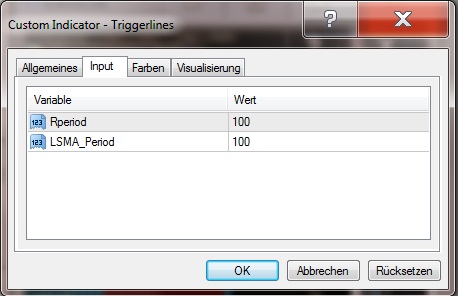
I played with the inputs for triggerline and found that if you make inputs at 95 or 100 each it will cleanup alot of the whipsaw action making it more stable in predicting trendline changes. Try those setting and you may find they are closer to the original trendline indicator but provide better entry points.
Thank you for the indicators but if this is an EA, not related to this thread, can you please make this a new thread and post there???. Unless it is pertaining to the SEFC GoldSuperCycle system; I would respectfully ask you take EAs that are not related to this system to another Thread.
That way we keep this strickly to this system and it does not confuse people.
Thanks.
eval.
Ignored
Eva, I think you misunderstood. . .
This is NOT an EA for your strategy, it is simply EA to install Renko charts and work manually with your strategy.
Thank you for the indicators but if this is an EA, not related to this thread, can you please make this a new thread and post there???. Unless it is pertaining to the SEFC GoldSuperCycle system; I would respectfully ask you take EAs that are not related to this system to another Thread
My Apologies Eval got carried away helping out..
Thank You James16, Fijitrader, Mbqb1, ghous, Pinbar and Jarroo. cpfleger
Eva, I think you misunderstood. . .
This is NOT an EA for your strategy, it is simply EA to install Renko charts and work with your strategy.
Ignored
Ok. that is fine as long as we stay on thread.. Can you explain how it enhances the system?
?
But once we get off thread you must take into another place. Fair?
Today I made : +248,5 pips (winners) and -71,1 pips (loosers). It's a good 177,4 positive pips day !
All those trades were 0.3 lots on 5M chart (with a lot of repaints).
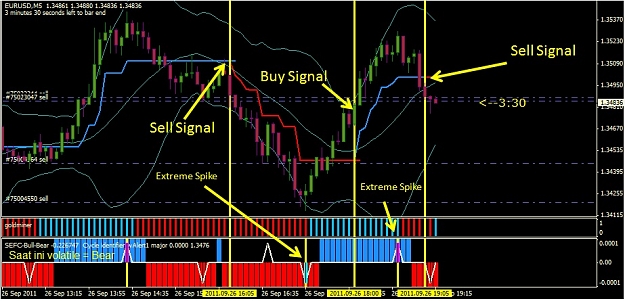
Here is a situation you may encounter (like today) where the order using the system does not seem to follow a clear path.
We have a clear signal to make an order. The price action begins to go as predicted but we have an extreme spike indicator signal befor it reaches the 30pip mark to make modification to the stoploss to protect our order and keep in profit. (per the Order Account Balance Protection rule see post #1)
In this situation, if you get a move with a extreme spike (spike with colour) that is less than 30 pips then you need to obey the rules set in Exit Strategy (1) which state on the close of a candlestick with extreme spike signal you close the order.
So, close the order and look for a better postion and signal.
Remember '' a bird in the hand is worth 2 in the bush''
Hi Eval
I had a simular trade this morning, got all my entry signals and price action going well for 17 pips then price came back to 10 pips on close of candle and coloured spike apeard so came out happy to take the 10 pips..
Thank You James16, Fijitrader, Mbqb1, ghous, Pinbar and Jarroo. cpfleger



 thanks evaluator for this wonderful strategy