"Everybody needs money. That's why they call it money" - Danny De Vito

- #1,093
- Sep 29, 2008 11:58pm Sep 29, 2008 11:58pm
- | Joined Nov 2006 | Status: Trader | 1,143 Posts
24 hours in a day – 24 bottles of beer in a case – Coincidence? I think not
SIMPLE EA for a simple method needed!! 2 replies
trader101 method based trades 12 replies
Trader101 Method Back Testing Tool Q+A 16 replies
Setting up the Basics for Trader101 style trading. 28 replies
DislikedMy biggest challenge is going to allow you to "replay" a specific timeframe to analyze this strategy bar-by-bar, on your own time. And allow you to make simulated trades, or "practice."
CarlIgnored
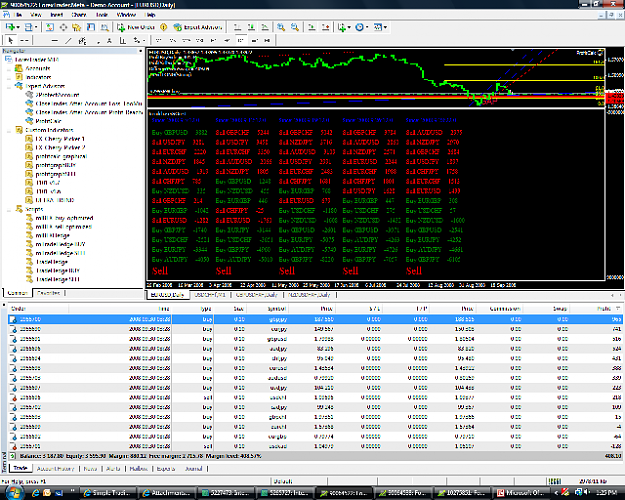
DislikedWell have just finished this thread since yesterday..^o^.. Trying to set up my IBFX mini demo, attached is my IBFX chart.
Found strong short at the chart with all the sell in profit except for EG & EU, appreciate your comments whether am I doing the right thing..^_^..
Thanks
IreneIgnored
DislikedOk, here is an update of my external windows program using MT4 quote data. I have just completed the real-time test of the functions I have programmed thus far.
-Shows real-time view of currency pairs (IBFX pairs)
-Shows real-time bias (strength)
-Allows choosing any day in the past as reference (using available history)
starting point. You don't have to wait until things "settle down."
-Allows simulated trades, so you can see what would have happened, at the click of one button.
-Logging window will show trading events and even more important will log when anchor positions change.
In this realtime test, I saw that positive numbers were creeping into the green bottom seven currency pairs, which tells me there may be a small bounce. I took the buy on all 14 pairs. I've got a 139 pip gain in just a short period of time.
My biggest challenge is going to allow you to "replay" a specific timeframe to analyze this strategy bar-by-bar, on your own time. And allow you to make simulated trades, or "practice."
CarlIgnored
Dislikedi never did sleep last night, and i worked today, before i sleep id like to give a update
i suggest you just ignore the sig, and usethe 14 pairs as a indicator
iv basically put everything in 1 place
the equity trails
if at any time, profit drops below target, all is closed
the ea will start out with a target of -10% of the account balance
that means theres a 10% stop loss, il make all of this optional later
when you reach 1% profit, the target will change to 0.5
when you reach 2%, the target will change to 1%
when you reach 3%, the target will change to 2%
when you reach 4%, the target will change to 3%
ect...ect...
oh there is money management, to disable it, just set risk to 0, and lots will be usedIgnored
DislikedOk, here is an update of my external windows program using MT4 quote data. I have just completed the real-time test of the functions I have programmed thus far.
-Shows real-time view of currency pairs (IBFX pairs)
-Shows real-time bias (strength)
-Allows choosing any day in the past as reference (using available history)
starting point. You don't have to wait until things "settle down."
-Allows simulated trades, so you can see what would have happened, at the click of one button.
-Logging window will show trading events and even more important will log when anchor positions change.
In this realtime test, I saw that positive numbers were creeping into the green bottom seven currency pairs, which tells me there may be a small bounce. I took the buy on all 14 pairs. I've got a 139 pip gain in just a short period of time.
My biggest challenge is going to allow you to "replay" a specific timeframe to analyze this strategy bar-by-bar, on your own time. And allow you to make simulated trades, or "practice."
CarlIgnored
DislikedHi Julius,
When I install 2ProtectAccount in my Broco MT4 Experts folder, then drag it onto one chart...I get a platform crash and an error message:
There has been a critical error
Time : 2008.09.30 12:38
Program : Client Terminal
Version : 4.00 (build: 217, 02 Jul 2008)
OS : Windows XP Professional 5.1 Service Pack 2 (Build 2600)
Processors : 2 x X86 (level 15)
Memory : 1048044/524652 kb
Exception : C0000005
Address : 004602DB
Access Type : read
Access Addr : 7D8B12FC
Registers : EAX=041AB348 CS=001b EIP=004602DB EFLGS=00010216
: EBX=7D8B12FC SS=0023 ESP=079BFF2C EBP=079BFF64
: ECX=041AB348 DS=0023 ESI=0045F62C FS=003b
: EDX=0000001F ES=0023 EDI=028FD2C0 GS=0000
Stack Trace : 00454D53 7C80B6A3 00000000 00000000
: 00000000 00000000 00000000 00000000
: 00000000 00000000 00000000 00000000
: 00000000 00000000 00000000 00000000
Modules :
1 : 00400000 002AA000 c:\program files\broco3\terminal.exe
2 : 00C20000 000A0000 c:\program files\tall emu\online armor\oawatch.dll
3 : 20000000 002C5000 c:\windows\system32\xpsp2res.dll
4 : 5AD70000 00038000 c:\windows\system32\uxtheme.dll
5 : 636E0000 00028000 c:\program files\spyware doctor\smumhook.dll
6 : 662B0000 00058000 c:\windows\system32\hnetcfg.dll
7 : 71A50000 0003F000 c:\windows\system32\mswsock.dll
8 : 71A90000 00008000 c:\windows\system32\wshtcpip.dll
9 : 71AA0000 00008000 c:\windows\system32\ws2help.dll
10 : 71AB0000 00017000 c:\windows\system32\ws2_32.dll
11 : 72D10000 00008000 c:\windows\system32\msacm32.drv
12 : 72D20000 00009000 c:\windows\system32\wdmaud.drv
13 : 73DD0000 000FE000 c:\windows\system32\mfc42.dll
14 : 74720000 0004C000 c:\windows\system32\msctf.dll
15 : 755C0000 0002E000 c:\windows\system32\msctfime.ime
16 : 76380000 00005000 c:\windows\system32\msimg32.dll
17 : 76390000 0001D000 c:\windows\system32\imm32.dll
18 : 763B0000 00049000 c:\windows\system32\comdlg32.dll
19 : 769C0000 000B3000 c:\windows\system32\userenv.dll
20 : 76B40000 0002D000 c:\windows\system32\winmm.dll
21 : 76C30000 0002E000 c:\windows\system32\wintrust.dll
22 : 76C90000 00028000 c:\windows\system32\imagehlp.dll
23 : 77120000 0008B000 c:\windows\system32\oleaut32.dll
24 : 773D0000 00103000 c:\windows\winsxs\x86_microsoft.windows.common-controls_6595b64144ccf1df_6.0.2600.2982_x-ww_ac3f9c03\comctl32.dll
25 : 774E0000 0013D000 c:\windows\system32\ole32.dll
26 : 77A80000 00094000 c:\windows\system32\crypt32.dll
27 : 77B20000 00012000 c:\windows\system32\msasn1.dll
28 : 77BD0000 00007000 c:\windows\system32\midimap.dll
29 : 77BE0000 00015000 c:\windows\system32\msacm32.dll
30 : 77C00000 00008000 c:\windows\system32\version.dll
31 : 77C10000 00058000 c:\windows\system32\msvcrt.dll
32 : 77DD0000 0009B000 c:\windows\system32\advapi32.dll
33 : 77E70000 00091000 c:\windows\system32\rpcrt4.dll
34 : 77F10000 00047000 c:\windows\system32\gdi32.dll
35 : 77F60000 00076000 c:\windows\system32\shlwapi.dll
36 : 7C800000 000F5000 c:\windows\system32\kernel32.dll
37 : 7C900000 000B0000 c:\windows\system32\ntdll.dll
38 : 7C9C0000 00817000 c:\windows\system32\shell32.dll
39 : 7E410000 00091000 c:\windows\system32\user32.dll
Call stack :
0045F5B0:0D2B [004602DB] ?ExecuteStaticAsm@CExpertInterior (terminal.exe)
00454C40:0113 [00454D53] ?RunExpertInt@CExpertInterior (terminal.exe)
Thanks for help,
GeorgeIgnored
DislikedHi Julius,
When I install 2ProtectAccount in my Broco MT4 Experts folder, then drag it onto one chart...I get a platform crash and an error message:
There has been a critical error
Time : 2008.09.30 12:38
Program : Client Terminal
Version : 4.00 (build: 217, 02 Jul 2008) <<< TRY UPDATING THIS TO BUILD 218
PS: if you read, a couple of pages ago some similar problem was fixed with this update
GeorgeIgnored
DislikedHi trader 101
now on ibfx we have usdchf moved in between the sells , is this what we are waiting for to get ready for a trend reverse .
u have said in a previous post you are waiting for one of the buys to get into the sells . so please can u explain what we have to wait for to signal a trend reverse
thanksIgnored
DislikedCloseAll Script attached...
If you have pairs that are NOT being traded by your script, you may not have them in your tradeable pairs list...
Open up your "Market Watch" pane. This is the one that shows all the pairs on the left, green or red, with their bid/ask prices. These are the pairs you can trade. Some might be hidden. If they are hidden, your script can't select them to trade them. To unhide everything, put your cursor in the Symbol column, and right click. In the list, click "Show All". This will add any hidden pairs to the list, and you are good to go. You can now close the pane, and run the script, you should be OK. Unless, of course, your broker does not offer CADJPY !! But once you hit show all, you will be able to confirm that your broker does, or does not, have all the pairs you need.Ignored
DislikedIm not sure yet if this is the signal lets wait for a while. I am sensing a reversal but i want to be sure when we come in. the PCalc is still short, thats why.Ignored
Dislikedi never did sleep last night, and i worked today, before i sleep id like to give a update
i suggest you just ignore the sig, and usethe 14 pairs as a indicator
iv basically put everything in 1 place
the equity trails
if at any time, profit drops below target, all is closed
the ea will start out with a target of -10% of the account balance
that means theres a 10% stop loss, il make all of this optional later
when you reach 1% profit, the target will change to 0.5
when you reach 2%, the target will change to 1%
when you reach 3%, the target will change to 2%
when you reach 4%, the target will change to 3%
ect...ect...
in the pic below, i locked in 3%
the target might be to tight, wel optimize that when i know whats best
i have been getting stopped out at 2-3% mostly
but on a day like today iv banked about 20% i think
heres a screen shot
Attachment
default settings, the ea virtually opened the hedge on last weeks candle close
this gives a fresh start every week
the time frame and bars back is customisable
by setting this to false update_start= true; the start time will never update, unless the ea is reset
the symbol names are changeable in the ea properties
if you change them in editor, itl be permanat
under each symbol is a price field
if you input a price, that price will be used for the start, instead of the bars
the default symbols are the ibfx mini set
by removing the "m" you can use standard, or other brokers
heres what the properties look like
look_back= 1;
tf=10080;
update_start= true;
long_basket1= "GBPUSDm";
price1= 0;
long_basket2= "EURGBPm";
price2= 0;
long_basket3= "GBPJPYm";
price3= 0;
long_basket4= "USDCHFm";
price4= 0;
long_basket5= "NZDUSDm";
price5= 0;
ong_basket6= "AUDJPYm";
price6= 0;
long_basket7= "EURJPYm";
price7= 0;
youl notice 3 objects on the chart
open_longs
open_shorts
close
if you double click the object and select it, them move it atleast 1 pixel or more
on the next tick, the object will initiate, then snap back to its original location
these objects are like scripts
scrips have 1 advantage, no need to wait for a tick
open_longs opens 14 longs, if any longs already exist, they wont open
your only allowed 1 trade per pair
a short counts as a trade
open_shorts same
close will close all trades
by default the ea is set to only trail with equity
it will not open trades on its own
can_trade= false;
can_exit= true;
the opening of trade right now is just, whichever trend is strongest
so if theres 5 sells in profit, and 4 buys, the ea will say, signal=sell
i did test a few ways, say if theres 7 sells in profit, signal = sell
but i cant test 14 pairs in tester
im realy waiting on trader 101 to make me some code that says when to trade
as in his ea
thats it for now
oh there is money management, to disable it, just set risk to 0, and lots will be usedIgnored
DislikedI'm going to buy all since 29/09/08 03.38, now pofit USD 400.
The SELL pair EG is moving upward and BUY pair UC is moving downward.
I just try the methods 6 hours ago.Ignored
DislikedHope it helps, and that you read the thread b4 asking questions that might be answered a couple of pages back... NO FREE LUNCHESIgnored