
-
About Forex Factory / Blog / Page 2
Alerting all members
May 11, 2022

Forex Factory’s new alerting system better connects you to the markets, and to each other!
Alerts are initiated by clicking the Subscribe icons ( ), located throughout the site. Alerts are available for news, calendar events, and other members, to name a few.
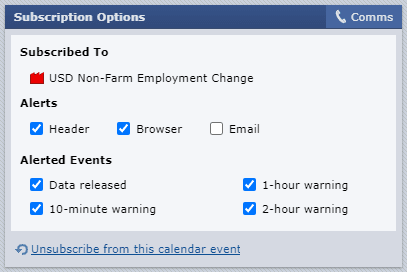
You have full control over which alerts are sent to you. To edit the Alerts for a Subscription, click the icon a second time to access the settings.
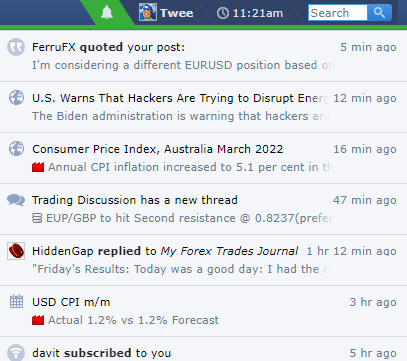
To view your alerts in one place, click the bell icon located in the Forex Factory header.
Give it a try and let us know what you think!
Alerts are initiated by clicking the Subscribe icons (
), located throughout the site. Alerts are available for news, calendar events, and other members, to name a few.You have full control over which alerts are sent to you. To edit the Alerts for a Subscription, click the icon a second time to access the settings.
To view your alerts in one place, click the bell icon located in the Forex Factory header.
Give it a try and let us know what you think!

Comment
27
comments
Like the good stuff
November 7, 2016

In our unrelenting pursuit to bring the best information to the forefront, we've integrated a 'liking' system into the Forum. Liking a post shows appreciation to the author (they get a profile notification), and helps other traders discover the post via the 'Most Liked' feed on the homepage and interior Forum pages. To like a post, just click the like icon ( ) in it lower-right corner.
We also included a 'dislike' feature to minimize low-quality content. Clicking the dislike icon ( ) collapses posts you don't want to see, and if a thread starter dislikes a post in their thread, it collapses it for everyone. This gives thread starters a lot more control over the quality of their thread.
The liking system is independent of the subscription system. Subscribing is for things that produce content (e.g., members, threads), and liking is for content that's static (e.g., replies, comments).
Liking is somewhat experimental at this stage – the effects will evolve as the feature is used more frequently, and we'll be adapting the system to ensure it remains an advocate for the discovery of high-quality content!
) in it lower-right corner.We also included a 'dislike' feature to minimize low-quality content. Clicking the dislike icon (
) collapses posts you don't want to see, and if a thread starter dislikes a post in their thread, it collapses it for everyone. This gives thread starters a lot more control over the quality of their thread.The liking system is independent of the subscription system. Subscribing is for things that produce content (e.g., members, threads), and liking is for content that's static (e.g., replies, comments).
Liking is somewhat experimental at this stage – the effects will evolve as the feature is used more frequently, and we'll be adapting the system to ensure it remains an advocate for the discovery of high-quality content!
Emoji arrives
October 3, 2016
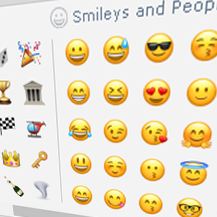
Emoji is sweeping the globe, and for good reason! It's specifically digital, facilitates expression, and breaks down language barriers. In other words, it's perfect for FF's global network of traders!
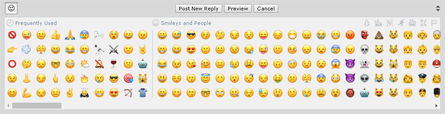
We've integrated emoji into Forum posts, Private Messages, and profile Shouts – emoji will work from either your phone's keyboard, or from the desktop-editor panel:
Have fun out there!


We've integrated emoji into Forum posts, Private Messages, and profile Shouts – emoji will work from either your phone's keyboard, or from the desktop-editor panel:
Have fun out there!
Mobile view completed
September 5, 2016
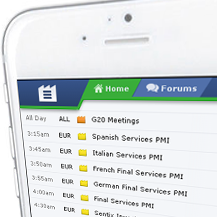
Today we completed the rollout of FF's mobile view. The entire website is now compatible with all smartphone viewports, and best of all, it's the same site no matter which device you're using! That means you don't have to learn a mobile interface, because everything you know from the desktop view translates to the mobile view. It also means everything from URLs to settings stays consistent and synced from your phone to your desktop.
Nearly all desktop features were retained in the mobile view. That's a lot of functionality packed into a mobile viewport, so it may require some exploration to find where things are tucked away. If you take what you know from the desktop view, it should help guide you to the feature on the mobile view.
We love to hear your feedback – let us know what you think!
Nearly all desktop features were retained in the mobile view. That's a lot of functionality packed into a mobile viewport, so it may require some exploration to find where things are tucked away. If you take what you know from the desktop view, it should help guide you to the feature on the mobile view.
We love to hear your feedback – let us know what you think!

Market Scanner launched
January 15, 2015
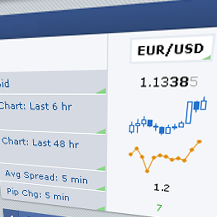
Six years ago we introduced the first composite forex market data, merging feeds from several brokers into a single price. We've never stopped believing in the value of composite data – it's a truer representation of the market than any single feed – and over the years we've worked to include more brokers, reduce data lag to nearly zero, and make the interface easier and more powerful. These efforts have culminated in the development of the new Market Scanner:

The Scanner is new from the ground up. It's powered by our new, blazing-fast data aggregation engine, MDA, which collects and calculates prices from scores of leading forex brokers with virtually no lag.
The interface features real-time charts, spread analysis, and even individual brokers rates – and everything updates automatically when 'Live' is checked:

The best thing about the Scanner is its flexibility. You can change the currencies displayed, the metrics tracked, the colors used, and even the name of the block:

The Scanner is part of the Market product, and as of today it was added as a default block on the Homepage. Remember, you can adjust the position of the block with the new page arrangement feature.
We hope the Scanner makes a positive impact on your trading! If you have any questions or suggestions, make sure to let us know – we're always interested in feedback from you guys!
The Scanner is new from the ground up. It's powered by our new, blazing-fast data aggregation engine, MDA, which collects and calculates prices from scores of leading forex brokers with virtually no lag.
The interface features real-time charts, spread analysis, and even individual brokers rates – and everything updates automatically when 'Live' is checked:
The best thing about the Scanner is its flexibility. You can change the currencies displayed, the metrics tracked, the colors used, and even the name of the block:
The Scanner is part of the Market product, and as of today it was added as a default block on the Homepage. Remember, you can adjust the position of the block with the new page arrangement feature.
We hope the Scanner makes a positive impact on your trading! If you have any questions or suggestions, make sure to let us know – we're always interested in feedback from you guys!
