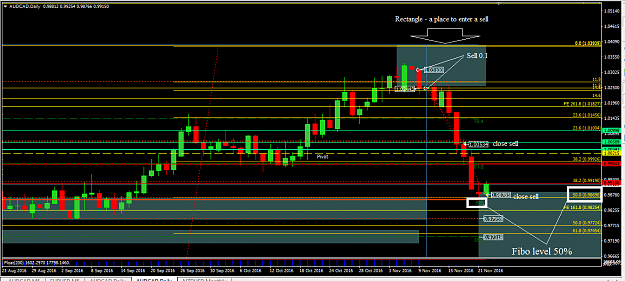
{quote} Dear Genry, Where is the point of level of 50% Fib? As you mentioned, once the price reaches level of 50% Fib then put 0.1 lot to buy? If I am wrong, pls correct me. I want to learn more from teacher. Thanks John
Ignored
No, John, Fibs 50% - a level close a sell transaction.
Dear all, thanks for all your great efforts in working out this EA. I'd love not to help you with some testing. I've been reading the whole thread but I only found the russian version of the EA. I've seen the translations page but I am not sure how to go and switch to english the settings titles. If anyone is willing to tell me how to do it I'll take the time to copy and paste and then distribute it for the others, if noone has already done it previously. BR
Ignored
I'm starting to have fun when I read the phrase: "I've been reading the whole thread but ...".
This forum does not matter - Russian or English. The answer is usually in the preceding pages.
Yet strangely, many people downloaded the program, and no one suggested eldiablo80 where to take her.
This leads me to once again wonder why I spend my time here?
Thanks Genry,
really read all those 145 pages + 76 of the previous thread.
I'll try to be helpful as well to the other members of the community.
BR
Eldiablo80
Thank you Fabio.g will you please post or link to the sets you are using for your test?
I am also interested to know the changelog for this current version.
I am using the StrategyTester to generate options for the NZDUSD but no matter what I try I cannot get the EA to make a trade. I also have this problem on a live demo test.
Colleagues, I'm sorry to ask such a basic question, but can you identify what setting might be causing the EA to behave so conservatively?
I'm testing most recent version of Rsi4Cmtf.
Thank you Fabio.g will you please post or link to the sets you are using for your test? I am also interested to know the changelog for this current version. I am using the StrategyTester to generate options for the NZDUSD but no matter what I try I cannot get the EA to make a trade. I also have this problem on a live demo test. Colleagues, I'm sorry to ask such a basic question, but can you identify what setting might be causing the EA to behave so conservatively? I'm testing most recent version of Rsi4Cmtf.
Ignored
if you click on the link in my post it will take to the post, i am using the same set file for all the pairs, in the pictures.
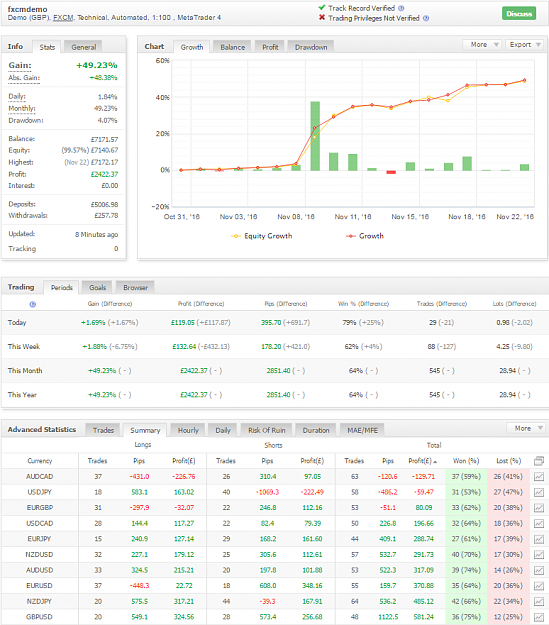
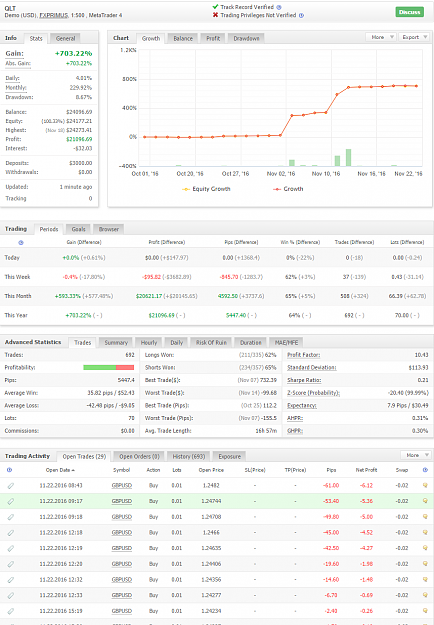
Hello everyone, just some updates. i have a demo on the ea posted on the following link, please see the results. http://www.forexfactory.com/showthre...00#post9210800 Now Genry has posted i think an updated version, could you let
me now the changes btw the 2 versions, please? {image}
Thank you Fabio.g will you please post or link to the sets you are using for your test? I am also interested to know the changelog for this current version. I am using the StrategyTester to generate options for the NZDUSD but no matter what I try I cannot get the EA to make a trade. I also have this problem on a live demo test. Colleagues, I'm sorry to ask such a basic question, but can you identify what setting might be causing the EA to behave so conservatively? I'm testing most recent version of Rsi4Cmtf.
Ignored
Dear clemmo17,
You can try to follow these steps below:
1. You need to put EA_QLT_Rsi4Cmtf under MQL/EXPERT folder.
2. The rest indicators which you downloaded, put into MQL/INDICATORS folder
3. Refresh your Expert Advisors which on the left of your Navigator block.
4. Right click EA_QLT_Rsi4Cmtf, and select Attach to a Chart
5. Under Common tab, just tick Allow live trading and Allow DLL imports
6. Under Input tab, just click Load button to select the set file which you download
7. On the top of your MT4 Terminal, you can find the AUTO TRADING button, just click it, let it turn to green color, and the top right has a smiled face.
8 Now, you can enjoy your EA trading.
Anything, pls let me know with PM of the forum or post here!
{quote} Dear clemmo17, You can try to follow these steps below:...
Ignored
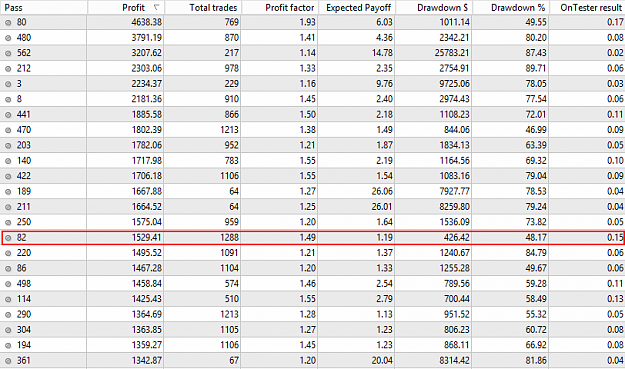
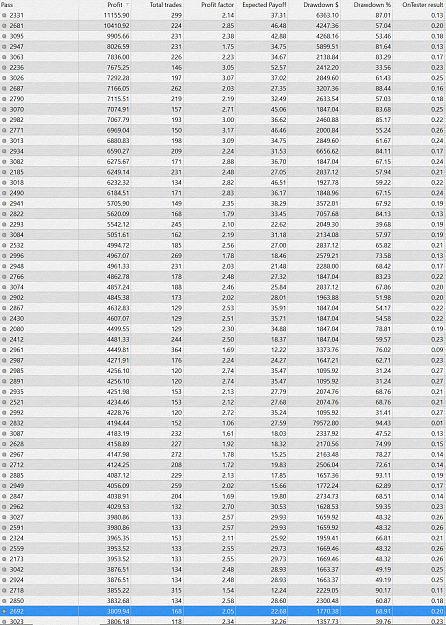
I see the results of your work. You can reduce the options with great DD. It is necessary to "Optimize" tab,
reduce the value of "Maximum drawdown" from 70 to 55 (for example).
After changing the value in the window you should press Return, click the mouse will not work correctly.
{Very hard to filter results, Server has been processed for 2 days.
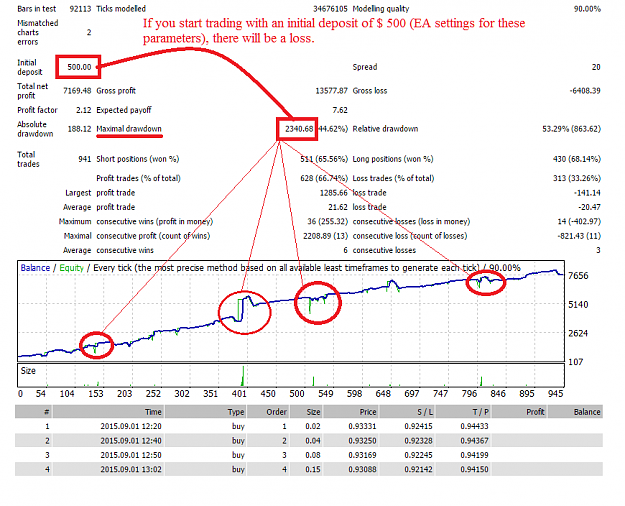
Just find one seems fit the rule. 500 deposit, DD under 500.
Ignored
1.Trades enough =1288, it is possible to slightly increase the options xdist and\or xcandles.
2.If the starting lot more than 0.01, you can reduce the volume, but increase factor.
These measures will help to reduce the DD.
{quote} Dear clemmo17, You can try to follow these steps below: 1. You need to put EA_QLT_Rsi4Cmtf under MQL/EXPERT folder. 2. The rest indicators which you downloaded, put into MQL/INDICATORS folder 3. Refresh your Expert Advisors which on the left of your Navigator block. 4. Right click EA_QLT_Rsi4Cmtf, and select Attach to a Chart 5. Under Common tab, just tick Allow live trading and Allow DLL imports 6. Under Input tab, just click Load button to select the set file which you download 7. On the top of your MT4 Terminal, you can find the AUTO...
Ignored
Thank you John Luo, I'm not sure what the problem was, but going through the checklist worked and it is now testing nicely. I will have an interesting setfile for you, hopefully in a few days.
{quote} Thank you John Luo, I'm not sure what the problem was, but going through the checklist worked and it is now testing nicely. I will have an interesting setfile for you, hopefully in a few days.
Ignored
Dear clemmo17,
I am very happy you can use the EA now.
Anything issues, just let me know, will try my best to help you!
Have a nice Thanksgiving Day to all colleagues here!
John,
If you check your optimization graph, you can also click the small blue dots that are there. They will take you directly to that specific result in your results list.


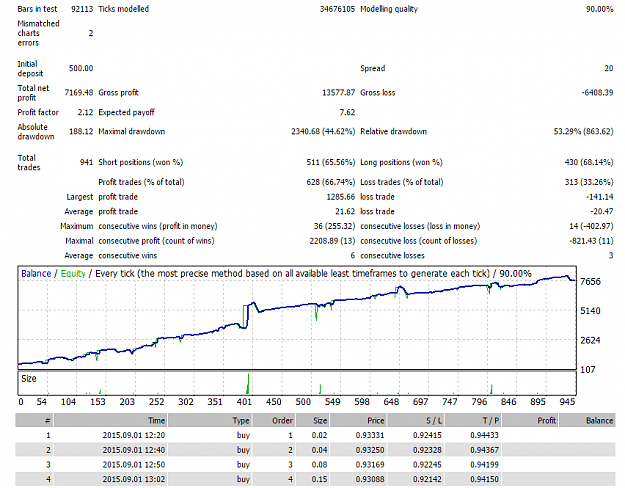


 Thanks John