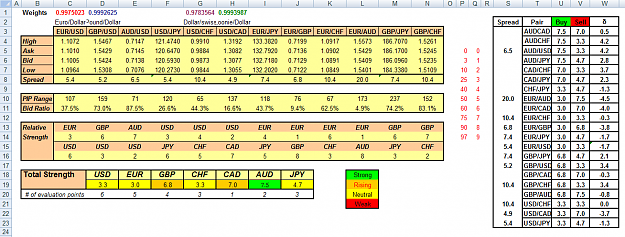
{quote} better then demo. you can put many orders with very little real money. like 50$ give you 5000 found this http://forextrading100.com/mini/ anyone experience?
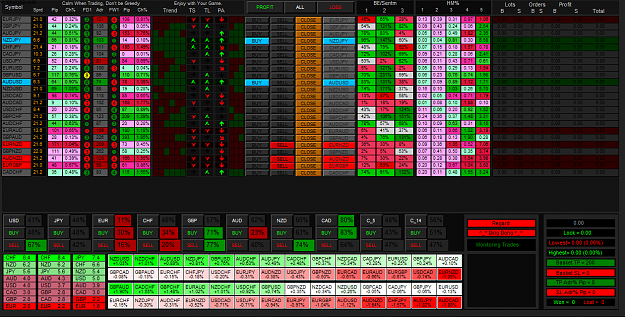
Morning all; I keep my promise to upload my dash into this forum. If the dash cant load into your platform, please dont ask me. I am not a coder like GVC, HP, Denya or DD99. I tested in demo in 2 weeks and real account in 2 days. 5 digits broker and 4 digits broker. But i didnt test in suffix-prefix broker. My trade idea based on 00 Leve Trading Udine and fxrabbi: 1. I use M30 TF on my trading. 2. M15 to D1 candles color must all green or red. 3. Always check ADR, ATR, DPP, and DOL For detail, check this link: http://www.forexfactory.com/showthre...15#post8352315...
Ignored
hoooeeee,,, Brother.....your dash so neat ....
nice work, brother Ghoul007...
After several weeks of reading from the very first post and walking trough all the amazing ideas and tools I was able to test, here is my first post in this thread. At some point I decided to start my own dashboard and I started by doing a fork of the great Power Meter v3 from GVC, melted with some ideas of the Ultimate DB, some other ideas I grabbed from users and my own needs when using the dashboards already posted in this thread. It's intended to be used in manual mode, but have an option to run in auto or auto-reverse modes. Right now it looks...
Ignored
hi brother aesem...
nice work, when I look at your dashboard...
I hope you always evolving and constantly developing your dashboard ...
hello, excuse me because she gives me this error? How can I fix {image}
Ignored
dashboard work uses data
M1 - MN1 ....
M1 - D1 history data is usually easy to get ...
when a zero divide, mostly occurs less historical data on W1, or MN1. so the dashboard is not working.
28 pair, with a history data to MN1 ...
zero divide prevalent in the heatmap W1, or MN1 ....
you can change the time frame of the settings in Dashboard .....
Exness, has 26 pairs were included in the Dashboard ..
but the dashboard still works ...
Morning all; I keep my promise to upload my dash into this forum. If the dash cant load into your platform, please dont ask me. I am not a coder like GVC, HP, Denya or DD99. I tested in demo in 2 weeks and real account in 2 days. 5 digits broker and 4 digits broker. But i didnt test in suffix-prefix broker. My trade idea based on 00 Leve Trading Udine and fxrabbi: 1. I use M30 TF on my trading. 2. M15 to D1 candles color must all green or red. 3. Always check ADR, ATR, DPP, and DOL For detail, check this link: http://www.forexfactory.com/showthre...15#post8352315
Ignored
...
Ignored
it still needs fix the dash.
halah ene org indo meneh.
haha
{quote} Hi Ghoul, By the way, when I set your dash to auto mode, when entry signal line up as green or red bar. I did not see EA opens a new order. I use Exness broker who support only 26 pairs. Is this going to be a significant concern? However, manually open trades following the signal got all positions closed at default TP. Thanks for creating a good new tool for us. Chidchanok
{quote} hi brother aesem... nice work, when I look at your dashboard... I hope you always evolving and constantly developing your dashboard ... {quote} dashboard work uses data M1 - MN1 .... M1 - D1 history data is usually easy to get ... when a zero divide, mostly occurs less historical data on W1, or MN1. so the dashboard is not working. 28 pair, with a history data to MN1 ... zero divide prevalent in the heatmap W1, or MN1 .... you can change the time frame of the settings in Dashboard ..... Exness, has 26 pairs were included in the Dashboard...
Ignored
You are doing great with your dashboards. and the latest one shows a great improvement... I have a lot to learn from it...
Have you already read the #Post 1 of this thread yet?
Expand the Expert tab. Load the ForceLoadHistoricalData script in any open chart. From the expert tab at the bottom of screen find the charts giving the
zero divide error. For each chart giving the error , do the following:
1. Open the chart that giving the zero divide error.
2. Turn of chart autoscroll from properties.
3. Zoom the chart down to lowest setting.
4. Press and hold down the home key until chart no longer scrolls back any further.
5. Repeat this weekly, daily, 4H and 1H time frames.
6. Load the dasboard.
Hopefully this this resolve the problem. It worked for me.
{quote} Expand the Expert tab. Load the ForceLoadHistoricalData script in any open chart. From the expert tab at the bottom of screen find the charts giving the zero divide error. For each chart giving the error , do the following: 1. Open the chart that giving the zero divide error. 2. Turn of chart autoscroll from properties. 3. Zoom the chart down to lowest setting. 4. Press and hold down the home key until chart no longer scrolls back any further. 5. Repeat this weekly, daily, 4H and 1H time frames. 6. Load the dasboard. Hopefully this this...
Ignored
Thanks for the information. This resolved my issue.










 Hi pipdripper, I've made a PDF-file of your Dashboard Description. {image}