



What are you waiting to have the Olimpia Price Action Dahboard?
Forex never been before so profitable and easy with this system!

------------
You Can choose your favourite pairs to trade!
Use the EA only one hour after NY or London market starts.. take your profits--- then continue your real life!
Again a new video with Dashboard performance of today July 1 2015
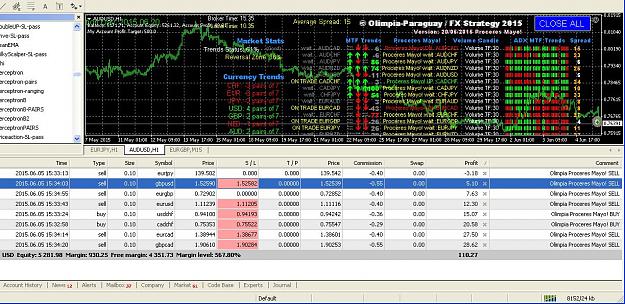
This EA-Indicator is a multipairs dashboard which recognizes the best pair setup to open orders with 8 families of currencies. Families of currencies include: AUD, USD, EUR, GBP, CAD, NZD, CHF, JPY; 28 pairs in total (but you can change just your favourite pairs)
The precise moment to open an order is shown at PriceAction UP or DN (in the middle) on the dashboard.
The best way to use the EA is to use it as semiautomatic EA which watches the screen, so the EA opens orders and you close all orders with the excellent "CLOSE ALL" button. It is strongly recommended after that to disable your EA! Don't overtrade!
Forex never been before so profitable and easy with this system!
Attached Image (click to enlarge)
------------
You Can choose your favourite pairs to trade!
Use the EA only one hour after NY or London market starts.. take your profits--- then continue your real life!
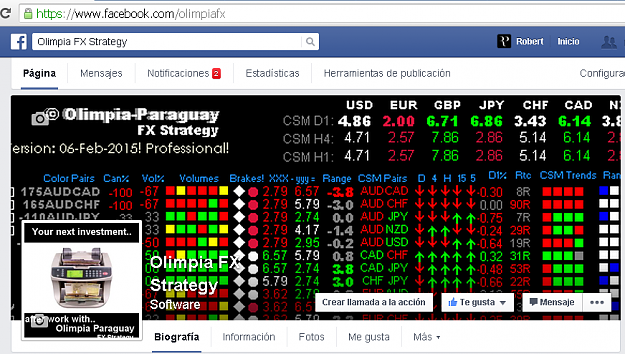
DOn't Forguet TO visit and give "like" to our Facebook Home page and have more info about the Olimpia works
Again a new video with Dashboard performance of today July 1 2015
Inserted Video
Reference OF USING THIS dashBOARD
This EA-Indicator is a multipairs dashboard which recognizes the best pair setup to open orders with 8 families of currencies. Families of currencies include: AUD, USD, EUR, GBP, CAD, NZD, CHF, JPY; 28 pairs in total (but you can change just your favourite pairs)
The precise moment to open an order is shown at PriceAction UP or DN (in the middle) on the dashboard.
The best way to use the EA is to use it as semiautomatic EA which watches the screen, so the EA opens orders and you close all orders with the excellent "CLOSE ALL" button. It is strongly recommended after that to disable your EA! Don't overtrade!
- Spreadnum: 20 (default). Alerts and/or opening orders with pairs having less spread than the value.
- Indicator Parameters
- ShowColumnsInfo: true or false. Shows the info of columns values on one side.
- Spreadnum: 20 (default). Alerts and/or opening orders with pairs having less spread than the value.
- Difference Broker Time. You can compare the broker time to your local time to adjust this parameter (not important for indicator action).
- Negative amount to close all opened trades (-xxxx) and profit amount to close all opened trades (+xxxx). Example: if you set Profit Amount to 40, all orders will be closed when you have 40$ positive sum of all orders in equity. And negative amount -100 will close all opened orders when you have negative sum of 100$ in your equity.
- Lot Size: XX. The size of lots used by the EA for opening orders.
- Open Orders with pair Spread: 15. Only open orders with pairs having less spread than the parameter value.
- Trade TF with high volume on: 60. The EA only opens orders when the configured timeframe has a volume higher than the average one (60 and 30 timeframes are highly recommended).
- Use Only Window Time below: TRUE. Default. If FALSE, the EA is active to open orders all the time. If TRUE, the EA is only active and opens orders in Window Time operation. You need to configure time ranges depending on your broker time. You can see the broker time in the top left corner of your chart screen if you add the EA on it.
- WindowStartHour: 12.31. Recommended value in hour and minutes. 90 min after London Market opens. This value is very important and uses your broker time.
- WindowEndHours: 13.01. The hour when Window Time Operation of the EA closes and it is impossible to open orders. Recommended use: 30 min later than the WindowStartHour parameter. But if you wish, you can configure any time your prefer to finish the EA operation.
-
Note
You don't have to worry in which TF or chart pair add the EA. The EA is programmed to use all included pairs (28). Its concept lays in recognition the best pair to open orders. The EA can NOT show history or do back testing because it's using real time values. You can not do back testing.
Attached Image(s) (click to enlarge)
visit www.OlimpiaFX.com

