{quote} hi , KVAK can you share this arrow indicator, because I am a beginner and need it. thanks {image}
Ignored
thank you mr kvak for your response
i have found it, i was wrong and stupid too.
but mr kval can you add this indicator to multi time frame
.thank you for your hard work.
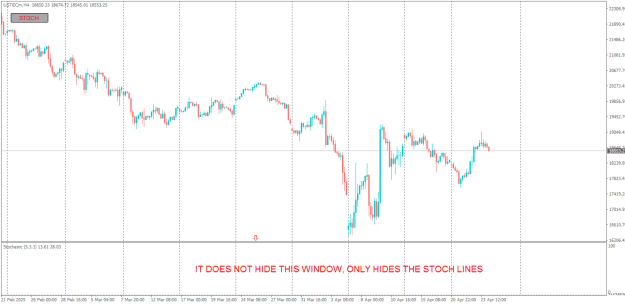
{quote} Hi Banzai Kindly edit this Stoch BT Indicator to hide also the Oscillator Window not only hide the Stoch lines. Regards {file} {image} {image}
Ignored
i think, it's impossible to hide subwindow completely:
we will have to delete induk from chart, and its button will be deleted along w it. although, can make separate induk-button, that will set/delete this induk from chart...
but this is complicated & inconvenient idea .. don't know: who can do this!?
{quote} i think, it's impossible to hide subwindow completely: we will have to delete induk from chart, and its button will be deleted along w it. although, can make separate induk-button, that will set/delete this induk from chart... but this is complicated & inconvenient idea .. don't know: who can do this!? gif-file... {image} {image} {file}
Ignored
Thank you sooo much, It works perfectly.
Lastly, Could you be kind enough to Modify the attached OHLC Indi as well to Ignore Sunday candle, because on Mondays, it shows The Highs and Lows of Sunday on my broker, not for Friday.
Regards
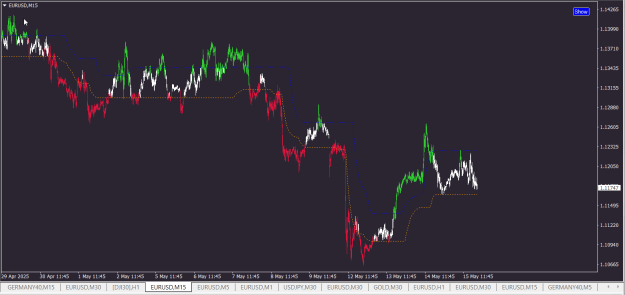
I would like to kindly request if it's possible to add an ON/OFF button to this indicator, so that I can toggle its visibility or functionality directly from the chart.
This would help me manage my chart view more efficiently without needing to remove or reload the indicator.
Thank you very much for your time and support!
I would like to kindly request if it's possible to add an ON/OFF button to this indicator, so that I can toggle its visibility or functionality directly from the chart. This would help me manage my chart view more efficiently without needing to remove or reload the indicator. Thank you very much for your time and support! {file} {file}
Bro, seriously thank you so much for helping me with the ON/OFF button. It might seem like a small thing, but it really makes a huge difference when I’m working on the chart. Wishing you lots of success and good fortune ahead.
{quote} Hello, have not idea, maybe direct me in article with this picture and I will remember what is it...
Ignored
Hello KVAK, sorry I am not good at English and I am using a translator. I am looking for the source code of an MQL4 indicator that you have written and I really need it. If the on/off button could be removed.
{quote} Hello KVAK, sorry I am not good at English and I am using a translator. I am looking for the source code of an MQL4 indicator that you have written and I really need it. If the on/off button could be removed. {file}
Dear Coders
I need your help please; to fix this OHLC Indicator to ignore Sundays, because on my broker it shows Highs and Lows for Sunday on a Monday, yet it is supposed to show Friday OHLC Levels. The pink lines on the pic, it is where the Friday levels are supposed to show.
Thank you.
{quote} Dear Coders I need your help please; to fix this OHLC Indicator to ignore Sundays, because on my broker it shows Highs and Lows for Sunday on a Monday, yet it is supposed to show Friday OHLC Levels. The pink lines on the pic, it is where the Friday levels are supposed to show. Thank you. {file} {image}
Ignored
---
Test this version:
Attached Image (click to enlarge)
--- ChangeLog:
Inserted Code
/*--------------------------------------------------------------------
Change-log: Bigger_TF_OHLC_dvl-BT_SundayFix
MODIFIED:[18-05-2025 ]
By: MwlRCT
--------------------------------------------------------------------
- Implemented "Sunday Fix": Modified OHLC data retrieval to enhance accuracy at the start of the trading week.
    - When the indicator encounters a bar corresponding to a Sunday for the selected `TimeFrame` (e.g., PERIOD_D1):
        - The Open, High, Low, and Close (OHLC) values are now sourced from the immediately preceding Friday of that same week.
        - This is achieved by identifying Sunday bars (where `TimeDayOfWeek()` returns 0) and then shifting the bar index (typically `bar + 2` for daily timeframe) to fetch Friday's data.
        - Added a bounds check (`if (fridayBarShift < Bars)`) to ensure data for the calculated Friday bar index is available, falling back to Sunday's data if not (e.g., at the very beginning of history).
    - For all other days (Monday-Saturday), the OHLC data is fetched as per the original logic.
- Updated indicator version to "2.23".
- Modified button text and internal names to reflect the "Sunday Fix" (SF) modification (e.g., `btn_text` to "BigTF-OHLC-SF").
- Updated `IndicatorShortName` to include "(SundayFix)" for clarity on the chart.
- Ensured that the time placement of the drawn OHLC lines remains correct; only the price levels are adjusted for the Sunday-to-Friday substitution.
--------------------------------------------------------------------*/
{quote} --- Test this version: {image} --- ChangeLog: /*-------------------------------------------------------------------- Change-log: Bigger_TF_OHLC_dvl-BT_SundayFix MODIFIED:[18-05-2025 ] By: MwlRCT -------------------------------------------------------------------- - Implemented "Sunday Fix": Modified OHLC data retrieval to enhance accuracy at the start of the trading week. - When the indicator encounters a bar corresponding to a Sunday for the selected `TimeFrame` (e.g., PERIOD_D1): - The Open, High, Low, and Close (OHLC) values are now sourced...
Ignored
Thank you, but now its showing Thurs Levels on a Monday. Those short lines in a Sunday Column are the Fri Levels which are supposed to be showing from Sunday overlapping to Monday like I have shown with those pink and blue lines.



 Indicators with ON/OFF buttons