07) The single explanation, instrument by instrument, of what you will use in this Configuration with Renko bars. How and where to install everything.
This EA manual, is a bit 'the soul of the "Configuration".
It allows you to trade on EOS RENKO "synthetic" charts in the right way.
AND ONLY ON EOS RENKO CHARTS.
If you use it on other types of charts, you will have guaranteed losses.

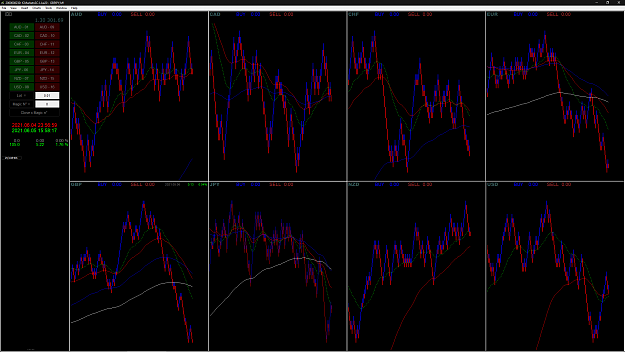
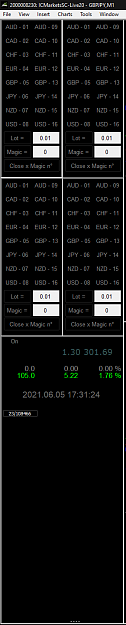
I give you 2 models (the images are video. Click above to see the animation):
EA EOS me_TradingDashboard v8 big RENKO.ex4
the "BIG" version for the single panel

and the "Small" version for the multi panel
EA EOS me_TradingDashboard v8 small RENKO.ex4

They are both identical, precise, the same. Only the size is different.
The videos are self-explanatory, but I still write two lines:
- You can match a magic number to each operation:
- button A ... a number
- button A ... other number
- button A ... different lot .... other number
- button A and button B same number
The combinations are really many.
When you click on a button, a white frame appears, reminding you that you have selected it.
Ditto when you close one or more selections.
These frames remain until you call up the EA panel and close it.
These frames, if you close and reopen the MT4 are gone.
If you leave trades open, you need to remember what you did. I hope you have a good memory.
More info:
https://www.forexfactory.com/thread/...sket-trader-ea
Thanks to qkcode and sakisf for creating and some changes.
The files in this thread have problems. Attention.
IMPORTANT UPDATE:
Check and make sure the exact name your broker gives to FX pairs.
If the pair names have a suffix or a prefix, you must enter it in the "EA control panel" (Pair_Prefix and Pair_Suffix).
Otherwise they can not be open market operations (trivial thing, right?).
This EA manual, is a bit 'the soul of the "Configuration".
It allows you to trade on EOS RENKO "synthetic" charts in the right way.
AND ONLY ON EOS RENKO CHARTS.
If you use it on other types of charts, you will have guaranteed losses.
Attached Image
I give you 2 models (the images are video. Click above to see the animation):
EA EOS me_TradingDashboard v8 big RENKO.ex4
the "BIG" version for the single panel
Attached Image
and the "Small" version for the multi panel
EA EOS me_TradingDashboard v8 small RENKO.ex4
Attached Image
They are both identical, precise, the same. Only the size is different.
The videos are self-explanatory, but I still write two lines:
- You can match a magic number to each operation:
- button A ... a number
- button A ... other number
- button A ... different lot .... other number
- button A and button B same number
The combinations are really many.
When you click on a button, a white frame appears, reminding you that you have selected it.
Ditto when you close one or more selections.
These frames remain until you call up the EA panel and close it.
These frames, if you close and reopen the MT4 are gone.
If you leave trades open, you need to remember what you did. I hope you have a good memory.
More info:
https://www.forexfactory.com/thread/...sket-trader-ea
Thanks to qkcode and sakisf for creating and some changes.
The files in this thread have problems. Attention.
IMPORTANT UPDATE:
Check and make sure the exact name your broker gives to FX pairs.
If the pair names have a suffix or a prefix, you must enter it in the "EA control panel" (Pair_Prefix and Pair_Suffix).
Otherwise they can not be open market operations (trivial thing, right?).
I've seen things you people wouldn't believe
1