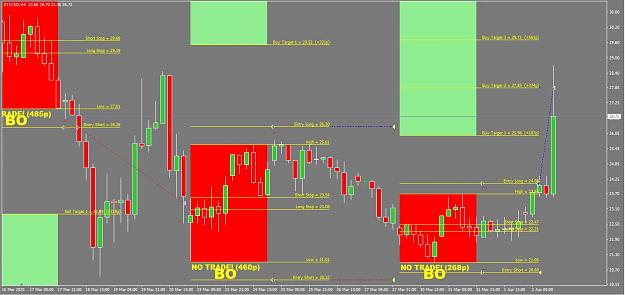
Not looking to good at the moment.
- #1,883
- Edited 11:30am Apr 2, 2020 8:18am | Edited 11:30am
- Joined Sep 2011 | Status: Trader | 1,252 Posts
Simple Monthly System (see attached calculator) 48 replies
Excel simple risk calculator needed 10 replies
what if every free system is attached to a trading explorer? 28 replies
If it's such a great system, why isn't there a Trade Explorer attached? 261 replies
Simple Fx Calculator 1 reply
Disliked{quote} Hi Paul. I have noticed that in Strategy Tester V1.061 only shows a single trade in back-testing. The settings used are default, and this happens with all majors. Are you experiencing a similar?Ignored
Disliked{quote} To be honest, all of my testing has been limited to scenarios within the last week or two, so there may be something awry when running it over historic data. I'll look into it.Ignored
Disliked{quote} Ugh...so sorry - this is what I get for coding at 3am! I had been testing the bodies setting and didn't switch back... Here's a fix for this. {file}Ignored
Disliked{quote} I'm not use EA, just only script (in attach) for send pending orders. {quote} In attached script this features realized. Early version didn't have settings to be change when execute. Now I add lots and TP(if 0 - no TP). In source code you can find some examples. If you late and not execute script at first hour of wednesday(by broker's time) you also can use script, but for range calculation will be use 48 1 hours bars to the left by current. {quote} Yes. In TE you can change period for statistics. See attach image. {image} {file}Ignored
Disliked{quote} Hi PaulDV, Thanks for your efforts and sharing the EA's . Is it possible to set EA's to trade more than one during a week? because sometimes the trades hit the SL and again come back to profit.Ignored
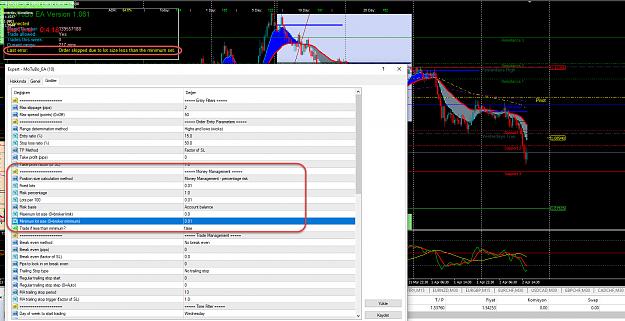
Disliked{quote} Hi, Sorry for my English. I'm using the last version of your EA. But It couldn't open any position. I'm sending you an example for EUR/USD. I couldn't understand the reason. In the picture you can see my EA settings and the error message at EA info panel. Please help me to solve the problem. Thanks, {image}Ignored
You have a couple of ways around this:
Hope this helps.
Disliked{quote} Hi PaulDV, Thanks for your efforts and sharing the EA's . Is it possible to set EA's to trade more than one during a week? because sometimes the trades hit the SL and again come back to profit.Ignored
Basically, it gets to being a bit of a minefield rather quickly, and is more likely to be easier to open new trades manually, on those few occasions that you want to use this feature.
If there's a demand for it, and I can get a good idea of how it should work (without being too complicated!) then I may build it in.
Disliked{quote} Currently, no, but the coding is there to support it, so it could be enabled. The issue with doing this though is the rules that need to be put into place... Do you allow a second trade while the first is still open? Do you allow a second trade if the first lost? Do you allow a second trade if the first won? If you allow a second trade, do you want to limit it to the same direction or the opposite direction of the first, or no limits at all? How about a third, or fourth trade?... Basically, it gets to being a bit of a minefield rather quickly,...Ignored
Disliked{quote} I already posted my MT4 & 5 Robot and Indicator here. Comes with trailing stop options, move to break even, various other parameters you can test, including the original stop loss and entry methods from this strategy.Ignored
DislikedHi to all the EA gurus. I dont really understand them as I am an old fart LOL. Question at the start we are told that positions not opened by the close of the weekend should be cancelled and the open trades let run. Is this what the eas you are using do ????Ignored
Disliked{quote} Hi Stumpy, My EA (MoTuBo_EA) uses market orders, so you won't have any pending orders to cancel. Whether or not you leave open orders over the weekend is up to you.Ignored