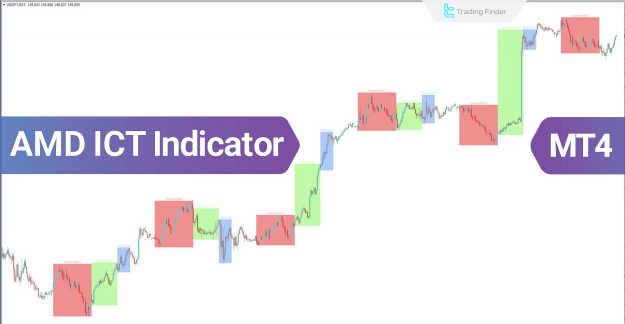
The Accumulation, Manipulation, and Distribution (AMD) Indicator in MetaTrader 4 is a liquidity-based trading tool designed for trend analysis. It segments price movements into three key phases—Accumulation, Manipulation, and Distribution—to help traders spot potential trend reversals and market inefficiencies.
You can download it from this link:
https://cdn.tradingfinder.com/file/2...4-by-tflab.zip
You can also access the MetaTrader 5 version of this indicator through this page:
https://www.forexfactory.com/thread/...ndicator-tflab
For instructions on how to install:
https://www.forexfactory.com/thread/...-in-metatrader
 Key Features of the AMD Indicator
 Session-Based Trend Analysis – Identifies market cycles based on specific trading sessions.
Color-Coded Zones – Accumulation (Pink), Manipulation (Green), and Distribution (Blue) for quick visual interpretation.
Entry & Exit Confirmation – Helps traders confirm trade setups based on price behavior in different phases.
Multi-Asset Compatibility – Works in Forex, Cryptos, Stocks, and Commodities.
Ideal for ICT & Liquidity Trading – Designed for Smart Money traders and ICT concepts.
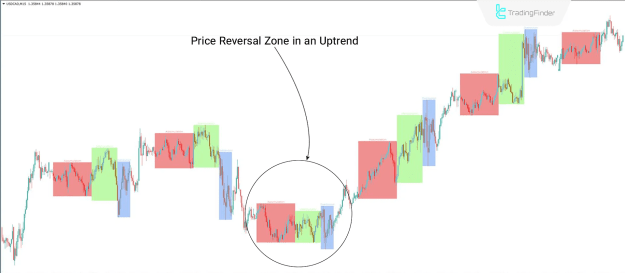
 AMD Indicator in an Uptrend (USD/CAD – 15M Chart)
Accumulation Phase (Pink) – Buyers accumulate positions, signaling potential price growth.
Distribution Phase (Blue) – Price stabilizes as buying pressure reduces.
Manipulation Phase (Green) – Price movement before a significant breakout.
 Trade Idea: Identify breakout levels within the Accumulation zone for potential long entries.
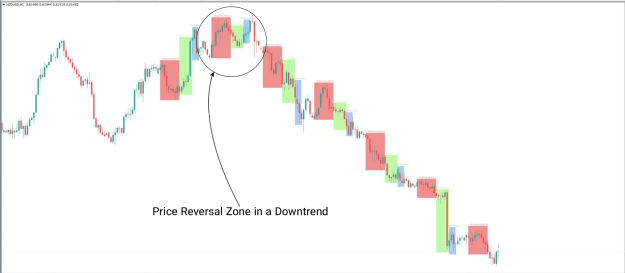
 AMD Indicator in a Downtrend (NZD/USD – 1H Chart)
 Distribution Phase (Blue) – Sellers distribute holdings, causing downward pressure.
Accumulation Phase (Pink) – Weakness in accumulation suggests continued bearish momentum.
Manipulation Phase (Green) – Price moves erratically before resuming the downtrend.
Trade Idea: Look for trend weaknesses in the Distribution zone to confirm short entries.
 AMD Indicator Settings
Theme – Choose between Dark and Light themes.
Session Type – Select session analysis mode (AMDX).
Lookback Days – Adjust the number of previous days to analyze (default: 5).
 Why Use the AMD Indicator?
 Enhances Market Structure Understanding – Helps traders anticipate market behavior within different trading sessions.
 Confirms Trend Reversals – Assists in validating buy/sell decisions based on session highs and lows.
 Optimized for Swing & Day Trading – Suitable for 15M, 30M, and 1H timeframes.
 Final Thoughts
The AMD Indicator for MT4 is a powerful tool for liquidity-based trading strategies. By segmenting market phases and highlighting potential accumulation or distribution areas, it enables traders to identify high-probability trade setups.
 Master Market Liquidity with the AMD Indicator & Trade Smarter!
You can download it from this link:
https://cdn.tradingfinder.com/file/2...4-by-tflab.zip
You can also access the MetaTrader 5 version of this indicator through this page:
https://www.forexfactory.com/thread/...ndicator-tflab
For instructions on how to install:
https://www.forexfactory.com/thread/...-in-metatrader
Inserted Video
Key Features of the AMD Indicator Session-Based Trend Analysis – Identifies market cycles based on specific trading sessions. Color-Coded Zones – Accumulation (Pink), Manipulation (Green), and Distribution (Blue) for quick visual interpretation. Entry & Exit Confirmation – Helps traders confirm trade setups based on price behavior in different phases. Multi-Asset Compatibility – Works in Forex, Cryptos, Stocks, and Commodities. Ideal for ICT & Liquidity Trading – Designed for Smart Money traders and ICT concepts. AMD Indicator in an Uptrend (USD/CAD – 15M Chart) Accumulation Phase (Pink) – Buyers accumulate positions, signaling potential price growth. Distribution Phase (Blue) – Price stabilizes as buying pressure reduces. Manipulation Phase (Green) – Price movement before a significant breakout. Trade Idea: Identify breakout levels within the Accumulation zone for potential long entries. AMD Indicator in a Downtrend (NZD/USD – 1H Chart) Distribution Phase (Blue) – Sellers distribute holdings, causing downward pressure. Accumulation Phase (Pink) – Weakness in accumulation suggests continued bearish momentum. Manipulation Phase (Green) – Price moves erratically before resuming the downtrend. Trade Idea: Look for trend weaknesses in the Distribution zone to confirm short entries. AMD Indicator Settings Theme – Choose between Dark and Light themes. Session Type – Select session analysis mode (AMDX). Lookback Days – Adjust the number of previous days to analyze (default: 5). Why Use the AMD Indicator? Enhances Market Structure Understanding – Helps traders anticipate market behavior within different trading sessions. Confirms Trend Reversals – Assists in validating buy/sell decisions based on session highs and lows. Optimized for Swing & Day Trading – Suitable for 15M, 30M, and 1H timeframes. Final ThoughtsThe AMD Indicator for MT4 is a powerful tool for liquidity-based trading strategies. By segmenting market phases and highlighting potential accumulation or distribution areas, it enables traders to identify high-probability trade setups.
Master Market Liquidity with the AMD Indicator & Trade Smarter! Attached Image(s) (click to enlarge)