question. Is it possible to program to EA news filter but not for ALL red news? I mean not all of them are really red. I dont want trade for example just
Crude oil, FOMC, NFP, BOJ, BOE, BOC, ECB, RBA, RBNZ rest I dont care. I was thinking if it takes data from Sonic FFCALL and somehow filter those mentioned news.
Thanks for reply
Adapt useful, reject useless, add what is specifically your own.
I just noticed, that you silently edited the Action Forex Pivots indi and the post #18,932 a bit later after I posted some of my wishes on further modification of the indi in post #18,950. Thank you very much!
The reason I came back to post #18,932 is that I wanted to slightly modify the standard settings of the indi I knew before my post #18,950 in terms of fonts, colors, style s etc, so I needed a build 509 compiler. So I still want to modify some for the latest version and I'm facing problems with compiling.
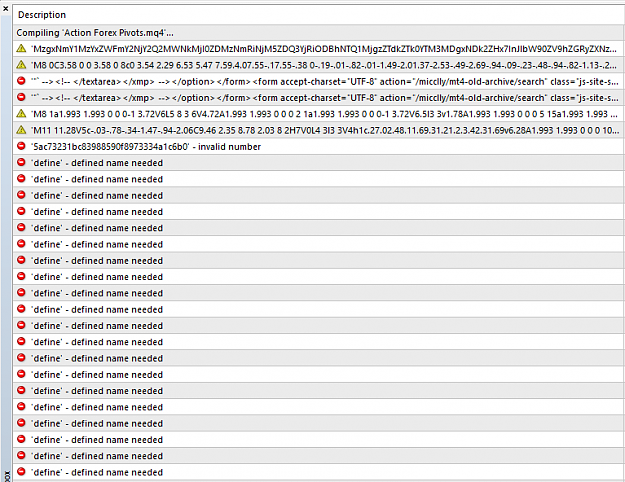
At first I had these errors,
Attached Image
and I found those files here https://github.com/micclly/mt4-old-a...xperts/include and put them into Build 509 compiler\experts\include folder, but now trying to compile I'm having this huge pile of errors (443 error(s), 15 warning(s)):
Attached Image (click to enlarge)
What I'm doing wrong? How to compile build 509 indis properly?
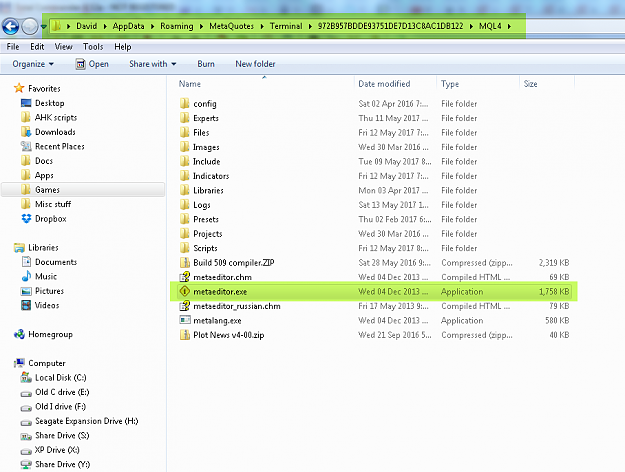
I have the build 509 compiler (i.e. the four files in the 'Build 509 compiler.ZIP' file) installed in the ..../MQL4 folder, then I run the MetaEditor.exe program (highlighted in screenshot) from there. I have all MQH files (including WinUser32.mqh, stderror.mqh, stdlib.mqh) present in both the ..../MQL4/Includeand the ..../MQL4/Experts/include folders, and the compiler seems to find them OK.
Yes, the error messages "Function [xxxx] is not referenced and will be removed from exp-file" are harmless. All it means is that some of the functions in the 'hanover extensible functions.mqh' file are not being used. But I keep them in there because (1) they are used by my other indicators and EAs, and (2) I might need them if I modify the code at some future point. They are functions that I've written to extend the MQL4 programming language.
{quote} I have the build 509 compiler (i.e. the four files in the 'Build 509 compiler.ZIP' file) installed in the ..../MQL4 folder, then I run the MetaEditor.exe program (highlighted in screenshot) from there. I have all MQH files (including WinUser32.mqh, stderror.mqh, stdlib.mqh) present in both the ..../MQL4/Include and the ..../MQL4/Experts/include folders, and the compiler seems to find them OK. {image} More info here. {quote} Yes, the error messages "Function [xxxx]...
Ignored
With the mqh files from this post the problem was sold. So these 4 files in the 'Build 509 compiler.ZIP' file and those mqh files are enough to complile build 509 indis.
{quote} Try the attached indicator. I couldn't test it properly as I don't have a sample CSV file to work with. It expects to find the CSV file (name matching your CSVfilename setting) in your .../MT4/Files folder. In the CSV file, the first entry on each line must be the symbol ID, which must exactly match the instrument/symbol of the current chart, for horizontal lines to be plotted at the levels of each of the remaining (price-based) entries on the line. (If your br0ker suffixes symbol IDs, e.g. "EURUSDpro", then enter the suffix, e.g. "pro",...
Ignored
David, couple of questions:
1. How to properly put custom RGB color code in the metaeditor here: LineColorWidthStyleStartLength = "Green,1,0,-5,0"; ?
To replace Green with 61,226,151.
2. Could you, please, make the distance to be shown with one mark behind the comma, in other words more precise?
1. How to properly put custom RGB color code in the metaeditor here: LineColorWidthStyleStartLength = "Green,1,0,-5,0"; ? To replace Green with 61,226,151.
2. Could you, please, make the distance to be shown with one mark behind the comma, in other words more precise?
Ignored
1. Try r61g226b151 instead of Green (where r,g,b = red, green, blue values -- r,g,b can be upper or lowercase; also, you can put spaces between the values, e.g. R61 G226 B151 if it makes it easier to read). Alternatively, you could type the relevant hexadecimal value prefixed by 0x (e.g. 0x97E23D) or a decimal value (e.g. 9953853) as shown by the calculator (Blue*256*256+Green*256+Red) in the screenshot.
{quote} 1. Try r61g226b151 instead of Green (where r,g,b = red, green, blue values -- r,g,b can be upper or lowercase; also, you can put spaces between the values, e.g. R61 G226 B151 if it makes it easier to read). 2. Sorry, I don't understand the question.
Ignored
1. This works.
2. I can see that distance between PP and actual price is rounded, e.g. 11 pips instead of actual 10.7 pips. Could you make the indi show not rounded values?
hello,
need help to alter this indicator, anyone please help me,
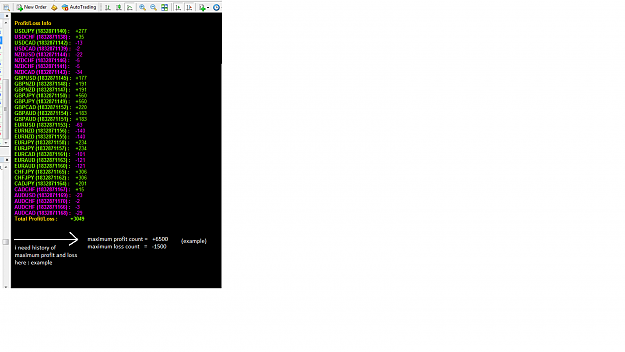
please, i need help for alter this profit and loss indicator, please add some future with the history of maximum floating profit and loss value of opened positions. the reason is, if visual value of maximum profit and loss on the screen , i can take decision for put stoploss or closing the position with advance. i have attached the indicator with this. please , help me, thanking you
I can see that distance between PP and actual price is rounded, e.g. 11 pips instead of actual 10.7 pips. Could you make the indi show not rounded values?
Ignored
If you want to remove the rounding, change the final setting (the format Mask) in LabelFontSizeColorHposVposMask to ' = 'T-5' pips' (this will cause 10.7 to be shown as 10 instead of being rounded up to 11 pips). The R in the mask means round up if > 0.5, round down if < 0.5
If you want to show it rounded to 1 decimal place, change the final setting (the format Mask) in LabelFontSizeColorHposVposMask to ' = 'TR-5.1' pips' (this will cause 10.7 to be shown as 10.7 pips).
The text inside the first and second pair of quotes gets displayed 'as is', before and after the formatted number value. Hence for example, you could have something display instead of the ' = ' prefix, or the word ' pips' in the suffix.
Also, if you want to display the number of pips as an absolute value, i.e. a positive number regardless of whether the pivot level is above or below the current bid price, then remove the minus sign, e.g. ' = 'TR5.1' pips'
Or if you want a + sign displayed if the pivot level is above the bid price, and a minus sign if below, then do this: ' = 'TR+5.1' pips'
There are lots of other possibilities, for the full list see the section titled OutputString = NumberToStr(n,"mask")here.
Hey Guys, i want to learn and improve my MQL4 skills. I think the best way to do this is to practice. Unfortunately sometimes I don`t have any nice idea which i can implement in a Expert Advisor / Indicator. So if any of you is interested, please post in this forum your ideas and i will try to implement it into mql4. Andi
Ignored
Hello sir Andi,
Could you email me for something I wanna ask privately?
About coding an EA.
At lovexscar@hotmail(dot)com
{quote} If you want to remove the rounding, change the final setting (the format Mask) in LabelFontSizeColorHposVposMask to ' = 'T-5' pips' (this will cause 10.7 to be shown as 10 instead of being rounded up to 11 pips). The R in the mask means round up if > 0.5, round down if < 0.5 If you want to show it rounded to 1 decimal place, change the final setting (the format Mask) in LabelFontSizeColorHposVposMask to ' = 'TR-5.1' pips' (this will cause 10.7 to be shown as 10.7 pips). The text inside the first and second pair of quotes gets displayed 'as...
Ignored
Should have guessed myself that the A is behind "Mask".
Thank you once again for your thorough replies.
P.S.: I really could have not noticed that you have modified the indi to its last version.
Hi I would be very gratefull if someone could get this EA to trade microlots as its only trading minilots and standard lots at the moment, many thanks. {file}



 I will code your EAs and Indicators for no charge