{quote} draugas2: how do you add the 8th chart in a group that has only 7 charts displayed ? do i have to use basket txt file for it? thank you, {image}
{quote} No, that's a good question. How to trade you will find here: http://www.forexfactory.com/showthread.php?t=558372 Since English is not my native language, I can confuse you! Under the link you'll find a lot of videos. I'm a scalper and I close to all ideas related to the accuracy of input, quick exit from deal. I'll post a screen of my strategy if HP do not mind of course. I do not leave the idea to combine the BMD, DASHBOARD with my system. Thank you. {image}
Ignored
Hi denya.
Do you have an alert when all trading conditions is met when trading your great scalp.inc system?
{quote} draugas2: how do you add the 8th chart in a group that has only 7 charts displayed ? do i have to use basket txt file for it? thank you, {image}
Ignored
BDM is running on a chart itself.
So as long as you load movable (fibo) or placable indicators you can load them on the BDM chart.
They will be covert up of course if you open more than 7 charts or if you use a dashboard that is full size.
But on your dashboard template you can just put anything you want.
{quote} BDM is running on a chart itself. So as long as you load movable (fibo) or placable indicators you can load them on the BDM chart. They will be covert up of course if you open more than 7 charts or if you use a dashboard that is full size. But on your dashboard template you can just put anything you want. {image} {image} {image}
great work as allways
At the moment I test all the functions.
Its possible to make the BDMhelper Indicator moveable, so I can push the indi to the right side of the chart or so ?
When I use SuperJolt MoneyLanes, the Indi overlays the BDMhelper
Attached Image (click to enlarge)
and why the charts don't autoscroll. I must allways scroll at the end?
Thanks HP great work as allways At the moment I test all the functions. Its possible to make the BDMhelper Indicator moveable, so I can push the indi to the right side of the chart or so ? When I use SuperJolt MoneyLanes, the Indi overlays the BDMhelper {image} and why the charts don't autoscroll. I must allways scroll at the end? Edit: after new start MT4 Auto scroll works
Ignored
I will find a solution.
Movable is not an option because the new position will not be remembered on the template.
So i made two input params for the helper xoffset and yoffset.
Do not forget to save your template after setting the offsets.
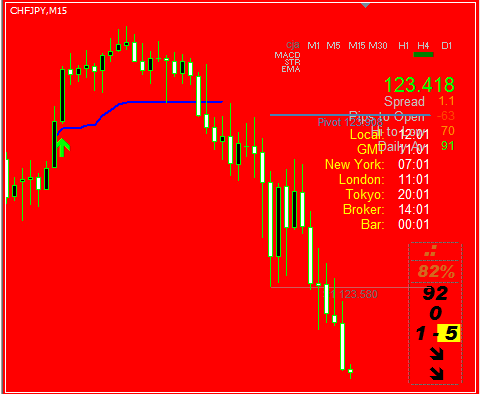
@Draugas Does the color of the other boxes matter or only the bottom two directionals ? I am writing the BDMalarm for the ultra and you would do me a big favor if you would write the selections fi. as follows: Buy Box 1 - does not matter Box 2 - If the text color is green and > 75% Box 3 - if the background color is green and > 30 Box 4 - ........ You know the indicator. Ps. About box 1, i can check the colors (it is the trend indicator). {image}
Ignored
It's good idea to use alarm ...
For this we need clearly rules ...
it works, but in the small charts the indi its not visible when I set the indi to the right side
I'm not a coder, maybe the indi values must be defined first by the corner and then y + x axis ?
Edit: other phenomen: when I open a red Chart with SZ > it open with a withe Chart. After press RS > the Chart will be black or red
{quote} I will find a solution. Movable is not an option because the new position will not be remembered on the template. So i made two input params for the helper xoffset and yoffset. Do not forget to save your template after setting the offsets. {file}
Thanks HP it works, but in the small charts the indi its not visible when I set the indi to the right side I'm not a coder, maybe the indi values must be defined first by the corner and then y + x axis ? Edit: other phenomen: when I open a red Chart with SZ > it open with a withe Chart. After press RS > the Chart will be black or red {image} {quote}
Ignored
I do not get your problem, i can place the Helper anywhere i want.
See example.
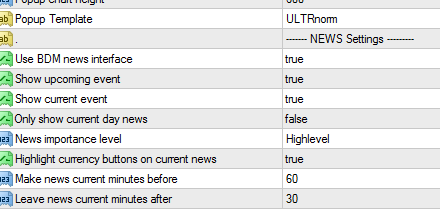
In the indicator settings of the ULTRnorm template you have to turn the BDM alarm off or else the indicator will keep triggering the alarms after reset.
@Draugas Does the color of the other boxes matter or only the bottom two directionals ? I am writing the BDMalarm for the ultra and you would do me a big favor if you would write the selections fi. as follows: Buy Box 1 - does not matter Box 2 - If the text color is green and > 75% Box 3 - if the background color is green and > 30 Box 4 - ........ You know the indicator. Ps. About box 1, i can check the colors (it is the trend indicator). {image}
Ignored
HI
HP Parameters settable by users:
The parameters of the 2 additional indicators (MACD and Stoch)
The position of the box on your chart
The colors of the 5 indicators and text
Choice of a small box with only values instead of the big one
An alert option (pop up or email) is also available at a settable % of probability
How to decrypt the Probability Meter values?
All values and colors have to be watch closely.
1. Multi-Info+ : more than 75 (red/green) for strong Up/Down trend
2. Indice Strength : 0-1-2 for strong Down trend, 7-8-9 for strong Up trend, 3-4-5-6 for sideway
3. Currency Pair Range : range of 5 or more between the 2 currencies. Example: 7-2, 9-3 etc for a strong Up trend, 0-5, 2-8 etc for a strong Down trend
4 and 5 : red color for Down trend, green for Up trend and Orange for sideway
The global value in percent (%) has to be watch closely and with experience you will have feeling. This value is the combination of the 5 values listed above. 75-80% is a good point for trigger a trade.
Example how i trade with it: attach the Meter on M15 and the 2TFs below (M5 and M1). First, the 2 additional indicators on the 3 TFs must agree. Then watch the numbers of the 3 others indicators (doesn't matter which TF because the number will be the same). If these numbers are about the ones i suggested in the explanation above, then the Global % would be close to a good entry point. 75% seems to work well but with experience we'll all find our % which we are confortable with.
For exit, when you'll see that the Multi-info+ start to reverse on the 3 TFs. It's the one react the most quickly.
Example how i trade with it: attach the Meter on M15 and the 2TFs below (M5 and M1). First, the 2 additional indicators on the 3 TFs must agree. Then watch the numbers of the 3 others indicators (doesn't matter which TF because the number will be the same). If these numbers are about the ones i suggested in the explanation above, then the Global % would be close to a good entry point. 75% seems to work well but with experience we'll all find our % which we are confortable with.
You beat me with your answer before i asked the question how many timeframes.
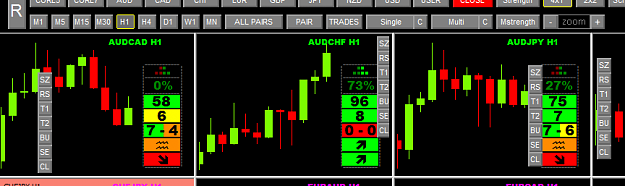
Because i looked inside the indicator and i liked what i saw so i am planning to create a 28 pair dashboard for 3 timeframes.
Something like below.


 {image}





 Under the link you'll find a lot of videos. I'm a scalper and I close to all ideas related to the accuracy of input, quick exit from deal. I'll post a screen of my strategy if HP do not mind of course.