My ultimate goal is to be able to use multiple MT4/5 platforms to feed a custom application written in C#.
At the moment, black box doesn't do anything. I am just working on the communication.
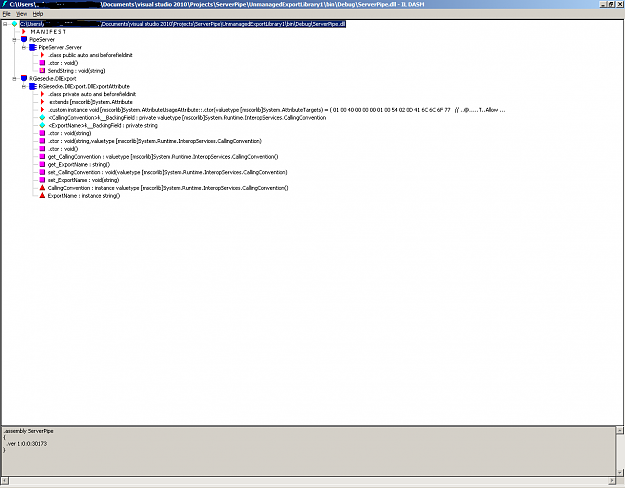
I have the Client.cs and Server.cs successfully talking to each other. When I output PipeServer to a .dll and attempt to load in MT5, I get the error, "Cannot find 'SendString' in 'PipeServer.dll'. I have tried everything I can think of. I've read numerous online articles and am still going around in circles.
C# code for PipeServer: (don't mind all the comments. It just makes it easier to switch back and forth between dll and exe)
C# code for the PipeClient:
MQL5 code for EA/script:
Testing C#<--->C# gives a throughput of over 165,000 ticks/second without any performance tweaking. This is one of the main reasons I want to use a DLL solution. Also, developing in C# is much less restrictive. I do understand that there are ways of using native MQL5 code but that is not the path I am pursuing.
So my overall question is how do I correctly call my SendString(string someParameter)?
It doesn't matter at the moment which data type I send. It can be an int, double, or string. I just want to get the functionality working.
Any help or suggestions would be greatly appreciated so I can stop
Thanks,
Jason
Inserted Code
                 MT5
                  |
                  |
                 \ /
MT5--->black box C# program<---MT5
                 / \
                  |
                  |
                 MT5
At the moment, black box doesn't do anything. I am just working on the communication.
I have the Client.cs and Server.cs successfully talking to each other. When I output PipeServer to a .dll and attempt to load in MT5, I get the error, "Cannot find 'SendString' in 'PipeServer.dll'. I have tried everything I can think of. I've read numerous online articles and am still going around in circles.
C# code for PipeServer: (don't mind all the comments. It just makes it easier to switch back and forth between dll and exe)
Inserted Code
using System;
using System.Collections.Generic;
using System.Linq;
using System.Text;
using System.IO.Pipes;
using System.IO;
using System.Diagnostics;
using System.Runtime.InteropServices;
using RGiesecke.DllExport;

namespace PipeServer
{
    public class Server
    {
        //static void Main(string[] args)
        [DllExport("SendString", CallingConvention = CallingConvention.StdCall)]
        public static void SendString(string args)
        {
            using (NamedPipeServerStream pipeServer = new NamedPipeServerStream("testpipe",
                                                                                 PipeDirection.InOut))
            {
                //Console.WriteLine("NamedPipeServerStream object created.");

                // Wait for a client to connect
                //Console.Write("Waiting for client connection...");
                pipeServer.WaitForConnection();
                //Console.WriteLine("Client connected.");

                //bool Disconnect = false;
                try
                {
                    // Read user input and send that to the client process.
                    using (StreamWriter sw = new StreamWriter(pipeServer))
                    {
                        //string temp;
                        //while (pipeServer.IsConnected && !Disconnect)
                        //{
                            sw.AutoFlush = true;
                            //Console.Write("Enter text: ");
                            //temp = Console.ReadLine();
                            //if (temp == "exit") Disconnect = true;
                            //Disconnect = true;
                            sw.WriteLine(args);
                        //}
                    }
                }
                // Catch the IOException that is raised if the pipe is
                // broken or disconnected.
                catch (IOException e)
                {
                    Console.WriteLine("ERROR: {0}", e.Message);
                }

            }
        }
    }
}
C# code for the PipeClient:
Inserted Code
using System;
using System.Collections.Generic;
using System.Linq;
using System.Text;
using System.IO.Pipes;
using System.IO;
using System.Diagnostics;

namespace PipeClient
{
    public class Client
    {
        static void Main(string[] args)
        {
            using (NamedPipeClientStream pipeClient = new NamedPipeClientStream(".",
                                                                                "testpipe",
                                                                                PipeDirection.InOut))
            {

                // Connect to the pipe or wait until the pipe is available.
                Console.Write("Attempting to connect to pipe...");
                pipeClient.Connect();

                Console.WriteLine("Connected to pipe.");
                Console.WriteLine("There are currently {0} pipe server instances open.",
                   pipeClient.NumberOfServerInstances);

                while (pipeClient.IsConnected)
                {
                    using (StreamReader sr = new StreamReader(pipeClient))
                    {
                        // Display the read text to the console
                        string temp;
                        while ((temp = sr.ReadLine()) != null)
                        {
                            Console.WriteLine("Received from server: {0}", temp);
                        }
                    }
                }
            }
            Console.Write("Press Enter to continue...");
            Console.ReadLine();
        }
    }
}
MQL5 code for EA/script:
Inserted Code
//+------------------------------------------------------------------+
//|                                               TestPipeServer.mq5 |
//|                                                  Copyright, NONE |
//|                                                                  |
//+------------------------------------------------------------------+

//#property script_show_inputs

#import "PipeServer.dll"
static void SendString(string args);
#import

//+------------------------------------------------------------------+
//| Script program start function                                    |
//+------------------------------------------------------------------+
void OnStart()
{
   Print("test loaded correctly");
   SendString("test"); // if I comment out this function call, the script works
}
//+------------------------------------------------------------------+
Testing C#<--->C# gives a throughput of over 165,000 ticks/second without any performance tweaking. This is one of the main reasons I want to use a DLL solution. Also, developing in C# is much less restrictive. I do understand that there are ways of using native MQL5 code but that is not the path I am pursuing.
So my overall question is how do I correctly call my SendString(string someParameter)?
It doesn't matter at the moment which data type I send. It can be an int, double, or string. I just want to get the functionality working.
Any help or suggestions would be greatly appreciated so I can stop
Thanks,
Jason