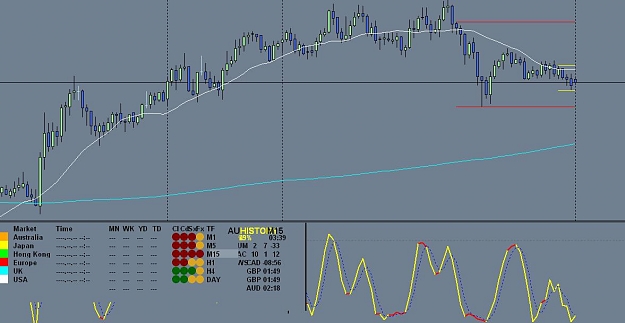
I have been trading for the past one year and have been using thv in the last 5 or 6 months. Very effective system. I really appreciate the contributions of people who are all involved in it. I am constantly making reasonable pips in the demo account and want to graduate to a live account this month. Before doing so decided to purchase the dashboard and tried to install it today. I didn't have the executable in the zip file. I installed the template and the indicators manually. I loaded the dashboard on the chart. Not sure what is happening, but unable to find out the problem. I have attached the chart after installing the dashboard. Why don't I see all that is in the dahsboard? Please help me install it properly and see the required charts.
If you add the dash manually, you need another indicator added to the chart to create a window below the main chart for the dash to fit on eg stochastics, rsi etc
I have been trading for the past one year and have been using thv in the last 5 or 6 months. Very effective system. I really appreciate the contributions of people who are all involved in it. I am constantly making reasonable pips in the demo account and want to graduate to a live account this month. Before doing so decided to purchase the dashboard and tried to install it today. I didn't have the executable in the zip file. I installed the template and the indicators manually. I loaded the dashboard on the chart. Not sure what is happening,...
The thv lamps are a guide to what's going on in multiple time frames. You should look at the thv on M5, M1 when you see the dash rows M5 at or near all green or red. Then take your entry off the actual thv indicators chart.
NOTE: you should not use the lamps being all green and red as a signal ie they are a guide. You must have a good setup based on traditional trading techniques to consider the lamp condition eg support and resistance, daily pivots etc
One question about using your dashboard with THV entries: do you wait until all M1, M5 and M5 lamps are in agreement? Or is M1 and M5 enough to open a position on M1 timeframe? Thx!
If you add the dash manually, you need another indicator added to the chart to create a window below the main chart for the dash to fit on eg stochastics, rsi etc
Ignored
Thank You Stratman and dean01292 for the response. I did install the template. I have double checked and made sure that it is in the right template folder.
Stratman,
could you please explain more on what you mean that I need another indicator added? So, should I just go ahead and add a stochastics or rsi manually?
Rob,I juz finish reading all the post in your thread at FF.Setup everything according to manuals.No glitch as indicated in FF.I am on Vista.Lucky me.The reason is I turn off User Account Control.Plus I am on MT4 Jadefx.Could be kind to include me in your Pipware Skype Room list.I play fully your combinations of features and indicators.It is a dynamite.I wish I had this 10years ago.On post 951 you have a sneak DB 4.0 templates.How to access this?Also the fonts files.It does not come with the DB4.0.Also how to activate the Synergy TDI in PIPware Chart 4.0. Fantastic piece of code.It is every real trader dream to have it and it juz cost.......
It is a just a matter of time before your sales skyrocket.If you have a IPO I will be the first to grab it.
I did a detailed analysis of the combinations of trading system from your DB and it is mind boggling.Just the auto S/R system is a value that is beyond what many users here can comprehend.
I am not a salesman but have study for 3 years full time learning Forex.This site of your is my top list and my recommendations to all especially you just starting out.The others is Bemac reverse Fib ,Skunny Fib and Dove Alliance pivot.
Your DB with Bemac is a real knock-out.
The possibilities is endless.
Thank You Stratman and dean01292 for the response. I did install the template. I have double checked and made sure that it is in the right template folder.
Stratman,
could you please explain more on what you mean that I need another indicator added? So, should I just go ahead and add a stochastics or rsi manually?
Thanks
Ignored
I think you installed everything right, but did not load the template on the chart.
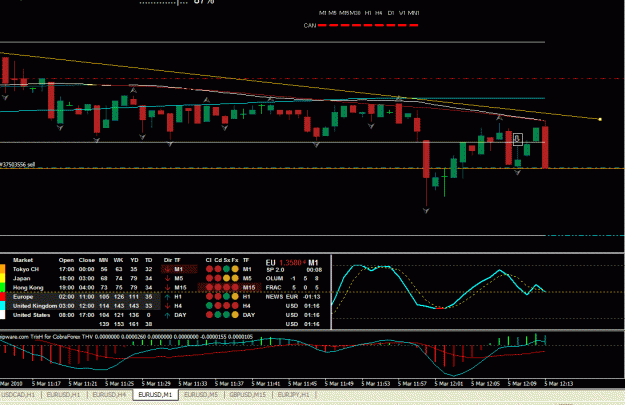
Open a new chart, right click on the chart and choose for template, then choose the dashboard template (pipware-gray is the standard one, but there are others for download) and all will be loaded on your screen.
Now you have to see the layout of the dashboard and you are able to adjust the settings of the dashboard for your broker time zone and so on.
Even if you choose the right time zone there will be a yellow time warning, but that’s normal because the market is closed now.
Rob,I juz finish reading all the post in your thread at FF.Setup everything according to manuals.No glitch as indicated in FF.I am on Vista.Lucky me.The reason is I turn off User Account Control.Plus I am on MT4 Jadefx.Could be kind to include me in your Pipware Skype Room list.I play fully your combinations of features and indicators.It is a dynamite.I wish I had this 10years ago.On post 951 you have a sneak DB 4.0 templates.How to access this?Also the fonts files.It does not come with the DB4.0.Also how to activate the Synergy TDI in PIPware Chart...
Rob,I juz finish reading all the post in your thread at FF.Setup everything according to manuals.No glitch as indicated in FF.I am on Vista.Lucky me.The reason is I turn off User Account Control.Plus I am on MT4 Jadefx.Could be kind to include me in your Pipware Skype Room list.I play fully your combinations of features and indicators.It is a dynamite.I wish I had this 10years ago.On post 951 you have a sneak DB 4.0 templates.How to access this?Also the fonts files.It does not come with the DB4.0.Also how to activate the Synergy TDI in PIPware Chart...
may drop down a bit as Craig Harris pointed out that I had his name in my keywords (tags) on youtube. I had posted some videos with trades in the style of Craig Harris.
It was quite amazing because anyone searching for Craig Harris Forex was getting my videos at the top of the search results ... when you compare the differences of the pipware dashboard and his natural flow system ... then compare the prices ...
Anyway, Craig was none too pleased and now I have fixed up all my videos and website to have no mention of him or natural flow ... even though I personally don't think I breached any copyright issues ... just don't want Craig and I to have to be side-tracked by any legal battles ... neither of us need that.
But I'm confident it wont be long before the masses realise they can get a good system that makes 40-100 pips per day that wont cost them an arm and a leg.
I'm guessing others will make comparisons between our systems and post their own videos and links with 'Craig Harris' keywords & tags. At least it wont be me in the gun.
I'm going to do some more videos shortly with info on where you can get all these trading ideas like IB (inside bars), OB (outside bars), reversal candles with stochastics. I have found this system has been around as early as 2001
My DB V4 is not showing the hours ADR problem today so very hard for me to find a problem ... can those that are experiencing this today please contact me on skype (stratman_fx)?
The news bug may be the UAC of vista and windows 7. I not sure yet how to work out a solution to this. I always ran vista and windows 7 with UAC turned off ... probably why I didn't see a problem.
Very few people during Asia in the skype room today. I wasn't going to trade asia (today) as I was working on bug fixes but the setups were just begging to be taken
I called out all my trades and made +47 pips so far. To get in the room, just contact me 'stratman_fx' on skype and I can add you.
I'm offering this service at no extra cost to those that own the dashboard. You can still chat to each other even if I'm not there ie when I'm sleeping .
My DB V4 is not showing the hours ADR problem today so very hard for me to find a problem ... can those that are experiencing this today please contact me on skype (stratman_fx)?
The news bug may be the UAC of vista and windows 7. I not sure yet how to work out a solution to this. I always ran vista and windows 7 with UAC turned off ... probably why I didn't see a problem.
I'm still looking for solutions.
Ignored
Team,
If you move (cut and paste) or re-install your entire MetaTrader 4 to the Users/Public/ Area (sorry I am on an xp machine right now and can not remember exact path), this problem should resolve itself. You would have to recreate or alter any shortcuts you currently have to point to the new directory path for MT4.
The real solution is in changing the permissions on the folders so that everybody can fully access (read, write, alter), but this process can be a bit much for some people.
Mark
P.s.
Stratman, Great job on this and all of your indicators ...
|
Joined Mar 2009
|
Status: Beware of candle patterns...
|205 Posts
Great job on this indicator Rob...you have my utmost respect for your effort to give us struggling Forex traders such an indicator at such a low price.
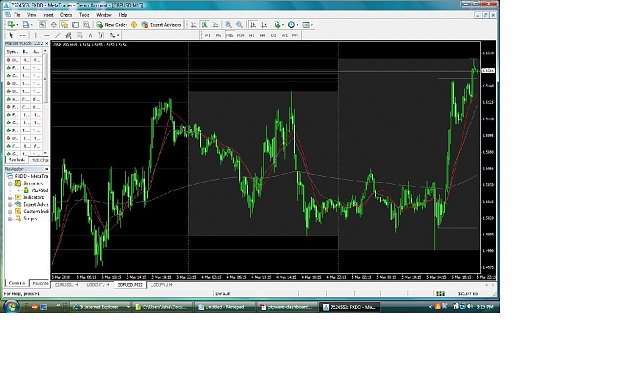
Attached is the chart of AUDUSD, 15min. with DB V4.
The indicators fonts looks messy, is there any way to tidy it up? Also, it is 5:20PM EST time now, and wonder why the Market sessions all show 0 value?
Any tips/suggestions greatly appreciated from anyone who is using DB V4...Cheers.
If you move (cut and paste) or re-install your entire MetaTrader 4 to the Users/Public/ Area (sorry I am on an xp machine right now and can not remember exact path), this problem should resolve itself. You would have to recreate or alter any shortcuts you currently have to point to the new directory path for MT4.
The real solution is in changing the permissions on the folders so that everybody can fully access (read, write, alter), but this process can be a bit much for some people.





 .
.