one question... the lot size remains as 0.1 am I correct?
have a good w/e guys...
Ignored
The lot calculation takes place only when MoneyMgtMethod is 1 (enabled), in this case the Lots parameter is ignored. So if you want to check out the lot calculation fix from last night then please enable the money mgt and then 'wait & see'
The lot calculation takes place only when MoneyMgtMethod is 1 (enabled), in this case the Lots parameter is ignored. So if you want to check out the lot calculation fix from last night then please enable the money mgt and then 'wait & see'
I've been using version 11, since you issued it. My basic parameters at this point
are the default lot size, with MM turned off, and TP using trailing stop on HAS.
On 8/5 two trades opened, sell orders on UJ and AJ, closing on the 6th as losers.
On the 6th, 2 more trades were issued. Buys in the same 2 pairs. These were also losers, and that was expected because the pairs were obviously ranging back and forth. No big deal.
I'm currently in 5 trades, 2 buys in UC and EG, and 3 sells in EU, GJ, and AJ. They're all in healthy profit and gains versus losses at this point, I'm about even.
It'll be interesting to see the long term performance through this month after the NFP breaks this morning. I'm very optimistic. Thanks very much for this system and the EA.
The lot calculation takes place only when MoneyMgtMethod is 1 (enabled), in this case the Lots parameter is ignored. So if you want to check out the lot calculation fix from last night then please enable the money mgt and then 'wait & see'
Ignored
LB
good news mate 2 trades opened up with money management working according to 3% rule however it only opened 1 position... is there a setting to make 2 entries as per Mr Eds style?
i have just stumbled on this system and it looks promising.
i started testing it yesterday. already i am +60 pips so far.
however ever i have some issues which i would like clearification:
1) after the Hb cahnges color completely an the rules for entering trade is valid, is the trade entered immediately or on the next candle?
2) asuming that the ATR reads: 0.00811, what would the TP/TL bbe?
3) am getting my self confused trying to calculate the pip value for currencies like ADUJPY (81.749), EURJPY 138.566) because of the decimal places. can somebody please help me out here.
thanks in adv.
good news mate 2 trades opened up with money management working according to 3% rule however it only opened 1 position... is there a setting to make 2 entries as per Mr Eds style?
good luck guys
Ignored
ExitMethod=2 would implement something like that: while one position is created when trigger shows up, reaching TP1 the EA will try to close half of that position (at new bar). Note that the position size must be big enough to support this operation (at least 2 * minimum lot size like 2 * 0.50 = 1.0 lot for FXCM) otherwise the EA will have to close off the full position.
Hmm, this actually reminds me to review the lot size handling at the partial close routine - v0.11.1 fixed this for FXCM and alikes when new market order is created but I am not sure about the partial close routine
ExitMethod=2 would implement something like that: while one position is created when trigger shows up, reaching TP1 the EA will try to close half of that position (at new bar). Note that the position size must be big enough to support this operation (at least 2 * minimum lot size like 2 * 0.50 = 1.0 lot for FXCM) otherwise the EA will have to close off the full position.
Hmm, this actually reminds me to review the lot size handling at the partial close routine - v0.11.1 fixed this for FXCM and alikes when new market order is created but I am not...
Ignored
I fixed the lot size handling at the partial close routine as well - see the attached EA version 0.11.2.
I would suggest upgrade to everyone using broker with other than 0.01 minimum lot size.
hello mister ED
i read all posts of ur thread and i really like it
i am starting to use it manually beside my own strategy
where i will post the compination of both after testing them well together
but i have a question please
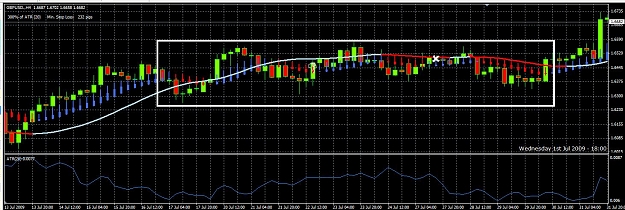
HOW DO U PROTECT YOURSELF FROM SIDEWAY TRADES ??
like these
Attached Image (click to enlarge)
THE CREATOR AND OWNER OF S.N.M "Serve no Master" Trading Stystem
Is it possible to have a setting on a pair that just trades off a certain time candle? eg for me EURJPY is very successful on the 0:00 candle
Mister ED
Ignored
Hi Mister ED,
There are new parameters to filter trades for certain time candles, see TradeTimeMon through TradeTimeSun. In order to do trade only for 8am and 4pm on every Monday the following must be set:
TradeDay parameter shall have "Mon" listed, eg = "Mon,Tue,Fri"
TradeTimeMon = "08:00,16:00"
The time must always be in 24-hour with leading zero format. So 8am goes in as 08:00, 4pm will have to be 16:00 etc - these are server times always. Multiple times can be listed, those shall be separated by any non-numeric character like space, comma etc.
In order to make backtesting easy both TradeDay or the TradeTimeXXX parameters can be left empty (I mean zero length!). In this case the EA will ignore any filtering by that parameter and will apply the trading logic to all possible opportunities, days or candle times.
There are new parameters to filter trades for certain time candles, see TradeTimeMon through TradeTimeSun. In order to do trade only for 8am and 4pm on every Monday the following must be set:
TradeDay parameter shall have "Mon" listed, eg = "Mon,Tue,Fri"
TradeTimeMon = "08:00,16:00"
The time must always be in 24-hour with leading zero format. So 8am goes in as 08:00, 4pm will have to be 16:00 etc - these are server times always. Multiple times can be listed, those shall be separated by any non-numeric character...
Ignored
hi LB
thanks 4 d updates
I had 3 trades opened so far... but other trades should have opened (GJ + EJ + AJ) as well on friday but didnt... any ideas?
FYI I am going to have a long weekend now and will be away from my PC up to mid next week. Will follow up on the EA feedback/experience on the second half of next week.
What is new about ver 12?
I like the the idea of how this trades, but so far the EA is not doing well for me at all. I have been trying on 4hr time frame. I tried it on shorter times and it jumped in and out of trades way to fast. But still it is not doing well. does anyone have a better set up?
i mean if i found entring opportunities in all of them
which one should i choose ???
Ignored
Hi NG, just be careful of having too much exposure to the JPY crosses, if they all go wrong at the same time they will take a heavy toll on your account balance. Personally I only use 1 or 2 of the JPY crosses, the EURJPY or the CADJPY.
Hi NG, just be careful of having too much exposure to the JPY crosses, if they all go wrong at the same time they will take a heavy toll on your account balance. Personally I only use 1 or 2 of the JPY crosses, the EURJPY or the CADJPY.
Ignored
thnx brucy for ur response
what about GBPJPY ISNOT THAT THE BEST JPY TEAM MATE ?
THE CREATOR AND OWNER OF S.N.M "Serve no Master" Trading Stystem



 Mister ED's 4 hour Heikin Ashi system