I also checked your post and I can see you know what you’re talking about.
The filtering sensitivity and over-optimization side that is exactly where a lot of systems start to become misleading.

Market view based on my Trading systems and Experience 10 replies
Systems, Systems and Systems... 1 reply
Using Visual Traders Studio...help 1 reply
Visual Traders Studio 3 replies
So there is a very wide range available, with a lot of freedom and room to explore different combinations.
That is one of the strongest points of the software. The search space is large, and you can make the EA as simple or as complex as you want.
Personally, I prefer simpler.
From my own experience, very complex EAs with too many indicators, signals, filters and conditions are often less robust. There are exceptions, of course, but in general I prefer clean logic over too much complexity.
It is the same principle as manual trading. A clean chart is usually better than an overloaded chart full of noise and distraction. I look at strategy building in a similar way. Simpler is often better. Too much complexity usually means too much noise.
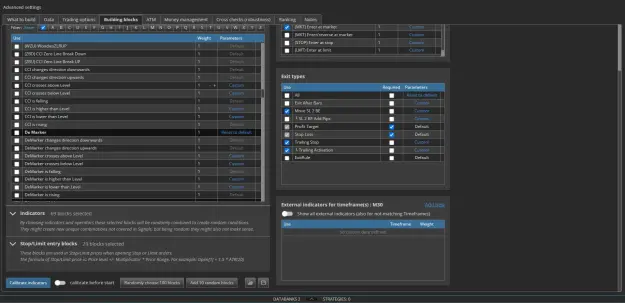
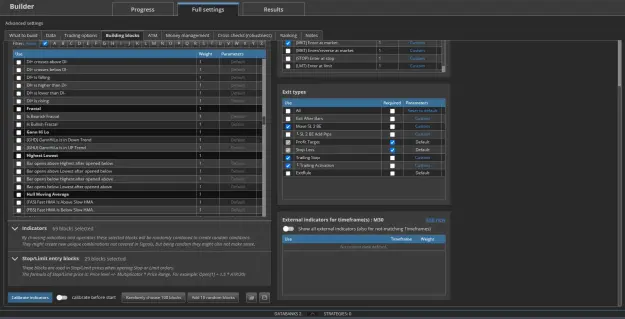
So in this post, I mainly wanted to show the signal blocks together with the order types and exit types, just to give a clear visual idea of what is actually available inside the playground.
Everything that is checked here becomes part of the generation process. In other words, whatever is selected here is what the software is allowed to use while building strategies.
At the moment, in these screenshots, I am using Enter at Market, but I switch between order types regularly depending on what I want to explore.
For exit types, my approach is more fixed.
Stop Loss is standard for me. I do not use robots without a stop loss, not on live and not on demo. Even if there are other exit mechanisms available, stop loss is mandatory for me.
Take Profit is different. That is not always required. In many cases I prefer not to force a fixed take profit, because that gives a strategy more room to follow a move if it is more trend-oriented.
You may also notice that Exit Rule is turned off here. Normally that is often enabled, but in this case I was specifically searching for more trend-following behavior. An exit rule can sometimes take a strategy out of a move too early, so disabling it in some tests can make sense depending on the objective.
So again, the main point of this post is simply to show what the playground has available in terms of signals, rules and building options.
In the next post, I will show more of the indicators and also the stop/limit entry blocks, because that gives an even better picture of how much choice is actually available inside StrategyQuant.
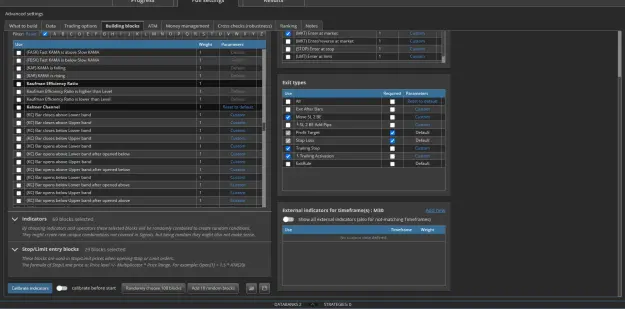
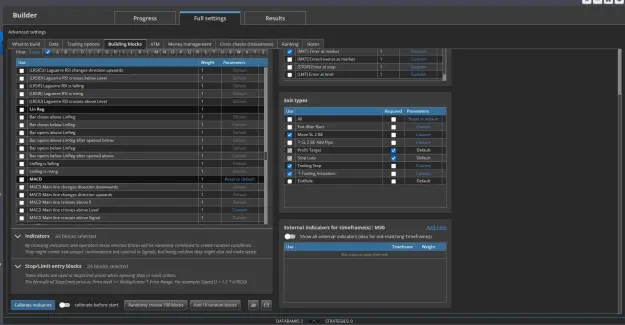
Below you can see the rest of the signals. It’s not everything, but the majority is included here.
EA Studio is also a solid tool for building robots, but I won’t go too deep into that here.
It’s simple and effective. The indicators available there are standard MT4/MT5 indicators, and in terms of stress testing you mainly have Monte Carlo, Walk Forward and Multi Market.
Like I said, EA Studio is powerful, but not really the focus of what I want to show here. StrategyQuant is more complex, which makes it more interesting to experiment with and also more relevant to demonstrate fully.
This is not promotion, and I’m not putting any links here. If someone wants to know what StrategyQuant is, they can just google it themselves. I’m not here to push anyone to use these builders. And to be honest, whether someone uses them or not, or whether they take anything from what I post here or not, it changes nothing for me. My grind stays the same, and my focus stays on my own accounts.
This is to complete the visual overview of what is available inside the playground.
The stop / limit entry blocks belong to the other entry order types, as the name already suggests.
At the moment that is not what I’m using here, because in these screenshots I only have Enter at Market enabled.
That’s business.
Nothing wrong with that, but it’s not the same as trading.
If someone only shows their real workflow after you pay,
then it’s not really about helping.
That’s just a business model.
Same thing in simple terms:
You have people who help others for real.
And you have people who “help” because there is money behind it.
Big difference.
Also about EAs in general.
Most EAs being sold are:
They can look good for a while,
but that’s not real trading.
It’s just stacking risk.
At some point, it blows up.
That’s why they sell, not because they actually work long term.
If you want to know more about grid and what actually happens with a lot of EAs being sold, you can check post #8. I go a bit deeper into it there.
But just to keep it simple here:
The robots I build for my broker won’t automatically work the same on another broker.
Even if the brokers are similar, there is still no guarantee.
Execution, spread, data, all of that matters.
So even a system that works on one broker can behave differently somewhere else.
For me it’s simple.
I spent years on this.
Testing, failing, rebuilding, starting over.
It took me around 5 years before I started getting consistent results.
I can explain what I do.
I can show how I build.
I can share what I look for.
I can show the mistakes and where things changed for me.
But the way you think for yourself, the way you read things, the way you stay consistent…
that part you have to develop on your own.
That’s also why I don’t sell anything.
I don’t believe in hiding information behind a paywall.
When I started, this kind of information wasn’t available.
Everything was either incomplete or behind payment.
So for me, it’s simple:
I’d rather just share what I know over time for free,
for the people who are willing to learn and build something themselves.
Even if someone offered a lot of money for my systems, I wouldn’t do it.
I’d rather build my own capital over time.
It takes longer, but it’s real and it’s mine.
The goal of this thread is simple.
I’m just going to drop everything here over time.
How I actually build, how I test, what works, what doesn’t, the mistakes, the lessons.
Just real information.
That’s it.
This makes it possible to test not just performance, but how the structure reacts under different types of stress and execution conditions.
DislikedSo my question is: Would anyone be willing to share a demo MT5 statement file? You can post it here, or if you prefer to send it privately, you can email it to: [email protected] This is purely for development and testing purposes to improve the tools. Thanks in advance to anyone willing to help.Ignored
DislikedI have a question and I’m looking for someone who might be able to help. I’m an MT4 user, and I’ve been building tools for MT4 users who save their history statements and want to upload them for much deeper analysis. The goal is to push these tools as far as possible toward an institutional-level standard over time. The tools are already live and usable right now. At this stage, the current toolset already includes Monte Carlo, the Intelligence Report, the EA Breakdown + Survival Tool, the Equity DNA Analyzer, and the Portfolio Builder. I explained...Ignored
Disliked{quote} Hi, Can you give me the demo MT4 statement file so I understand what you want?Ignored
The goal is simply to understand how MT5 structures its statement export so I can adapt the parser properly and extend the tools for MT5 users.
So if you have something like that available, or if anyone else here is willing to share one, even anonymized, that would help a lot.
Thanks in advance.
Disliked{quote} MT5 statements can be exported as detailed HTML reports, which include full trade history, balance, equity, and statistics. Depending on your parser, you might also want to look into extracting raw trade data via CSV export for more flexibility. I don’t have one ready to share right now, but that should give you a good starting point.Ignored
Disliked{quote} Hmmm, well I am confused LOL You want a real MT5 statement, But you don’t use MT5 in your workflow at all. ??? Yes, it looks like you will have to do this magic yourselfIgnored
February and March are the part I find most useful to share. Gold was choppy — neither the trend systems nor the reversal systems had clean conditions. Small drawdown, nothing catastrophic. Then April delivered a sustained directional move and the trend systems captured it properly.
The lesson for me was the same one you touched on — the system needs to be left alone to work. Stopping it in March would have meant missing April entirely.
Curious whether your EA Studio systems show similar variance month to month, or do you find the portfolio approach smooths it out more consistently?
Verified third-party data available if anyone wants to compare notes.
DislikedAppreciate the transparency in this thread. Sharing my own experience for context. I run a custom-built EA on XAUUSD — not EA Studio or StrategyQuant, coded from scratch in MQL5. Seven independent systems running simultaneously: four trend-following (T1–T4) and three counter-trend (R1–R3), each on its own timeframe (M30, H1, H4). No grid, no martingale, hard SL on every trade. Live account results since January 2026 (Micro account, $2,000 deposit): Jan: +8.97% Feb: -0.01% Mar: -3.78% Apr: +29% Total: +32.28% | Max DD: 16.81% February and March are...Ignored
And then they think the system is strong.
But that is not enough.
A robot can be profitable and still be fragile.
A portfolio can look good and still be carried by one or two robots.
A strategy can have a nice curve and still collapse when sequencing, spread, slippage, bad months, outlier dependency, or drawdown pressure become worse.
That is the whole point behind these tools and guides.
The first guide is about the Strategy Intelligence Report.
This is a basic guide on how to read a strategy or statement report properly.
Not just asking “did it make money?”, but looking at structure, drawdown, recovery, outlier dependency, consistency, concentration, and whether the profit actually deserves deeper trust.