You can download it from this link:
https://cdn.tradingfinder.com/file/3...tflab-v1-2.zip
 You can also access the MetaTrader 4 version of this indicator through this page:
https://www.forexfactory.com/thread/...der-expert-via
 For instructions on how to install:
https://www.forexfactory.com/thread/...-in-metatrader
TP & SL Tool: Risk Reward Ratio Calculator RRR MT5 | Prop Firm Protector: Trade Assist Prop Firm Plus TF Expert MT5 | Money Management +
DrawDown Protector: Trade Panel Prop Firm Drawdawn Limiter Pro MT5 |Get a free Expert Advisor license via Telegram and WhatsApp
Key features include:
- Instant notifications for trading activity such as position opening and closing
- Real-time updates to stop loss and take profit levels
- Automatic handling of pending order events and partial trade closures
- Telegram bot integration for seamless signal delivery
- Support for multi-timeframe and multi-instrument analysis
- Customizable message formats with emoji support and dynamic variable placeholders
- Compatible with swing trading, scalping, day trading, and fast scalping strategies
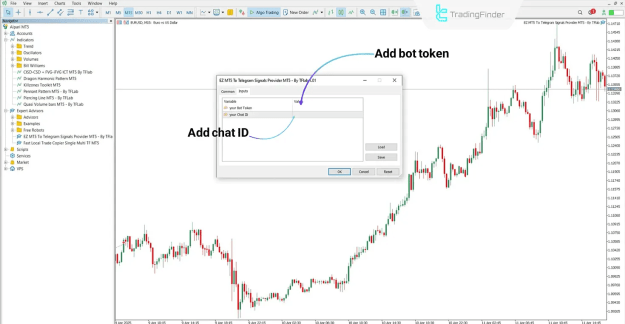
To enable this functionality, traders must set up a dedicated Telegram bot using the official @BotFather. After using the /newbot command and assigning a unique username ending with “bot,” the user receives a bot token, which serves as an authorization key for the Expert Advisor.
To determine where messages are delivered, a Telegram Chat ID is required. This ID is a numeric code that represents a user, group, or channel. The easiest method to retrieve it is through @JsonBot:
- Open @JsonBot in Telegram
- Click "Start" and send a message
- The bot will return your Chat ID in numeric form
For Telegram groups:
- Add your bot to the group and assign admin rights
- Add the group to @JsonBot to receive its unique Chat ID
For Telegram channels:
- Add your bot as an admin and allow it to send messages
- Add @JsonBot to the channel, send a message, and retrieve the channel ID
- You can remove @JsonBot afterward if preferred
Before message delivery can begin, WebRequest access must be granted in MetaTrader 5:
- Go to Tools > Options > Expert Advisors
- Enable "Allow WebRequest for listed URL"
Once WebRequest is enabled, attach the Expert to a chart, input the bot token and Chat ID, and save the settings. The Expert will then begin monitoring trading activity and sending messages accordingly.
The settings panel of the Expert provides control over:
- Enabling or disabling message delivery
- Saving or clearing message templates
- Adding or removing message fields dynamically
Traders can choose specific trade actions that trigger messages:
- Opening a position
- Closing a position
- Updating stop loss or take profit
- Partial trade exit
- Creating, deleting, or modifying pending orders
To personalize messages, the Expert supports emojis and variable codes. For example:
Emoji codes:
 {GreC}
 {RedC}
- {up}
 {down}
 {rocket}
Variable codes for account and trade information:
- {Balance}, {Equity}, {Leverage}, {Currency}
- {entry}, {sl}, {tp}, {profit}, {volume}, {RR}, {symbol}
- {GMT}, {server}, {local}, {CompanyName}, {AccountName}
These codes are replaced in real-time with actual trade data during message transmission.
Example message structure:
 EURUSD
Buy |  Profit: +$120
Entry: 1.1050 | SL: 1.1020 | TP: 1.1100
 Server Time: 14:23
This kind of message format ensures that alerts are clear, organized, and informative.
The Expert supports various trading environments, including:
- Platforms: MetaTrader 5
- Skill level: Advanced
- Indicators: Entry/Exit, Multi-Timeframe
- Instruments: Forex, Crypto, Stocks, Indices, Commodities
- Trading styles: Scalping, Swing Trading, Day Trading
The EZ MT5 to Telegram Signal Provider Expert is a highly effective tool for traders seeking real-time automation in trading communication. With just a Telegram bot, a valid Chat ID, and a few simple configurations, users can receive immediate updates on trading activity. Additionally, customizable templates with emoji and variable codes allow traders to enhance readability and precision in signal delivery, whether for personal monitoring or group broadcasting.