



The VR Alert indicator warns the trader about the price or any other indicator reaching a specified level.
The indicator has been developed as an assistant when you wait for a breakout of an important price level, which can take hours or even days.
With this indicator, you do not need to constantly monitor your terminal. The indicator alerts of a level breakdown or of the specified time using the selected method.
Monitoring charts for a prolonged time causes most traders to have "Blurred eyes".
This makes them miss really good signals while looking at their trading strategies, and, conversely, see their signals where there is nothing to see.
Advantages of the VR Alert indicator 
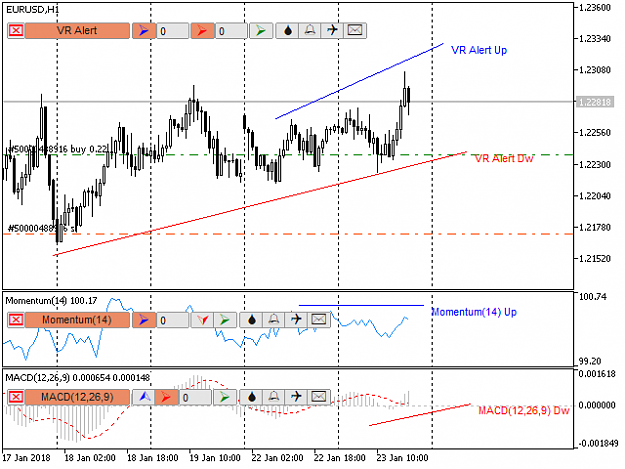


The indicator has four notification systems in case the price or an indicator reaches the set values:
Instructions
The indicator has been developed as an assistant when you wait for a breakout of an important price level, which can take hours or even days.
With this indicator, you do not need to constantly monitor your terminal. The indicator alerts of a level breakdown or of the specified time using the selected method.
Monitoring charts for a prolonged time causes most traders to have "Blurred eyes".
This makes them miss really good signals while looking at their trading strategies, and, conversely, see their signals where there is nothing to see.
Advantages of the VR Alert indicator
- Ability to monitor the breakout of both horizontal and inclined trend lines
- Works with the price any other indicators, whether it is an indicator from the Market or from the Internet (the indicator should be written in accordance with the documentation and without errors)
- Easy to install and configure
- Levels can be dragged along the chart using the mouse
- Highly customizable parameters and color scheme, presets are available
- Any trading instruments and timeframes
- It is possible to limit the indicator signals in time
Attached Image (click to enlarge)
Attached Image (click to enlarge)
Attached Image (click to enlarge)
Attached Image (click to enlarge)
The indicator has four notification systems in case the price or an indicator reaches the set values:
- Color notification - the terminal chart will change its background color
- Sound notification - the terminal will play a short melody attracting the attention of the trader
- Notification to a mobile device - the indicator sends a push notification to the trader, specifying the name of the indicator and the instrument
- Е-Mail message - the indicator sends an email to the trader, specifying the name of the indicator and the instrument
Inserted Video
Instructions
- Drag the indicator from the Market folder in the Navigator window to the chart.
- Set your indicators according to your trading system. VR Alert automatically detects new indicators and adds a control panel to them.
- To set a level for the upward breakout, press the up arrow key: a numeric input box will appear. The default value is 0, pick a buffer number to select a specific line. Depending on the way an indicator is written, the lines and arrows it draws can have different numbers (usually 0, but there are exceptions). There are indicators with several lines (for example, Bands). To select a specific line in the input box of the up arrow, enter the numbers 0, 1, 2 in turn. When entering each number, a line will automatically appear next to one of the three lines of the indicator. By selecting the desired line, you can stretch the signal level according to your rules.
- After setting all the lines, you can select the notification methods: audio file, blinking background, Push message, Email. Sound and blinking work until they are turned off, Push and Email are sent only once. (To send Push and Email messages, the terminal should be correctly configured)
Solved problems
Have you ever had a situation where you could not leave the terminal waiting a signal, while waiting for a signal from the indicators or a price level breakout took hours?
Perhaps you already have an excellent indicator that generates accurate signals, but you spend hours in from of the monitor waiting for them?
Maybe you have already tried to find ways to tie notifications to your indicators?
All these problems are solved by the VR Alert indicator, see the screenshots and video recorded by the author of the program.
Other versions of the program
MetaTrader 4
- VR Alert - https://www.mql5.com/en/market/product/13548
- VR Alert Lite - https://www.mql5.com/en/code/11606
MetaTrader 5
- VR Alert MT 5 - https://www.mql5.com/en/market/product/23438
- VR Alert Lite - https://www.mql5.com/en/code/19824
My topics: https://www.forexfactory.com/thread/1399775-vr-trade-panel-profe