{quote} Set your chart with the EA to Daily timeframe, that's it
Ignored
.
I think what some of us who would like to trade this system on Daily charts are wondering is if any of the parameters need to be tweaked from the original since the EA has been emphasized on 4H charts. I have read that it can be used on Daily, but not offered any advice as to whether the default settings work just fine, or could be enhanced by slight changes.
{quote}. I think what some of us who would like to trade this system on Daily charts are wondering is if any of the parameters need to be tweaked from the original since the EA has been emphasized on 4H charts. I have read that it can be used on Daily, but not offered any advice as to whether the default settings work just fine, or could be enhanced by slight changes.
Ignored
It should work just fine, but on the daily you probably want to change the SL/TP levels
I have special request, for the next EA update.
Please can you add a MAX NO OF TRADES function
I want to try to limit the trades to 1 at a time.
currently only way is manually
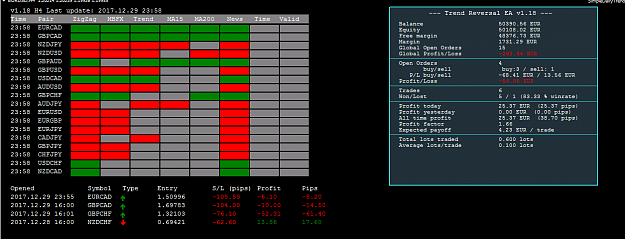
Hi guys, quick question. I've been busy with changing the GUI of the EA a bit and this is what i came up with so far.
i replaced all the check marks/ticks with simple coloured boxes. Color red=sell, Green=buy, grey = not valid yet
Pairs with the most number of valid signals are placed on top, pairs with least # of valid signals are placed on the bottom.
SMA 200 trend filter now has its own column, which will show only when SMA200 trend filter is enabled
So if you look in the screenshot then NZDCAD is at the bottom since it only has a zigzag arrow (and there is no news)
EURCAD & GBPCAD are on top since they are the most promising.
The only reason why those 2 are not valid buy/sells at this moment is because the time filter, which is grey since the markets are closed now
But i'm not a GUI designer. So if anyone of you has an idea on how to improve the GUI, then pls let me know.
Hi guys, quick question. I've been busy with changing the GUI of the EA a bit and this is what i came up with so far. i replaced all the check marks/ticks with simple coloured boxes. Color red=sell, Green=buy, grey = not valid yet Pairs with the most number of valid signals are placed on top, pairs with least # of valid signals are placed on the bottom. SMA 200 trend filter now has its own column, which will show only when SMA200 trend filter is enabled So if you look in the screenshot then NZDCAD is at the bottom since it only has a zigzag arrow...
Ignored
Hi ebeckers, thanks for the great work as always! I was about to suggest transferring the "Open Trades" in line with the "Signals" column, but then I realized that some signals go away, which will make it a problem.
Regarding the problem in opening trades during retracement (GPBCHF this week was a trade to forget), is it possible to add a delay input? For example, after a signal, the EA will delay opening a position after a number of minutes or by fibonacci computation?
Hi guys, quick question. I've been busy with changing the GUI of the EA a bit and this is what i came up with so far. i replaced all the check marks/ticks with simple coloured boxes. Color red=sell, Green=buy, grey = not valid yet Pairs with the most number of valid signals are placed on top, pairs with least # of valid signals are placed on the bottom. SMA 200 trend filter now has its own column, which will show only when SMA200 trend filter is enabled So if you look in the screenshot then NZDCAD is at the bottom since it only has a zigzag arrow...
Ignored
@ebeckers,
this gives us a very good overview! Thank you.
Could we also take into consideration a currency strenght indi?
Anyone know how to limit the amount of trades on a signaled pair on the EA to one only. I get 5-7 trades simultaneously on the same pair sometimes. other times just 1-2.
Anyone know how to limit the amount of trades on a signaled pair on the EA to one only. I get 5-7 trades simultaneously on the same pair sometimes. other times just 1-2.
Hi guys, quick question. I've been busy with changing the GUI of the EA a bit and this is what i came up with so far. i replaced all the check marks/ticks with simple coloured boxes. Color red=sell, Green=buy, grey = not valid yet Pairs with the most number of valid signals are placed on top, pairs with least # of valid signals are placed on the bottom. SMA 200 trend filter now has its own column, which will show only when SMA200 trend filter is enabled So if you look in the screenshot then NZDCAD is at the bottom since it only has a zigzag arrow...
Ignored
Hi ebeckers,
I usually don't post on forex factory, however, I couldn't restrain myself from contributing to this thread created by mrdfx and your wonderful contributions.
Thanks for another great innovation to the already good dashboard.
Ebeckers, the EA opens several trades at the same time on same pair quite often 5-7 trades. Thats risking a margin call. sometimes one trade only on a pair which is ideal. I have enabled 30 mins in between but still get multiples.



 Simple Daily Trend Reversal Trading System