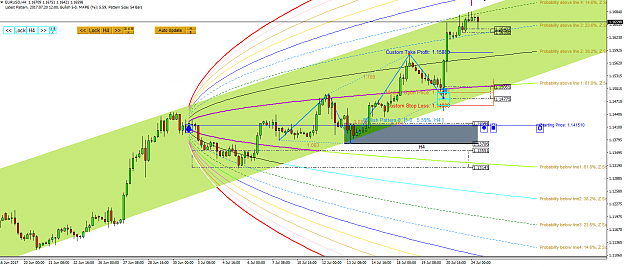
How to save Harmonic Patterns in your chart
With our Harmonic Pattern Plus and Harmonic Pattern Scenario Planner, you can perfectly control the repainting and redrawing issues of the classic Price Action and Pattern Trading. Beside this powerful feature, the highly precise pattern recognition feature of our Harmonic Pattern Plus and Harmonic Pattern Scenario Planner makes these tools to stand out from rest.
Let us show the simple steps to save the Harmonic Pattern in your chart for future reference purpose. Firstly press “Lock” button in your chart to save the Harmonic Patterns. If you want to remove the locked patterns from your chart, then there are two ways of doing it.
Firstly you can click X button to remove the entire locked patterns. Secondly, you can double click over the name of the patterns to remove the individual patterns from your chart. You might remove the individual patterns by double click on the edge of the pattern occasionally (However, somehow, in MetaTrader, this feature is not perfect. Try to click the edge of the pattern not inside. )
Now here is some advanced trading tips. Saving (locking) the pattern in your chart is very useful because you can take them to lower or higher timeframe too. This naturally reinforce your multiple timeframe pattern analysis. If you want to double confirm your trading signal in both lower and higher timeframe, this feature is very useful.
As usual, this tips are applicable to both Harmonic Pattern Plus and Harmonic Pattern Scenario Planner.
Do not miss our Powerful Trading system which can help your trading enormously.
https://www.mql5.com/en/market/product/4488
https://www.mql5.com/en/market/product/4475
https://www.mql5.com/en/market/product/6240
https://www.mql5.com/en/market/product/6101
http://algotrading-investment.com/po...-pattern-plus/
http://algotrading-investment.com/po...nario-planner/
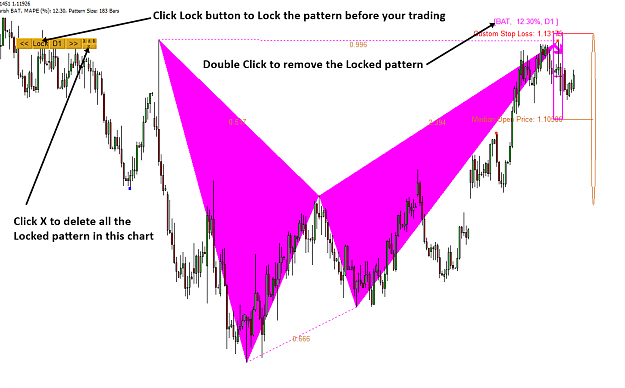
With our Harmonic Pattern Plus and Harmonic Pattern Scenario Planner, you can perfectly control the repainting and redrawing issues of the classic Price Action and Pattern Trading. Beside this powerful feature, the highly precise pattern recognition feature of our Harmonic Pattern Plus and Harmonic Pattern Scenario Planner makes these tools to stand out from rest.
Let us show the simple steps to save the Harmonic Pattern in your chart for future reference purpose. Firstly press “Lock” button in your chart to save the Harmonic Patterns. If you want to remove the locked patterns from your chart, then there are two ways of doing it.
Firstly you can click X button to remove the entire locked patterns. Secondly, you can double click over the name of the patterns to remove the individual patterns from your chart. You might remove the individual patterns by double click on the edge of the pattern occasionally (However, somehow, in MetaTrader, this feature is not perfect. Try to click the edge of the pattern not inside. )
Now here is some advanced trading tips. Saving (locking) the pattern in your chart is very useful because you can take them to lower or higher timeframe too. This naturally reinforce your multiple timeframe pattern analysis. If you want to double confirm your trading signal in both lower and higher timeframe, this feature is very useful.
As usual, this tips are applicable to both Harmonic Pattern Plus and Harmonic Pattern Scenario Planner.
Do not miss our Powerful Trading system which can help your trading enormously.
https://www.mql5.com/en/market/product/4488
https://www.mql5.com/en/market/product/4475
https://www.mql5.com/en/market/product/6240
https://www.mql5.com/en/market/product/6101
http://algotrading-investment.com/po...-pattern-plus/
http://algotrading-investment.com/po...nario-planner/
Attached Image (click to enlarge)