You can access the Indicator from this link:
https://tradingfinder.com/products/i...ing-stop-loss/
You can access the Indicator on the TradingView website:
https://www.tradingview.com/script/h...rning-Methods/
Prop Firm DrawDown Protector : Prop Firm Capital Protection Expert MT5 |Forex Money Management: Forex Trade Management Expert MT5 | ICT Concepts Indicator MT5 |Smart Money Concepts Expert MT5 | Smart Money Trap Scanner | Get a free Expert Advisor license via Telegram and WhatsApp
Key Features of the Trailing Stop Loss Indicator
- Enables dynamic stop loss adjustment in real-time.
- Assists in determining precise entry and exit points.
- Improves risk management strategies, especially in high-volatility environments.
- Supports both long and short positions.
Functional Overview
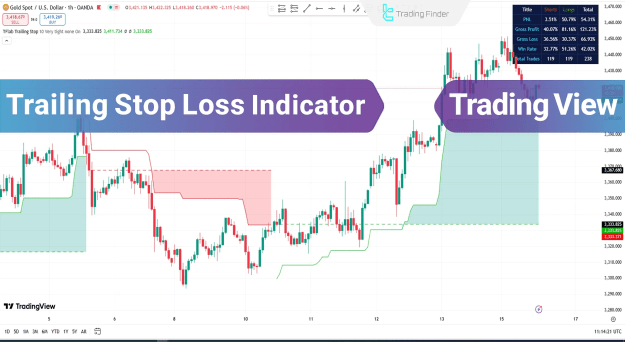
The indicator operates by setting a trailing stop that adjusts according to market trends. As price action unfolds, the stop loss follows the trend, allowing profits to accumulate while minimizing potential losses from reversals.
- For buy positions, the stop loss rises as price moves upward.
- For sell positions, the stop loss drops accordingly with downward movement.
This method ensures that traders are able to protect profits without needing to manually adjust their stop losses.
Example: Uptrend Scenario
On a 1-hour GBP/USD chart:
- Entry point is identified and shown as a dotted marker.
- A green line follows the upward price trend to serve as the trailing stop.
- As the price increases, the trailing stop line ascends to lock in gains.
This mechanism maximizes profitability while minimizing drawdown.
Example: Downtrend Scenario
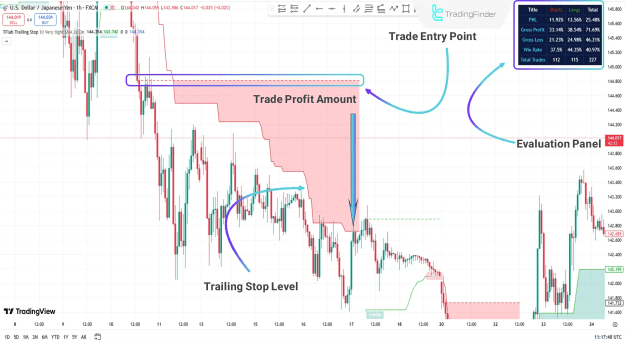
On a 1-hour USD/JPY chart:
- The indicator marks the optimal entry for a short position.
- A red line is plotted, representing the trailing stop for the downtrend.
- It automatically adjusts lower as price declines.
Additionally, traders can view performance metrics in a panel that includes:
- Profit & Loss (P&L)
- Win Rate
- Percentage Gain/Loss
These features provide real-time insights and support informed decision-making.
Customizable Indicator Settings
The Trailing Stop Loss Indicator comes with adjustable parameters, allowing users to tailor the tool to their specific trading strategies:
- Length: Defines the calculation window.
- Base Level: Modifies the baseline used for calculations.
- Show EP: Toggles visibility of entry points.
- Show PNL: Enables display of real-time profit/loss data.
- Filter: Allows selection of a filtering method.
- Alert: Activates notifications when critical levels are triggered.
- Inputs in Status Line: Shows input data within the status bar.
Conclusion
The Trailing Stop Loss Indicator for TradingView provides an advanced, algorithm-driven approach to technical analysis. It intelligently calculates and updates stop loss positions based on market trends, offering traders a robust solution for managing risk and securing profits.
By integrating this tool into their trading framework, users can enhance strategy execution, maintain disciplined risk control, and improve their overall trading performance across volatile market conditions.