You can download it from this link:
https://cdn.tradingfinder.com/file/4...4-by-tflab.zip
 You can also access the MetaTrader 5 version of this indicator through this page:
https://www.forexfactory.com/thread/...advisor-in-mt5
 For instructions on how to install:
https://www.forexfactory.com/thread/...-in-metatrader
TP & SL Tool: Risk Reward Ratio Calculator RRR MT4 | Prop Firm Protector: Trade Assist Prop Firm Plus TF Expert MT4 | Money Management + DrawDown Protector: Trade Panel Prop Firm Drawdawn Limiter Pro MT4 |Get a free Expert Advisor license via Telegram and WhatsApp
This advanced tool empowers Forex traders to manage trading psychology, protect capital from excessive losses or profits, and execute strategies within pre-established risk parameters. Its user-friendly interface features seven distinct functional tabs that offer a comprehensive framework for disciplined and structured trading behavior.
Key Features of the Prop Draw Down Protector Expert Advisor
- Supports risk management and capital protection.
- Designed specifically for Prop Traders using MetaTrader 4 (MT4).
- Offers advanced features to enhance trading psychology and discipline.
- Enables customizable rules for trade volume, time-based trading, profit/loss limits, symbol filtering, and news risk management.
- Helps enforce strict Take Profit and Stop Loss rules.
- Ideal for scalping, day trading, and intraday strategies.
Volume Management Tab
The Volume Tab allows traders to define precise limits on their trade volume and frequency. This feature enhances emotional control and reinforces disciplined capital management.
Core Functionalities:
- Max Trade Size – Set maximum lot size per trade.
- Max Daily Size – Define maximum total daily trade volume.
- Max Daily Number – Limit the number of trades per day.
- Max Daily Seq Loss / Profit – Control allowed losing or winning streaks daily.
- Max Weekly Size / Number – Set weekly caps for volume and trade count.
- Max Weekly Seq Loss / Profit – Prevent extended drawdowns or overconfidence streaks.
Time-Based Trading Tab
The Time Tab enables traders to restrict trading activity to specific time intervals or days, reducing exposure to high-risk or off-plan periods.
Configurable Elements:
- Start and End Time – Define the active trading window.
- Day-Based Scheduling – Enable or disable trading per weekday (MON to SUN) with customizable time ranges.
This feature ensures consistency and prevents impulsive trades outside the trading plan.
Profit/Loss Management Tab (P/L)
The P/L Tab gives full control over daily and weekly gains and losses using thresholds based on percentages, pips, or monetary values.
Risk Controls:
- Max Day/Week Profit – Limit excessive gains to avoid overtrading.
- Max Day/Week Loss – Set firm loss limits to prevent emotional decisions.
These safeguards are crucial for capital preservation and long-term stability.
Symbol Filtering Tab
The Symbol Tab restricts trading activity to selected financial instruments, keeping the trader aligned with their strategy.
Symbol Selection Options:
- Current Chart Only
- All Charts
- Market Watch Symbols
- Manually Defined Symbols
By narrowing focus, traders can minimize distractions and improve strategy adherence.
Trade Monitoring Tab
The Trades Tab provides real-time account analytics, helping traders monitor performance and remain aware of key metrics.
Insights Available:
- Start Day/Week Balance
- Current Profit and Loss (Daily/Weekly)
- Profit and Loss Sequences
- Daily/Weekly Drawdown
Additionally, activating the DATA TAB displays these insights in an on-chart info panel for instant visibility.
Take Profit & Stop Loss Control Tab (TP & SL)
The TP & SL Tab enforces mandatory Take Profit and Stop Loss placement and restricts emotional changes mid-trade.
Key Controls:
- Obligatory TP/SL – Force the placement of risk management levels.
- Alert Timing – Receive alerts if TP or SL is not set within a given time.
- Max Movement Settings – Limit how far TP or SL can be manually adjusted during trades.
This feature ensures that every trade follows a predefined risk-reward ratio and discourages unplanned interventions.
News Management Tab
The News Tab helps traders manage risk during volatile market events by setting news blackout periods for up to 8 key instruments.
Configurable Settings:
- Before and After News Filters
- Display Timing (Check Time)
- Symbol-Specific News Filters
- Enable/Disable News Alerts (All or Latest News)
By avoiding trades during critical news releases, traders reduce their exposure to unexpected market spikes.
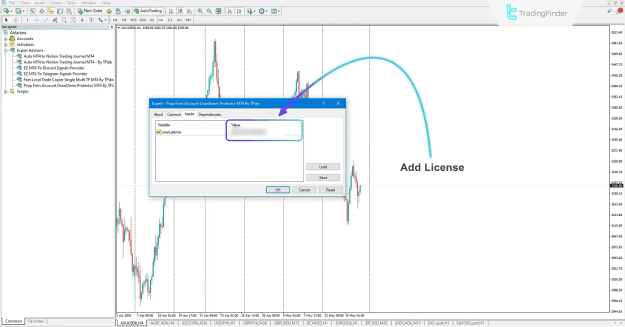
License Activation for Prop Draw Down Protector
To use the Prop Draw Down Protector Expert Advisor, a valid license is required.
- Contact the support team through the official website, Telegram, or WhatsApp to obtain an activation code or request a free license.
Conclusion
The Prop Draw Down Protector Expert Advisor is an essential tool for any Prop Trader looking to maintain consistent profitability, emotional discipline, and strict risk control. Compatible with popular strategies such as ICT and SMC, this expert advisor ensures that all trades align with a structured and well-defined trading plan.
By leveraging this EA, traders can mitigate the effects of market psychology, minimize risk, and improve trading performance with precision and consistency. It is a cornerstone solution for developing professional trading routines and preventing unnecessary drawdowns or margin calls.