Forex Factory
  • Login

  • Username: Password:
  • 8:14pm

  • Search
  • Home

  • Forums

  • Trades

  • Calendar

  • News

  • Market

  • Brokers

Options

Search
Search
Search

Subscribe to Thread

Bookmark Thread

First Page First Unread Last Page Last Post

Printable Version

Similar Threads

MTF Indicators for the 'Trading Made Simple' system 146 replies

Monitor for 'Trading Made Simple' system 82 replies

Simple and Easy System-only two indicators 14 replies

Trading Made Simple system follower - Thanks to eelfranz 9 replies

  • Platform Tech
  • /
  • Reply to Thread
  • 74

Indicators for the 'Trading Made Simple' system

  • Last Post
  • First Unread
  •  
  • Page 1 23456 12
  •  
  • Post# 1
  • Quote
  • First Post: May 15, 2011 9:18pm | Edited Aug 19, 2011 11:45pm – Added links to posted indicators
  • Xaphod
    Joined Mar 2010 | 910 Posts | Status: Member
It appears that some versions of the TDI indicator being used in the 'Trading Made Simple' system look different live than they do after they have been redrawn. The lines for the current bar are mostly not updated as the bar changes. This results in the chart of an indicator that has been running live looking different form a chart of an indicator that is newly loaded.

The line for the current bar is drawn when the bar opens and then is only updated if the brokers server happens to request an update of the previous bar. Does the author of the original indicator know something the rest of us don't about why MT4 servers request updates of bars or is the slope of the current bar just based on a chance event?

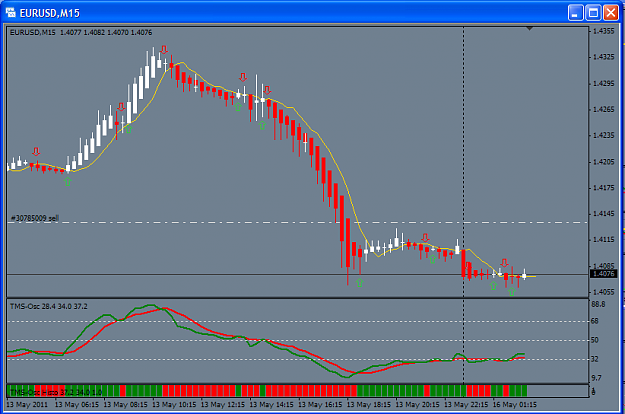
Here are alternative indicators that updates the currently open bar as ticks are received and some of derivative/supporting indicators:

TMS-Osc.mq4:
  1. Main Oscillator. Use instead of the TDI indicator.
  2. Displays the RSI signal, the trade signal and optionally the market base line.

TMS-Osc Cross.mq4:
  1. Draws arrows on chart showing the crossover of the RSI signal and the Trade signal.
  2. Optional popup and email alerts on signal crossover.

TMS-Osc Histo.mq4:

  1. Tape chart of the RSI Signal and the Trade Signal.
  2. Optional popup and email alerts on tape color change (signal crossover).

@TMSTDI_WatchDog.ex4 by plamendp
  1. Shows last 2 bars TDI Delta (slope as units per candle)
  2. Slope Histogram
  3. Alerts: Popup and Email
  4. Alerts based on slope value while Green crosses Red
  5. Repaint/Non Repaint switch
  6. Alert logging in a file under "experts/files"
  7. Multitimeframe
  8. Multisymbol
  9. Colorize last bar
  10. Equal to Big E's original "TDI" If all options are left by default
Post with the latest version of @TMSTDI_WatchDog.ex4


xTDI Strong-Histo v1.01
xTDI-Histo v1.11

  1. Old indicators from the 5 Method thread modified to update on every tick.
  2. Refer to links provided in download link for more info.
Post with the latest versions of 'xTDI Strong-Histo v1.01' and 'xTDI-Histo v1.11'


TMS-Osc.mq4, TMS-Osc Cross.mq4, TMS-Osc Histo.mq4
Input parameters:

RSI.Settings
  1. RSI.Period=13;
    // RSI Period
  2. RSI.Price=PRICE_CLOSE;
    // RSI Price Type: CLOSE=0, OPEN=1, HIGH=2, LOW=3, MEDIAN=4, TYPICAL=5, WEIGHTED=6
RSISignal.Settings
  1. RSISignal.Period=2;
    // RSI Signal MA-Filter Period
  2. RSISignal.Mode=MODE_SMA;
    // MA-Filter Method: SMA=0, EMA=1, SMMA=2, LWMA=4
TradeSignal.Settings
  1. TradeSignal.Period=7;
    // Trade Signal MA-Filter Period
  2. TradeSignal.Mode=MODE_SMA;
    // MA-Filter Method: SMA=0, EMA=1, SMMA=2, LWMA=4
Arrow.Settings
  1. Arrow.Type=2;
    // 0=Thin, 1=Thick, 2=Hollow, 3=Round, 4=Diagonal Thin, 6=Diagonal Thick, 7=Diagonal Hollow, 8=Fractal, 9=Ribbon, 10=Thumb, 11=Finger
  2. Arrow.Size=1;
    // Size of arrow (1-5)
  3. Arrow.Spacing=25;
    // Offset from end of candle to show arrow
Alert.Settings
  1. Alert.Popup=false;
    // Popup window & sound on alert
  2. Alert.Email=false;
    // Send email on alert
  3. Alert.Subject="Default";
    // Email Subject. If "Default" the subject is set by the indicator

Updates:
  1. 2011-05-18:
    Uploaded v1.04 of TMS-Osc Cross and TMS-Osc-Arrow.
    - Fixed: Repeating Alerts.
  2. 2011-05-18:
    Uploaded v1.03 of TMS-Osc Cross and TMS-Osc-Arrow.
    - Fixed: Timestamp in email alert.
  3. 2011-05-17:
    Uploaded v1.02 of TMS-Osc Cross and TMS-Osc-Arrow.
    - Fixed: Alerts for bar 1 only. Prevents multiple alerts when MT4 reloads bars.
  4. 2011-05-16:
    Uploaded v1.01 of TMS-Osc Cross and TMS-Osc-Arrow.
    - Fixed: No alerts after initialization.
Attached Image (click to enlarge)
Click to Enlarge

Name: TMS Osc.png
Size: 27 KB
Attached Files
File Type: mq4 TMS-Osc.mq4   4 KB | 4,351 downloads
File Type: ex4 TMS-Osc.ex4   4 KB | 2,405 downloads
File Type: mq4 TMS-Osc Cross.mq4   11 KB | 3,630 downloads | Uploaded May 18, 2011 8:01am
File Type: ex4 TMS-Osc Cross.ex4   8 KB | 2,356 downloads | Uploaded May 18, 2011 8:01am
File Type: mq4 TMS-Osc Histo.mq4   8 KB | 3,244 downloads | Uploaded May 18, 2011 8:01am
File Type: ex4 TMS-Osc Histo.ex4   7 KB | 2,224 downloads | Uploaded May 18, 2011 8:01am
  • Post# 2
  • Quote
  • May 15, 2011 11:13pm
  • Batavier
    Joined Jun 2009 | 198 Posts | Status: Member
Thanks Xaphod
  • Post# 3
  • Quote
  • May 15, 2011 11:52pm
  • 33drifter
    Joined Feb 2011 | 264 Posts | Status: Member
Hi Xaphod,

thanks for this. it has fixed my problem.

i was previously unuable to save changes i made to the indi such as colours, and levels.

im having the same problem with the HA candles, everytime i close MT4 or change time frames i lose my colour changes.

Do you have another HA indi i can use or a suggestion on how to fix this.

Thanks
Drifter
He who dies with the most toys wins !!
  • Post# 4
  • Quote
  • May 16, 2011 12:15am
  • ndhoanggia
    Joined Aug 2006 | 126 Posts | Status: Member
Thank you very much!
  • Post# 5
  • Quote
  • May 16, 2011 12:37am
  • dean
    Joined Feb 2010 | 842 Posts | Status: Member
Quoting Xaphod
It appears that some versions of the TDI indicator being used in the 'Trading Made Simple' system appear to be a bit flaky. The lines for the current bar do not repaint correctly. This results in chart of an indicator that has been running live looking different form a chart of an indicator that is newly loaded.

Here is a replacement that should work correctly and a couple of supporting indicators:

TMS-Osc.mq4:
[list][*]Main Oscillator. Use instead of the TDI indicator.[*]Displays...
Hi xaphod,
I was wondering if you would happen to know a way of replicating the TDI by using an rsi and something else?? I have different charting software that will not allow me to add indicators but it has the standard RSI's and MA's etc etc and I am wondering if you know what settings I could use to replicate the green and red lines on the TDI? Sorry for any inconvenience.
Dean
  • Post# 6
  • Quote
  • May 16, 2011 12:47am
  • Four Kids
    Joined May 2007 | 1,260 Posts | Status: Member
Quoting dean
Hi xaphod,
I was wondering if you would happen to know a way of replicating the TDI by using an rsi and something else?? I have different charting software that will not allow me to add indicators but it has the standard RSI's and MA's etc etc and I am wondering if you know what settings I could use to replicate the green and red lines on the TDI? Sorry for any inconvenience.
Dean

Hi Dean,

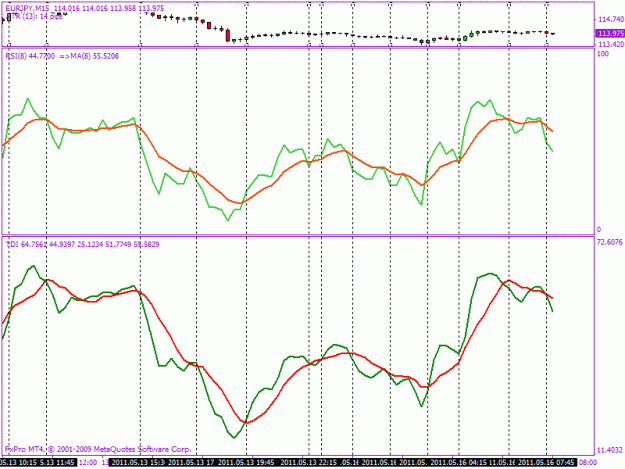
Put a RSI 8, on your chart. On top of the RSI 8 place a MA 8. This 8 on 8 indicator ( from the early days of FF ), is almost identical to the TDI. Every now and then ( very rarely ), the 8 on 8 will cross one bar before the TDI.
  • Post# 7
  • Quote
  • May 16, 2011 1:13am
  • Four Kids
    Joined May 2007 | 1,260 Posts | Status: Member
Almost identical. The ma in this example is a simple one. If you change the type of ma ( not the value ), you may get it more exact.
Attached Image (click to enlarge)
Click to Enlarge

Name: tdi ma.gif
Size: 20 KB
  • Post# 8
  • Quote
  • May 16, 2011 2:41am
  • hanover
    Joined Sep 2006 | 5,010 Posts | Status: Gone AWOL for a few months.....
Quoting dean
Hi xaphod,
I was wondering if you would happen to know a way of replicating the TDI by using an rsi and something else?? I have different charting software that will not allow me to add indicators but it has the standard RSI's and MA's etc etc and I am wondering if you know what settings I could use to replicate the green and red lines on the TDI? Sorry for any inconvenience.
Dean
Dean,

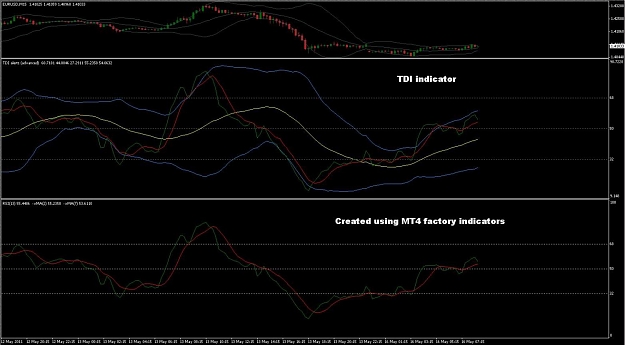
If you're using Dean Malone's original settings, the green line is a SMA(2) of a RSI(13,close). Then the red line is a SMA(7) of the green line.

By way of proof, you can replicate this using factory MT4 indys:

1. Create RSI in a new window. Set the parameters to 13 and close, and the color to None, so that it doesn't show.

2. Drag the MA indy into the same window as the RSI. Set the values to 2, simple, close, color = Green, and most importantly, Apply to = Previous Indicator's Data

3. Drag the MA indy into the same window as the RSI. Set the values to 7, simple, close, color = Red, and once again, Apply to = Previous Indicator's Data

That should be an exact match to TDI with the settings (see attached screenshot):
RSI_Period = 13
RSI_Price = 0
RSI_Price_Line = 2
RSI_Price_Type = 0
Trade_Signal_Line = 7
Trade_Signal_Type = 0

The other parameters impact only the yellow and blue lines.

So the answer is yes, you can replicate TDI green/red lines in any charting package that allows MAs of a RSI.

David
Attached Image (click to enlarge)
Click to Enlarge

Name: TDI example.jpg
Size: 109 KB
I'm taking a rest from forums. Please don't expect replies to your posts.
  • Post# 9
  • Quote
  • May 16, 2011 4:25am
  • dean
    Joined Feb 2010 | 842 Posts | Status: Member
Quoting hanover
Dean,

If you're using Dean Malone's original settings, the green line is a SMA(2) of a RSI(13,close). Then the red line is a SMA(7) of the green line.

By way of proof, you can replicate this using factory MT4 indys:

1. Create RSI in a new window. Set the parameters to 13 and close, and the color to None, so that it doesn't show.

2. Drag the MA indy into the same window as the RSI. Set the values to 2, simple, close, color = Green, and most importantly, Apply to = Previous Indicator's Data

3. Drag the MA indy into the same window...
Firstly I would like to thank you all for your input. After playing around with them all it seems David's is the pretty much spot on, so thank you again and specifically thank you David, I appreciate it greatly. Dean
  • Post# 10
  • Quote
  • May 16, 2011 4:39am
  • esquire
    Joined Apr 2011 | 77 Posts | Status: Member
I'm actually getting the exact same lines as the tdi..? Don't know what i am doing wrong?

Checked your code for a sec but it seems like you are still doing the same as the original tdi, what's the difference between this one and the original?

Thanks,
Simon
  • Post# 11
  • Quote
  • May 16, 2011 5:39am
  • Xaphod
    Joined Mar 2010 | 910 Posts | Status: Member
Quoting esquire
I'm actually getting the exact same lines as the tdi..? Don't know what i am doing wrong?

Checked your code for a sec but it seems like you are still doing the same as the original tdi, what's the difference between this one and the original?
If you find that the version of the TDI you are using is working correctly, then you have no need for this. The problem has been described in the first post:
Quote
The lines for the current bar do not repaint correctly. This results in chart of an indicator that has been running live looking different form a chart of an indicator that is newly loaded.
  • Post# 12
  • Quote
  • May 16, 2011 5:57am
  • Xaphod
    Joined Mar 2010 | 910 Posts | Status: Member
Quoting 33drifter
i was previously unuable to save changes i made to the indi such as colours, and levels.
im having the same problem with the HA candles, everytime i close MT4 or change time frames i lose my colour changes.
Do you have another HA indi i can use or a suggestion on how to fix this.
Here:
Attached File
File Type: mq4 Heiken Ashi Candles.mq4   4 KB | 1,013 download
  • Post# 13
  • Quote
  • May 16, 2011 6:28am
  • dazzdude
    Joined Oct 2009 | 821 Posts | Status: Member
Thanks Xaphod. Do you have a MFT version on the TDI tape? For example, if watching the 1hr chart, it would be great to have a tape for the 4hr and maybe daily at the bottom of the chart. Similarly, if watching 4 hours charts, a tape for daily and maybe wekly? Cheers, Darren.
What's important isn't what you know, but what you do with what you know.
  • Post# 14
  • Quote
  • May 16, 2011 7:12am
  • esquire
    Joined Apr 2011 | 77 Posts | Status: Member
Quoting Xaphod
If you find that the version of the TDI you are using is working correctly, then you have no need for this.
It actually isn't correct (it does repaint when reloading). Weird cause your indicator is doing exactly the same thing (changing on reload).
  • Post# 15
  • Quote
  • May 16, 2011 8:15am
  • Xaphod
    Joined Mar 2010 | 910 Posts | Status: Member
Quoting esquire
It actually isn't correct (it does repaint when reloading). Weird cause your indicator is doing exactly the same thing (changing on reload).
No it does not do exactly the same thing.

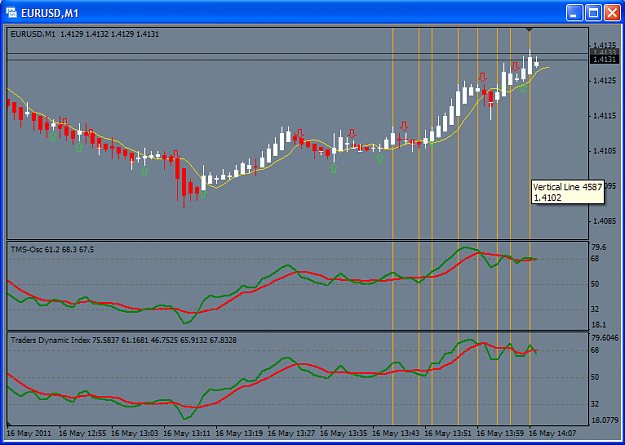
TMS-Osc vs TDI. Chart Reloaded at 13:46.
Attached Image (click to enlarge)
Click to Enlarge

Name: TMS Osc vs TDI - 1.png
Size: 29 KB


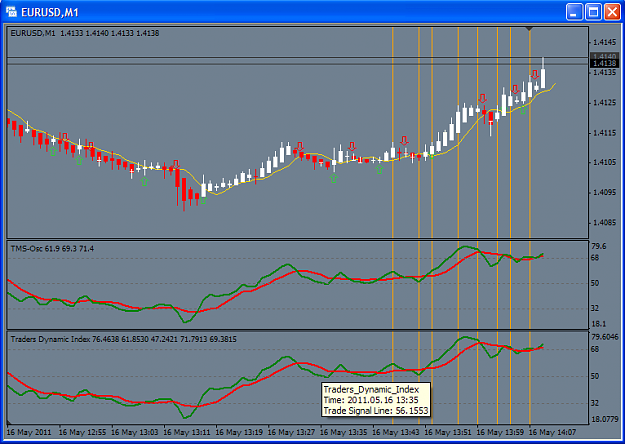
TMS-Osc vs TDI. Chart Reloaded at 14:09
Attached Image (click to enlarge)
Click to Enlarge

Name: TMS Osc vs TDI - 2.png
Size: 30 KB


TMS-Osc does not change.
TDI Changes.
  • Post# 16
  • Quote
  • May 16, 2011 8:44am | Edited at 9:10am
  • Olarion1975
    Joined May 2010 | 721 Posts | Status: Member
Hi Xaphod,

thanx or the indies. But there is a problem:

After saving the indicators in the appropriate folder my MT4 freezes as soon as I want to open the indicator list. This happened on 3 different br*kers...

Could you please check that?

Cheers,
Olarion

PS:
Problem is even worse...after deleting the indies, the platform still freezes after trying to open the indicator list...have to re-install I think...

PPS:
The freeze occurs also occurs on trying to open the object list...probably on all menus...
  • Post# 17
  • Quote
  • May 16, 2011 9:13am | Edited at 9:39am
  • Xaphod
    Joined Mar 2010 | 910 Posts | Status: Member
Quoting Olarion1975
But there is a problem:
After saving the indicators in the appropriate folder my MT4 freezes as soon as I want to open the indicator list. This happened on 3 different br*kers...
There is nothing out of the ordinary in these indicators. It is all standard mql4 code. For maximum compatibility with your version of MT4, it is best to install the source files *.mq4, and let your MT4 compile them when it starts up.

Also, the indicators are not run until you put them on a chart. So I do not see how they can cause your MT4 instances to crash merely by being in the indicators folder.

Do a security scan of your computer with a good antivirus program.

Quoting Olarion1975
Problem is even worse...after deleting the indies, the platform still freezes after trying to open the indicator list...have to re-install I think...
The freeze occurs also occurs on trying to open the object list...probably on all menus...
If you cannot startup after deleting the indicators then the indicators are probably not the problem. MT4 cannot run deleted indicators.

This below is for if you have a problem starting up MT4! However it seems you can start up so it does not apply to your situation.

Go to folder ../metatrader/profiles/
edit the file lastprofile.ini and set it to a profile that you know works.

If you don't have any other profile besides 'default' the you can delete the files in ../metatrader/profiles/default/
This will remove all open charts from the profile.
  • Post# 18
  • Quote
  • May 16, 2011 9:42am
  • esquire
    Joined Apr 2011 | 77 Posts | Status: Member
here is one of my screens, one of a original tdi running for a couple of hours, the other one a freshly loaded TMS indi.

Sorry for the prob, can't find the cause. Really appreciate your efford
Attached Image
  • Post# 19
  • Quote
  • May 16, 2011 9:50am
  • Xaphod
    Joined Mar 2010 | 910 Posts | Status: Member
Quoting esquire
here is one of my screens, one of a original tdi running for a couple of hours, the other one a freshly loaded TMS indi.

Sorry for the prob, can't find the cause. Really appreciate your efford
Yes, that is the problem. The TDI is incorrect. The chart it has drawn for the couple of hours is not accurate. It should look like the freshly drawn TMS-Osc Chart.

Reload the TDI:
CTRL-I -> Select TDI -> Click Edit for TDI input parameter dialog. -> Click 'OK' -> Close the indicators dialog.

Now the TDI will have reloaded and will not be the same as it was before reloading. Do you not think that is a cause for concern?
  • Post# 20
  • Quote
  • May 16, 2011 10:04am
  • ataviano
    Joined Feb 2008 | 30 Posts | Status: Member
Quoting Xaphod
It appears that some versions of the TDI indicator being used in the 'Trading Made Simple' system appear to be a bit flaky. The lines for the current bar do not repaint correctly. This results in chart of an indicator that has been running live looking different form a chart of an indicator that is newly loaded.

Here is a replacement that should work correctly and a couple of supporting indicators:

TMS-Osc.mq4:
[list][*]Main Oscillator. Use instead of the TDI indicator.[*]Displays...
Thanks for the indic. i hope i 'll not be of more pain by asking if you can make the TMS-Osc.mq4 more flexible by adding a user define timeframe input. it would be great if we can plot it on maybe H1 tf and it would display the H4 data so that we know wether we are going against or with the immediate higher tf without toggling througth different tf.
Sorry for my english, hope you understand.
Thread Tools Search this Thread
Show Printable Version Show Printable Version
Email This Thread Email This Thread
Search this Thread:

Advanced Search

  • Platform Tech
  • /
  • Indicators for the 'Trading Made Simple' system
  • Reply to Thread
    • Page 1 23456 12
0 traders viewing now
  • More

©2013 Forex Factory, Inc. / Terms of Use / Privacy Policy

Forex Factory® is a registered trademark.

Connect

  • Facebook
  • Twitter
  • RSS

Company

  • About FF
  • FF Blog
  • Careers at FF
  • Advertising
  • Contact FF

Products

  • Forums
  • Trades
  • Calendar
  • News
  • Market
  • Brokers
  • Trade Explorer

Website

  • Homepage
  • Search
  • User Guide
  • Member List
  • Online Now
  • Report a Bug