Last update: Feb 17, 2014, uploaded sample templates. (Build 600+ compatible).
Last "P4L PeriodCon.mq4" update: Feb 14, 2014, uploaded "P4L PeriodCon 509.ex4" (still v1.11)
Last "P4L getPeriodSymbolTimeshiftsecLib.mq4" update: Apr 01, 2011, posted first release v1_0
There have been several versions of period converter programs that were first created in late 2005 and then updated into early 2006, but since then, there have not been any updates (to my knowledge) or solutions to some of the limitations -- until now.
A new version (>= v1.6) is provided which I've renamed to "P4L PeriodCon.mq4". (It is a derivative of previous versions called: periodcon.mq4 (v1.5 and v1.4), Period_Converter_Opt.mq4 and Period_Converter.mq4 Previous authors (if known) are credited in the source, and their earlier contributions are graciously acknowledged).
New features:
* (Added in v1.11) Variable "InvertChart" was added. If set to "True", an inverted chart is output with an "i" as a prefix to the symbol name. (e.g. iEURUSD)
These external variables also apply:
InvertedOutputMultiplier = 1.0 The inverted prices are = InvertedOutputMultiplier/price.
InvertedOutputDigits = -1, where -1 is Automatic, or the user can manually set to >= 0
Example: Invert USDJPY to get iUSDJPY (same as JPYUSD). Set InvertedOutputMultiplier=1000.0, and set InvertedOutputDigits=3 (or 4). A price of 79.275 would normally invert to 0.012614 but with these overrides, inverted price would be 12.614
* Multi-chart live-updates work! The old versions could only live-update (tick-by-tick) a *single* offline chart with a given name. You could generate, e.g. an M20 (offline) chart and open it, but if you opened a 2nd-Nth window(s) of the same M20 (offline) chart, these did not get live-updates! With some hints from FF user rangebound (Thanks!), a new method was devised that finds and updates as many charts of a given name as you open. (FYI, if you only open ONE of each offline chart and if you want to save CPU, there is an external variable ("LiveUpdateMultipleCharts") you can change to "false". However in my experience CPU performance has not been a problem with the new multi-chart method).
* Full support for timeshifts (offsets) for any timeframe chart. Previous version v1.5 had the ability to generate a single Daily chart with one timeshift, but this new version can open many charts -- and of any timeframe, not just Daily -- where the user can specify any timeshift offset desired (plus or minus). HOWEVER: The timeshift *must* be an exact multiple of the source timeframe: 90min timeshift is legal on a source M30, M15, ... or less, but illegal on H1(60min) because it is not an exact multiple (i.e. 90/60 equals "1.5" which is not an exact multiple like 1,2,3, ...).
* Timeshifts are now specified either in #bars, or with the new number format, H.MM, ... or both can be used (as of >= v1.7).
Change the external variable "TimeShiftAdd_in_HptMM" from "0.0" to a number. Examples:
1.0 Timeshift 1hour forward (later). If your broker time says 22:45:00, then the timeshifted offline chart time will be 23:45:00
0.9 Timeshift 90 minutes forward.
1.3 Timeshift 90 minutes forward (as in 1 hour + 30 min = 90min total, same as 0.90 )
-0.20 Timeshift 20 minutes backward (earlier).
-5.0 Timeshift 5 hours backward (For a GMT broker time, the chart would then display NY local time)
(Reminder, the timeshift must be an exact multiple of the source timeframe (in minutes) ).
If you prefer specifying bars, use variable "TimeShiftAdd_in_Bars" (in >= v1.7). The timeshift (in minutes) is then the #bars * Period (of the source chart).
NOTE: These 2 variables for timeshifts are BOTH in effect and the values will combine (converted to minutes) if you use both variables.
The most obvious applications of timeshifts would be:
- Open a chart with a timeshift such that the X-axis displays your LOCAL times instead of the broker times.
- Using a single MT4 feed, create H4 and Daily charts where the daily 00:00:00 new bar time has been shifted by any number of hours, to see the same candles as are seen on other broker feeds that have a different native broker time (e.g. GMT vs. GMT+2 vs. GMT-17 etc.) You can decide if you want new Daily candles to occur at London open, NY open, NY close, etc.
- Create M45 candles but shift the bar start time as desired, to align with a time such as NY open (8AM ET) or NYSE open (9:30AM ET).
- Get a 1minute headstart on a bar close by shifting it 0.01. (How? Use an M1 chart to generate a higher TF chart timeshifted by +1M)
- Generate a Daily chart with 5-bars-per-week instead of the common 6-bars-per-week! Example: Suppose your broker time is 00:00:00 the same time as GMT. NewYork is GMT-5 which is 19:00:00. Your broker closes on Friday < 17:00:00 NY and reopens on Sunday >= 17:00:00 NY. Your Daily chart has a 2-hour Sunday bar, which is undesired. SO, you can generate an offline xxxxxx+2H,Daily chart which will *eliminate* the Sunday bar! If your broker has exactly 24*5=120 (or less) bars-per-week, and if you currently have a short Sunday (or Saturday) Daily bar on your chart, then you can pick an appropriate timeshift to eliminate your extra (short) Daily bar!
- Traders who look for candlestick patterns can try different timeshifts to see if a pattern is more (or less) successful for timeshifted vs. normal broker time.
* As before, one can still add multiple instances of this indicator to a single source chart to generate the data for multiple, different timeframe-or-timeshifted offline charts.
* An unobtrusive number of popup Alerts were added to notify the user of the offline chart name, and whether there were any problems with generating the desired chart. These occur when you add the indicator to the source chart, or when you restart MT4 with a session that has a chart with this indicator attached.
* A lot of people like to use indicators like CandleTime.mq4 to display the time remaining for the bar. However, for timeshifted data, some indicators (like these) don't work unless modified appropriately. A new version v1_2 of my "P4L CandleTime.mq4" indicator has been posted which is compatible with the timeshifted offline charts. Please download it from this thread: "New very cool CandleTime and session time Clock indicators"
(Note, a new v1_3 (not released yet) will be required to support charts > 1 Month period).
How to use:
* Copy this indicator to C:/Program Files/__your_MT4_broker__/experts/indicators/
Review the source with MetaEditor, Save+Compile any changes to defaults. Quit and restart MT4.
* Open a source chart of a lower-timeframe that is a multiple of whatever chart you want to generate. If you want a Daily chart with different hourly offsets than your existing normal Daily chart, then you could open an H1 chart or lower. (Note, you can choose any source TF but you will only generate data for only as much data as is in your source chart. If your M5 has 4 months of data, if you want to generate Daily charts, you would probably prefer to use H1 as source since it would likely have many more months/years of data. If you want to use a timeshift, the value (in minutes) must be an exact multiple of your source chart timeframe (in minutes) (e.g. 90min/M30 is legal but 90min/H1 is not).
* Add this indicator to the source chart. NOTE: On the Common tab, you must check the box to "Allow DLL imports".
* As desired, change the values for the variables PeriodMultiplier and/or TimeShiftAdd_in_HptMM (or TimeShiftAdd_in_Bars), and any other external variable. Example: Open an EURUSD,H1 chart, add this indicator and set PeriodMultipler=24 and a timeshift = -2.0. It will generate the data for a "EURUSD-2H,Daily" chart.
* Next, use the menu command: File -> Open offline -> (go down the list to find the exact chart name generated, i.e "EURUSD-2H,Daily"). Select it and click "Open".
* FYI, if you want to output the generated chart data into a CSV file, change OutputCSVFile from "0" (HST only) to either "1" (CSV+HST) or "2"(CSV Only). The csv file will be output into the folder <your_MT4>/experts/files/
Limitations:
* If your generated chart has changed the "Symbol()" name (which includes all TimeShifted charts!), you will NOT be able to use that chart with EA's or other indicators that require the original "Symbol()" name in order to work. Neither will you see live trades displayed on that chart. Why? Your broker only knows about the official Symbol names (e.g. "EURUSD"). An EA can place a trade of that Symbol, and MT4 can display the Buy/Sell/SL/TP lines for live trades on all charts with that same Symbol name. But if you have a TimeShifted chart, the Symbol name will have changed, for example, to "EURUSD+7H". Your broker doesn't know anything about that new Symbol name, so you can't trade it directly, and MT4 won't display live trades on TimeShifted charts. Assuming you have access to the MQ4 source file, your code can probably be modified to place trades if it knows the original "Symbol()" name. File "P4L getPeriodSymbolTimeshiftsecLib.mq4" below is provided for this purpose, but it's up to you to modify your MQ4 source code.
* Due to a MT4 limitation, in order to open any offline chart with a bar period of greater than 1 Month (30 days), MT4 must be fooled by telling it the period is <= 1Month. To tell the user what the actual period is, EITHER the symbol name is changed, or the period is changed (FYI, the period is always wrong for charts > 1 Month; this is a consequence of the MT4 limitations). For the following discussion, keep in mind that a chartname is always "symbol,period".
In >= v1.8, variable "Over_1MN_alters_Symbol_name" is "true" by default. This method is much easier to determine at a glance what is the actual chart period, but it is less compatible with some indicators (especially MTF, a.k.a. multi-time-frame) that require the original "Symbol()" name to be unmodified.
If "Over_1MN_alters_Symbol_name = true" :
An "_x#" is added to the Symbol name, where # is the PeriodMultiplier. Example:
EURUSD_x12,Monthly (This is 12 months, i.e. a Yearly chart!)
Due to an MT4 limit of 11-characters for the symbol name, if the user specifies also a timeshift and/or a large PeriodMultiplier, the symbol name is hacked in various creative ways to shorten it so MT4 can handle it. For example, a Monthly chart with PeriodMultiplier =12 and TimeShiftAdd_in_bars = 1 would be:
EURUSD+1Nx12,Monthly (ILLEGAL 12 character name!)
EU+1N_x12,Monthly (shortened symbol name). (Note "+1N" is +1 month shift!)
If "Over_1MN_alters_Symbol_name = false" :
Instead of changing the "Symbol()" name, the "Period()" is modified instead by the formula "Period() - PeriodMultiplier". The "Period()" in this case is the *source* chart period, which in common practice when generating charts over 1-month (30 days) is likely to be either PERIOD_MN1 (43200), or PERIOD_W1 (10080) or PERIOD_D1(1440). Examples:
A monthly source chart with PeriodMultiplier=2 will generate: EURUSD,M43198
A weekly source chart with PeriodMultiplier=5 will generate: EURUSD,M10075
Note: 4 hour charts are PERIOD_H4(240) but would require a multiplier of at least 180 to exceed 1-month bars. Perhaps it will work but it probably will be more confusing to even try. (FYI, regardless of timeframe, if "Period() - PeriodMultiplier" is negative, an arbitrary value of "101" is used instead).
Note2: Regardless of the setting for "Over_1MN_alters_Symbol_name", in the generated chart, the value for "Period()" is a lie! If you try to use indicators that require an accurate value for "Period()", it's going to be wrong and your indicator source must be changed to correct this. If the variable is "true", the true period is found by decoding the "Symbol()" name, finding the "#" after "x", and multiplying it times the "Period()" value. If instead the variable is "false", the true period is found by noting that it is slightly less than one of PERIOD_MN1, PERIOD_W1 or PERIOD_D1, calculating the difference, then multiplying the difference times the nearby PERIOD_* value. This is complicated... sometime in the future, I intend to post a routine to do this conversion which you can incorporate into your indicators. (UPDATE: See release of "P4L getPeriodSymbolTimeshiftsecLib.mq4" below!)
* As before, you cannot generate a chart that has the same period as an already existing normal timeframe: M1, M5, M15, M30, H1, H4, Daily, Weekly, Monthly (and on some brokers like Oanda, M10). However, as it already exists, there is no point in doing so. HOWEVER, if you want one of these standard charts but timeshifted by some amount, no problem.
* Some indicators aren't compatible with these generated charts. Any timeshifted chart tells the user how much the shift is by changing the "Symbol()" name. If your source chart is "EURUSD" and you timeshift by +15 minutes, the offline (new) Symbol() name is "EURUSD+15M". Most indicators and scripts don't care about what the symbol name is exactly, but some of them do. (ALL EA's that take trades DO care, and are not compatible unless modified!) Therefore, offline charts may not be compatible with some programs unless they have been properly modified to account for this Symbol() name change (AND also, if necessary, account for the fact that the bars have been timeshifted relative to the broker time). Also note that any indicator that has hardcoded the standard timeframe values may need modifications to work with non-standard timeframes like M10, M45, H2, etc. (UPDATE: See release of "P4L getPeriodSymbolTimeshiftsecLib.mq4" below!)
* In MT4 when you open an offline chart, it does not use your "Default" chart template (if you have one), but you can just manually load any desired template. (UPDATE: Solved! Save a template named "Offline", then future offline charts will open with that default. A WARNING, however: In your "offline" saved-template, you MUST check the F8->Common->Offline_chart checkbox or else you will get blank charts that say "Waiting for Update").
* Version 1.8 created so-called Yearly charts, but the starting month was arbitrary (and therefore somewhat useless). Version 1.9 addressed some of these problems with higher-TF charts.
Thinking ahead:
Please note that this indicator is written for MT4. The new MT5 version (released in 2010) can already generate charts with just about any timeframe (i.e. M2, M10, M20, M1234, H2, H8, etc. NOT sure about > Monthly(?) ). I have no idea if MT5 already supports an ability to timeshift data or not. Please comment if you know the answer. (So far, the answer has been "no").
UPDATES:
2009-11-13: First release of "P4L PeriodCon.mq4" v1.6 (Was downloaded 68 times).
2009-12-07: Released v1.7 update of "P4L PeriodCon.mq4" (Was downloaded 16 times).
Thanks to circlesquare, a method to create charts > 1 Month was found. MT4 can be fooled by (falsely) marking a chart as "Monthly" or less even though the data is > 1 Month-per-bar. However, to visually tell the user what is the actual period, the symbol name is modified to add "_x#" (e.g. "EURUSD_x12,Monthly" is actually a Yearly chart! Also added back in the "TimeShiftAdd_in_Bars" variable which is easier for higher timeframes.
2009-12-10: Released v1.8 update of "P4L PeriodCon.mq4" (Was downloaded 1407 times).
Added new variable "Over_1MN_alters_Symbol_name" ("true" by default). This is the more readable format used in v1.7, but setting it to "false" will modify the "Period()" value: Source-Period() - PeriodMultiplier. This later method leaves the Symbol() name unchanged (so long as timeshifts are zero!!) which makes generated charts somewhat more compatible with indicators. (Note, for charts > 1-month, the "Period()" is always a lie -- this was necessary to get around an MT4 limitation).
2011-03-23: Released v1.9 update of "P4L PeriodCon.mq4"(Was downloaded 3828 times).
Changes:
* Fixed some of the problems with higher timeframe charts (e.g. weekly) that caused the start-of-the-bar to be irregular (i.e. a weekly should start the beginning of the week, either Sunday or Monday, not a Thursday for example). Some higher timeframe charts that involve timeshifts may or may not work, because the method to "slice" up the source bars and allocate them is not perfect. This version, however, is better than v1.8
2011-04-01: First Release v1_0 of "P4L getPeriodSymbolTimeshiftsecLib.mq4"
New:
* This libary file can be included in your MQ4 indicator/script/EA source files to interpret the "Symbol()" and "Period()" values as modified by the "P4L PeriodCon.mq4" indicator. The library routine returns the period, symbol, and timeshiftsec values. It is up to the user to properly incorporate the values into your code.
* Two use models are described in the code, either to call the routine in a separate library file, or to include the 3 necessary routines in your source code.
* Note: This is brand new code and was tested for some commonly generated charts. It hasn't been fully tested for every obscure possible chart multiplier/timeshift combination. Report any problems found by posting to the thread.
2012-10-18: Released v1.11 update of "P4L PeriodCon.mq4"
Changes:
* Variable "InvertChart" added. If set to "True", an inverted chart is output with an "i" as a prefix to the symbol name. (e.g. iEURUSD,H1)
* New external variables:
InvertedOutputMultiplier = 1.0 The inverted prices are = InvertedOutputMultiplier/price.
InvertedOutputDigits = -1, where -1 is Automatic, or the user can manually set to >= 0
Example: Invert USDJPY to get iUSDJPY (same as JPYUSD). Set InvertedOutputMultiplier=1000.0, and set InvertedOutputDigits=3 (or 4). A price of 79.275 would normally invert to 0.012614 but with these overrides, inverted price would be 12.614
* Changed the primary initial popup message to
"P4L PeriodCon: Do File->Open_Offline of chart: EURUSD,H12 (offline) (Time shifted 0min) and KEEP this Source H1 OPEN!"
2014-02-14: Uploaded "P4L PeriodCon 509.ex4" (still v1.11)
Changes: None. (It's the same source as is already posted). It was simply compiled using build 509, and it appears to be compatible with the new builds >=600.
Fyi, the posted v1.11 .mq4 (source) file is NOT compatible with the new builds. The source file will require code changes for the new build. (I've no immediate plans to do so). Should you need to make custom edits, you can use your own (old) copy of 509, or find the 509 MetaEditor posted elsewhere that you can use to edit and re-compile to make your own .ex4 file.
2014-02-17: Uploaded sample 509 templates (Build 600+ compatible)
Changes:
Two sample templates are available below. They are identical, except with respect to what indicator name is used.
One assumes use of "P4L PeriodCon 509.ex4". The other assumes use of "P4L PeriodCon.ex4". (Both based on v1.11).
I don't care which name you use for the base indicator. Your choice.
Use the appropriate template with any H1 chart. It will generate two offline charts: base+7H,H4 and base+7H,Daily
The generated H4 and Daily charts are timeshifted by +7H. Why? These are intended for use with GMT-5 broker feeds (i.e. those who match NewYork U.S. Eastern Time). If you have such a GMT-5 broker, you can use this template to generate GMT+2 charts. Fyi, GMT+2 Daily charts normally have 5-Daily-bars-per-week, and 30-H4-bars-per-week. GMT-5 charts (and most every other time feed) have 6-Daily-bars-per-week, and 31-H4-bars-per-week. I like to compare the two, because the broker feed affects, for example, the slopes of trendlines, pitchforks, etc.
New users: Regardless of your broker GMT+??, use these templates to get started, just to prove you can generate and open offline charts. Then customize the settings and create your own desired template(s) that suit your own needs. If you want M10 or H2 charts... then customize. If your broker has a different GMT offset, then use a different timeshift value to customize as desired.
Screenshots:
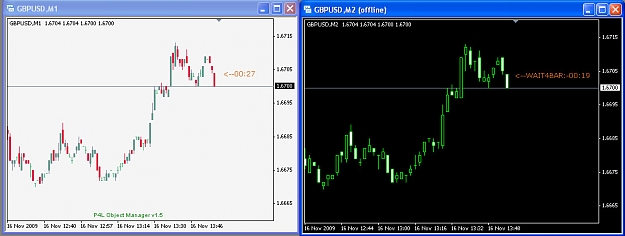
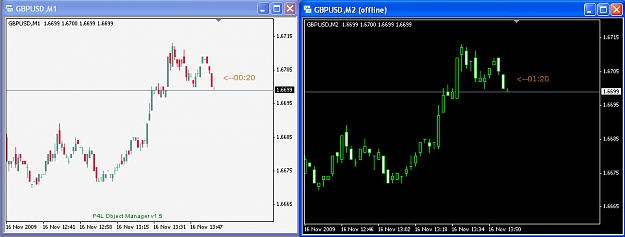
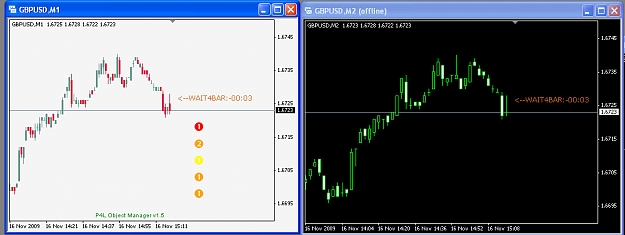
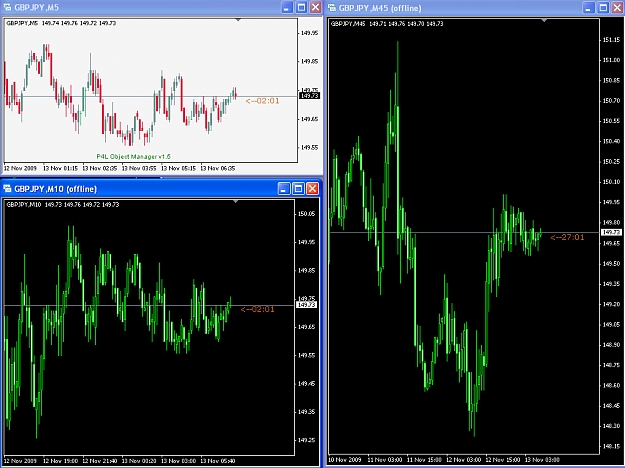
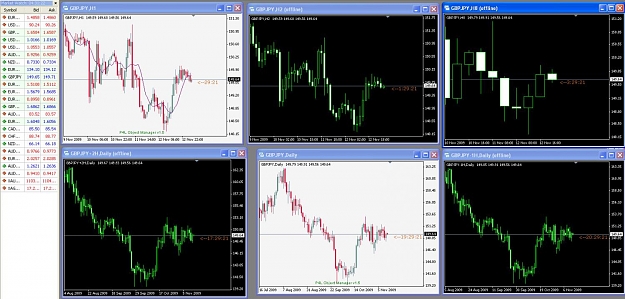
The white charts are native timeframes, the black ones are generated "offline" charts. (FYI, you can change the colors of "offline" charts just like any other chart).
Note the non-standard timeframes generated (M10, M45, H2, H8).
Note the time-shifted Daily charts with +2H and -1H. A regular Daily chart is between them. See how the new "P4L CandleTime.mq4" indicator displays different numbers of hours for each Daily chart before the bar closes for each of those charts. The +2H has 17:29:21 remaining, regular has 19:29:21, and -1H has 20:29:21 remaining.
-----------------------------------------------
FYI, see also: Collection of programs by pips4life
-----------------------------------------------
These and other programs I've posted are *free*, but donations are welcome! PayPal to pips4life_at_yahoo_dt_com
Last "P4L PeriodCon.mq4" update: Feb 14, 2014, uploaded "P4L PeriodCon 509.ex4" (still v1.11)
Last "P4L getPeriodSymbolTimeshiftsecLib.mq4" update: Apr 01, 2011, posted first release v1_0
There have been several versions of period converter programs that were first created in late 2005 and then updated into early 2006, but since then, there have not been any updates (to my knowledge) or solutions to some of the limitations -- until now.
A new version (>= v1.6) is provided which I've renamed to "P4L PeriodCon.mq4". (It is a derivative of previous versions called: periodcon.mq4 (v1.5 and v1.4), Period_Converter_Opt.mq4 and Period_Converter.mq4 Previous authors (if known) are credited in the source, and their earlier contributions are graciously acknowledged).
New features:
* (Added in v1.11) Variable "InvertChart" was added. If set to "True", an inverted chart is output with an "i" as a prefix to the symbol name. (e.g. iEURUSD)
These external variables also apply:
InvertedOutputMultiplier = 1.0 The inverted prices are = InvertedOutputMultiplier/price.
InvertedOutputDigits = -1, where -1 is Automatic, or the user can manually set to >= 0
Example: Invert USDJPY to get iUSDJPY (same as JPYUSD). Set InvertedOutputMultiplier=1000.0, and set InvertedOutputDigits=3 (or 4). A price of 79.275 would normally invert to 0.012614 but with these overrides, inverted price would be 12.614
* Multi-chart live-updates work! The old versions could only live-update (tick-by-tick) a *single* offline chart with a given name. You could generate, e.g. an M20 (offline) chart and open it, but if you opened a 2nd-Nth window(s) of the same M20 (offline) chart, these did not get live-updates! With some hints from FF user rangebound (Thanks!), a new method was devised that finds and updates as many charts of a given name as you open. (FYI, if you only open ONE of each offline chart and if you want to save CPU, there is an external variable ("LiveUpdateMultipleCharts") you can change to "false". However in my experience CPU performance has not been a problem with the new multi-chart method).
* Full support for timeshifts (offsets) for any timeframe chart. Previous version v1.5 had the ability to generate a single Daily chart with one timeshift, but this new version can open many charts -- and of any timeframe, not just Daily -- where the user can specify any timeshift offset desired (plus or minus). HOWEVER: The timeshift *must* be an exact multiple of the source timeframe: 90min timeshift is legal on a source M30, M15, ... or less, but illegal on H1(60min) because it is not an exact multiple (i.e. 90/60 equals "1.5" which is not an exact multiple like 1,2,3, ...).
* Timeshifts are now specified either in #bars, or with the new number format, H.MM, ... or both can be used (as of >= v1.7).
Change the external variable "TimeShiftAdd_in_HptMM" from "0.0" to a number. Examples:
1.0 Timeshift 1hour forward (later). If your broker time says 22:45:00, then the timeshifted offline chart time will be 23:45:00
0.9 Timeshift 90 minutes forward.
1.3 Timeshift 90 minutes forward (as in 1 hour + 30 min = 90min total, same as 0.90 )
-0.20 Timeshift 20 minutes backward (earlier).
-5.0 Timeshift 5 hours backward (For a GMT broker time, the chart would then display NY local time)
(Reminder, the timeshift must be an exact multiple of the source timeframe (in minutes) ).
If you prefer specifying bars, use variable "TimeShiftAdd_in_Bars" (in >= v1.7). The timeshift (in minutes) is then the #bars * Period (of the source chart).
NOTE: These 2 variables for timeshifts are BOTH in effect and the values will combine (converted to minutes) if you use both variables.
The most obvious applications of timeshifts would be:
- Open a chart with a timeshift such that the X-axis displays your LOCAL times instead of the broker times.
- Using a single MT4 feed, create H4 and Daily charts where the daily 00:00:00 new bar time has been shifted by any number of hours, to see the same candles as are seen on other broker feeds that have a different native broker time (e.g. GMT vs. GMT+2 vs. GMT-17 etc.) You can decide if you want new Daily candles to occur at London open, NY open, NY close, etc.
- Create M45 candles but shift the bar start time as desired, to align with a time such as NY open (8AM ET) or NYSE open (9:30AM ET).
- Get a 1minute headstart on a bar close by shifting it 0.01. (How? Use an M1 chart to generate a higher TF chart timeshifted by +1M)
- Generate a Daily chart with 5-bars-per-week instead of the common 6-bars-per-week! Example: Suppose your broker time is 00:00:00 the same time as GMT. NewYork is GMT-5 which is 19:00:00. Your broker closes on Friday < 17:00:00 NY and reopens on Sunday >= 17:00:00 NY. Your Daily chart has a 2-hour Sunday bar, which is undesired. SO, you can generate an offline xxxxxx+2H,Daily chart which will *eliminate* the Sunday bar! If your broker has exactly 24*5=120 (or less) bars-per-week, and if you currently have a short Sunday (or Saturday) Daily bar on your chart, then you can pick an appropriate timeshift to eliminate your extra (short) Daily bar!
- Traders who look for candlestick patterns can try different timeshifts to see if a pattern is more (or less) successful for timeshifted vs. normal broker time.
* As before, one can still add multiple instances of this indicator to a single source chart to generate the data for multiple, different timeframe-or-timeshifted offline charts.
* An unobtrusive number of popup Alerts were added to notify the user of the offline chart name, and whether there were any problems with generating the desired chart. These occur when you add the indicator to the source chart, or when you restart MT4 with a session that has a chart with this indicator attached.
* A lot of people like to use indicators like CandleTime.mq4 to display the time remaining for the bar. However, for timeshifted data, some indicators (like these) don't work unless modified appropriately. A new version v1_2 of my "P4L CandleTime.mq4" indicator has been posted which is compatible with the timeshifted offline charts. Please download it from this thread: "New very cool CandleTime and session time Clock indicators"
(Note, a new v1_3 (not released yet) will be required to support charts > 1 Month period).
How to use:
* Copy this indicator to C:/Program Files/__your_MT4_broker__/experts/indicators/
Review the source with MetaEditor, Save+Compile any changes to defaults. Quit and restart MT4.
* Open a source chart of a lower-timeframe that is a multiple of whatever chart you want to generate. If you want a Daily chart with different hourly offsets than your existing normal Daily chart, then you could open an H1 chart or lower. (Note, you can choose any source TF but you will only generate data for only as much data as is in your source chart. If your M5 has 4 months of data, if you want to generate Daily charts, you would probably prefer to use H1 as source since it would likely have many more months/years of data. If you want to use a timeshift, the value (in minutes) must be an exact multiple of your source chart timeframe (in minutes) (e.g. 90min/M30 is legal but 90min/H1 is not).
* Add this indicator to the source chart. NOTE: On the Common tab, you must check the box to "Allow DLL imports".
* As desired, change the values for the variables PeriodMultiplier and/or TimeShiftAdd_in_HptMM (or TimeShiftAdd_in_Bars), and any other external variable. Example: Open an EURUSD,H1 chart, add this indicator and set PeriodMultipler=24 and a timeshift = -2.0. It will generate the data for a "EURUSD-2H,Daily" chart.
* Next, use the menu command: File -> Open offline -> (go down the list to find the exact chart name generated, i.e "EURUSD-2H,Daily"). Select it and click "Open".
* FYI, if you want to output the generated chart data into a CSV file, change OutputCSVFile from "0" (HST only) to either "1" (CSV+HST) or "2"(CSV Only). The csv file will be output into the folder <your_MT4>/experts/files/
Limitations:
* If your generated chart has changed the "Symbol()" name (which includes all TimeShifted charts!), you will NOT be able to use that chart with EA's or other indicators that require the original "Symbol()" name in order to work. Neither will you see live trades displayed on that chart. Why? Your broker only knows about the official Symbol names (e.g. "EURUSD"). An EA can place a trade of that Symbol, and MT4 can display the Buy/Sell/SL/TP lines for live trades on all charts with that same Symbol name. But if you have a TimeShifted chart, the Symbol name will have changed, for example, to "EURUSD+7H". Your broker doesn't know anything about that new Symbol name, so you can't trade it directly, and MT4 won't display live trades on TimeShifted charts. Assuming you have access to the MQ4 source file, your code can probably be modified to place trades if it knows the original "Symbol()" name. File "P4L getPeriodSymbolTimeshiftsecLib.mq4" below is provided for this purpose, but it's up to you to modify your MQ4 source code.
* Due to a MT4 limitation, in order to open any offline chart with a bar period of greater than 1 Month (30 days), MT4 must be fooled by telling it the period is <= 1Month. To tell the user what the actual period is, EITHER the symbol name is changed, or the period is changed (FYI, the period is always wrong for charts > 1 Month; this is a consequence of the MT4 limitations). For the following discussion, keep in mind that a chartname is always "symbol,period".
In >= v1.8, variable "Over_1MN_alters_Symbol_name" is "true" by default. This method is much easier to determine at a glance what is the actual chart period, but it is less compatible with some indicators (especially MTF, a.k.a. multi-time-frame) that require the original "Symbol()" name to be unmodified.
If "Over_1MN_alters_Symbol_name = true" :
An "_x#" is added to the Symbol name, where # is the PeriodMultiplier. Example:
EURUSD_x12,Monthly (This is 12 months, i.e. a Yearly chart!)
Due to an MT4 limit of 11-characters for the symbol name, if the user specifies also a timeshift and/or a large PeriodMultiplier, the symbol name is hacked in various creative ways to shorten it so MT4 can handle it. For example, a Monthly chart with PeriodMultiplier =12 and TimeShiftAdd_in_bars = 1 would be:
EURUSD+1Nx12,Monthly (ILLEGAL 12 character name!)
EU+1N_x12,Monthly (shortened symbol name). (Note "+1N" is +1 month shift!)
If "Over_1MN_alters_Symbol_name = false" :
Instead of changing the "Symbol()" name, the "Period()" is modified instead by the formula "Period() - PeriodMultiplier". The "Period()" in this case is the *source* chart period, which in common practice when generating charts over 1-month (30 days) is likely to be either PERIOD_MN1 (43200), or PERIOD_W1 (10080) or PERIOD_D1(1440). Examples:
A monthly source chart with PeriodMultiplier=2 will generate: EURUSD,M43198
A weekly source chart with PeriodMultiplier=5 will generate: EURUSD,M10075
Note: 4 hour charts are PERIOD_H4(240) but would require a multiplier of at least 180 to exceed 1-month bars. Perhaps it will work but it probably will be more confusing to even try. (FYI, regardless of timeframe, if "Period() - PeriodMultiplier" is negative, an arbitrary value of "101" is used instead).
Note2: Regardless of the setting for "Over_1MN_alters_Symbol_name", in the generated chart, the value for "Period()" is a lie! If you try to use indicators that require an accurate value for "Period()", it's going to be wrong and your indicator source must be changed to correct this. If the variable is "true", the true period is found by decoding the "Symbol()" name, finding the "#" after "x", and multiplying it times the "Period()" value. If instead the variable is "false", the true period is found by noting that it is slightly less than one of PERIOD_MN1, PERIOD_W1 or PERIOD_D1, calculating the difference, then multiplying the difference times the nearby PERIOD_* value. This is complicated... sometime in the future, I intend to post a routine to do this conversion which you can incorporate into your indicators. (UPDATE: See release of "P4L getPeriodSymbolTimeshiftsecLib.mq4" below!)
* As before, you cannot generate a chart that has the same period as an already existing normal timeframe: M1, M5, M15, M30, H1, H4, Daily, Weekly, Monthly (and on some brokers like Oanda, M10). However, as it already exists, there is no point in doing so. HOWEVER, if you want one of these standard charts but timeshifted by some amount, no problem.
* Some indicators aren't compatible with these generated charts. Any timeshifted chart tells the user how much the shift is by changing the "Symbol()" name. If your source chart is "EURUSD" and you timeshift by +15 minutes, the offline (new) Symbol() name is "EURUSD+15M". Most indicators and scripts don't care about what the symbol name is exactly, but some of them do. (ALL EA's that take trades DO care, and are not compatible unless modified!) Therefore, offline charts may not be compatible with some programs unless they have been properly modified to account for this Symbol() name change (AND also, if necessary, account for the fact that the bars have been timeshifted relative to the broker time). Also note that any indicator that has hardcoded the standard timeframe values may need modifications to work with non-standard timeframes like M10, M45, H2, etc. (UPDATE: See release of "P4L getPeriodSymbolTimeshiftsecLib.mq4" below!)
* In MT4 when you open an offline chart, it does not use your "Default" chart template (if you have one), but you can just manually load any desired template. (UPDATE: Solved! Save a template named "Offline", then future offline charts will open with that default. A WARNING, however: In your "offline" saved-template, you MUST check the F8->Common->Offline_chart checkbox or else you will get blank charts that say "Waiting for Update").
* Version 1.8 created so-called Yearly charts, but the starting month was arbitrary (and therefore somewhat useless). Version 1.9 addressed some of these problems with higher-TF charts.
Thinking ahead:
Please note that this indicator is written for MT4. The new MT5 version (released in 2010) can already generate charts with just about any timeframe (i.e. M2, M10, M20, M1234, H2, H8, etc. NOT sure about > Monthly(?) ). I have no idea if MT5 already supports an ability to timeshift data or not. Please comment if you know the answer. (So far, the answer has been "no").
UPDATES:
2009-11-13: First release of "P4L PeriodCon.mq4" v1.6 (Was downloaded 68 times).
2009-12-07: Released v1.7 update of "P4L PeriodCon.mq4" (Was downloaded 16 times).
Thanks to circlesquare, a method to create charts > 1 Month was found. MT4 can be fooled by (falsely) marking a chart as "Monthly" or less even though the data is > 1 Month-per-bar. However, to visually tell the user what is the actual period, the symbol name is modified to add "_x#" (e.g. "EURUSD_x12,Monthly" is actually a Yearly chart! Also added back in the "TimeShiftAdd_in_Bars" variable which is easier for higher timeframes.
2009-12-10: Released v1.8 update of "P4L PeriodCon.mq4" (Was downloaded 1407 times).
Added new variable "Over_1MN_alters_Symbol_name" ("true" by default). This is the more readable format used in v1.7, but setting it to "false" will modify the "Period()" value: Source-Period() - PeriodMultiplier. This later method leaves the Symbol() name unchanged (so long as timeshifts are zero!!) which makes generated charts somewhat more compatible with indicators. (Note, for charts > 1-month, the "Period()" is always a lie -- this was necessary to get around an MT4 limitation).
2011-03-23: Released v1.9 update of "P4L PeriodCon.mq4"(Was downloaded 3828 times).
Changes:
* Fixed some of the problems with higher timeframe charts (e.g. weekly) that caused the start-of-the-bar to be irregular (i.e. a weekly should start the beginning of the week, either Sunday or Monday, not a Thursday for example). Some higher timeframe charts that involve timeshifts may or may not work, because the method to "slice" up the source bars and allocate them is not perfect. This version, however, is better than v1.8
2011-04-01: First Release v1_0 of "P4L getPeriodSymbolTimeshiftsecLib.mq4"
New:
* This libary file can be included in your MQ4 indicator/script/EA source files to interpret the "Symbol()" and "Period()" values as modified by the "P4L PeriodCon.mq4" indicator. The library routine returns the period, symbol, and timeshiftsec values. It is up to the user to properly incorporate the values into your code.
* Two use models are described in the code, either to call the routine in a separate library file, or to include the 3 necessary routines in your source code.
* Note: This is brand new code and was tested for some commonly generated charts. It hasn't been fully tested for every obscure possible chart multiplier/timeshift combination. Report any problems found by posting to the thread.
2012-10-18: Released v1.11 update of "P4L PeriodCon.mq4"
Changes:
* Variable "InvertChart" added. If set to "True", an inverted chart is output with an "i" as a prefix to the symbol name. (e.g. iEURUSD,H1)
* New external variables:
InvertedOutputMultiplier = 1.0 The inverted prices are = InvertedOutputMultiplier/price.
InvertedOutputDigits = -1, where -1 is Automatic, or the user can manually set to >= 0
Example: Invert USDJPY to get iUSDJPY (same as JPYUSD). Set InvertedOutputMultiplier=1000.0, and set InvertedOutputDigits=3 (or 4). A price of 79.275 would normally invert to 0.012614 but with these overrides, inverted price would be 12.614
* Changed the primary initial popup message to
"P4L PeriodCon: Do File->Open_Offline of chart: EURUSD,H12 (offline) (Time shifted 0min) and KEEP this Source H1 OPEN!"
2014-02-14: Uploaded "P4L PeriodCon 509.ex4" (still v1.11)
Changes: None. (It's the same source as is already posted). It was simply compiled using build 509, and it appears to be compatible with the new builds >=600.
Fyi, the posted v1.11 .mq4 (source) file is NOT compatible with the new builds. The source file will require code changes for the new build. (I've no immediate plans to do so). Should you need to make custom edits, you can use your own (old) copy of 509, or find the 509 MetaEditor posted elsewhere that you can use to edit and re-compile to make your own .ex4 file.
2014-02-17: Uploaded sample 509 templates (Build 600+ compatible)
Changes:
Two sample templates are available below. They are identical, except with respect to what indicator name is used.
One assumes use of "P4L PeriodCon 509.ex4". The other assumes use of "P4L PeriodCon.ex4". (Both based on v1.11).
I don't care which name you use for the base indicator. Your choice.
Use the appropriate template with any H1 chart. It will generate two offline charts: base+7H,H4 and base+7H,Daily
The generated H4 and Daily charts are timeshifted by +7H. Why? These are intended for use with GMT-5 broker feeds (i.e. those who match NewYork U.S. Eastern Time). If you have such a GMT-5 broker, you can use this template to generate GMT+2 charts. Fyi, GMT+2 Daily charts normally have 5-Daily-bars-per-week, and 30-H4-bars-per-week. GMT-5 charts (and most every other time feed) have 6-Daily-bars-per-week, and 31-H4-bars-per-week. I like to compare the two, because the broker feed affects, for example, the slopes of trendlines, pitchforks, etc.
New users: Regardless of your broker GMT+??, use these templates to get started, just to prove you can generate and open offline charts. Then customize the settings and create your own desired template(s) that suit your own needs. If you want M10 or H2 charts... then customize. If your broker has a different GMT offset, then use a different timeshift value to customize as desired.
Screenshots:
The white charts are native timeframes, the black ones are generated "offline" charts. (FYI, you can change the colors of "offline" charts just like any other chart).
Note the non-standard timeframes generated (M10, M45, H2, H8).
Note the time-shifted Daily charts with +2H and -1H. A regular Daily chart is between them. See how the new "P4L CandleTime.mq4" indicator displays different numbers of hours for each Daily chart before the bar closes for each of those charts. The +2H has 17:29:21 remaining, regular has 19:29:21, and -1H has 20:29:21 remaining.
-----------------------------------------------
FYI, see also: Collection of programs by pips4life
-----------------------------------------------
These and other programs I've posted are *free*, but donations are welcome! PayPal to pips4life_at_yahoo_dt_com
Attached Image(s) (click to enlarge)
Attached File(s)