Forex Factory
  • Login

  • Username: Password:
  • 8:45am

  • Search
  • Home

  • Forums

  • Trades

  • Calendar

  • News

  • Market

  • Brokers

Options

Search
Search
Search

Subscribe to Thread

Bookmark Thread

First Page First Unread Last Page Last Post

Printable Version

Similar Threads

CFD Position Size Calculator 2 replies

Position size calculator 2 replies

Looking for MM/position size calculator 21 replies

Position Size Calculator 0 replies

Position size calculator 1 reply

  • Platform Tech
  • /
  • Reply to Thread
  • 17

Visual Position Size Calculator

  • Last Post
  • First Unread
  •  
  • Page 1 23 4
  •  
  • Post# 1
  • Quote
  • First Post: Sep 26, 2007 2:57am | Edited Oct 1, 2007 5:12pm
  • JoshDance
    Joined Mar 2007 | 600 Posts | Status: Member
Most Recent Version, 1.4, attached to this post at the bottom.

See detailed instructions here:

http://www.forexfactory.com/showpost...7&postcount=18

Hi all,

I have a spreadsheet that I use to manage how large of a position to put on based on how much I want to risk, the currency being traded, and the stop loss. However, it's inconvenient to switch back and forth between MT and this during a live trading opportunity, so I've decided to create an expert advisor to do this work for me from within MT, visually on the screen.

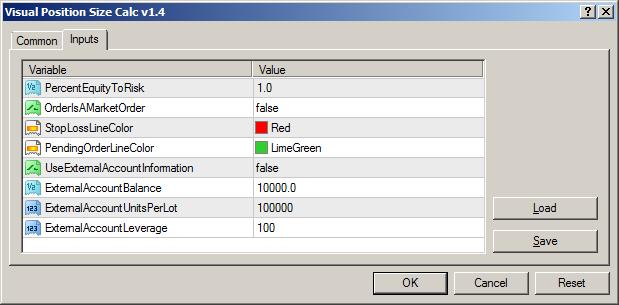
When you attach the indicator, you will have the following options:
  1. percent of your balance you wish to risk on a trade
  2. whether your order will be a market or limit order
  3. external account information -- this is for use if you have a non-MT broker and still use MT for charts, and don't want to use your MT account balance for calculations
  4. color of the stop loss/limit lines which is created (see below)
After you OK the options, a stop loss line will be created on your chart. For long trades, this will obviously be below the price, and for shorts, it will be above. Set the line to where your stop loss will be for the trade. Note that after you move the line, the values displayed telling you how many lots to trade will not be updated until another tick comes in, so be sure a tick occurs after you move the line!

Note that the stop loss value and calculations take into account the spread, which on shorter TF trades can be very significant. Remember that when going long, you buy not at the bid price, which is the default price displayed in MT, but rather at the ask, so if the spread is 5 pips and your line appears to be 15 pips below the price, the SL is actually 20.

Though I have not yet tested it, this should also work work accounts whose deposit currency is not USD. It should work with EUR-based accounts for sure, and most others, though there is definitely code missing to make it truly work for all currencies. If anyone finds that it does not work with theirs, I will certainly update it.

Hopefully this will be useful to MT4 users. Position sizing is so important in trading but often overlooked, probably because people just don't really know that there are many different ways to calculate it, or how to calculate it at all. My hope is that this indicator takes some of the focus off of calculations and lets you focus on good trade setups and exits!

(If anyone wants modifications or has a feature request, let me know and I'll do my best)
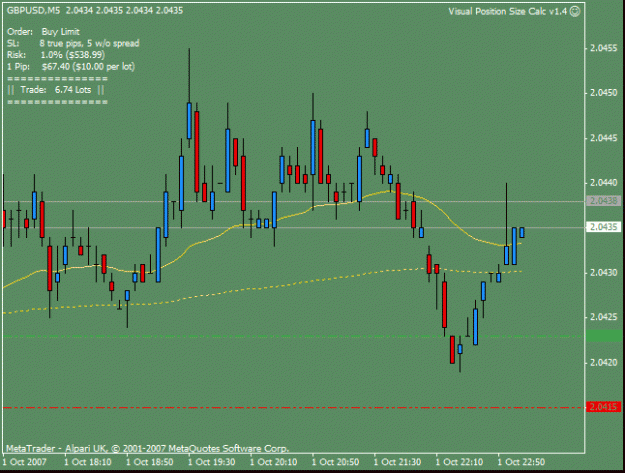
Attached Image (click to enlarge)
Click to Enlarge

Name: ss.gif
Size: 15 KB
Attached Image
Attached File
File Type: ex4 Visual Position Size Calc v1.4.ex4   10 KB | 1,856 download | Uploaded Oct 1, 2007 5:09pm
  • Post# 2
  • Quote
  • Sep 26, 2007 3:10am
  • Trader KGB
    Joined Apr 2007 | 1,775 Posts | Status: Live long and prosper
Nice work, that's pretty handy. One feature I might suggest is a margin rate selection (.25% - 4% should cover most). I'm not sure what it's hard-coded to, but it's giving me some off the wall lot numbers for my external balance. I would double-check the code on the external balance too.

Edit - there is definitely something wrong in the lots number/external balance logic. Example: external balance $10k, stop loss of 5pips, shows 45 lots..
  • Post# 3
  • Quote
  • Sep 26, 2007 6:42am
  • Liquid11
    Joined Jul 2006 | 62 Posts | Status: Forex Prospect
I cannot figure out how to drag the line. Its an amazing little tool but i cant use it!!! help!
  • Post# 4
  • Quote
  • Sep 26, 2007 7:54am
  • mac18
    Joined Jan 2007 | 36 Posts | Status: Member
Quoting Liquid11
I cannot figure out how to drag the line. Its an amazing little tool but i cant use it!!! help!

Try double clicking on it, until you see small boxes at the ends of the line. You can now move it anywhere. Applies to most lines etc on MT4 you want to move. Only learnt that recently too, courtesy of mbq11 (thanks again)

mac18
  • Post# 5
  • Quote
  • Sep 26, 2007 8:39am | Edited at 10:53am
  • JoshDance
    Joined Mar 2007 | 600 Posts | Status: Member
Quoting Trader KGB
Edit - there is definitely something wrong in the lots number/external balance logic. Example: external balance $10k, stop loss of 5pips, shows 45 lots..
Depends KGB--what currency, what risk %, and why type of account?

For example: a 5 pip stop on a $10,000 mini account with 2.5% risk on GBPUSD actually is about 50 mini lots. Remember, in this case we're risking $250, and on a mini account where 1 pip = $1, a 5 pip stop would give 50 lots ($250 for a total of 5 pips of movement is $50/pip). Super tight stops like this generate massive lot sizes and are usually not recommended except for scalping.

So, if you think there's an error, can you please post the currency, account size, account type, and risk percentage? Thanks for your help! :-)
  • Post# 6
  • Quote
  • Sep 26, 2007 8:40am
  • JoshDance
    Joined Mar 2007 | 600 Posts | Status: Member
Quoting mac18
Try double clicking on it, until you see small boxes at the ends of the line. You can now move it anywhere. Applies to most lines etc on MT4 you want to move. Only learnt that recently too, courtesy of mbq11 (thanks again)

mac18
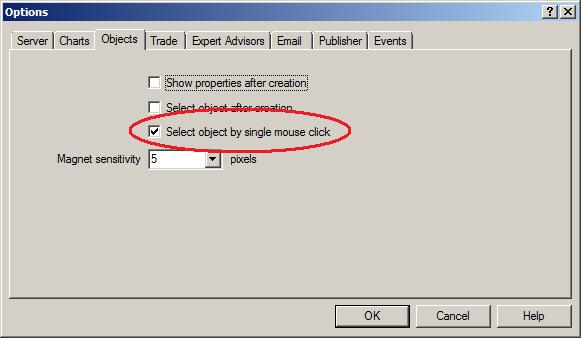
Actually just a single click will do, and this option is set under Tools->Options->Objects->"Select objects by single mouse click".
  • Post# 7
  • Quote
  • Sep 26, 2007 9:52am
  • mac18
    Joined Jan 2007 | 36 Posts | Status: Member
Quoting JoshDance
Actually just a single click will do, and this option is set under Tools->Options->Objects->"Select objects by single mouse click".
and for the info on setting a single click.

The MM (position sizing) indicator is a MUST! Keeps you from being overleveraged, if the only excuse is you can't be bothered with the calculations.

mac18
  • Post# 8
  • Quote
  • Sep 26, 2007 10:01am
  • Unforeseen
    Joined Oct 2006 | 100 Posts | Status: Member
Excellent tool. Thanks for sharing. I was always doing it by calculator before, so this is a big time saver and I like to to see the visual.
To be one with the market, you must first be one with yourself.
  • Post# 9
  • Quote
  • Sep 26, 2007 11:00am
  • melpheos
    Joined Jan 2007 | 1,597 Posts | Status: Stochastic pipster
Great tool, thanks for that
  • Post# 10
  • Quote
  • Sep 26, 2007 11:23am
  • PeterFM
    Joined Apr 2006 | 1,815 Posts | Status: Suaviter in modo, fortiter in re
Quoting JoshDance
Hi all,

I have a spreadsheet that I use to manage how large of a position to put on based on how much I want to risk, the currency being traded, and the stop loss. However, it's inconvenient to switch back and forth between MT and this during a live trading opportunity, so I've decided to create a custom indicator to do this work for me from within MT.
(If anyone wants modifications or has a feature request, let me know and I'll do my best)
I have a live 'demo' (IBFX MT4) for forward test ing stuff, and need 0.01 minimum lot size.
  • Post# 11
  • Quote
  • Sep 26, 2007 4:46pm
  • Liquid11
    Joined Jul 2006 | 62 Posts | Status: Forex Prospect
When i change the sl bar, the position size and sl size on the indicator do not change! what am i doing wrong?
  • Post# 12
  • Quote
  • Sep 26, 2007 6:21pm
  • Unforeseen
    Joined Oct 2006 | 100 Posts | Status: Member
Quoting Liquid11
When i change the sl bar, the position size and sl size on the indicator do not change! what am i doing wrong?
You have to wait for a tick to occur on the currency pair you are viewing.
To be one with the market, you must first be one with yourself.
  • Post# 13
  • Quote
  • Sep 26, 2007 9:21pm
  • JoshDance
    Joined Mar 2007 | 600 Posts | Status: Member
Quoting PeterFM
I have a live 'demo' (IBFX MT4) for forward test ing stuff, and need 0.01 minimum lot size.
Hi Peter, so let me make sure I understand--you need smaller than micro? So standard is 100K, mini is 10K, micro is 1K, and you need 100? Correct?

I suppose I could just put the option to be units instead of standard, mini, etc... that way you could make it anything you want, with the default being standard, or just 100000. Hmm, maybe I'll go ahead and do this tonight. Thanks for the suggestion Peter!
  • Post# 14
  • Quote
  • Sep 26, 2007 9:27pm
  • JoshDance
    Joined Mar 2007 | 600 Posts | Status: Member
Yes liquid, as Unforseen said, a tick must occur--the start() function in a custom indicator is run every time a tick occurs, so there is only one way around the problem: an infinite loop that polls continuously for the location of the line. This would unfortunately, I'm afraid, eat up CPU pretty badly. I could give it a try though, but it's not a good idea generally. Unfortunately in custom indicators use of the sleep() function is not allowed--with that I could poll the location of the line every half second or so. You can do this in EAs, however. Hmm, maybe I should just create an EA version that does this, and that would solve the inconvenience. Will think about this.
  • Post# 15
  • Quote
  • Sep 26, 2007 11:26pm
  • Trader KGB
    Joined Apr 2007 | 1,775 Posts | Status: Live long and prosper
Quoting JoshDance
Depends KGB--what currency, what risk %, and why type of account?
For example, a $10k external balance, standard 100k lots, 20% risk (this is just hypothetical). Regardless of currency pair (say GBP/USD) when the stop loss is small (<10 pips), the lot size shoots through the roof (30 lots). This is not possible on a $10k account. 30 lots of GBP/USD would be over 600:1 leverage on a $10k account.

What the indicator needs is a margin selection option (.25% - 5%, iow 400:1 down to 20:1), with the max lots limited to this selection.
  • Post# 16
  • Quote
  • Sep 27, 2007 4:57pm
  • JoshDance
    Joined Mar 2007 | 600 Posts | Status: Member
Quoting Trader KGB
For example, a $10k external balance, standard 100k lots, 20% risk (this is just hypothetical). Regardless of currency pair (say GBP/USD) when the stop loss is small (<10 pips), the lot size shoots through the roof (30 lots). This is not possible on a $10k account. 30 lots of GBP/USD would be over 600:1 leverage on a $10k account.

What the indicator needs is a margin selection option (.25% - 5%, iow 400:1 down to 20:1), with the max lots limited to this selection.
I understand KGB. I'll implement this tonight and post it later. However, I must say that anyone who would take a 20% risk on a trade will definitely blow their account sooner or later... at that high amount of risk, then one is certainly subject to margin requirement problems. Any risk higher than say 5% IMO on a trade except on a system with an extremely high win rate (say, above 90%) is just a gamble. 1% is the default risk for a reason :-)
  • Post# 17
  • Quote
  • Sep 27, 2007 5:23pm
  • Trader KGB
    Joined Apr 2007 | 1,775 Posts | Status: Live long and prosper
Quoting JoshDance
I understand KGB. I'll implement this tonight and post it later. However, I must say that anyone who would take a 20% risk on a trade will definitely blow their account sooner or later... at that high amount of risk, then one is certainly subject to margin requirement problems. Any risk higher than say 5% IMO on a trade except on a system with an extremely high win rate (say, above 90%) is just a gamble. 1% is the default risk for a reason :-)
Right, it was purely hypothetical. I was just testing to see if margin limits were in place.
  • Post# 18
  • Quote
  • Sep 29, 2007 1:06am | Edited at 5:14pm
  • JoshDance
    Joined Mar 2007 | 600 Posts | Status: Member
PLEASE NOTE that Visual PS Calculator is an Expert Advisor now, NOT a custom indicator. So, you must put it in your MetaTrader\experts folder, NOT in the indicators folder. Be sure to restart MetaTrader after you put the file there.

Also, note that this version, 1.2, will expire January 1, 2008. My intent is to keep this free and remove the expiration restriction, but I value intellectual property (meaning I pay for software, and things of the sort), including my own, and I feel it best for now to put an expiration on it.

Now Visual PS Calculator has the ability to work for market and limit orders, and also checks that margin requirements are met (however, if you are using sensible risk and your leverage is high enough, then this will not be an issue).

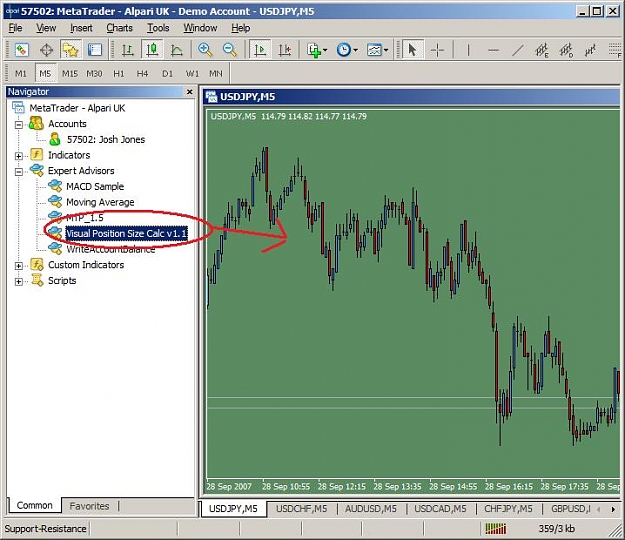
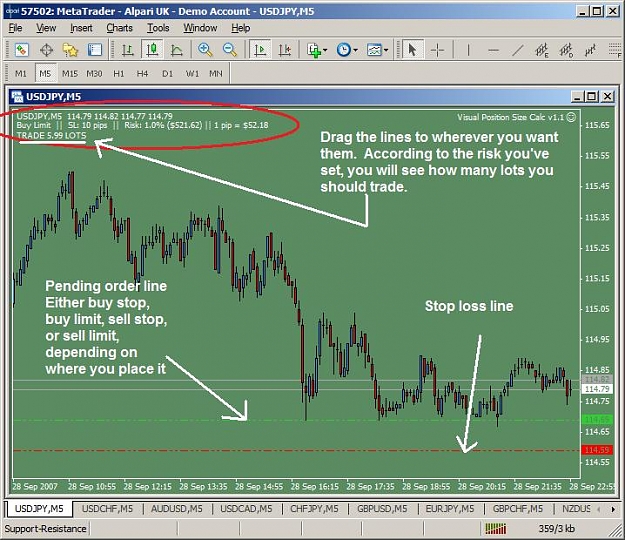
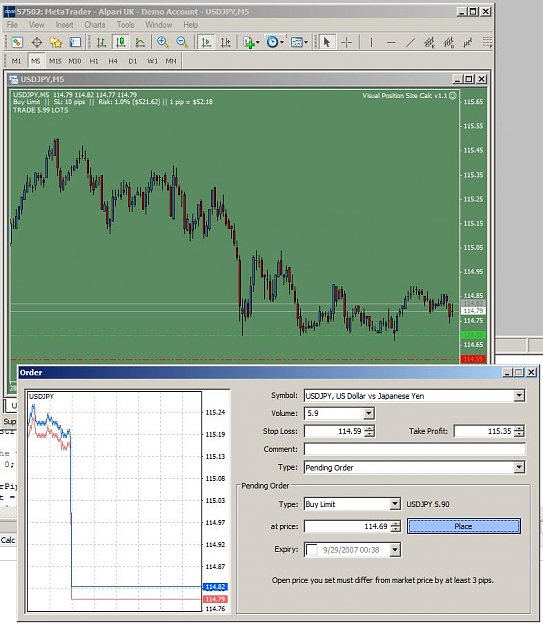
Easy steps to follow: (See screenshots below)
  1. Enable object selection
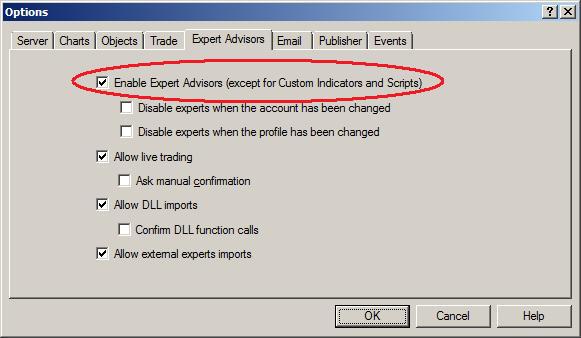
  2. Enable Expert Advisors
  3. Drag the EA onto the chart
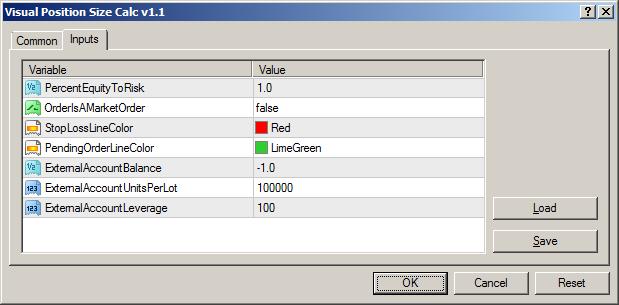
  4. Set your risk, and whether the order will be a market or a limit order, and if you are using an external non-MT4 account, set your balance, lot size (100000 for standard, 10000 for mini, and so on), and leverage
  5. select your stop loss with a single mouse click and drag it where you want it, and if this is a limit order, do the same for the limit line that has been created
  6. place your order when you see fit, based on the values given by the EA
  7. remove the EA from the chart when you are done
If you are not familiar with how limit/market orders work, there are plenty of resources available online to help you understand. The order type will be displayed by the EA along with the SL value, the amount of risk, value of each pip movement, and most importantly, how many lots you should trade.

After you OK the options, a stop loss line will be created on your chart. If you have selected to use a pending order ("OrderIsAMarketOrder" is false), then a limit line will also be created. Set the line to where your stop loss will be for the trade, and do the same for your limit line if you are doing a pending order. This limit line works for stops (i.e., line below price for a sell, and line above price for a buy), as well as limits (i.e., line below price for buy, line above price for a sell).

Note that you must select Tools-->Options-->Objects-->"Select object by single mouse click" in order to select the SL/limit lines after they are created. Single click the line, and then you can drag it around.


When you attach the EA, you will have the following options:
  1. PercentEquityToRisk: percent of your balance you wish to risk on a trade -- 1% is the default, and for a good reason
  2. OrderIsAMarketOrder: if false, then two lines will be created, one for the SL, and the other for the price to buy/sell at, and the position size will be calculated based on these two lines. If true, then just a SL line will be created, and the position size will be calculated based on the current price.
  3. External accounts -- This is for use if you have a non-MT broker and still use MT for charts, and don't want to use your MT account balance for calculations. If ExternalAccountBalance is set to anything above 0, then the EA will do calculations based on these three variables, which are balance, lot size, and leverage.
Note that the stop loss value and calculations take into account the spread, which on shorter TF trades can be very significant. Remember that when going long, you buy not at the bid price, which is the default price displayed in MT, but rather at the ask, so if the spread is 5 pips and your line appears to be 15 pips below the price, the SL is actually 20.

There is a lot of error-checking and input validation in my code, so it should cover all cases where an order would not be valid (like putting the stop loss 2 pips away from the limit price when the spread is 3 pips, for example). But if you find any errors, and I'm sure you will, please let me know!
Attached Images (click to enlarge)
Click to Enlarge

Name: VPSC3.jpg
Size: 67 KB Click to Enlarge

Name: VPSC5.jpg
Size: 83 KB Click to Enlarge

Name: VPSC6.jpg
Size: 98 KB
Attached Images
Attached File
File Type: ex4 Visual Position Size Calc v1.2.ex4   7 KB | 441 downloads
  • Post# 19
  • Quote
  • Sep 29, 2007 4:27am
  • PeterFM
    Joined Apr 2006 | 1,815 Posts | Status: Suaviter in modo, fortiter in re
If I had a dog, he would be really happy now 'cos he'd have two sets of bo**ocks (UK expression lol)
  • Post# 20
  • Quote
  • Sep 29, 2007 12:01pm
  • JoshDance
    Joined Mar 2007 | 600 Posts | Status: Member
Quoting PeterFM
If I had a dog, he would be really happy now 'cos he'd have two sets of bo**ocks (UK expression lol)
Lol Peter, ok, so I don't quite understand the expression--just translate for me, are you happy and good? :-)
Thread Tools Search this Thread
Show Printable Version Show Printable Version
Email This Thread Email This Thread
Search this Thread:

Advanced Search

  • Platform Tech
  • /
  • Visual Position Size Calculator
  • Reply to Thread
    • Page 1 23 4
0 traders viewing now
  • More

©2013 Forex Factory, Inc. / Terms of Use / Privacy Policy

Forex Factory® is a registered trademark.

Connect

  • Facebook
  • Twitter
  • RSS

Company

  • About FF
  • FF Blog
  • Careers at FF
  • Advertising
  • Contact FF

Products

  • Forums
  • Trades
  • Calendar
  • News
  • Market
  • Brokers
  • Trade Explorer

Website

  • Homepage
  • Search
  • User Guide
  • Member List
  • Online Now
  • Report a Bug