Forex Factory
  • Login

  • Username: Password:
  • 8:51am

  • Search
  • Home

  • Forums

  • Trades

  • Calendar

  • News

  • Market

  • Brokers

Options

Search

Subscribe to Thread

Bookmark Thread

First Page First Unread Last Page Last Post

Printable Version

Similar Threads

1 Minute Scalping with PA and Common Sense 6 replies

Trendline Scalping 4hr timeframe 1463 replies

1 minute momentum scalping 188 replies

Multiple timeframe based price action scalping? 1 reply

Who are using one minute chart for scalping ? 4 replies

  • Trading Systems
  • /
  • Reply to Thread
  • 11

15 minute timeframe scalping system

  • Post# 1
  • Quote
  • First Post: Jan 1, 2013 4:45pm
  • tdhowl
    Joined Jul 2012 | 24 Posts | Status: Member
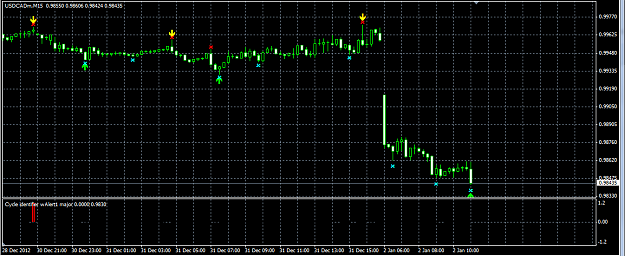
Hi, I developed a system which appears to me to be profitable when I manually trade this system on demo account. I use 2 indicators which I downloaded from ForexFactory.com. These indicators are: the cycleidentifier with alerts indicator, and the super signal v3 indicator. I trade this system on the EUR/USD pair on the Minute 15 timeframe. Both indicators are installed together on the EUR/USD on the 15 minute chart. I use the cycleidentifier indicator like a filter. I trade only in the direction of the trend indicated by the cycle identifier. So if the cycleidentifier indicator indicates blue, I will only trade long. If it indicates red, I will only trade short. To finally make the decision to enter or exit a trade.. I use the super signal v3 indicator. When a strong buy or a strong sell pop up alert is given from the super signal v3.. I get ready to enter a trade. Now I wait for price to stop repainting the arrow with the x shown on the screen, and for price to move away from the arrow with the X by one bar. Then I enter the trade in the same direction as indicated by the cycleidentifier and super signal v3 together. I do not use a stoploss because I fear price manipulation on the other end, so instead, I use a script on the chart instead where I can set and move the stoploss around manually. I exit the trade whenever the OPPOSITE arrow plus the x are indicated together.. I would then either wait for a next trade or if this opposite arrow plus x indicates together in the same direction as the cycle identifier.. then I would close any open trade, and re-enter in the new direction indicated. I have attached a screenshot to this thread for anyone to review. I am currently having a programmer make me an EA using this system. It should be ready for testing in the weeks ahead.
Attached Image (click to enlarge)
Click to Enlarge

Name: howeashouldfunctionpic.gif
Size: 36 KB
  • Post# 2
  • Quote
  • Jan 1, 2013 6:53pm
  • tang
    Joined Jun 2008 | 25 Posts | Status: Member
Would u like to share your indicator.
  • Post# 3
  • Quote
  • Jan 1, 2013 7:23pm
  • tdhowl
    Joined Jul 2012 | 24 Posts | Status: Member
Hi tang, I have attached the 2 indicators and 1 script. The TrailingLinesv2-50 stop is a script, and goes in the script folder in metatrader. For this script.. set trailing to true under inputs, then, on the chart you will see 2 lines. Double click on the red line .. this is the trailing stoploss line, after you double click on it you will be able to drag this line up or down on you chart freely.. Please be aware that you must move the red trailing stoploss line far away from the current price before you enter a trade, or you will enter the trade and then get stopped out immediately.
Attached Files
File Type: mq4 Cycle identifier wAlert1 major.mq4   15 KB | 1,010 download
File Type: mq4 Super Signal_v3.mq4   6 KB | 959 downloads
File Type: mq4 TrailingLinesv2-50 stop.mq4   5 KB | 770 downloads
  • Post# 4
  • Quote
  • Jan 1, 2013 8:05pm
  • tang
    Joined Jun 2008 | 25 Posts | Status: Member
Thanks. So which indicator repaints and how bad it is. It looks fine but like any other indicator there are always some pitfalls. What exactly are those. Would u like to share your template too.
  • Post# 5
  • Quote
  • Jan 2, 2013 1:14am
  • smartvin
    Joined Dec 2010 | 5 Posts | Status: Member
Hi tghowl is that cycleidentifier with alerts indicator repaint?
  • Post# 6
  • Quote
  • Jan 2, 2013 2:40am
  • tdhowl
    Joined Jul 2012 | 24 Posts | Status: Member
Hi tang, your welcome. Both indicators re-paint somewhat. I think the higher up on the timeframe, the less these indicators should re-paint I think. The 1 minute timeframe produces a lot of market noise, and way to many signals. The 5 minute timeframe produces a little less market noise, and less signals then the minute 1. I personally never trade against the 15 minute timeframe. So if I wanted to enter a trade from a signal that was given on the 5 minute timeframe.. I would first check to see if the signal on the 15 minute is the same. If it is, then I could enter the trade. I would not use these indicators on any timeframe lower than 15 minutes. I think there are big players in the forex market, and they don't like when individual traders make money; and I think there is price manipulation. This is why I wait for price to move atleast 1 bar away from the arrow plus the x after the pop up strong buy or sell appears on the screen. A third indicator may be beneficial too for safer entry into the market.. but I don't know which one to use. As for posting the template I would if I could but metatrader does not allow TPL files to be saved I think.
  • Post# 7
  • Quote
  • Jan 2, 2013 5:44am
  • Goodgame42
    Joined May 2012 | 118 Posts | Status: Member
Hi everybody,

I post the template.
You have to paste it into the folder Metatrader/templates.

Green pips to all !
Attached File
File Type: tpl # 15min scalping.tpl   2 KB | 483 downloads
  • Post# 8
  • Quote
  • Jan 2, 2013 5:56am
  • Goodgame42
    Joined May 2012 | 118 Posts | Status: Member
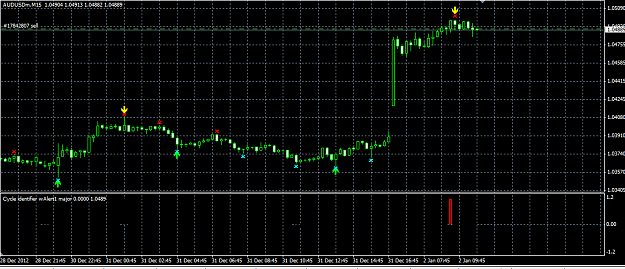
I took 2 trades this morning.
We'll see that

EDIT: AUD/USD just closed +17 pips !
Attached Images (click to enlarge)
Click to Enlarge

Name: 1rst entry.PNG
Size: 33 KB Click to Enlarge

Name: 2nd entry.PNG
Size: 33 KB
  • Post# 9
  • Quote
  • Jan 2, 2013 6:00am
  • Goodgame42
    Joined May 2012 | 118 Posts | Status: Member
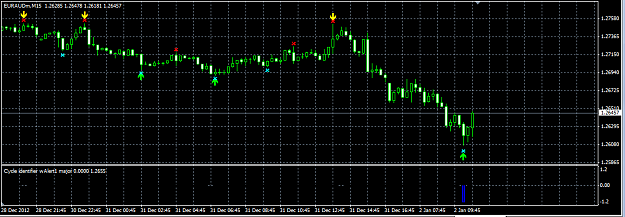
An other good entry here !
Attached Image (click to enlarge)
Click to Enlarge

Name: entry.PNG
Size: 32 KB
  • Post# 10
  • Quote
  • Jan 2, 2013 6:17am
  • Goodgame42
    Joined May 2012 | 118 Posts | Status: Member
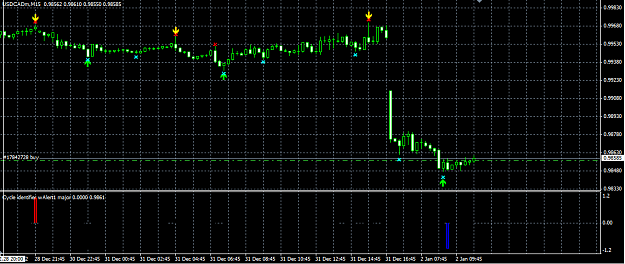
Trade on USD/CAD closed -11pips !
Show how the indicators repaint !
Not good to continue this strategy for me !

Good luck ;-)
Attached Image (click to enlarge)
Click to Enlarge

Name: repaint.PNG
Size: 38 KB
  • Post# 11
  • Quote
  • Jan 2, 2013 8:41am
  • tdhowl
    Joined Jul 2012 | 24 Posts | Status: Member
Hi smartvin, the cycleidentifier does repaint and I think it is probably not stable enough to trade alone on the minute 1 or minute 5 chart. The minute 15 I think is the lowest timeframe that this indicator would be stable. No indicator that I know of is infallible. By using the other indicator with this one, and waiting one bar after the arrow plus x appears after the pop up strong buy or sell alert appears.. This should give better odds, and to win more than lose. I also want to make a change to this strategy..(If your in a trade, and after a while the cycle identifier gives a contradictory signal to your open position.. then you might as well close the trade. Only trade and stay in a trade only when both indicators are in agreement).
  • Post# 12
  • Quote
  • Jan 2, 2013 1:21pm
  • The Sparrow ● Online
    Joined Jul 2010 | 17 Posts | Status: Member
Hey TD don't give up on this thread, even solving the repaint will not solve a initial bad signal, so what we need is a filter to avoid the low volatility trades. also using a stop order above the buy signal candle will avoid a lot of losing trades or false signals.
  • Post# 13
  • Quote
  • Jan 2, 2013 11:36pm
  • tdhowl
    Joined Jul 2012 | 24 Posts | Status: Member
Hi The Sparrow, thanks for your advise. The only thing I can think of to stop the repainting is to add a third indicator for this system. Price seems to me to eventually go in the direction of both the cycleidentifier, and the super signal v 3.. but these indicators seem to repaint really badly. I'm attaching a third indicator which I am now testing to stop the repainting problem for this system. As for the volatility.. I don't know what filter to use.
Attached File
File Type: mq4 #SHI_SilverTrendSig-Mod 1a(alert).mq4   5 KB | 359 downloads
  • Post# 14
  • Quote
  • Jan 2, 2013 11:41pm
  • Alexoptions
    Joined Dec 2012 | 48 Posts | Status: Member
Seems like it could be a great system
  • Post# 15
  • Quote
  • Jan 3, 2013 12:07am
  • mkfx
    Joined Nov 2012 | 59 Posts | Status: Member
Hi

It looks a good system . We can use some EMAs as filter to trade in that direction.

Example : if price closed is above 10EMA /below 10 EMA in case of Long / Short. ( 15 MTF)
and if Price is above 200 EMA only Long or below 200 EMA only Short trade.( 15 MTF)


Thanks
  • Post# 16
  • Quote
  • Jan 3, 2013 1:08am
  • Alexoptions
    Joined Dec 2012 | 48 Posts | Status: Member
Quoting tdhowl
Hi, I developed a system which appears to me to be profitable when I manually trade this system on demo account. I use 2 indicators which I downloaded from ForexFactory.com. These indicators are: the cycleidentifier with alerts indicator, and the super signal v3 indicator. I trade this system on the EUR/USD pair on the Minute 15 timeframe. Both indicators are installed together on the EUR/USD on the 15 minute chart. I use the cycleidentifier indicator like a filter. I trade only in the direction of the trend indicated by the cycle identifier. So...
Have you tried this on renko bars, and then turning that into an EA?? you can get the strategy tester for Renko bars also to help with basic strat testing
  • Post# 17
  • Quote
  • Jan 15, 2013 1:04am
  • tdhowl
    Joined Jul 2012 | 24 Posts | Status: Member
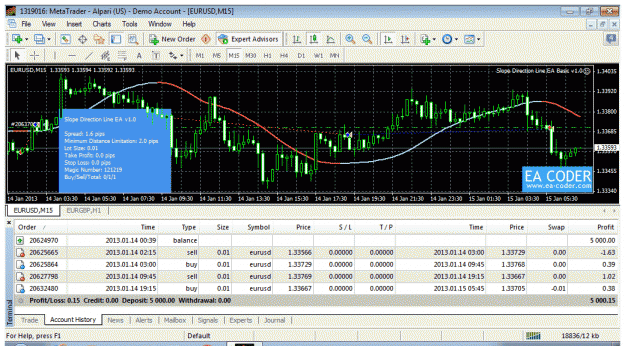
Hi mkfx, and alexoptions, .. thank you both for your advise. The ideas seem excellent but I spent $150 to an EA programmer to program the basic original strategy, and as of right now.. I am disappointed to say that it is not working correctly and he did not fix it yet. I don't intend to spend any more right now to have another programmer rebuild a new EA, or try to fix the existing one. On a positive note.. I just purchased an EA from ea-coder.com, and this other EA has provided some interesting positive results. This slope direction line ea is able to constantly trade in a trendless market for over a 24 hour period with no loss. This is amazing. I have never before seen constant trading in a trendless market for such an extended period of time with no loss. I am attaching a pic. I know I am off subject for this thread.. but I thought everyone might be interested to see the pic.
Attached Image (click to enlarge)
Click to Enlarge

Name: constant-trendless-trading-no-loss.gif
Size: 55 KB
  • Post# 18
  • Quote
  • Jan 15, 2013 5:41am
  • Denis Denis
    Joined May 2012 | 4 Posts | Status: Member
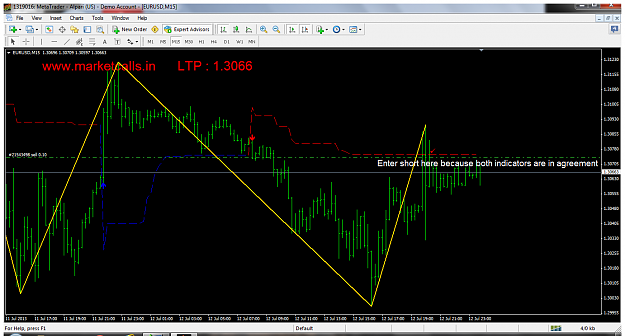
Hello from Russia Found in this system is an interesting point If open transactions on the trend for 15 minutes using a zig-Zag and stochastics it turns Bomb can even grail

rules:
1) zigzag broke the previous high-low
2) Stochastic entered the zone 80-20 Stochastic (11,3,5)
3) An arrow appears at the sale-purchase

example:

[img] http://rghost.ru/43046934/image.png [/img]

Regards Denis.

Sorry for the mistakes ...
  • Post# 19
  • Quote
  • Jan 15, 2013 5:48am
  • Denis Denis
    Joined May 2012 | 4 Posts | Status: Member
I almost forgot after breaking through the minimum-maximum set to breakeven
  • Post# 20
  • Quote
  • Last Post: Jan 16, 2013 11:49am
  • toco9000
    Joined Aug 2011 | 1 Post | Status: Junior Member
I like your system! Is your EA ready to work?
Thread Tools Search this Thread
Show Printable Version Show Printable Version
Email This Thread Email This Thread
Search this Thread:

Advanced Search

  • Trading Systems
  • /
  • 15 minute timeframe scalping system
  • Reply to Thread
1 trader viewing now

©2013 Forex Factory, Inc. / Terms of Use / Privacy Policy

Forex Factory® is a registered trademark.

Connect

  • Facebook
  • Twitter
  • RSS

Company

  • About FF
  • FF Blog
  • Careers at FF
  • Advertising
  • Contact FF

Products

  • Forums
  • Trades
  • Calendar
  • News
  • Market
  • Brokers
  • Trade Explorer

Website

  • Homepage
  • Search
  • User Guide
  • Member List
  • Online Now
  • Report a Bug