
Forex Factory
  • Login

  • Username: Password:
  • 5:18pm

  • Search
  • Home

  • Forums

  • Trades

  • Calendar

  • News

  • Market

  • Brokers

Options

Search
Search
Search

Subscribe to Thread

Bookmark Thread

First Page First Unread Last Page Last Post

Printable Version

Similar Threads

Am i making progress? 5 replies

How much time did it take you to make progress? 45 replies

ZSI's Progress and Accountability 6 replies

Market correction in progress? 0 replies

The monkey (in progress) 19 replies

  • Trading Systems
  • /
  • Reply to Thread
  • 84

Progress - The System

  • Last Post
  • First Unread
  •  
  • Page 1 23456 11
  •  
  • Post# 1
  • Quote
  • First Post: Dec 12, 2012 4:50pm | Edited Jun 17, 2013 9:12am (32 hr ago)
  • Jurex
    Joined Mar 2012 | 136 Posts | Status: Member

Here it comes, I decided finally to make a step after a long hard work that led to create my system that I named PROGRESS.


About me : My name is Gabriel Jureidini, I discovered Forex 4 years ago and I quickly understood that it is a hard, rough thing to trade this market.

I won't speak of the rules, and all the things a trader should understand before trying to make money, all good traders talk about it and give you a lot to read in other forum threads.. I go directly to the goal of what I am intending to do here.


First : I will present PROGRESS and all its capabilities.

Second : I will ask all of the participants in this thread to talk only about the following systems for many of them are integrated :

THV System

Symphonie System

TMA Extreme System

Genesis System

NB 10.2 System

Dadas (Price Action) PCTEZ


All these systems have their forums and we are obliged to limit the number of systems because as you will discover, PROGRESS is not a Trading system that is based on one strategy but it can work on all systems. So here we will try to find rules that combines all the well known systems to have an optimised winning system.

Third : I won't give the source code of the system as I didn't decide yet if I will share it or commercialise it so please don't ask me the code I won't give it and a big part of the system is in C++ language so better not to get in it as it is not easy to understand. If you find bugs or any suggestions I will do the maintenance and deliver it.

Fourth: Be patient to accumulate and to understand the philosophy of the system because once you understand it , you will go very fast to implement your own strategy.


The system can be used by all traders :


  1. Traders who want to look at their prefered indicators with a dashboard integrating News, sound and executing their orders manually.
  2. Traders who want to write an Expert System or a Automated Strategy that can be monitored fro the Command Panel. A way to switch from Automatic to Manual to control what's happening at any time.

Now let's have a picture of the system (you can filter the indicators you want to see , here I put them all) :
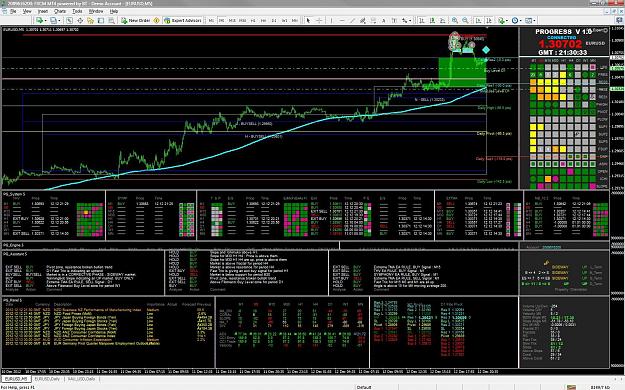


Attached Image (click to enlarge)
Click to Enlarge

Name: progress1.jpg
Size: 332 KB


and another one of the command window (Panel) :
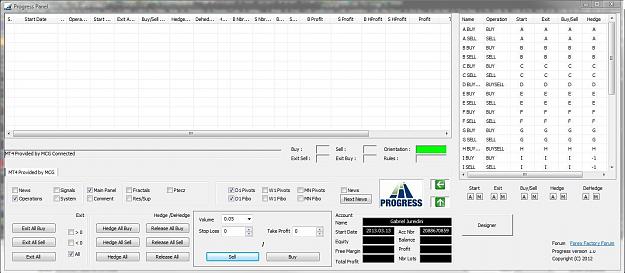

Attached Image (click to enlarge)
Click to Enlarge

Name: Panel.jpg
Size: 123 KB


PROGRESS supports :


  1. News in real time
  2. Sound
  3. Hedge
  4. Indicators (that can be removed from the screen, for those who said that my system is flushy but nothing inside)
  5. Command Panel
  6. Manual Intervention
  7. Rule Editor
  8. Signal Editor
  9. and more

Installation of PROGRESS


I made it the simplest possible so here is what you need :


PG_Expert.ex4 (PROGRESS system on MT4. This file goes in the experts folder of your MT4 terminal)

PG_Command.exe (the command Panel. This file goes in the root folder of your Broker Terminal)


PG_ExtFunctions.dll (a small dll for launching the Command Panel on windows)

PG_EntryRules.dll (a dll that it is generated when you define your rules)


these 2 dlls will be in the root folder of your broker terminal


Now PG_Command.exe can deal with multiple brokers at the same time but let's work in this forum on one broker, not to have to talk of problems issues related to the installation and things I didn't verify yet. I will deliver a tested version later on. All this to tell that you don't need to put these 2 dlls in your windows system folder.


Indicators that are used by the system with iCustom are needed in experts/indicators folder and are :


I preceded each file with PG_ and the system from where I got the file. I just do this to have a clean way to know that these files are used by PROGRESS. These are not PROGRESS files , you can find them in the trading System forums. My problem was always to know from which system an indicator has been downloaded. I give the source files for all these indicators whenever they publish it, or it is not forbidden by the author else I just put the .ex4 file.


PG_Slope

PG_Sar

PG_TPO_Velocity


PG_THV_trix ===> (THV_trix_call version 4)

PG_THV_Coral ===>(THV_Coral version 4)


PG_SYMP_Sentiment ===>(Symphonie_Sentiment_Indikator_ v3)

PG_SYMP_Emotion ===>(Symphonie_Emotion_Indikator_v3 .0)

PG_SYMP_TrendLine ===>(Symphonie_Trendline_Indikator_ v3.0)

PG_SYMP_Extreme ===>(Symphone_Extreme_Indikator_v3. 0)


PG_10.2_WOH 2x1 5.22

PG_10.2_WOH 1x0 5.22


PG_TMA_ExtremeSpike


Others common indicators can be found anywhere and I just preceded them also with PG_ but you can use your own. (not needed by the system)


like PG_Ichimoku, PG_HeikenAshi .. etc


The system goes with 4 indicators which will be put in experts/indicators folder


PG_Assistant.ex4 (it assists the trader)

PG_Engine.ex4 (it draws the engines and the rules that the system has launched)

PG_System.ex4 (it draws signals for system objects and others)

PG_Panel.ex4 (it draws the news, fibol levels and angles)


In the experts/files you need these files :


PG_Brokers.csv (this file is created if it doesn't exit and contains the broker and the port on which the system will connect with the command panel)

PG_Engines.csv (this file contains the engines you defined. I explained already. It can be generated by the command Panel)

PG_Objects.csv (this file contains a list of all objects supported with some fields for sound and panel drawing. Don't look at it for the moment)

PG_Signals.csv (this file contains a list of all signals and field for the sound assistant, don't bother with it also for the moment)

PG_RuleFilters.csv (this file contains rules filter. I will deliver the file with all rules filtered, so no need to bother also)

PG_SignalFilters.csv (this file contains how sound is filtered for your signals. It can be modified by the command panel)

PG_ObjSignals.csv (this file contains signals that correspond to every objectl)


One last thing


in expert/files/rules you have two folders :

expert/files/input

expert/files/output


in input you will find this :


CRules.h

CSignals.h

makefile

and R_x.cpp from A to R (in these files you define your rules that will be compiled in PG_EntryRules.dll. Don't worry this will be done in the Panel Command and will be placed automatically in the root forlder of your broker. So no need to look at these files externally you will see it in the designer.


in output you should have this :

CRules.o

CSignals.o

EntryRules.o

and all the R_x.o where the compiler will generate objects files. (x goes from A to R)


for the compilation we use the GNU compiler which is an opensource and you will have to install it on your post.

That's ALL


Ok this is a brief presentation ...

Later on I will explain the modeling of the system step by step


HERE IS THE DOWNLOAD of the system updated on the 17 June 2013


Attached File
File Type: rar Progress.rar   2.2 MB | 7 downloads | Uploaded Jun 17, 2013 9:11am

  • Post# 2
  • Quote
  • Dec 12, 2012 4:54pm | Edited at 5:13pm
  • billbss
    Joined Apr 2006 | 3,459 Posts | Status: Member
Great chart for Christmas. This is a good time to post it.

That green blob in the upper right corner, looks like Santa and his sleigh.
  • Post# 3
  • Quote
  • Dec 12, 2012 5:10pm
  • nightstocher
    Joined Mar 2009 | 44 Posts | Status: Member
Quoting billbss
Great chart for Christmas. This is a good time to post it.

That green blog in the upper right corner, looks like Santa and his sleigh.
funny you should mention Santa cause I was looking for the window that controlled Rover Curiosity.

interesting idea, will follow if I can refer to OP as ground control and/or Houston.

much success.
It's a buy the dip scheme, ya feel me?
  • Post# 4
  • Quote
  • Dec 12, 2012 5:35pm
  • forexhard
    Commercial Member | 557 Posts | Joined May 2011
Let me make sure I understand this. The OP has taken his favorite parts from several free and publicly posted systems, which he intends to combine into a single system which he mentions he might "commercialise". And this is not stealing how exactly?
  • Post# 5
  • Quote
  • Dec 12, 2012 5:50pm
  • nightstocher
    Joined Mar 2009 | 44 Posts | Status: Member
Quoting forexhard
Let me make sure I understand this. The OP has taken his favorite parts from several free and publicly posted systems, which he intends to combine into a single system which he mentions he might "commercialise". And this is not stealing how exactly?
don't forget the part where he wants others to contribute to said theft...w/o actually receiving compensation of course. that would be plain foolish.
It's a buy the dip scheme, ya feel me?
  • Post# 6
  • Quote
  • Dec 12, 2012 5:53pm
  • Jurex
    Joined Mar 2012 | 136 Posts | Status: Member
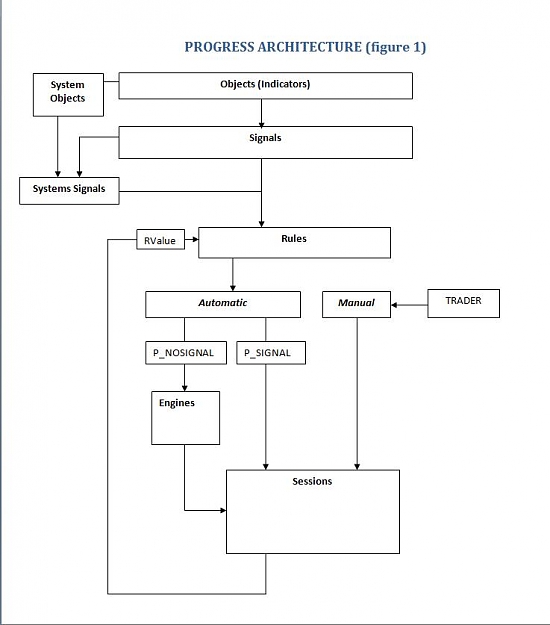
Brief Introduction to the PROGRESS Model :


Entities that are supported in the system are :


OBJECTS : are basic or user defined indicators (UPFRACTAL, PIVOT, BOLINGER, RES, SLOPE, CORAL, TMA_S, FTRIX, STRIX, ... etc)
SIGNALS : are signals related to OBJECTS (S_CROSS_UP, S_ABOVE, S_BULL, S_OVERBOUGTH, S_ALERT, S_DISTANCE, ... etc)
SYSTEMS : are combined OBJECTS that represents a system and are related to S_BUY, S_SELL, S_EXIT_BUY, S_EXIT_SELL signals...

RULES: represents the behaviour of a session, when it starts , when it buys, when it exists and how it works
ENGINES : represents the way a session initially works (Recovery mode, Maxcount, pipstep, timestep, ...). Every Engine is associated to a rule.
SESSIONS: is an instance of an ENGINE. It can be a simple operation to a more complex combination of buy sell

so with these entities we should be able to program our own session that represents all what is above

I know it is a little bit disturbing to talk about programming for a trader but it is easy once you find out how to do it.

Example :

let's say I have the following :

AndS (UPFRACTAL, S_ABOVE, P_M30, P_H1)

you can guess ?

well this means above fractal for period 30 and H1
UPFRACTAL is the OBJECT
S_ABOVE is the SIGNAL
and P_M30 and P_H1 are the period I want to check

ok let's define how a session can start in a rule :

if (AndS (FTRIX, S_UP, P_H1))
Set_Rule (OP_BUY, T_START, R_F, P_SIGNAL);

this sound a little more complicated but this means :

if FTRIX is up for the period H1 I start the rule R_F

Ok That's all for the language ... this is not programming but modelling, so if you are able to do so you can write all what goes in your mind
  • Post# 7
  • Quote
  • Dec 12, 2012 6:32pm
  • Jurex
    Joined Mar 2012 | 136 Posts | Status: Member
Quoting forexhard
Let me make sure I understand this. The OP has taken his favorite parts from several free and publicly posted systems, which he intends to combine into a single system which he mentions he might "commercialise". And this is not stealing how exactly?
I may commercialise the system itself which has nothing to do with the systems I mentioned... It can work on any other indicators or systems ... it is an Open system and not related directly to the trading systems mentioned in the forums.... it is not difficult to understand that you can sell a refrigerator without the food inside.. I mentioned these systems because I worked on them as a trader and test them all, but all the work on PROGRESS is in the modelling and the communication with the Panel Command.
  • Post# 8
  • Quote
  • Dec 12, 2012 6:47pm
  • Bilstein
    Joined Mar 2010 | 184 Posts | Status: Member
That just seems like a whooooole lotta nothin'.

  • Post# 9
  • Quote
  • Dec 12, 2012 6:53pm
  • forexhard
    Commercial Member | 557 Posts | Joined May 2011
Quoting Jurex
I may commercialise the system itself which has nothing to do with the systems I mentioned... It can work on any other indicators or systems ... it is an Open system and not related directly to the trading systems mentioned in the forums.... it is not difficult to understand that you can sell a refrigerator without the food inside.. I mentioned these systems because I worked on them as a trader and test them all, but all the work on PROGRESS is in the modelling and the communication with the Panel Command.
merde -- connerie
  • Post# 10
  • Quote
  • Dec 13, 2012 1:00am
  • Jurex
    Joined Mar 2012 | 136 Posts | Status: Member
Quoting forexhard
merde -- connerie

I don't know who you are but you seem to have nothing to do but sticking on the merde and connerie .. nobody oblige you to participate here just forget this forum ok ?
  • Post# 11
  • Quote
  • Dec 13, 2012 2:04am
  • Jurex
    Joined Mar 2012 | 136 Posts | Status: Member
1- ENGINE

A session represents a trading scenario, it goes from a simple buy or sell with a stoploss to a combined orders that are represented in the engine to which it belongs.

An engine describes the behaviour of a session. It is represented in a Excel file PG_Engines.csv and have these properties :

Name : Name of the engine
Operation : Operations that are allowed (BUY, SELL or BUYSELL). BUYSELL means that we combine the two trading types BUY and SELL.
StartRule : Rule that triggers the engine to launch a session (required)
BuyRule : Rule that triggers the engine to launch a buy trade. it can be -1 it means no rule
SellRule : Rule that triggers the engine to launch a sell trade. it can be -1 it means no rule
ExitBuyRule : Rule that triggers the engine to exit all buy orders. it can be -1 it means no rule
ExitSellRule : Rule that triggers the engine to exit all sell orders. it can be -1 it means no rule
ExitRule : Rule that triggers the engine to exit all orders and exit session. it can be -1 it means no rule

ILot : Initial Lot of a trade
MaxLot : the maximum Lots volume that it is allowed to trade
MaxCount : the maximum number of trades, if we have a BUYSELL engine so we have Maxcount for buy and Maxcount for sell (2 times)
Direction : Direction is the way we add trade from the initial trading . (It can be BACKWARD, FORWARD, or ANY) .. I explain more on this later
RecoveryMode : RecoveryMode is the way the volume of trades are calculated . for the moment it covers 12 ways of recovery . I explain later
RecoveryValue : the value associated to the recovery mode ... for instance if my recovery mode is a multiplier the value can be 1.5 or 2 ....
PipStep : is the distance in pips between two trades. if it is -1 it means no distance is required
TimeStep : is the time in minutes between two trades. if it is -1 it means no time
OrderType : this is the way we do a buy and sell in a mixed session (BUYSELL operation) look above the operation field. it can be MONO or HEDGE
KeepBuySell : this is to tell that we are keeping a combined Buy and Sell . (only for a BUYSELL session with HEDGE as OrderType)
ExitMode : For BUYSELL engine , it tells if I should exit the buy trades before sell trades for instance or not, it can be EXITANY, EXITBUYFIRSTor EXITSELLFIRST
MaxTime : Maximum time in minutes we allow a session to live. if it is -1 no time is applied
StartTime : tells when to begin sessions belonging to this engine ... (not supported yet)
HedgeMagnitude : It represents the magnitude of hedging when required for Buy or Sell trades
MinProfit : is the minimum profit for my session (buy sell combined) . if an exit rule is triggered we don't exit if we don't have the minimum profit.it can be -1 it means no minimum is required
BuyMinProfit : Minimum buy profit when exit buy rule is triggered. -1 no minprofit
SellMinProfit : minimum sell profit when exit sell rule is triggered. -1 means no minprofit
TP : Take profit for the whole session represented in an amount. Session exits when TP is reached
TS : Trailing stop for the whole session in amount.
SL : Stop Loss for the whole session in amount. Session exits when SL is reached
BuyTP : idem as TP for BUY trades
BuyTS : idem as TS for BUY trades
BuySL : idem as SL for BUY trades
SellTP : idem as TP for SELL trades
SellTS : idem as TS for SELL trades
SellSL : idem as SL for SELL trades
BuyLotTP : Take profit in pips for each buy order of my session
BuyLotTS : Trailing stop in pips for each buy order of my session
BuyLotSL : Stop Loss in pips for each buy order of my session

SellLotTP : idem as BuyLotTP for sell orders
SellLotTS : idem as BuyLotTS for sell orders
SellLotSL : idem as BuyLotSL for sell orders


Here is an example of a PG_Engines.csv file ...
You don't have to fill it in an excel file as PROGRESS has a graphic way to define your engines
this file is in experts/files folder
Attached File
File Type: csv PG_Engines.csv   1 KB | 205 downloads
  • Post# 12
  • Quote
  • Dec 13, 2012 2:54am
  • Jurex
    Joined Mar 2012 | 136 Posts | Status: Member
1-1 ENGINE example (simplest scenario)

When defining an engine two fields are important to express its unicity :

Operation Field and StartRule Field.

Operation can be BUY, SELL or BUYSELL
StartRule goes from A to R (for simplicity)


The simplest scenario is where we only have a start rule to activate the session.
let's immagine I want a session that can have only 6 trades, it performs only BUY trades and each trade is at 30 pips from the minimum trade and using the recovery mode M (that means multiplier with value 2) , ok it is a martingale and don't criticize it is only an example , we have 12 recovery mode types Now as we don't define exit rules we should specify the minimum profit for my session let's say 100 dollars.
We will have this :
Name : "A BUY"
Operation : BUY
StartRule : A
BuyRule : -1
SellRule : -1
ExitBuyRule : -1
ExitSellRule : -1
ExitRule : -1

ILot : 0.1
MaxLot : 3.2
MaxCount : 6
Direction : BACKWARD
RecoveryMode : M
RecoveryValue : 2
PipStep : 30
TimeStep : -1
OrderType : (not required)
KeepBuySell : (not required)
ExitMode : (not required)
MaxTime : -1
StartTime : (not supported yet)
HedgeMagnitude : 1
MinProfit : 100
BuyMinProfit : 100 (not required as it is the same profit that is in MinProfit for all the session)
SellMinProfit : (not required) we are in a BUY session
TP : 0
TS : 0
SL : 0
BuyTP : 0
BuyTS : 0
BuySL :0
SellTP : 0
SellTS : 0
SellSL : 0
BuyLotTP : 0
BuyLotTS : 0
BuyLotSL : 0
SellLotTP : 0
SellLotTS : 0
SellLotSL : 0

OK everything is here to let it run but StartRule A is not define yet ...
not complicated, we will have :

if (true) Set_Rule (OP_BUY, T_START, R_A, P_SIGNAL);


what does it means ? the rule R_A receives a T_START signal for BUY operations and this all the time because of (the true condition) , so PROGRESS look for the engine that corresponds to the Operation BUY and the Rule A and if any is defined will launch a session if it is not already launched.

When the session reaches the min profit mentioned which is 100 dollars and as the exit rule is not defined it exits. Now automatically another session will be launched because of the true condition ... ok this is the simplest case and surely we will not do this but it is only to go softly in letting you understand .

To resume an engine is defined by its StartRule and Operation .... so if ever we want the same engine but for SELL operations, we will define another engine which is identically the same as the one above but with SELL as operation.
  • Post# 13
  • Quote
  • Dec 13, 2012 3:31am
  • Jurex
    Joined Mar 2012 | 136 Posts | Status: Member
1-1 ENGINE example (add a buy rule)

Now that we have seen how we define an engine let's go a little bit deeper and define a buy rule.

In ou previous example we didn't specify a Buy rule and the system do buying every time we reach the level 30 pips backward from the minimum of all the trades in the session.

Suppose I want to limit the buying only when the RSI indicator for the M15 period and the M5 period gets in the oversold range. So we have to add this to the engine description :


BuyRule : A

Now as the BuyRule is not -1, the system waits that the buy rule gets triggered to make any buy order at 30 pipstep from the minimum.

so to do this we define the BUY RULE as this :

if (AndS (RSI, S_OVERSOLD, P_M15, P_M5)) Set_Rule (OP_BUY, T_STATUS, R_A, P_SIGNAL);


Now AndS indicates when a signal is valid for my object RSI

as I explain in the beginning .... we have OBJECTS and SIGNALS ...
RSI is an object
and the signal here is S_OVERSOLD

when the condition is reached (RSI is oversold for the two periods P_M15 and P_M5) the Rule A will receives a BUY signalwhic is represented by Set_Rule (OP_BUY, T_STATUS, R_A, P_SIGNAL)

ok we have seen for the rule A two attibutes T_START and T_STATUS

T_STATUS is combined with (OP_BUY, OP_SELL, OP_EXIT, OP_EXIT_BUY, OP_EXIT_SELL, OP_CLOSE_BUY, OP_CLOSE_SELL ....)
these are the operators .... I'll talk about it later


to exit a BUY Session for the rule A we have : Set_Rule (OP_EXIT_BUY, T_STATUS, R_A, P_SIGNAL)

So in this example now we have two lines that are defined :


if (true) Set_Rule (OP_BUY, T_START, R_A, P_SIGNAL);

if (AndS (RSI, S_OVERSOLD, P_M15, P_M5)) Set_Rule (OP_BUY, T_STATUS, R_A, P_SIGNAL);

Buyin are done now only when we reach oversold zone for the two periods and having a minimum 30 pips between last trade and the minimum trade of my session.
  • Post# 14
  • Quote
  • Dec 13, 2012 5:36am | Edited at 5:49am
  • Jurex
    Joined Mar 2012 | 136 Posts | Status: Member
1-1 ENGINE example (add an exit rule)

Session in our example exit only if we made a 100 dollars profit. Suppose now I want to specify that I want it to exit only if it crosses up the pivot first resistance line, I write :

we put in ExitBuyRule field of the engine : A

and add to the rule this line :

if (AndS (PIVOT_RESISTANCE, S_CROSS_UP, P_D1) Set_Rule (OP_EXIT_BUY, T_STATUS, R_A, P_SIGNAL);

Now the session will only exit if its profit is minimum 100 dollars and it crosses the pivot resistance line.

NB : if we don't specify the exit rule in the engine , let's say we keep it to -1 that means no rule we can add the exit rule in the rule file .. (we will see later)

Now let's say In this case I don't want a minimum profit of 100 but any positif number :

if (AndS (PIVOT_RESISTANCE, S_CROSS_UP, P_D1)
{
Set_Rule (OP_EXIT_BUY, T_MINPROFIT, R_A, P_SIGNAL, 0);
Set_Rule (OP_EXIT_BUY, T_STATUS, R_A, P_SIGNAL);
}

As you can see I didn't change the value of my Engine Minimum profit as i is still 100 but I put this condition in my rule so whenever the price crosses the pivot resistance line I just exit with any positif result ... here the minprofit field of my engine becomes obsolete.
  • Post# 15
  • Quote
  • Dec 13, 2012 9:33am
  • Jurex
    Joined Mar 2012 | 136 Posts | Status: Member
1-1 ENGINE

So we saw how we define an engine , here are the first most important think to know about engines:
  1. You need to specify an Operation and a StartRule . Operation field is one of this value : OP_BUY, OP_SELL, OP_BUYSELL
  2. Once ExitBuy Rule is triggered and the buy orders are closed the session will not do any buy orders.
  3. Once ExitSell Rule is triggered and the sell orders are closed the session will not do any sell orders.
  4. If a session is of type OP_BUY and we exit buy trades, the session exit.
  5. If a session is of type OP_SELL and we exit sell trades the session exit.
  6. If a session is of type OP_BUYSELL and we exit buy and we exit sell the session exit.
  • Post# 16
  • Quote
  • Dec 13, 2012 10:07am | Edited Dec 14, 2012 9:00am
  • Jurex
    Joined Mar 2012 | 136 Posts | Status: Member
1-2 Engine (another example a little bit more complicated)

In this example we will define an engine having OP_BUYSELL as operation and let's say is associated to J rule. So we define an engine in the excel file that is called J BUYSELL that have OP_BUYSEL for Operation Field and J as a StartRule.

then we give the default properties for the engine (Ilot, pipstep, .... etc) and save the file.

the most important fields to notice here are these 3

MaxCount is 8
OrderType is OT_HEDGE (this means that we do Buy trade and Sell Trade simultaneously)
RecoveryMode is D (we double the lot volume after 4 trades )
RecoveryValue is 4 (4 trades)


so the session here begins by buying and selling the same amount of lot until we exit from buy or sell trades.

Once we done it we have to define the J RULE :
so let's take a look at the J rule code I will stop here before explaining everything in details so read it carefully and try to understant how it works without explanation for the moment ( I am a little bit tired)

// Initialisation (here defaults value are defined in the excel file for J BUYSELL engine but we can override them by putting them again)


Set_Rule (OP_BUYSELL, T_ILOT, R_J, P_SIGNAL, 0.2); // This is the initial lot for the engine it's ok no need to put it cause it is already defined


Set_Rule (OP_BUYSELL, T_PIPSTEP, R_J, P_SIGNAL, 10); // pipstep for buy or sell orders ... also defined in the engine properties


Set_Rule (OP_EXIT_SELL, T_MINPROFIT, R_J, P_SIGNAL, 100); // minimum profit that we need for sell trades
Set_Rule (OP_EXIT_BUY, T_MINPROFIT, R_J, P_SIGNAL, 100); // minimum profit that we need for buy trades
Set_Rule (OP_EXIT_SELL, T_RULE, R_J, P_SIGNAL, R_J); // associate J RULE as the exit sell rule
Set_Rule (OP_EXIT_BUY, T_RULE, R_J, P_SIGNAL, R_J); // associate J Rule for the exit buy rule


// START RULE

Set_Rule (OP_BUYSELL, T_START, R_J, P_SIGNAL); // Session is started all the time no condition is required to launch it


// EXIT RULES

if (!AndS (PROGRESS, S_BUY, P_H4, P_D1))
if (AndS (FTRIX, S_EXIT_BUY, P_M5))
{
Set_Rule (OP_EXIT_BUY, T_STATUS, R_J, P_SIGNAL);
Set_Rule (OP_HEDGE_EXIT_SELL, T_STATUS, R_J, P_SIGNAL);
}


if (!AndS (PROGRESS, S_SELL, P_D1, P_H4))
if (AndS (FTRIX, S_EXIT_SELL, P_M5))
{
Set_Rule (OP_EXIT_SELL, T_STATUS, R_J, P_SIGNAL);
Set_Rule (OP_HEDGE_EXIT_BUY, T_STATUS, R_J, P_SIGNAL);
}

// PROFIT RULES


if (RValue (OP_BUYSELL, T_EXITSELL, R_J) == 0 ||
RValue (OP_BUYSELL, T_EXITBUY, R_J) == 0)
{
if (RValue (OP_BUYSELL, T_PROFIT, R_J) > 1000)
{
if (AndS (PROGRESS, S_EXIT_BUY, P_D1) || AndS (PROGRESS, S_EXIT_SELL, P_D1))
{
Set_Rule (OP_BUYSELL, T_TS, R_J, P_SIGNAL, 400);
}
}
}

if (RValue (OP_BUYSELL, T_HEDGED, R_J) && RValue (OP_BUYSELL, T_PROFIT, R_J) > 500)
{
Set_Rule (OP_BUYSELL, T_TS, R_J, P_SIGNAL, 100);
}

// HEDGE RULES


if (RValue (OP_BUYSELL, T_BUYNBRLOTS, R_J) > 0 &&
RValue (OP_BUYSELL, T_PROFITBUY, R_J) < 0 &&
AndS (PROGRESS, S_SELL, P_D1, P_H4))
Set_Rule (OP_HEDGE_BUY, T_STATUS, R_J, P_SIGNAL);


if (RValue (OP_BUYSELL, T_SELLNBRLOTS, R_J) > 0 &&
RValue (OP_BUYSELL, T_PROFITSELL, R_J) < 0 &&
AndS (PROGRESS, S_BUY, P_D1, P_H4))
Set_Rule (OP_HEDGE_SELL, T_STATUS, R_J, P_SIGNAL);


if (AndS (PROGRESS, S_BUY, P_D1, P_H4) && AndPS (PROGRESS, S_BUY, P_H4) &&
RValue (OP_BUYSELL, T_HEDGEPROFIT, R_J) > 0)
Set_Rule (OP_HEDGE_EXIT_BUY, T_STATUS, R_J, P_SIGNAL);

if (AndS (PROGRESS, S_SELL, P_D1, P_H4) && AndPS (PROGRESS, S_SELL, P_H4) &&
RValue (OP_BUYSELL, T_HEDGEPROFIT, R_J) > 0 )
Set_Rule (OP_HEDGE_EXIT_SELL, T_STATUS, R_J, P_SIGNAL);
  • Post# 17
  • Quote
  • Dec 14, 2012 9:35am
  • Jurex
    Joined Mar 2012 | 136 Posts | Status: Member
1-2 Engine (Continued example)

Ok let's examine al the above :

In our example we don't have any Buy/Sell rules as in the engine file PG_Egines.xls it is set to -1 and in the rule code we don't mention it so that means session will buy every 10 pips Bacwards ... so how ? as we are in a OP_BUYSELL operation and the Direction is set to BACWARDS for engine we do a sell trade every time it goes 10 pips above the maximum trade price and a buy trade every time price goes 10 pips below minimum trade price for the session. OK but actually we do a buy/sell operation simultaneously because we define OrderType for the session as OT_HEDGE. we do this until we exit from either BUY trades or Sell trades. Let's suppose we exit from Buy trades because ExitBuyRule was triggered so we keep on in sell trades with 10 pips above max price for the session. Once we exit Sell Trades we exit from all the session because we exited buy and sell for the session.

here are the exit rules :

1 - Exit Buy :

if (!AndS (PROGRESS, S_BUY, P_H4, P_D1))
if (AndS (FTRIX, S_EXIT_BUY, P_M5))
{
Set_Rule (OP_EXIT_BUY, T_STATUS, R_J, P_SIGNAL);
Set_Rule (OP_HEDGE_EXIT_SELL, T_STATUS, R_J, P_SIGNAL);
}

what does it means ? here if we don't have any sell signal for PROGRESS Indicator (I'll explain later what represents this indicator) and we have an exit buy signal for FTRIX ( fast trix : look at THV System ) we trigger a an exit buy for the rule R_J ... as we have a buyminprofit set to 100
we exit all buy trades once we have a minimum of 100.

Minimum profit is set here but we don't need to write it in the rule code if it is already mentioned in the Engine File but sometimes it is better to write here just to be able to modify it under certain circumstances.

Set_Rule (OP_EXIT_BUY, T_MINPROFIT, R_J, P_SIGNAL, 100);


now the other line is :

Set_Rule (OP_HEDGE_EXIT_SELL, T_STATUS, R_J, P_SIGNAL);

OP_HEDGE_EXIT_SELL is an operator related to hedging, we exit the hedge of all sell trades if it is already hedged. I didn't mention yet that it is possible to Hedge all buy trades or sell trades.

we do it here in the code :

if (RValue (OP_BUYSELL, T_BUYNBRLOTS, R_J) > 0 &&
RValue (OP_BUYSELL, T_PROFITBUY, R_J) < 0 &&
AndS (PROGRESS, S_SELL, P_D1, P_H4))
Set_Rule (OP_HEDGE_BUY, T_STATUS, R_J, P_SIGNAL);

the function RValue gives the value of the session related to the engine for the rule R_J .

T_BUYNBRLOTS returns the volume of lots for all buy trades of my session
T_PROFITBUY returns the profit for all my buy trades of my session

we will come back to all the attributes supported for a rule ... but let's stay here in the T_START and T_STATUS which are the attributes that trigger buy/sell/exit signal

Set_Rule (OP_HEDGE_BUY, T_STATUS, R_J, P_SIGNAL) means that we hedge all buy trades if we have a negative profit for buy trades ...but we need also to have a sell signal for PROGRESS indicator for the 2 periods H1 and D1. Hedging buy trades means we sell the same amount for my buy trades to neutralize the loss.

I'll come back later on hedging because it is very sensible subject and must be used very wisely.

Ok hope it is not tough for the moment and I know everybody is waiting to download the software to test it ... but it is important that I explain all at the beginning not to have to answer for things I could have explain.

Once all these are assimilated , the forum will be more interesting because we can talk about strategies.
  • Post# 18
  • Quote
  • Dec 14, 2012 3:07pm
  • Jurex
    Joined Mar 2012 | 136 Posts | Status: Member
2- PROGRESS Architecture


Attached Image (click to enlarge)
Click to Enlarge

Name: Progress_arch.jpg
Size: 41 KB
  • Post# 19
  • Quote
  • Dec 14, 2012 4:31pm
  • Jurex
    Joined Mar 2012 | 136 Posts | Status: Member
2-2 Objects & signals

Objects are simply indicators, it supports actually 52 objects but a little reorganisation is needed that we will implement in the next version :

Signals defines the property of the object.

Functions on Objects and Signals are :

SValue, STime, SPrice, AndS, AndPS, OrS, OrPS, Above, Below, AngleUp, AngleDown, AngleAbove, AngleBelow, AndAngle, All, All_s.


I'll explain each of these functions later but you have already seen the function AndS

Now Here are the objects or indicators :

UPFRACTAL
DOWNFRACTAL

RESISTANCE
SUPPORT

PIVOT_RESISTANCE2
PIVOT_RESISTANCE1
PIVOT_RESISTANCE
PIVOT_HIGH
PIVOT_POINT
PIVOT_LOW
PIVOT_SUPPORT
PIVOT_SUPPORT1
PIVOT_SUPPORT2

HEIKEN_ASHI
OPEN
ICHIMOKU
SLOPE
CORAL
MA_5_1
MA_7
BB_UB
MA_20
BB_LB
MA_200
SAR
WPR
RSI
VELOCITY
VOLUME
VOLUME_UP
VOLUME_DOWN
CCI
ADX

FTRIX
STRIX

TMA_UB
TMA
TMA_LB
TMA_S

EXTREME
TRENDLINE
EMOTION
SENTIMENT

TMA_T_S
WOH2X1
WOH1X0
MA_5_3
MA_5_5

MINOR_EXTREME
FIBOSTOPLOSSLEVEL
FIBOLEVEL
DIVERGENCE
PROGRESS
EXTREME1
MINOR_EXTREME1
NEWS
CCI_ENTRY

and the signals

S_ABOVE
S_BELOW
S_TOUCHED
S_ALERT
S_CROSS_UP
S_CROSS_DOWN
S_UP
S_DOWN
S_REVERSE_UP
S_REVERSE_DOWN
S_MIDDLE
S_CHANGED
S_TARGET
S_DISTANCE
S_CURRENT
S_PREVIOUS
S_BULL
S_BEAR
S_BUY
S_SELL
S_EXIT_BUY
S_EXIT_SELL
S_SIDEWAY
S_RANGE
S_OVERBOUGHT
S_OVERSOLD
S_EXT_OVERBOUGHT
S_EXT_OVERSOLD
S_VERYWEAK
S_WEAK
S_NEUTRAL
S_STRONG
S_VERYSTRONG
S_ANGLE
S_PANGLE
S_NBRBARS
S_RCROSSED
  • Post# 20
  • Quote
  • Dec 15, 2012 1:45am | Edited at 3:17am
  • Jurex
    Joined Mar 2012 | 136 Posts | Status: Member
UPRACTAL
S_CURRENT : returns the value of the fractal
S_PREVIOUS : Previous value
S_DOWN : Up Fractal is more recent than Down Fractal
S_SIDEWAY : Upfractal and DownFractal on the same bar
S_CHANGED : UPFRACTAL changed
S_MIDDLE : Price is in the middle of UPFRACTAL and DOWNFRACTAL
S_DISTANCE : Returns the distance between Ask and UPFRACTAL can be negative
S_TARGET : is the value of next UPFRACTAL when price is above else target is UPFRACTAL
S_ALERT : Price is approaching UPFRACTAL ascending. If it is above no signal
S_REVERSE_DOWN : The closing of the previous Bar is above UPFRACTAL and price is below it
S_TOUCHED : Price is equal to UPFRACTAL
S_CROSS_UP : Low of the current bar is below UPFRACTAL and Price is above
S_ABOVE : Price is above UPFRACTAL

DOWNFRACTAL
S_CURRENT : returns the value of the fractal
S_PREVIOUS : Previous value
S_UP : Down fractal is more recent than Up Fractal
S_SIDEWAY : Upfractal and DownFractal on the same bar
S_CHANGED : DOWNFRACTAL changed
S_MIDDLE : Price is in the middle of UPFRACTAL and DOWNFRACTAL
S_DISTANCE : Returns the distance between Bid and DOWNFRACTAL
S_TARGET : is the value of next DOWNFRACTAL when price is below, else value is DOWNFRACTAL
S_ALERT : Price is approaching DOWNFRACTAL from above .
S_REVERSE_UP: The closing of the previous Bar is below DOWNFRACTAL and price is above it
S_TOUCHED : Price is equal to DOWNFRACTAL
S_CROSS_DOWN : High of the current bar is above DOWNFRACTAL and Price is below
S_BELOW : Price is below DOWNFRACTAL

RESISTANCE
S_CURRENT : Value of the resistance line
S_PREVIOUS : Previous Value
S_DISTANCE : Distance between Price and resistance line
S_CHANGED : Resistance Line changed
S_TOUCHED : Price touching Resistance line
S_ABOVE : Price is above resistance line
S_MIDDLE : Price is is the middle between resistance line and support line
S_CROSS_UP : Price is above resistance line and the low of the previous bar is below it
S_ALERT : Price is approaching resistance line from below and open bar is below
S_REVERSE_UP : The low and the open of the second previous bar is respectively below and above the resistance line and the close of the previous bar is above and the price is above
S_RCROSSED : Resistance Line is below Support Line (when they cross without changing)
S_NBRBARS : Number of consecutive bars where Resistance has been broken

SUPPORT
S_CURRENT : Value of the support line
S_PREVIOUS : Previous Value
S_DISTANCE : Distance between Price and support line
S_CHANGED : Support Line changed
S_TOUCHED : Price touching support line
S_BELOW : Price is below support line
S_MIDDLE : Price is is the middle between resistance line and support line
S_CROSS_DOWN : Price is below support line and the high of the previous bar is above it
S_ALERT : Price is approaching support line from above and open bar is above
S_REVERSE_DOWN : The high and the open of the second previous bar is respectively above and below the support line and the close of the previous bar is below and the price is below
S_RCROSSED : Resistance Line is below Support Line (when they cross without changing)
S_NBRBARS : Number of consecutive bars where support has been broken

PIVOT_RESISTANCE2
PIVOT_RESISTANCE1
PIVOT_RESISTANCE
PIVOT_HIGH
PIVOT_POINT
PIVOT_LOW
PIVOT_SUPPORT
PIVOT_SUPPORT1
PIVOT_SUPPORT2
S_CURRENT : Value of the pivot line
S_PREVIOUS : Previous Value of the Pivot line
S_ALERT : Price is in near (from the two sides ) of the pivot line
S_TOUCHED : Price touching the pivot line
S_DISTANCE : Distance between current price and the pivot line
S_ABOVE : Price is above pivot line (PIVOT_x and x = POINT, HIGH, RESISTANCE, RESISTANCE1, RESISTANCE2)
S_BELOW : Price is below Pivot line (PIVOT_x and x = POINT, LOW, SUPPORT SUPPORT1 SUPPORT2)
S_CROSS_UP : the low of the current bar is below the pivot line and the price is above
S_REVERSE_UP : the low and the open of the second previous bar are respectively below and above the pivot line and last close of the previous bar is above the pivot line and the current price is above
S_REVERSE_DOWN : the high and the open of the second previous bar are respectively above and below the pivot line and last close of the previous bar is below the pivot line and the current price is below
S_MIDDLE : Price is is in the middle between two consecutive pivot lines, PIVOT_POINT don’t receive this signal . For instance S_MIDDLE for PIVOT_RESISTANCE2 is the middle between PIVOT_RESISTANCE2 and PIVOT_RESISTANCE1. To have the middle between PIVOT_POINT and PIVOT_RESISTANCE we write : AndS (PIVOT_RESISTANCE, S_MIDDLE, P_D1);

HEIKEN_ASHI
S_CURRENT : value (1 for up and 0 for down)
S_PREVIOUS : Previous value
S_UP : indicator is green for the current bar
S_DOWN : indicator is red for the current bar
S_BULL : indicator is green for the current bar
S_BEAR : indicator is red for the current bar
S_CHANGED : indicator turns to red or green from the previous bar
S_REVERSE_DOWN : the second previous bar is green and the previous bar is red
S_REVERSE_UP : the second previous bar is red and the previous bar is green
S_NBRBARS : returns the number of green or red consecutive bars

OPEN (We will add CLOSE, HIGH and LOW in the next version)
S_CURRENT : Open value for the current bar
S_PREVIOUS : Previous Value
S_ABOVE : Price is above the open value
S_BELOW : Price is below the open value
S_UP : Open Value of the previous bar is below current open value
S_DOWN : Open Value of the previous bar is above current open value
S_BULL : Open Value of the previous bar is below current open value
S_BEAR : Open Value of the previous bar is above current open value

ICHIMOKU
S_ABOVE : Price is above Ichimoku cloud
S_BELOW : Price is below the cloud
S_DISTANCE : Distance between upper Ichimoku cloud when price is above and between lower cloud and the price if price is below and the distance between the price and the middle point of the cloud if it is inside
S_CROSS_UP : Price is crossing up the upper band of cloud . the first previous bar outside the cloud must be under the cloud
S_CROSSDOWN : Price is crossing down the lower band of the cloud . the first previous bar outside the cloud must be above the cloud
S_REVERSE_UP : Price is crossing up the upper band of cloud . the first previous bar outside the cloud must be above the cloud
S_REVERSE_DOWN : Price is crossing down the lower band of the cloud . the first previous bar outside the cloud must be below the cloud
S_ALERT : Price is approaching the cloud from outside
S_SIDEWAY : Price is inside the cloud
S_TOUCHED : Price touching upper or lower band of the cloud

MA_7
MA_5_1
MA_5_3
MA_5-5
MA_20 (center line of Bollinger band)
MA_200
S_CURENT : current value of the corresponding moving average
S_PREVIOUS : Previous value
S_UP : Value is increasing from its previous value
S_DOWN : Value is decreasing from its previous value
S_SIDEWAY: Value is the same
S_ABOVE : Price is above moving average
S_BELOW : Price is below moving average
S_CHANGED: passes from up to down or down to up and in case of sideway it returns the changing of the two previous bar
S_CROSS_UP: Price crossing up moving average. The low of the current bar is below and the price is above
S_CROSS_DOWN: Price is crossing down the indicator> The high is above and the price is below for the current bar
S_ANGLE: returns the angle of the moving average. For the moment we look to 6 bars before the current bar
S_PANGLE: returns the angle for the 12 to the 6 previous bar
S_DISTANCE: Distance between the price and the indicator
S_ALERT: Price is approaching moving average from above or below

(to be continued)
Thread Tools Search this Thread
Show Printable Version Show Printable Version
Email This Thread Email This Thread
Search this Thread:

Advanced Search

  • Trading Systems
  • /
  • Progress - The System
  • Reply to Thread
    • Page 1 23456 11
0 traders viewing now
  • More

©2013 Forex Factory, Inc. / Terms of Use / Privacy Policy

Forex Factory® is a registered trademark.

Connect

  • Facebook
  • Twitter
  • RSS

Company

  • About FF
  • FF Blog
  • Careers at FF
  • Advertising
  • Contact FF

Products

  • Forums
  • Trades
  • Calendar
  • News
  • Market
  • Brokers
  • Trade Explorer

Website

  • Homepage
  • Search
  • User Guide
  • Member List
  • Online Now
  • Report a Bug