Forex Factory
  • Login

  • Username: Password:
  • 12:39pm

  • Search
  • Home

  • Forums

  • Trades

  • Calendar

  • News

  • Market

  • Brokers

Options

Search

Subscribe to Thread

Bookmark Thread

First Page First Unread Last Page Last Post

Printable Version

Similar Threads

Fibonacci EXTENSION in MT4? 5 replies

Fibonacci Extension Tutorial 15 replies

Fibonacci values (metatrader) 2 replies

  • Platform Tech
  • /
  • Reply to Thread
  • 3

Fibonacci extension metatrader 4

  • Post# 1
  • Quote
  • First Post: May 19, 2009 6:09pm
  • lawl
    Joined May 2009 | 25 Posts | Status: Member
In Metatrader 4, Is there a simple custom tool like the fibonacci retracement tool that only shows the extension levels (ie 1.272, 1.618) and not the retracement levels as well? I know the fib retracement tool in metatrader can be customized to show only the extension levels however that requires constant changing back and forth to be able to use it for retracements as well. Also I know that it can show both the retracement and extension levels at once however this clutters my screen too much. What I need is a fib extension indicator that is seperate from the retracement tool.

Anyway, I would be very grateful to the person who has information on this.
  • Post# 2
  • Quote
  • May 21, 2009 11:35pm
  • lawl
    Joined May 2009 | 25 Posts | Status: Member
Or perhaps someone has the source code for the metatrader 4 fibonacci retracement tool. If so, i think I could customize it to what i need.

I cant find it in the files where other indicators and such are for metatrader. Im guessing this is because its viewed as a tool not an indicator.

Anyway, does anyone have the source code to the fib tool, or know where I can find it?
  • Post# 3
  • Quote
  • May 22, 2009 1:17am | Edited at 12:42pm – error in indicator
  • goingforward
    Joined Feb 2009 | 59 Posts | Status: You can't lose what you don't have!
Quoting lawl
In Metatrader 4, Is there a simple custom tool like the fibonacci retracement tool that only shows the extension levels (ie 1.272, 1.618) and not the retracement levels as well? I know the fib retracement tool in metatrader can be customized to show only the extension levels however that requires constant changing back and forth to be able to use it for retracements as well. Also I know that it can show both the retracement and extension levels at once however this clutters my screen too much. What I need is a fib extension indicator that is seperate...

Here you go... I cutomized one I had to show just the extensions. Hope it works.

Regards,

GF
  • Post# 4
  • Quote
  • May 22, 2009 3:26am
  • lawl
    Joined May 2009 | 25 Posts | Status: Member
Thank you goingforward for taking the time to do this. I can't seem to get it to work though. I placed it in the experts/indicators folder but it doesnt let me use it in metatrader. Also when I try to compile it, there are a 8 warnings or errors that occur. My knowledge of programming is very limited so I'm not sure how to fix these, although I have tried a few things.

Am I doing something wrong?

Thanks.
  • Post# 5
  • Quote
  • May 22, 2009 8:41am
  • goingforward
    Joined Feb 2009 | 59 Posts | Status: You can't lose what you don't have!
Quoting lawl
Thank you goingforward for taking the time to do this. I can't seem to get it to work though. I placed it in the experts/indicators folder but it doesnt let me use it in metatrader. Also when I try to compile it, there are a 8 warnings or errors that occur. My knowledge of programming is very limited so I'm not sure how to fix these, although I have tried a few things.

Am I doing something wrong?

Thanks.
Hi Lawl,

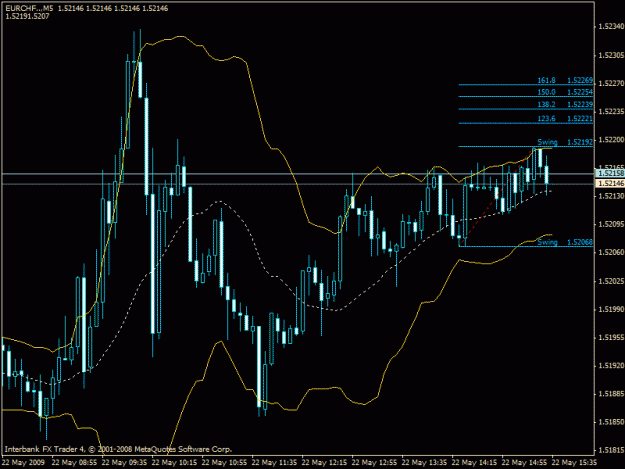
I took care of the warnings. I don't know why it is not working for you. After placing it in the indicators folder you have to close the platform and re-open it to see it in the folder. After that, just drag it on the chart and you should see something similar to the attached. Try it again.

Regards,

GF
Attached Image (click to enlarge)
Click to Enlarge

Name: fibo extensions.gif
Size: 21 KB
Attached File
File Type: mq4 Fibo Extensions.mq4   4 KB | 2,735 downloads
  • Post# 6
  • Quote
  • May 22, 2009 11:21am | Edited at 11:25am – edited to ad 4th reason
  • lawl
    Joined May 2009 | 25 Posts | Status: Member
Thank you goingforward,

I now can get it on my screen. I have a few problems, namely:

1. I would need to run multiple instances of this indicator on the chart. I can't seem to put more than one of these on a chart at a time, even if I change the number of candles it looks back for the high/low.

2. I would like a way to adjust the fib length manually by dragging the red line, when I do this it just goes back to its original location upon price changing. However, if this is not possible then I can adjust its length via the properties.

3. I would prefer the indicator not redraw itself every time price changes.

4. I can't seem to delete this indicator. Every time I do, it reappears after price changes.

If you could help out even just by telling me how to make these changes in the code, I would be very grateful.

Even if you can't help with this, thank you very much for this indicator! It is a step in the right direction for an indicator I've been needing for a long time.
  • Post# 7
  • Quote
  • May 22, 2009 12:27pm
  • goingforward
    Joined Feb 2009 | 59 Posts | Status: You can't lose what you don't have!
Quoting lawl
Thank you goingforward,

I now can get it on my screen. I have a few problems, namely:

1. I would need to run multiple instances of this indicator on the chart. I can't seem to put more than one of these on a chart at a time, even if I change the number of candles it looks back for the high/low.

Only one per chart of this particular indicator. You can add different Fibo indicators to the same chart.

2. I would like a way to adjust the fib length manually by dragging the red line, when I do this it just goes back...
I think if you want to have several instances of the same Fibs, what I would do is use the tool that comes with the platform and add as many Fibs as you wish to that particular currency chart. Customize each one with the levels/colors you want to have and then save the chart as a template. That way, when you open that currency chart with that template you will have the fibs on the screen and you can move them around as you wish. Of course, you will have to do it manually. To have the lines drawn dynamically then you need to add different fib indicators.

Now, for the above to work you must save each chart with its own template name. So, if you added the fibs to EU and then opened UJ and tried to load that template you will not see the fibs you saved under the EU template.

I am not a coder. So if anyone else here can add/expand on this, please do.

Hope this helps anyway.

GF
  • Post# 8
  • Quote
  • May 22, 2009 1:07pm
  • goingforward
    Joined Feb 2009 | 59 Posts | Status: You can't lose what you don't have!
Quoting lawl
Thank you goingforward,

I now can get it on my screen. I have a few problems, namely:

1. I would need to run multiple instances of this indicator on the chart. I can't seem to put more than one of these on a chart at a time, even if I change the number of candles it looks back for the high/low.

2. I would like a way to adjust the fib length manually by dragging the red line, when I do this it just goes back to its original location upon price changing. However, if this is not possible then I can adjust its length via the properties.

3. I...

Hi Lawl,

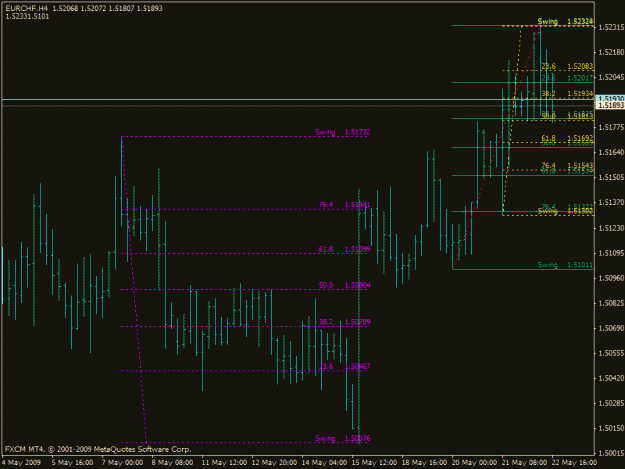
I forgot to mention: If you wanted to use the indicator I sent you earlier and you wanted to draw more than one Fib to resemble it, then all you have to do is attach it to one chart and save that chart as a template. Then when you open a new chart using that template, the fib tool that appears in the tool bar will allow you to draw each new fib to resemble the indicator without being dynamic. However, the indicator will remain active and change with each bar. So, if you did not want that you would simply remove it from the list of indicators leaving you with the fibs that you can control manually. The chart gives you an example of multiple Fibs.

Regards,

GF
Attached Image (click to enlarge)
Click to Enlarge

Name: fibo extensions2.gif
Size: 21 KB
  • Post# 9
  • Quote
  • Last Post: Jan 24, 2010 5:03am
  • fxhopper
    Joined Jan 2010 | 3 Posts | Status: Junior Member
Quoting goingforward
Hi Lawl,

I took care of the warnings. I don't know why it is not working for you. After placing it in the indicators folder you have to close the platform and re-open it to see it in the folder. After that, just drag it on the chart and you should see something similar to the attached. Try it again.

Regards,

GF
Hi goingforward,

I am looking for a dynamic FB extension and yours meet the criteria that I am looking for. I have been using MT4 for the last 3 years.

I tried downloading the link you provided above but it does not work. It comes with an exclamation mark which is quite different with all other indicators that I have sourced from this site. I am not able to get the source codes to work.

All other source codes that I have downloaded from this site are zipped files, so I simply perform the "extract" function, then the pop up window prompts for file location which is C:>Program Files>MT4>Experts>Indicators. I click Finish on "extract". Thereafter, I go to MT4, click on "Load Template", then find Experts, Indicators and the relevant files will be there.

Is there something I did wrong and is there a reason why its not a zipped file? Hope you can responde, thanks.
Thread Tools Search this Thread
Show Printable Version Show Printable Version
Email This Thread Email This Thread
Search this Thread:

Advanced Search

  • Platform Tech
  • /
  • Fibonacci extension metatrader 4
  • Reply to Thread
1 trader viewing now

©2013 Forex Factory, Inc. / Terms of Use / Privacy Policy

Forex Factory® is a registered trademark.

Connect

  • Facebook
  • Twitter
  • RSS

Company

  • About FF
  • FF Blog
  • Careers at FF
  • Advertising
  • Contact FF

Products

  • Forums
  • Trades
  • Calendar
  • News
  • Market
  • Brokers
  • Trade Explorer

Website

  • Homepage
  • Search
  • User Guide
  • Member List
  • Online Now
  • Report a Bug