Forex Factory
  • Login

  • Username: Password:
  • 9:43pm

  • Search
  • Home

  • Forums

  • Trades

  • Calendar

  • News

  • Market

  • Brokers

Options

Search
Search
Search

Subscribe to Thread

Bookmark Thread

First Page First Unread Last Page Last Post

Printable Version

Similar Threads

Am i making progress? 5 replies

How much time did it take you to make progress? 45 replies

ZSI's Progress and Accountability 6 replies

Market correction in progress? 0 replies

The monkey (in progress) 19 replies

  • Trading Systems
  • /
  • Reply to Thread
  • 78

Progress - The System

  • Last Post
  • First Unread
  •  
  • 1 2Page 3456 10
  •  
  • Post# 41
  • Quote
  • Dec 23, 2012 1:42am
  • Jurex
    Joined Mar 2012 | 128 Posts | Status: Member
3-1 Progress Panel (Session modification)

We can switch every property of our session from automatic to manual and vice/versa. When Property value is automatic, it means it is either set by the corresponding rule of the session or taken from the engine default values in your PG_Engines file. We can have a human intervention to every property of our session and change its value. When a value is switched to manual, the rule is not in charge of it anymore of it and the system will take the value set by you.

In our example below the pipstep field and the buy Trailing stop (Orange check) are shown.

Attached Image (click to enlarge)
Click to Enlarge

Name: PG_ManualSess.jpg
Size: 115 KB
  • Post# 42
  • Quote
  • Dec 23, 2012 2:03am
  • Jurex
    Joined Mar 2012 | 128 Posts | Status: Member
3-1 Progress Panel (Order Panel)


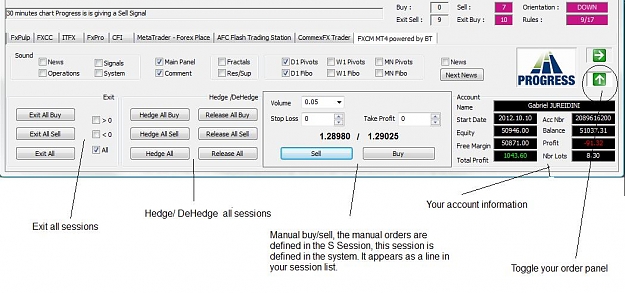
when you click on the green arrow of your panel, the window panel is expanded to show you the Order Window. In this Window you do operations on all your current sessions that are running.

You can exit all your buy trades for each session
You can exit all your sell trades for each session
and you can specify to do it if it is positif, negatif or any.

The same for Hedging.

A Manual Order Command that let you do operations outside any defined engine. The system let you see all your manual orders in a Session that it is named S and you can not perform any automatic modification because no rule is associated to it , but you can still do basic operations like exit, hedging or modifying the stoploss or takeprofit. All manual orders are seen in this session

And finally your account information.

Attached Image (click to enlarge)
Click to Enlarge

Name: PG_Order.jpg
Size: 88 KB
  • Post# 43
  • Quote
  • Dec 23, 2012 2:23am | Edited at 2:37am
  • Jurex
    Joined Mar 2012 | 128 Posts | Status: Member
3-1 Progress Panel (Engines Panel)


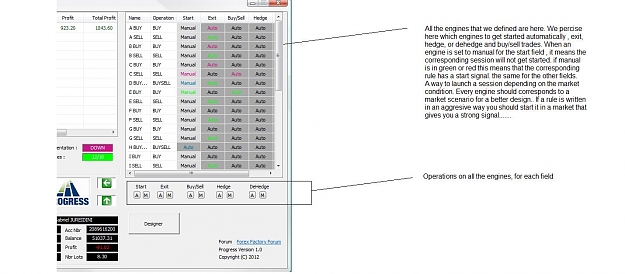
When you click on the horizontal arrow of your panel now, the window panel is expanded to show you the engines window. In this window you do operations on the states of your defined engines.

Here a picture

Attached Image (click to enlarge)
Click to Enlarge

Name: PG_Engines.jpg
Size: 117 KB


Still to show you the Designer. The designer (For the moment) allows you to define your engines, your rules, and the sound filters of your preferred signals. I will do this later because I am still working on it and thinking of a way to graphically program your rules without having to edit a lot. . For the moment I continue to explain how to program a rule.
  • Post# 44
  • Quote
  • Jan 4, 2013 2:00am | Edited at 2:16am
  • Jurex
    Joined Mar 2012 | 128 Posts | Status: Member
4 Simplest Rule (without Indicator !)


As you know Indicators help to give an idea of the current market tendancy but it is not everything. You can not rely on indicators only to have a winning strategy. You should combine it with logic and money management. I will show in this example that You can have a winning strategy without relying on a particular indicator just by following the market.


Here is the simplest example that you can have and with time you finish by having a positif result. Now by starting the session at a certain time can help a lot by reducing the time for having a positif result.

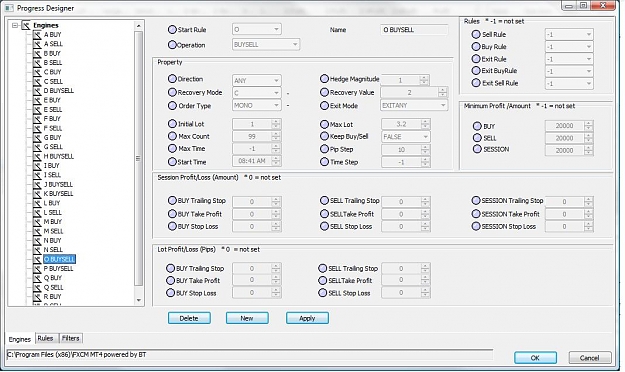
First define your engine this way , let's name it O :

Name : O BUYSELL
Operation : BUYSELL
StartRule : O
BuyRule : -1
SellRule :-1
ExitBuyRule : -1
ExitSellRule : -1
ExitRule :-1
ILot : 1
MaxLot : 1
MaxCount :99
Direction :ANY
RecoveryMode : C
RecoveryValue : 1
PipStep : 10
TimeStep : -1
OrderType : MONO
KeepBuySell : 0
ExitMode :EXITANY
MaxTime : -1
StartTime : -1
HedgeMagnitude : 1
MinProfit : 20000
BuyMinProfit : 20000
SellMinProfit : 20000
TP :0
TS : 0
SL : 0
BuyTP :0
BuyTS :0
BuySL : 0
SellTP : 0
SellTS : 0
SellSL : 0
BuyLotTP : 0
BuyLotTS :0
BuyLotSL : 0
SellLotTP : 0
SellLotTS :0
SellLotSL : 0


Let's examine the fields : We just specify the start rule which is O.

We don't define buy or sell rules neither exit rules , the exit will be done manually when we reach a positif result
We put BuyMinProfit and SellMinProfit and MinProfit to 20000 only to prevent the session from exiting as we want to do it manually.

The RecoveryMode is C that means constant with a Lot size of 1
Direction ANY that means when we have 10 pips under the lowest Bid of the session we sell and we have 10 pips above the highest Ask of the session we buy.

Now the engine is started with

Set_Rule (OP_BUYSELL, T_START, R_O, P_SIGNAL);

As there is no condition it means all the time .


The session will start by doing a combined Buy/Sell Trade and everytime we have 10 pips down we do a sell and a 10 pips upwards from the highest point we do a buy. The backward of this method is in a soon turning market.


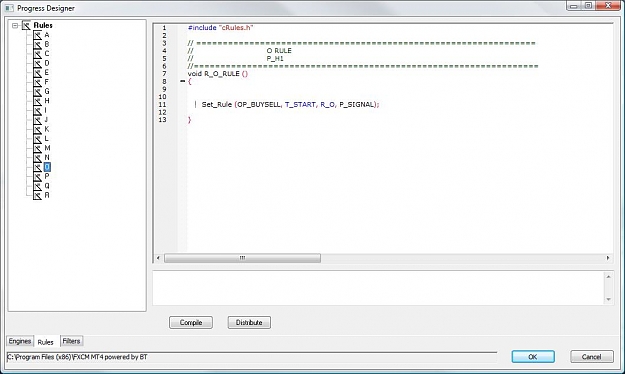
Here how you define it in the designer :


O Rule:

Attached Image (click to enlarge)
Click to Enlarge

Name: O-rule.jpg
Size: 61 KB


O Engine :


Attached Image (click to enlarge)
Click to Enlarge

Name: O-engine.jpg
Size: 112 KB


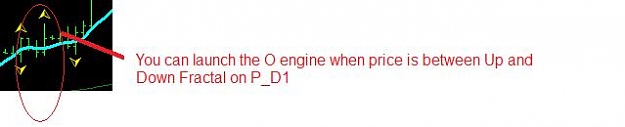
You can start the engine when daily price is ranging between up ad down fractals for instance as you don't know which one it is going to break :

Attached Image (click to enlarge)
Click to Enlarge

Name: O-launch.jpg
Size: 11 KB
  • Post# 45
  • Quote
  • Jan 4, 2013 2:49am | Edited at 3:13am
  • Jurex
    Joined Mar 2012 | 128 Posts | Status: Member
4-1 Discussion


A lot of traders rely on a a preferred indicator or on a single system or even a single strategy to make money. And A lot of them fail at a time because they have one schema in head and they wait that the market to react as they immagine it. Or in REALITY things are different. I worked a lot on many indicators and systems and YES Indicators are good but you should know when to use them and when you should not for the simple reason is to optimize your gain. (Even if finally you exit by a gain you should also count the time the system spent to do it)


To give you an example , the TMA extreme which indicates that the market is reversing should not be used unless you are sure that it is not preparing for a big drop or gain. Because once you have a buy signal indicating the marker is reversing the same indicator can show you that it is in a bear mode that can last several days. Can we say TMA system is not good ? NO , the reality is that we all know the market will react at some point but we should analyse the others indicators also to be sure that the bullish or bearish phase of the market is completely finished.


Indicators are here to give you a picture of the system and are not future teller.


In fact Fractals and Support/Resistance are the best indicators you can have , because it represents the true Ask/Bid of the market. These are the points where players get involved in the battle.

All this to tell you :

You should have many strategies prepared in your system that each is adapted to a market picture. When you have them ready in your system you can have your system optimized for all kind of market. Even a martingale strategy can be used.


So the question is which indicators to use then ?
I don't have an easy response to that but the way I do it is so :

First I look to P_D1 and H4 Periods :

The indicators that I watch are :

Resistance Support for P_D1 and H4 and fractals. If these are just broken that means we have already a clear signal.
After I look to the Fast Trix of the THV System. THV Sytem is very sensible to market changes so this what you should watch continueously. If Fast Trix and Slow Trix are in the same direction it is very clear signal.
Third I look at the extreme Spike.

When you have the Extreme Spike UP and Fast Trix UP and Slow Trix UP , you can tell that you have a verry bullish trend. (At least we are sure we will not have a hard drop ;-)) so whenever TMA is indicating a bear signal at that time , we should ignore it.

After I look at the Pivots line for P_D1 , P_W1, and P_MN (daily, weekly and monthly)
  • Post# 46
  • Quote
  • Jan 5, 2013 6:38am
  • Jurex
    Joined Mar 2012 | 128 Posts | Status: Member
4-2 Progress Indicator

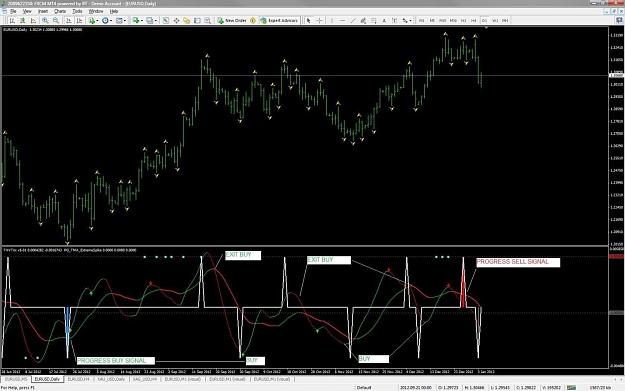
Progress Indicator works on Extreme Spike and THV fast trix ans slow trix.

It gives a BUY signal whenever we have an Extreme Spike down and fast trix up and slow trix up.

It gives a Exit BUY signal if we have :
  1. a minor Extreme Spike up and fast trix down and slow trix down OR
  2. an Extreme Spike up and fast trix down.
It gives a SELL signal whenever we have an Extreme Spike up and fast trix down and slow trix down.

It gives a Exit SELL signal if we have :
  1. a minor Extreme Spike down and fast trix up and slow trix up OR
  2. an Extreme Spike down and fast trix up.

look at the shema below :

Attached Image (click to enlarge)
Click to Enlarge

Name: pro-ind.jpg
Size: 127 KB


and so what's next ? Let us see how this indicator combined with others can give you a strong signal for entering a trade.
  • Post# 47
  • Quote
  • Jan 5, 2013 6:50am
  • Jurex
    Joined Mar 2012 | 128 Posts | Status: Member
4-3 PG_System

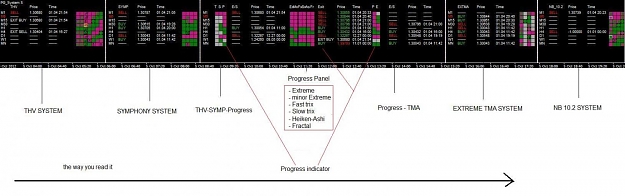
The PG_System indicator gives you all signals related to the systems included in Progress.

look a the picture below :

Attached Image (click to enlarge)
Click to Enlarge

Name: pro-system.jpg
Size: 84 KB


Next I'll explain how I read this panel and how we can write rules combining all of them
  • Post# 48
  • Quote
  • Jan 8, 2013 5:36am | Edited at 6:19am
  • Jurex
    Joined Mar 2012 | 128 Posts | Status: Member
Attached Image (click to enlarge)
Click to Enlarge

Name: read-system.jpg
Size: 228 KB


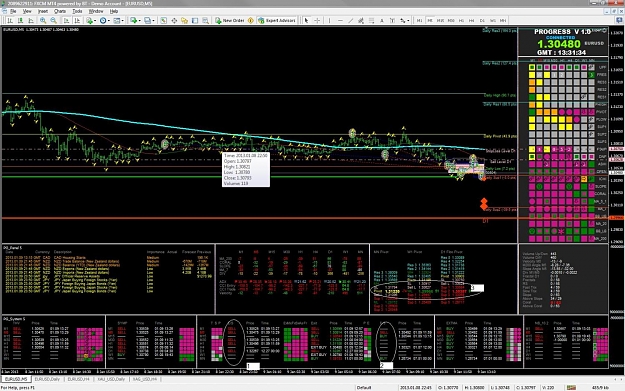
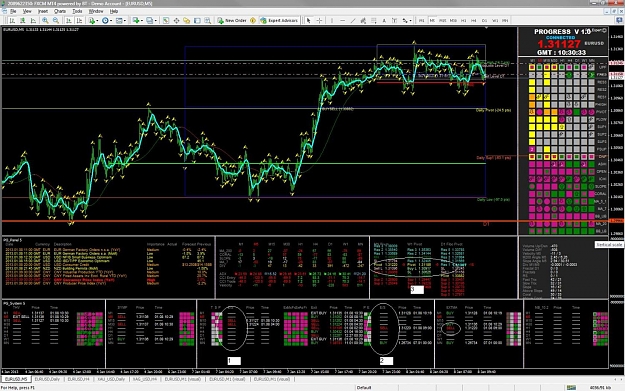
In the picture above you can see 3 rectangles from 1 to 3
this is where you look.

First you look at the column 1, here is a clear signal telling us if we are in a Bullish or Bearish trend.

the column 1 :
  1. gives a BUY signal if either THV system or Symphony system is giving a BUY signal and Progress Indicator (see above) is givin a BUY Signal.
  2. gives a SELL signal if either THV system or Symphony system is giving a SELL signal and Progress Indicator (see above) is givin a SELL Signal.
than you look at the column marked 2. Here you can see if it is the moment to apply the extreme system that tells if the market is reversing.

the column 2 :
  1. gives a BUY signal if TMA is giving a BUY signal and Progress Indicator is giving a BUY Signal.
  2. gives a SELL signal if TMA is giving a SELL signal and Progress Indicator is giving a SELL Signal.

in the example above (which is the actual market as I am writing) we have 2 SELL signals in column 1 and a SELL signal for period H1 and BUY signal for period MN in column 2.

the SELL signal for H1 confirms that we can apply the TMA Sell signal as the market is not anymore in a bullish trend (column1).


So we have a clear signal that a SELL can be traded ... but wait

in the rectangle 3 we look at the pivots monthly and weekly and our EUR/USD price is actually around these levels. So it is a very crucial point where we should wait to have a clear break.

So my reading is that we can perfrom a SELL signal because market is indicating that it is going to reverse but I should wait a little to have a clear break of my Pivots levels.
  • Post# 49
  • Quote
  • Jan 8, 2013 9:30am
  • Jurex
    Joined Mar 2012 | 128 Posts | Status: Member
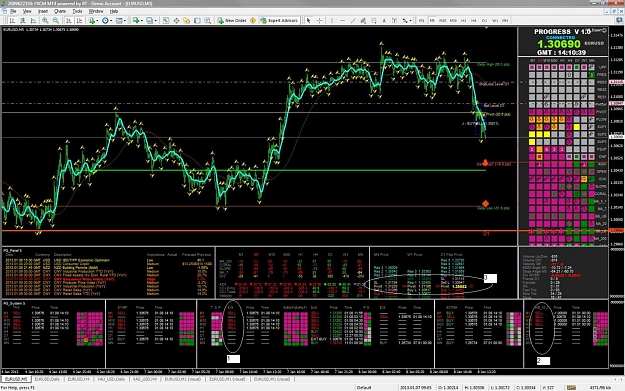
Actually we are here, as we see the price broke the pivots level and our sell signal was correct.Look at the market now :


Attached Image (click to enlarge)
Click to Enlarge

Name: read-system1.jpg
Size: 231 KB


We don't have a TMA H1 SELL signal as we are far from the upper band and we should now analyse our exit sell. In column 1 the market shows a bear trend for all periods under H4. Our previous column 2 don't show any extreme anymore and our new 2 column show us SELL signals . This column is related to naningbob system that is highly correlated to pivots lines. So we will stay in a sell mode till an extreme appears somewhere or when daily pivot support is touched.

All this to explain to you the way we read the system panel : Left to Right.
  • Post# 50
  • Quote
  • Jan 9, 2013 1:24am | Edited at 8:03am
  • Jurex
    Joined Mar 2012 | 128 Posts | Status: Member
4-3 Engine Example using Progress Indicator

As we saw previously , the progress indicator help us to confirm if a market is in a continuous bullish/bearish trend or is reversing. As it works on an extreme indicator and a trend indicator, it is a good idea to mix it with all kind of systems (Bearish/Bull indicators or with OverSold/OverBought or Extremes indicators)


Let's build a concrete example related to this indicator alone and then we complete it with others indicators :

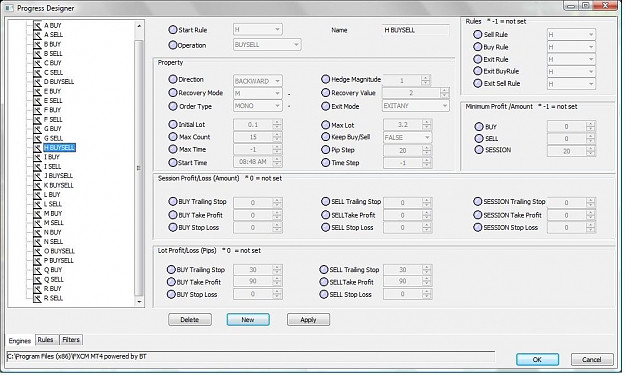
the idea is to build an engine that can trade in some cases in BACKWARD mode and in other cases in ANY mode and this depending if we have the same Progress trade signal on P_H4 and P_D1 or not.

if I have a BUY signal for the two periods I want an agressive way of buying let's say every 5 minutes ignoring the distance between the trades.
I want to multiply every time my trade by 2 for each new trade !!!!! (yes) and my maxcount is 15
My Initial lot is 0.1 and my maxlot is 3.2
Operations on trades can be buy or sell.
Trailing stop for every trade is 30 pips and
Take profit on every trade is 90 pips.

So here how I define my Engine let's call it H :

Attached Image (click to enlarge)
Click to Enlarge

Name: H-engine.jpg
Size: 111 KB


the default value for Direction is BACKWARD but we will see how we change it in the H Rule.

Let's see how we write the H Rule now :

My start rule :

Set_Rule (OP_BUYSELL, T_START, R_H, P_SIGNAL);


As my Maxcount is 15 I want that every time it exits from the buy trades it initials the next lot to the initial lot value, here how we write it :


if (RValue (OP_BUYSELL, T_BUYNBRTRADE, R_H) == 0)
Set_Rule (OP_BUYSELL, T_BUYLOT, R_H, P_SIGNAL, RValue (OP_BUYSELL, T_ILOT, R_H));

if (RValue (OP_BUYSELL, T_SELLNBRTRADE, R_H) == 0)
Set_Rule (OP_BUYSELL, T_SELLLOT, R_H, P_SIGNAL, RValue (OP_BUYSELL, T_ILOT, R_H));


Now as my default direction is BACKWARD, I precise that if I have a BUY or SELL signal on my three periods P_M5, P_M15, P_M30 , I set the pipstep value to -1 (that means no pipstep and the BACKWARD is ignored) and I set my buy or sell interval between two trades to 5 minutes .
Here how it is written :

if (AndS (FTRIX, S_BUY, P_M5, P_M15, P_M30) || AndS (FTRIX, S_SELL, P_M5, P_M15, P_M30))
{
Set_Rule (OP_BUYSELL, T_PIPSTEP, R_H, P_SIGNAL, -1);
Set_Rule (OP_BUYSELL, T_TIMESTEP, R_H, P_SIGNAL, 5);
}


Let's examine when we perform the BUY trades :

if (AndS (PROGRESS, S_BUY, P_D1))
{
if (AndS (FTRIX, S_BUY, P_M15))
Set_Rule (OP_BUY, T_STATUS, R_H, P_SIGNAL);


if (!AndS (PROGRESS, S_BUY, P_H4))
{
Set_Rule (OP_BUYSELL, T_PIPSTEP, R_H, P_SIGNAL, 20);
Set_Rule (OP_BUYSELL, T_TIMESTEP, R_H, P_SIGNAL, -1);
}
}


Notice here that I put back the default values of my engine in case we only have a BUY signal on P_D1.

to resume here how the buying is done :
  1. we do a buy every 5 minutes in case we have FTRIX BUY signal on P_M5 P_M15 and P_M30 and we have a PROGRESS BUY signal for P_H4 and P_D1.
  2. we do a backward buy for every 20 pipsteps in case we have a PROGRESS BUY signal on P_D1 and FTRIX BUY signal on P_M15
The exit condition for my BUY trades :


if (AndS (FTRIX, S_EXIT_BUY, P_M15) && RValue (OP_BUYSELL, T_PROFITBUY, R_H) > 0)
Set_Rule (OP_CLOSE_BUY, T_STATUS, R_H, P_SIGNAL);


The above means that I close all my buy trades in case I have positif profit and FTRIX gives an EXIT_BUY signal.
If you notice I used the OP_CLOSE_BUY operator and not the OP_EXIT_BUY. The difference here is that when I close my buy trades I can do again buying in the same session.

And the profit rules :


if (RValue (OP_BUYSELL, T_PROFITBUY, R_H) > 1500)
{
Set_Rule (OP_BUYSELL, T_BUYTS, R_H, P_SIGNAL, 200);
}


if (RValue (OP_BUYSELL, T_PROFIT, R_H) > 3000)
{
Print ("We can exit");
Set_Rule (OP_BUYSELL, T_TS, R_H, P_SIGNAL, 400);
}


This means that if the profit on my session for the buy trades are above 1500 (dollars) I put a trailing stop on the amount of all my buy trades to 200 (dollars). This should lock a gain of 1300 dollars minimum and we close the buy trades.

the second statement means that if the profit on all my session (buy and sell) is above 3000 (dollars) I put a trailing stop to 400 to all my session. This should lock 2600 minimum for my session and we close all the trades of the session.
  • Post# 51
  • Quote
  • Jan 9, 2013 3:18am | Edited at 8:16am
  • Jurex
    Joined Mar 2012 | 128 Posts | Status: Member
4-3 Engine Example using Progress Indicator (continued)


Here when I hedge my Buy Trades :

if (RValue (OP_BUYSELL, T_BUYNBRLOTS, R_H) > 0 &&
RValue (OP_BUYSELL, T_PROFITBUY, R_H) < 0 &&
AndS (PROGRESS, S_SELL, P_D1, P_H4))
Set_Rule (OP_HEDGE_BUY, T_STATUS, R_H, P_SIGNAL);

I hedge my buy trades in the case we have a PROGRESS SELL signal on my two periods P_H4 and P_D1 and I exit my hedging in the opposite case :

if (AndS (PROGRESS, S_BUY, P_D1, P_H4) && AndPS (PROGRESS, S_BUY, P_H4) &&
RValue (OP_BUYSELL, T_HEDGEPROFIT, R_H) > 0)
Set_Rule (OP_HEDGE_EXIT_BUY, T_STATUS, R_H, P_SIGNAL);


AndPS here is to confirm my signal. This is the signal of the previous bar for the period P_H4.


Notice that here we are using a trailing stop and take profit on the session and on the buy trades and the sell trades. We have also put a trailing stop of 30 pips on every trade and a take profit of 90 pips. (lokk at the engine definition).

If we wanted to define these in the H rule we add to the code :


Set_Rule (OP_BUYSELL, T_BUYLOTTS, R_H, P_SIGNAL, 30);
Set_Rule (OP_BUYSELL, T_BUYLOTTP, R_H, P_SIGNAL, 90);
Set_Rule (OP_BUYSELL, T_SELLLOTTS, R_H, P_SIGNAL, 30);
Set_Rule (OP_BUYSELL, T_SELLLOTTP, R_H, P_SIGNAL, 90);

it is the same.

Now in case of having a maxcount of buy trades and a maxcount of sell trades which is 15 in our example, I want to remove the take profit and the trailing stop for each trade here how I write it :


if (RValue (OP_BUYSELL, T_SELLNBRTRADE, R_H) == RValue (OP_BUYSELL , T_MAXCOUNT, R_H)&& // hedge is automatic here .. so check trend
RValue (OP_BUYSELL, T_BUYNBRTRADE, R_H) == RValue (OP_BUYSELL , T_MAXCOUNT, R_H))
{
Set_Rule (OP_BUYSELL, T_BUYLOTTS, R_H, P_SIGNAL, 0);
Set_Rule (OP_BUYSELL, T_BUYLOTTP, R_H, P_SIGNAL, 0);
Set_Rule (OP_BUYSELL, T_SELLLOTTS, R_H, P_SIGNAL, 0);
Set_Rule (OP_BUYSELL, T_SELLLOTTP, R_H, P_SIGNAL, 0);
}


Here is the complete code which will be in the R_H.cpp file :

#include "cRules.h"
// =================================== =============================
// H RULE
//
//=================================== ==============================
void R_H_RULE ()
{

Set_Rule (OP_BUYSELL, T_START, R_H, P_SIGNAL);


if (RValue (OP_BUYSELL, T_BUYNBRTRADE, R_H) == 0)
Set_Rule (OP_BUYSELL, T_BUYLOT, R_H, P_SIGNAL, RValue (OP_BUYSELL, T_ILOT, R_H));

if (RValue (OP_BUYSELL, T_SELLNBRTRADE, R_H) == 0)
Set_Rule (OP_BUYSELL, T_SELLLOT, R_H, P_SIGNAL, RValue (OP_BUYSELL, T_ILOT, R_H));


if (AndS (FTRIX, S_BUY, P_M5, P_M15, P_M30) || AndS (FTRIX, S_SELL, P_M5, P_M15, P_M30) ||
(AndR (OP_BUY, T_STATUS, R_Q) && AndS (UPFRACTAL, S_ABOVE, P_D1)) ||
(AndR (OP_SELL, T_STATUS, R_Q) && AndS (DOWNFRACTAL, S_BELOW, P_D1)))
{
Set_Rule (OP_BUYSELL, T_PIPSTEP, R_H, P_SIGNAL, -1);
Set_Rule (OP_BUYSELL, T_TIMESTEP, R_H, P_SIGNAL, 5);
}

if (RValue (OP_BUYSELL, T_SELLNBRTRADE,R_H) == 0 &&
RValue (OP_BUYSELL, T_BUYNBRTRADE, R_H) == 0 &&
RValue (OP_BUYSELL, T_HEDGED, R_H) == 0 &&
RValue (OP_BUYSELL, T_PROFIT, R_H) > 0)
Set_Rule (OP_EXIT, T_STATUS, R_H, P_SIGNAL);

if (AndS (PROGRESS, S_BUY, P_D1))
{
if (AndS (FTRIX, S_BUY, P_M15))
Set_Rule (OP_BUY, T_STATUS, R_H, P_SIGNAL);
if (!AndS (PROGRESS, S_BUY, P_H4))
{
Set_Rule (OP_BUYSELL, T_PIPSTEP, R_H, P_SIGNAL, 20);
Set_Rule (OP_BUYSELL, T_TIMESTEP, R_H, P_SIGNAL, -1);
}
}
else
if (AndS (PROGRESS, S_SELL, P_D1))
{
if (AndS (FTRIX, S_SELL, P_M15))
Set_Rule (OP_SELL, T_STATUS, R_H, P_SIGNAL);
if (!AndS (PROGRESS, S_SELL, P_H4))
{
Set_Rule (OP_BUYSELL, T_PIPSTEP, R_H, P_SIGNAL, 20);
Set_Rule (OP_BUYSELL, T_TIMESTEP, R_H, P_SIGNAL, -1);
}
}
else // The same thing between P_H4 and P_H1
{
if (AndS (PROGRESS, S_SELL, P_H4))
{
if (AndS (FTRIX, S_SELL, P_M15))
Set_Rule (OP_SELL, T_STATUS, R_H, P_SIGNAL);

if (!AndS (PROGRESS, S_SELL, P_H1))
{
Set_Rule (OP_BUYSELL, T_PIPSTEP, R_H, P_SIGNAL, 20);
Set_Rule (OP_BUYSELL, T_TIMESTEP, R_H, P_SIGNAL, -1);
}
}
else
if (AndS (PROGRESS, S_BUY, P_H4))
{
if (AndS (FTRIX, S_BUY, P_M15))
Set_Rule (OP_BUY, T_STATUS, R_H, P_SIGNAL);
if (!AndS (PROGRESS, S_BUY, P_H1))
{
Set_Rule (OP_BUYSELL, T_PIPSTEP, R_H, P_SIGNAL, 20);
Set_Rule (OP_BUYSELL, T_TIMESTEP, R_H, P_SIGNAL, -1);
}
}
else
{
if (AndS (PROGRESS, S_SELL, P_H1))
{
if (AndS (FTRIX, S_SELL, P_M5))
Set_Rule (OP_SELL, T_STATUS, R_H, P_SIGNAL);

if (!AndS (PROGRESS, S_SELL, P_M30))
{
Set_Rule (OP_BUYSELL, T_PIPSTEP, R_H, P_SIGNAL, 20);
Set_Rule (OP_BUYSELL, T_TIMESTEP, R_H, P_SIGNAL, -1);
}
}
else
if (AndS (PROGRESS, S_BUY, P_H1))
{
if (AndS (FTRIX, S_BUY, P_M5))
Set_Rule (OP_BUY, T_STATUS, R_H, P_SIGNAL);
if (!AndS (PROGRESS, S_BUY, P_M30))
{
Set_Rule (OP_BUYSELL, T_PIPSTEP, R_H, P_SIGNAL, 20);
Set_Rule (OP_BUYSELL, T_TIMESTEP, R_H, P_SIGNAL, -1);
}
}
if (AndS (FTRIX, S_EXIT_BUY, P_M5) && RValue (OP_BUYSELL, T_PROFITBUY, R_H) > 0)
Set_Rule (OP_CLOSE_BUY, T_STATUS, R_H, P_SIGNAL);

if (AndS (FTRIX, S_EXIT_SELL, P_M5) && RValue (OP_BUYSELL, T_PROFITSELL, R_H) > 0)
Set_Rule (OP_CLOSE_SELL, T_STATUS, R_H, P_SIGNAL);
}
}


// EXIT RULES


if (AndS (FTRIX, S_EXIT_BUY, P_M15) && RValue (OP_BUYSELL, T_PROFITBUY, R_H) > 0)
Set_Rule (OP_CLOSE_BUY, T_STATUS, R_H, P_SIGNAL);

if (AndS (FTRIX, S_EXIT_SELL, P_M15) && RValue (OP_BUYSELL, T_PROFITSELL, R_H) > 0)
Set_Rule (OP_CLOSE_SELL, T_STATUS, R_H, P_SIGNAL);

// PROFIT RULES

if (RValue (OP_BUYSELL, T_PROFITBUY, R_H) > 1500)
{
Set_Rule (OP_BUYSELL, T_BUYTS, R_H, P_SIGNAL, 200);
}
if (RValue (OP_BUYSELL, T_PROFITSELL, R_H) > 1500)
{
Set_Rule (OP_BUYSELL, T_SELLTS, R_H, P_SIGNAL, 200);
}

if (RValue (OP_BUYSELL, T_PROFIT, R_H) > 3000)
{
Set_Rule (OP_BUYSELL, T_TS, R_H, P_SIGNAL, 400);
}
// HEDGE RULES


if (RValue (OP_BUYSELL, T_BUYNBRLOTS, R_H) > 0 &&
RValue (OP_BUYSELL, T_PROFITBUY, R_H) < 0 &&
AndS (PROGRESS, S_SELL, P_D1, P_H4))
Set_Rule (OP_HEDGE_BUY, T_STATUS, R_H, P_SIGNAL);
if (RValue (OP_BUYSELL, T_SELLNBRLOTS, R_H) > 0 &&
RValue (OP_BUYSELL, T_PROFITSELL, R_H) < 0 &&
AndS (PROGRESS, S_BUY, P_D1, P_H4))
Set_Rule (OP_HEDGE_SELL, T_STATUS, R_H, P_SIGNAL);


if (AndS (PROGRESS, S_BUY, P_D1, P_H4) && AndPS (PROGRESS, S_BUY, P_H4) &&
RValue (OP_BUYSELL, T_HEDGEPROFIT, R_H) > 0)
Set_Rule (OP_HEDGE_EXIT_BUY, T_STATUS, R_H, P_SIGNAL);

if (AndS (PROGRESS, S_SELL, P_D1, P_H4) && AndPS (PROGRESS, S_SELL, P_H4) &&
RValue (OP_BUYSELL, T_HEDGEPROFIT, R_H) > 0 )
Set_Rule (OP_HEDGE_EXIT_SELL, T_STATUS, R_H, P_SIGNAL);

if (RValue (OP_BUYSELL, T_SELLNBRTRADE, R_H) == RValue (OP_BUYSELL , T_MAXCOUNT, R_H) &&
RValue (OP_BUYSELL, T_BUYNBRTRADE, R_H) == RValue (OP_BUYSELL , T_MAXCOUNT, R_H))
{
Set_Rule (OP_BUYSELL, T_BUYLOTTS, R_H, P_SIGNAL, 0);
Set_Rule (OP_BUYSELL, T_BUYLOTTP, R_H, P_SIGNAL, 0);
Set_Rule (OP_BUYSELL, T_SELLLOTTS, R_H, P_SIGNAL, 0);
Set_Rule (OP_BUYSELL, T_SELLLOTTP, R_H, P_SIGNAL, 0);
}

}


To test it go to Designer:

Define the engine file H as in the picture in Engine Tab then go to rule tab and do a copy paste of the code I just put in H rule.

Your demo account should be 50000 and launch it in manual when you are between the UP and DOWN fractals for D1 and in automatic when price is outside the 2 fractals. It should give a very good result.


  • Post# 52
  • Quote
  • Jan 9, 2013 8:40am
  • Jurex
    Joined Mar 2012 | 128 Posts | Status: Member
4-4 Rapidly Another example

Here is a picture of the market as I am writing .
Attached Image (click to enlarge)
Click to Enlarge

Name: sys-example2.jpg
Size: 223 KB


In Column 1 we can clearly see that we are in a bearish trend

In column 2 we have a extreme signal for a the period M15 , we ignore it.

In column 3 we see that price is 74 pips under the monthly pivot and 51 pips above the weekly low.


Action : Do a Manual SELL and exit when WL is touched and put a stop loss at the daily stop loss fibo level that you can see in Pink which is 1.3075
  • Post# 53
  • Quote
  • Jan 10, 2013 1:12pm
  • Jurex
    Joined Mar 2012 | 128 Posts | Status: Member
5- Discussion

The majority of traders were Bear on the EUR/USD as you can see it actually on the forum :


Attached Image


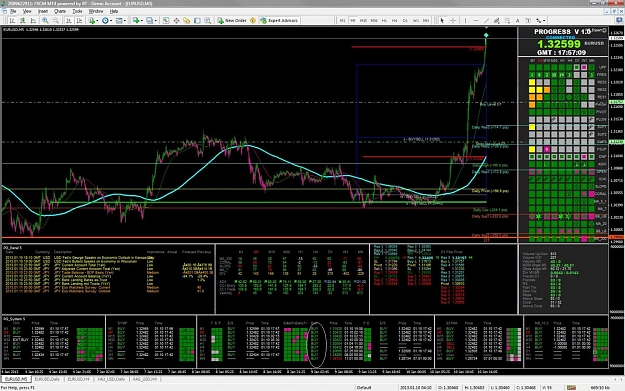
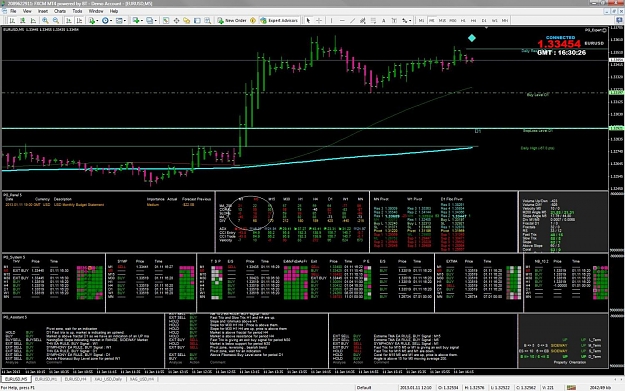
my D1 PROGRESS Signal has just given me a BUY Signal which is a strong signal. All PROGRESS periods are in a BUY mode look at the white ellipse in the next picture.... The market is indicating a long BULL trend.

Attached Image (click to enlarge)
Click to Enlarge

Name: system3.jpg
Size: 223 KB


The thing here is that yesterday we were around the Monthly pivot and the weekly pivot. It brokes down a little and it rebounds. Actually even the TMA Extreme are BULL under the H1 period and the NB_10.2 system has given me also BUY Signals for all periods under the D1 period (as we are above all the pivots).
  • Post# 54
  • Quote
  • Jan 11, 2013 2:24am | Edited at 2:40am
  • Jurex
    Joined Mar 2012 | 128 Posts | Status: Member
5-1 Working with angles

The angle of an indicator like MA or any indicator that works on average is the best and maybe the simplest way to know the tendancy of a market. Simple because you can see the movement of the market in observing the price , the moving average and the distance between them.

In my previous post I talked about these functions AngleAbove and AngleBelow, let's look at it now :


AngleAbove (MA_7, 10, P_M5)

if the function above is true , this means that the angle of the moving average (7 period) for the period P_M5 is above 10.

AngleBelow (MA_200, -10, P_M5) means that the angle of the moving average with 200 period is under -10.

the angle here is between the horizontal and the line that is tangente to the moving average. We calculate this by taking 7 bars back.


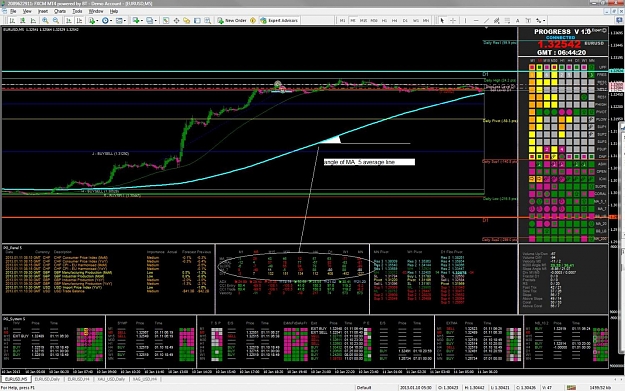
let's see it in picture for the period MA_200 (in turquoise) for te period M5 :

Attached Image (click to enlarge)
Click to Enlarge

Name: angles.jpg
Size: 219 KB


In the panel which is encapsulated by a whith ellipse it shows the angles for MA_200, CORAL, SLOPE and MA_7 for each period.

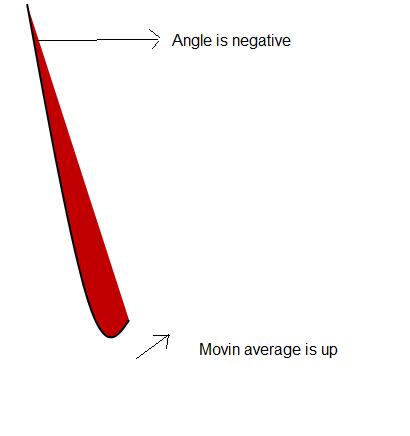
Negative angle means the average line is down oriented and positif up oriented.

Red means the previous angle is bigger thant the current angle and green means that the angle is increasing.
When it is in white this means that the moving average is turning. (I call it angle divergence ) let's see what it means :

We have a moving average that is indicating an up trend but the angle is negative or indicating a down trend but the angle is positif !!

so how we can have this ? look at the next picture and you understand , so here we have a nice way to see that the market is turning. In the panel you can see it when angles are in white.
Attached Image

You use this function in your rule code to test it :

bool AngleDivergence (int Object, int period)


The body of this fucntion is simple :

bool AngleDivergence (int Object, int period)
{
return ((AndS (Object, S_UP, period) && AngleBelow (Object, 0, period)) ||
(AndS (Object, S_DOWN, period) && AngleAbove (Object, 0, period)));
}

If you look in the panel you can see DIV which is the indicator DIVERGENCE that gives the distance between MA_7 and MA_200. (nothing to do with the Angle divergence, I should call it maybe DISTANCE_7-200 but it gives us the position of moving average 7 / to the Moving average 200.

In my next example I will show you a rule that works on angles only.
  • Post# 55
  • Quote
  • Jan 11, 2013 11:44am | Edited at 12:16pm
  • Jurex
    Joined Mar 2012 | 128 Posts | Status: Member
5-2 Rule on Angles

Let's define our engine G, we will have a BUY engine and a SELL engine for the rule G. This is a dangerous engine as we use a martingale so to use only in a very bull market like the one we have actually or to use it with another recovery mode . (I will talk about all the recovery modes later).


I'll just put the BUY engine , for the SELL engine it is the same.

My BUY Engine properties are defined as in the picture below.

Operation : OP_BUY (only)
RecoveryMode : M (Multiplier)
RecoveryValue : 2
InitialLot : 0.1
MaxLot : 3.2
MaxCount : 6
PipStep : -1 (No pip step)
TimeStep : -1 (No time step)
and
BuyMinProfit : -1 (no minimum profit so we can exit with a loose)


Attached Image (click to enlarge)
Click to Enlarge

Name: angle-example.jpg
Size: 112 KB


Now let's write our rule :

we want that the engine start when I have this conditions met :

if (AndS (MA_200, S_ABOVE, P_M1) &&
AngleAbove (MA_200, 10, P_M1) &&
AngleAbove (MA_200, 5, P_M5) &&
SValue (DIVERGENCE, S_CURRENT, P_M1) >= 0.0007)
{
Set_Rule (OP_BUY, T_START, R_G, P_SIGNAL);
}

It means if my price is above the 200 Moving average for the period M_1 and if the angle of this moving average is greater than 10 and the angle of the 200 moving average of the periode P_M5 (5 minute) is greater than 5 and the distance between the 7 moving average and the 200 Moving average is bigger than 0.0007 (7 pips) I start my G engine.


My Buy rule is the same but as I didn't mention any Pipstep neither Timestep the buying will be done on every tick so let's write something to limit fix a time between the buy trades .


if (RValue (OP_BUY, T_BUYNBRTRADE, R_G) >= 3)
Set_Rule (OP_BUY, T_TIMESTEP, R_G, P_SIGNAL, 2);

Here I fix 2 minutes after the 2 first trades.


My exit rule will be :

if (SValue (DIVERGENCE, S_CURRENT, P_M1) <= 0)
{
Set_Rule (OP_EXIT_BUY, T_STATUS, R_G, P_SIGNAL);
}


this means when the 7 moving average touch the 200 moving average for the period M1 I exit.


Let's add another exit rule :


if (AndS (PROGRESS, S_EXIT_BUY, P_D1) )
{
Set_Rule (OP_EXIT_BUY, T_STATUS, R_G, P_SIGNAL);
}

I just add this exit rule to show you that we can have many statements corresponding to a rule (exit , buy, ..). If one condition is met the rule is triggered.

Here the exit is done with no minimum profit so we can exit with a loose.


Here is a picture of the market actually and the ellipse corresponds to the angles for perios M1 and M5.

Attached Image (click to enlarge)
Click to Enlarge

Name: angle-example1.jpg
Size: 205 KB


And here is the code for G BUY engine and G Sell engine , with hedge rules and things already seen :


#include "cRules.h"

// =================================== =============================
// G RULE
// P_M1 (ANGLE M1 M5 + DIVERGENCE)
//=================================== ==============================
void R_G_RULE ()
{
double D_BuySell = 0.0007;
double D_StayOut = 0.0079;
if (RValue (OP_BUY, T_BUYNBRTRADE, R_G) >= 3)
Set_Rule (OP_BUY, T_TIMESTEP, R_G, P_SIGNAL, 2);
else
Set_Rule (OP_BUY, T_TIMESTEP, R_G, P_SIGNAL, 2);
if (RValue (OP_SELL, T_SELLNBRTRADE, R_G) >= 3)
Set_Rule (OP_SELL, T_TIMESTEP, R_G, P_SIGNAL, 2);
else
Set_Rule (OP_SELL, T_TIMESTEP, R_G, P_SIGNAL, 2);

if (AndS (MA_200, S_ABOVE, P_M1) &&
AngleAbove (MA_200, 10, P_M1) &&
AngleAbove (MA_200, 5, P_M5) &&
SValue (DIVERGENCE, S_CURRENT, P_M1) >= D_BuySell)
{
Set_Rule (OP_BUY, T_START, R_G, P_SIGNAL);
Set_Rule (OP_BUY, T_STATUS, R_G, P_SIGNAL);
}

if (AndS (MA_200, S_BELOW, P_M1) &&
AngleBelow (MA_200, -10, P_M1) &&
AngleBelow (MA_200, -5, P_M5) &&
SValue (DIVERGENCE, S_CURRENT, P_M1) <= (D_BuySell*(-1)))
{
Set_Rule (OP_SELL, T_START, R_G, P_SIGNAL);
Set_Rule (OP_SELL, T_STATUS, R_G, P_SIGNAL);
}
// EXIT RULES

if (SValue (DIVERGENCE, S_CURRENT, P_M1) >= 0)
{
Set_Rule (OP_EXIT_SELL, T_STATUS, R_G, P_SIGNAL);
}

if (SValue (DIVERGENCE, S_CURRENT, P_M1) <= 0)
{
Set_Rule (OP_EXIT_BUY, T_STATUS, R_G, P_SIGNAL);
}

if (AndS (PROGRESS, S_EXIT_SELL, P_D1))
{
Set_Rule (OP_EXIT_SELL, T_STATUS, R_G, P_SIGNAL);
}
if (AndS (PROGRESS, S_EXIT_BUY, P_D1) )
{
Set_Rule (OP_EXIT_BUY, T_STATUS, R_G, P_SIGNAL);
}


// HEDGE RULES


if (RValue (OP_BUY, T_BUYNBRLOTS, R_G) > 0 &&
RValue (OP_BUY, T_PROFITBUY, R_G) < -500 &&
AndS (PROGRESS, S_SELL, P_D1, P_H4))
Set_Rule (OP_HEDGE_BUY, T_STATUS, R_G, P_SIGNAL);


if (RValue (OP_SELL, T_SELLNBRLOTS, R_G) > 0 &&
RValue (OP_SELL, T_PROFITSELL, R_G) < -500 &&
AndS (PROGRESS, S_BUY, P_D1, P_H4))
Set_Rule (OP_HEDGE_SELL, T_STATUS, R_G, P_SIGNAL);


if (((AndS (PROGRESS, S_BUY, P_D1, P_H4) && AndPS (PROGRESS, S_BUY, P_H4)) || !AndS (DOWNFRACTAL, S_BELOW, P_D1)) &&
RValue (OP_BUY, T_HEDGEPROFIT, R_G) > 0)
Set_Rule (OP_HEDGE_EXIT_BUY, T_STATUS, R_G, P_SIGNAL);

if (((AndS (PROGRESS, S_SELL, P_D1, P_H4) && AndPS (PROGRESS, S_SELL, P_H4)) || !AndS (UPFRACTAL, S_ABOVE, P_D1)) &&
RValue (OP_SELL, T_HEDGEPROFIT, R_G) > 0 )
Set_Rule (OP_HEDGE_EXIT_SELL, T_STATUS, R_G, P_SIGNAL);

}

Hope you start to understand what I am writing
  • Post# 56
  • Quote
  • Jan 14, 2013 2:56am
  • Jurex
    Joined Mar 2012 | 128 Posts | Status: Member
6-1 Sound on Signals

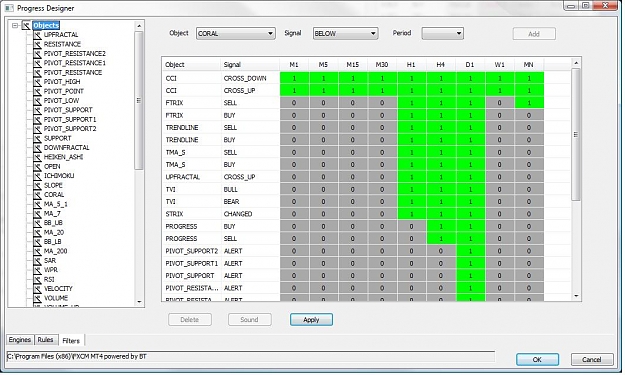
You can define a signal sound for every combination of OBJECT /SIGNAL/PERIOD graphically. This is done by going to the Filters Tab in the Progress Designer. For instance if you want to have an alert when the CCI Indicator cross the 0 level which gives usually an entry point you can do it by adding to the sound list the line CCI in the Object field, CROSS_UP in the Signal field and the PERIOD in the period field. Once the line is inserted you can/remove the sound filter by double-clicking the period item. In the picture below you can see that I add sounds on all periods for the CCI Object. if I want to remove the sound for a specific period I just double-click the field for the period and it passes to grey with 0 inside.

Attached Image (click to enlarge)
Click to Enlarge

Name: Sound.jpg
Size: 117 KB


Now the signal sound should be checked int the Progress Panel to be able to hear the signal sound.


The difference between Signal Sound and System Sound is that in System Sound you will get the alert for a combination of OBJECTS and SIGNALS that you predefined. (System Sound is not supported graphically it will be in the next version).
  • Post# 57
  • Quote
  • Jan 14, 2013 3:41am
  • Jurex
    Joined Mar 2012 | 128 Posts | Status: Member
6-2 Synthese


We have seen almost all the capabilities of the PROGRESS System, I resume again the main points of the actual version and I will give you a idea of the new fucntionalities that will be integrated in the next version.


First briefly what is missing in this version :
  1. Stochastic Indicator,
  2. the GAN and the T3 indicator of the Genesis System as the two others are TVI and CCI (we have them already)
  3. As there is no place to put any other system in the PG_System indicator , maybe I will integrate a PG_System1 indicator.
  4. Start date for an engine
  5. If I have time a nicer way for designing the rules (graphically)
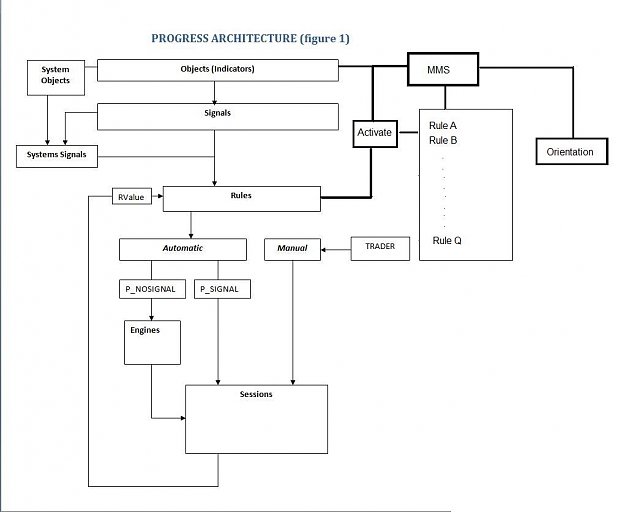
As you know the actual version is based on OBJECTS (Indicators), SIGNALS, SYSTEM (combination of indicators that give the BUY/SELL signals) , ENGINES and RULES.

Actually we decide when to activate the rule in an Automatic mode or Manual.

To be able to build a strong system we should classify our rules in a way that every rule should correspond to a market map. What I mean by a market map is all what describes the actual market that means the Orientation and its properties (up, down, reversing, sideway, ...), the momentum (velocity and volume) and an identification of what we say (long term medium term or short term). Once all these are cleary defined every rule should be launched accordingly.

For example in a sideway market a BUYSELL engine with OrderType HEDGE is adapted .

I will introduce the ORIENTATION entity that will have attributes describing the market, and the MMS System which will activate automatically the rule corresponding to the Market map after having analyse the Market Map . Actually I am hesitating in implementing the Market Map using a Neuron Network simulator (which is a little heavy) or using binary matching of the periods of the indicators. (i will talk about it later).


See next picture. (in bold the concept for new version)

Attached Image (click to enlarge)
Click to Enlarge

Name: Progress_archnew.jpg
Size: 53 KB


I just realized that MMS can be confused with (Money Management system) and it is missing too in the system that I will implement also in the next version but ok let's stay with MMS for the moment as things are not done.
  • Post# 58
  • Quote
  • Jan 20, 2013 3:12am | Edited at 3:29am
  • Jurex
    Joined Mar 2012 | 128 Posts | Status: Member
7-1 Market Orientation and discussion


Here I'll discuss how we can determine a market orientation and the things we should focus on at any moment to keep in head a clear look of the market.

To be able to do so we must clearly define the terms we are using when we say Long term orientation, Medium term orientation and short term orientation.

The common periods that traders work on goes from 1 minute chart to the monthly chart. So which period chart we should look and how to look and where to look is personal to every trader and this why new traders are a little bit disturbed when they start trading by seeing all these indicators but in fact things are much easier and this is how I see it.

Here are the chart periods in MT4 :

M1 M5 M15 M30 H1 H4 D1 W1 MN


if for instance the moving average (7 period on my period chart) is UP , I mark for this indicator 1 for the corresponding period otherwise 0.

let's suppose it is below for period M1, below for the period M5, below for M15, above for M30 , H1, H4 and below D1 and above W1 and MN here how it is represented :
0 0 0 1 1 1 0 1 1

and here how to analyse this representation : I have a down short term trend (M1 , M5, M15) in a up medium-short trend (M30, H1, H4) in a down medium trend (D1) in a up long term trend (W1, MN). but who cares ? let's continue

OK I already gave a definition for my Long Term Orientation : W1 and MN are the periods . Now by looking at the 2 final digits I can Have a clear image of the long trend , in our example it is UP because it is (1 1).

in case we had 0 1 this means that weekly we are down but monthly we are still up so we can say that the Long term Orientation is reversing down.

now let's represented by reversing the digits we will have : 1 1 0 1 1 1 0 0 0 . Here we have a binary representation of a number which is 440.

if we are up only for the monthly period we have : 1 0 0 0 0 0 0 0 0 and this is 256 in decimal.
for the weekly chart only we have : 0 1 0 0 0 0 0 0 0 and this is a 128 in decimal.
if we have the weekly and the monthly only : 1 1 0 0 0 0 0 0 0 and this is 384. (128 + 256)


So to every market configuration I have a number for my moving average indicator that goes from 0 to 511

511 means all my moving average are up and 0 all are down.


So here is the function that give us the number for my current indicator :

All (MA_7, S_UP)

it returns the decimal number corresponding to my representation for the periods of my MA_7 indicator.


if my decimal number is below 128 this means that the weekly and monthly periods are (0 0) .

Notice that here my decimal representation is not linear in a sense that my monthly period is 4 times my weekly periods and the number is two times bigger.


  1. m1 1
  2. m5 2
  3. m5_m1 3
  4. m15 4
  5. m15_m1 5
  6. m15_m5 6
  7. m15_m5_m1 7
  8. m30 8
  9. m30_m1 9
  10. m30_m5 10
  11. m30_m5_m1 11
  12. m30_m15 12
  13. m30_m15_m1 13
  14. m30_m15_m5 14
  15. m30_m15_m5_m1 15
  16. h1 16
  17. h1_m1 17
  18. h1_m5 18
  19. h1_m5_m1 19
  20. h1_m15 20
  21. h1_m15_m1 21
  22. h1_m15_m5 22
  23. h1_m15_m5_m1 23
  24. h1_m30 24
  25. h1_m30_m1 25
  26. h1_m30_m5 26
  27. h1_m30_m5_m1 27
  28. h1_m30_m15 28
  29. h1_m30_m15_m1 29
  30. h1_m30_m15_m5 30
  31. h1_m30_m15_m5_m1 31
  32. h4 32 // H4
  33. h4_m1 33 // H4 M1
  34. h4_m5 34 // H4 M5
  35. h4_m5_m1 35 // H4 M5 M1
  36. h4_m15 36 // H4 M15
  37. h4_m15_m1 37 // H4 M15 M1
  38. h4_m15_m5 38 // H4 M15 M5
  39. h4_m15_m5_m1 39 // H4 M15 M5 M1
  40. h4_m30 40 // H4 M30
  41. h4_m30_m1 41 // H4 M30
  42. h4_m30_m5 42 // H4 M30 M5
  43. h4_m30_m5_m1 43 // H4 M30 M5 M1
  44. h4_m30_m15 44 // H4 M30 M15
  45. h4_m30_m15_m1 45 // H4 M30 M15 M1
  46. h4_m30_m15_m5 46 // H4 M30 M15 M5
  47. h4_m30_m15_m5_m1 47 // H4 M30 M15 M5 M1
  48. h4_h1 48 // H4 H1
  49. h4_h1_m1 49 // H4 H1 M1
  50. h4_h1_m5 50 // H4 H1 M5
  51. h4_h1_m15 52 // H4 H1 M15
  52. h4_h1_m15_m5 54 // H4 H1 M15 M5
  53. h4_h1_m15_m5_m1 55 // H4 H1 M15 M5 M1
  54. h4_h1_m30 56 // H4 H1 M30
  55. h4_h1_m30_m1 57 // H4 H1 M30 M1
  56. h4_h1_m30_m5 58 // H4 H1 M30 M5
  57. h4_h1_m30_m5_m1 59 // H4 H1 M30 M5 M1
  58. h4_h1_m30_m15 60 // H4 H1 M30 M15
  59. h4_h1_m30_m15_m1 61 // H4 H1 M30 M1
  60. h4_h1_m30_m15_m5 62 // H4 H1 M30 M15 M5
  61. h4_h1_m30_m15_m5_m1 63 // H4 H1 M30 M15 M5 M1
  62. d1 64
  63. d1_m1 65
  64. d1_m5 66
  65. d1_m5_m1 67
  66. d1_m15 68 // D1 M15
  67. d1_m15_m1 69 // D1 M15 M1
  68. d1_m15_m5 70 // D1 M15 M5
  69. d1_m15_m5_m1 71 // D1 M15 M5 M1
  70. d1_m30 72 // D1 M30
  71. d1_m30_m1 73
  72. d1_m30_m5 74
  73. d1_m30_m5_m1 75
  74. d1_m30_m15 76 // D1 M30 M15
  75. d1_m30_m15_m1 77
  76. d1_m30_m15_m5 78 // D1 M30 M15 M5
  77. d1_m30_m15_m5_m1 79 // D1 M30 M15 M5 M1
  78. d1_h1 80 // D1 H1
  79. d1_h1_m1 81
  80. d1_h1_m5 82
  81. d1_h1_m5_m1 83
  82. d1_h1_m15 84
  83. d1_h1_m15_m1 85
  84. d1_h1_m15_m5 86
  85. d1_h1_m15_m5_m1 87
  86. d1_h1_m30 88 // D1 H1 M30
  87. d1_h1_m30_m1 89
  88. d1_h1_m30_m5 90
  89. d1_h1_m30_m5_m1 91
  90. d1_h1_m30_m15 92 // D1 H1 M30 M15
  91. d1_h1_m30_m15_m1 93
  92. d1_h1_m30_m15_m5 94 // D1 H1 M30 M15 M5
  93. d1_h1_m30_m15_m5_m1 95 // D1 H1 M30 M15 M5 M1
  94. d1_h4 96 // D1 H4
  95. d1_h4_m1 97
  96. d1_h4_m5 98
  97. d1_h4_m5_m1 99
  98. d1_h4_m15 100
  99. d1_h4_m15_m1 101
  100. d1_h4_m15_m5 102
  101. d1_h4_m15_m5_m1 103
  102. d1_h4_m30 104
  103. d1_h4_m30_m1 105
  104. d1_h4_m30_m5 106
  105. d1_h4_m30_m5_m1 107
  106. d1_h4_m30_m15 108
  107. d1_h4_m30_m15_m1 109
  108. d1_h4_m30_m15_m5 110
  109. d1_h4_m30_m15_m5_m1 111
  110. d1_h4_h1 112 // D1 H4 H1
  111. d1_h4_h1_m1 113
  112. d1_h4_h1_m5 114
  113. d1_h4_h1_m5_m1 115
  114. d1_h4_h1_m15 116
  115. d1_h4_h1_m15_m1 117
  116. d1_h4_h1_m15_m5 118
  117. d1_h4_h1_m15_m5_m1 119
  118. d1_h4_h1_m30 120 //D1 H4 H1 M30
  119. d1_h4_h1_m30_m1 121
  120. d1_h4_h1_m30_m5 122
  121. d1_h4_h1_m30_m5_m1 123
  122. d1_h4_h1_m30_m15 124 //D1 H4 H1 M30 M15
  123. d1_h4_h1_m30_m15_m1 125
  124. d1_h4_h1_m30_m15_m5 126 //D1 H4 H1 M30 M15 M5
  125. d1_h4_h1_m30_m15_m5_m1 127
  126. w1 128
  127. ---
  128. mn1 256
  129. ---
  130. 551
As you can see from the decimal number I can know which moving average is up or down for all my periods.

Now let's filter our number as we want to classify the orientation.

If I say that my long term orientation is W1 and MN we do a logical And Operation with : 0 0 0 0 0 0 0 1 1

If I say that my Mid term orientation is H1 H4 I do a logical And Operation with : 0 0 0 0 1 1 0 0 0 . the result here should give me these numbers (0, 16, 32, 48) 0 that means H1 and H4 are down, 16 means only my H1 period is up 32 means that only my H4 period is up and 48 the two of them are up.

(To be continued)


  • Post# 59
  • Quote
  • Jan 21, 2013 9:21am | Edited at 9:43am
  • Jurex
    Joined Mar 2012 | 128 Posts | Status: Member
7-2 Market Orientation (continued)


If we look at the periods , we just classify our Long Term Orientation with flags of the MN and W1 periods. What's about the Medium and the Short Term Orientation ?


if we look at the periods from D1 we can notice that D1 is 6 times H4 and H4 is 8 times M30 which is much more representative than H1 as H4 is 4 times H1 so if I should represent my Medium Orientation I will choose D1 , H4 and M30.

To analyse our Current Market Map we can say that D1 will represent the main orientation (up or down) , H4 the movement inside the Orientation and M30 the momemtum . So by looking at the M30 period I should look at the indicators that represents the momemtum of the market .

Here I am going a little bit fast but I will explain more later.

As for the Short Term Orientation , I will have H1 , M15 and (M5, M1). H1 is 4 times the M15 period which is 3 times M5. and M5 and M1 are the momentum.


Long Term Orientation [MN, W1]

Medium Term Orientation [D1, H4, m_30]

Short Term Orientation [H1, M15, (m_5, m_1)]

I put in small letters periods corresponding the momentum


if we look back at the binary representation , to determine my orientation we do an And logical operation with :


1 1 0 0 0 0 0 0 0 for long term

0 0 1 1 0 1 0 0 0 for medium term which gives the decimal numbers (d1, d1_h4, d1_h4, d1_h4_m30, h4, h4_m30, m_30) see above

0 0 0 0 1 0 1 1 0 for the short term whic should give us the decimals (h1, h1_m15, h1_m15_m5, m_15, m_15_m5, m_5)

The main Orientation is represented by the left digit, the movement the middle digit and the momentum the right digit.

DON't forget that the orientation doesn't mean that we should buy or sell it gives an image of the current market. we can have a midterm orientation equal to d1_h4_m30 and 2 seconds after the market start its long down trend .

So what for to determine the orientation ?

The orientation by itself is not important but what's important is the transition between these representation and the momentum flag .

I explain by an example. Let's choose to work on a mid term trade , and we have (1, 1, 1) orientation of the Slope indicator.
(1, 1, 1) means my slope is UP for the (D1, H4, M30) periods, at (t + 1) I have now (1, 1, 0) representation of my orientation , that means we have maybe a starting point of retracement. What we do? shall we exit if we have a position or not. Here we look at the indicators which are the most sensitive to the momentum for my period m30.


I classify them by importance :
  1. Acceleration
  2. Volume
  3. and Moving average (position, angles)
These are the most important indicators that can tell if a market is strongly reacting or not and that's why for my short term orientation the period M5 is very important to watch as I mentioned already the m5 represents the momentum.


So whenever we have a transition from (1, 1, 0) to (1,0, 0) and then to (0, 1, 1) .... etc My transition combined with the momentum indicators will tell me when to enter a trade and when to exit.


Ok here is the idea , I will detail with examples the two orientations MidTerm and ShortTerm and what are the indicators that I watch during an Orientation representation
  • Post# 60
  • Quote
  • Jan 21, 2013 4:14pm | Edited at 4:26pm
  • Jurex
    Joined Mar 2012 | 128 Posts | Status: Member
7-3 Velocity


Too few traders look at the velocity indicator ... very strange but it is the start point of a market trend and that's why I will talk here about it. In the package you can find the PG_TP_Velocity file. You put the parameter len to 10 because the default value is 14 I forget to change it. In Progress I use it with a 10 Len.

Look at it for the period M5. Below is the picture where you can find the velocity in Progress surrounded in a white rectangle.

Attached Image


you can see -4/-1 ===> VELOCITY/ACCELERATION
the actual value is -4 for the velocity
and -1 is the variation from a bar before

In our Example the market is calm and here there is no sign of a brutal movement. It is important to know !!!! You dont always need an important news to have a brutal movement of the market ... So here is the first alert if a sudden movement should happen.

The value should stay between [-15, 15].
the second value which is very important is the variation of the velocity (acceleration) this value should not exceed the [-4, 4] values.

for instance if we have a velocity of 20 which means that the market had a fast run up and an acceleration of -6, this means that it is reversing in a fast way and this is the paramater that you should take.

So FIRST we look at the ACCELERATION... and after on the VELOCITY ...

if we have 4/ 6 this means that market is running up. even if the velocity is under 15.


Keep always in mind that we use it for M5 period and M30 period , the first for the short term orientation and the second for the Medium term orientation ... I will give you the parmeters of the intervals for the M30 period later.


7-4 Volume


Another important indicator is the volume , here also the M5 period is very representative, and here also very few look at it . As the Mt4 Volume indicator doesn't give the volume on up bars and down bars I wrote one. It calculates the period bars in minutes for all periods so we have the actual volume for the last number of minutes .


I advise you to use it even if you are NOT using PROGRESS ...

Here is the code :

int v_period = period[x]; // number of minutes for the corresponding period
if (TimeOpenBar[0] != iTime (0,PERIOD_M1,0))
{
vol1u=0;
vol1d=0;
for (int i = v_period + 1 ; i <= v_period <<1; i++)
{
h = iClose(0,PERIOD_M1, i);
l = iOpen (0,PERIOD_M1, i);
if (h > l + Threshold)
vol1u += iVolume(0,PERIOD_M1,i);
else
if (l > h + Threshold)
vol1d += iVolume(0,PERIOD_M1,i);
}


volu[x] = 0;
vold[x] = 0;
for (i = 1; i <= v_period; i++)
{
h = iClose (0,PERIOD_M1,i);
l = iOpen (0,PERIOD_M1,i);
if (h > l + Threshold)
volu[x] += iVolume (0,PERIOD_M1,i);
else
if (l > h + Threshold)
vold[x] += iVolume (0,PERIOD_M1,i);
}
}
vol0u = volu[x];
vol0d = vold[x];


Here also it is the number just above the velocity which is 70/40 for the period M5

[70/40] It means the volume for the Up bars (close > Open) is 70 and the volume of the down bars (close < open) is 40. My total volume is 110 that you can check in the volume indicator of MT4.

My limit parameter for the M5 period is 175 that means when the total volume exceed 175 we are in front of a sharp movement.

We have also the volume variation that I should add also in the panel that gives the variation of the up and down between two bars.


Ok so we saw two of the parameters that will be calculated in my Momentum Design of a market orientation
Thread Tools Search this Thread
Show Printable Version Show Printable Version
Email This Thread Email This Thread
Search this Thread:

Advanced Search

  • Trading Systems
  • /
  • Progress - The System
  • Reply to Thread
    • 1 2Page 3456 10
0 traders viewing now
  • More

©2013 Forex Factory, Inc. / Terms of Use / Privacy Policy

Forex Factory® is a registered trademark.

Connect

  • Facebook
  • Twitter
  • RSS

Company

  • About FF
  • FF Blog
  • Careers at FF
  • Advertising
  • Contact FF

Products

  • Forums
  • Trades
  • Calendar
  • News
  • Market
  • Brokers
  • Trade Explorer

Website

  • Homepage
  • Search
  • User Guide
  • Member List
  • Online Now
  • Report a Bug