Forex Factory
  • Login

  • Username: Password:
  • 10:26am

  • Search
  • Home

  • Forums

  • Trades

  • Calendar

  • News

  • Market

  • Brokers

Options

Search
Search
Search

Subscribe to Thread

Bookmark Thread

First Page First Unread Last Page Last Post

Printable Version

Similar Threads

Need help programming some indicators/EAs 64 replies

Do You Buy EAs or Indicators from ebay? 59 replies

Dreamliners’ MPAS EAs, Indicators, etc 297 replies

Future EAs Code Language? 6 replies

EAs and indicators relating to moutaki... 17 replies

  • Platform Tech
  • /
  • Reply to Thread
  • 1,097

I will code your EAs and Indicators for no charge

  • Last Post
  • First Unread
  •  
  • 1 6364Page 656667 117
  •  
  • Post# 1,281
  • Quote
  • Dec 17, 2012 8:02am
  • zackery
    Joined Nov 2011 | 268 Posts | Status: Member
@cyber1:
I have found an Indicator (which I attach here ) which does nearly exactly like what i am trying to find .
The Indi is named "DAILY CLOSE" but it shows just the Open of the last Days and not the CLOSE.
Maybe it is easier for you to change this code to the Daily -Close.
Don't know.
Just a trial to make things easier.
Attached is the Indi.
Greeds Zack
Attached File
File Type: mq4 Daily Close.mq4   2 KB | 34 downloads
  • Post# 1,282
  • Quote
  • Dec 17, 2012 8:26am
  • cyber1
    Joined Jan 2011 | 592 Posts | Status: Member
Quoting zackery
@cyber1:
I have found an Indicator (which I attach here ) which does nearly exactly like what i am trying to find .
The Indi is named "DAILY CLOSE" but it shows just the Open of the last Days and not the CLOSE.
Maybe it is easier for you to change this code to the Daily -Close.
Don't know.
Just a trial to make things easier.
Attached is the Indi.
Greeds Zack
Zack-
I'm not sure that this is what you're looking for but I changed it open to the close. Keep in mind today's open is yesterday's close.
Attached File
File Type: mq4 Daily Close.mq4   2 KB | 42 downloads
  • Post# 1,283
  • Quote
  • Dec 17, 2012 8:33am
  • fairwind
    Joined Dec 2004 | 96 Posts | Status: Member
Hi there Cyber1,

Another successful modification, thanks a million and may all your trades be winners !!

I wish I knew how to program !
Good trading to All ..................... fairwind
  • Post# 1,284
  • Quote
  • Dec 17, 2012 2:26pm
  • RaptorUK
    Joined Jan 2008 | 529 Posts | Status: Member
Quoting cyber1
Zack-
I'm not sure that this is what you're looking for but I changed it open to the close. Keep in mind today's open is yesterday's close.
Except when there is a gap between the Close and Open and then they are not the same . . .
20 pips a day isn't too much to ask . . .
  • Post# 1,285
  • Quote
  • Dec 20, 2012 2:36am
  • faizpakoh
    Joined Jan 2012 | 83 Posts | Status: Member
Hi guys,i really need someone to make me one simple ea,i've been basket trading for a while now,so i need ea to close my order(14 pairs total) when it reach certain pips,i want to the ea to visually look simple because my sytem is already full with indicators.

example for ea setting :

Total profit pips : (5 decimal broker)
Total stop loss pips : (5 decimal broker)

how ea will look visually in mt4 (top left corner of mt4):

Account balance : (my current account balance including opened orders )
Total profit pips : (shows current value in ea setting )
Total stop loss pips : ( shows current value in ea setting )
Current pips : (shows current pips when opening order, if my trade is in loss it will show ( - x pips ) , if my trade is in profit ( + x pips ) (total of 14 pairs)

Thanks
Slow and Steady!
M60 Sytem All Time Return: 78.3%
  • Post# 1,286
  • Quote
  • Dec 20, 2012 7:53am
  • zackery
    Joined Nov 2011 | 268 Posts | Status: Member
Quoting cyber1
Zack-
I'm not sure that this is what you're looking for but I changed it open to the close. Keep in mind today's open is yesterday's close.

@cyber1:
Thanks for your effort.
But after some days of working with the Indi I have noticed that there is nothing changed.
It' still shows the OPEN of the current Candle and not the CLOSE of the last previous Candle.

Could you please so kind and have a further look to the Indi?

I appreciate any help.
Thanks for attention and effort.
Greeds Zack
  • Post# 1,287
  • Quote
  • Dec 20, 2012 8:17am
  • cyber1
    Joined Jan 2011 | 592 Posts | Status: Member
Quoting zackery
@cyber1:
Thanks for your effort.
But after some days of working with the Indi I have noticed that there is nothing changed.
It' still shows the OPEN of the current Candle and not the CLOSE of the last previous Candle.

Could you please so kind and have a further look to the Indi?

I appreciate any help.
Thanks for attention and effort.
Greeds Zack
Zack-
Could you post a screenshot? By definition the Open of the current candle equals Close of last candle.
  • Post# 1,288
  • Quote
  • Dec 20, 2012 9:30am
  • zackery
    Joined Nov 2011 | 268 Posts | Status: Member
Quoting cyber1
Zack-
Could you post a screenshot? By definition the Open of the current candle equals Close of last candle.
@cyber1:
Thanks a lot for your help first.
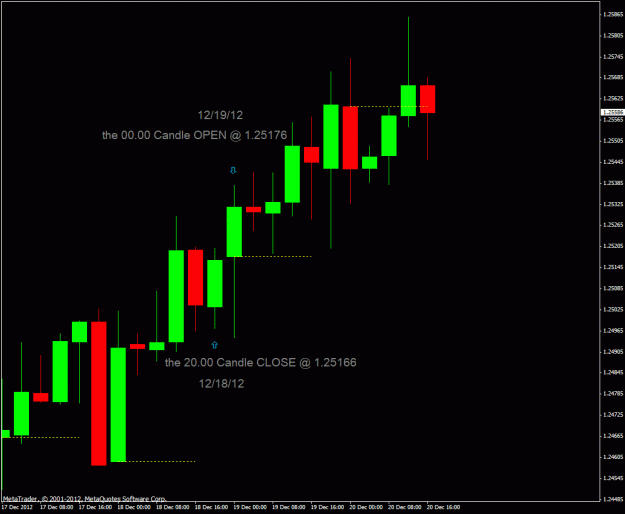
Attached is a pic of the Chart.

NOTE 1 : I am trading in the H 4 -TF .

NOTE 2 : One other thing I have recognized is that the Indi just shows the 4-digit-Price if you go with the mouse over the dotted Price-line .But it is very important for me to see the 5-digit-Price.

Thanks again for your help.
Greeds Zack
Attached Image (click to enlarge)
Click to Enlarge

Name: daily close pic.gif
Size: 21 KB
  • Post# 1,289
  • Quote
  • Dec 20, 2012 3:29pm
  • krmo
    Joined May 2006 | 218 Posts | Status: Be in the 5%
Cyber1,
You are very generous in sharing your time.
I am able to tweak code but not start anything from scratch.
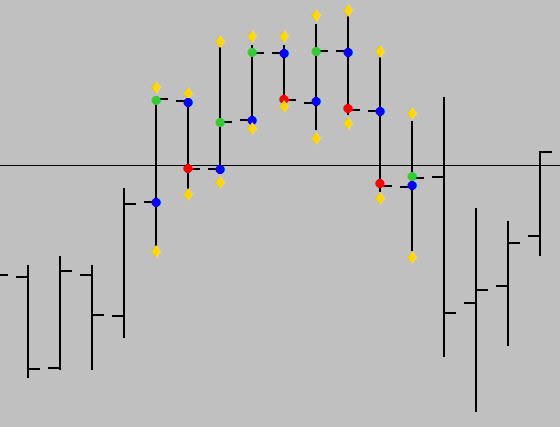
Would you be able to put the basic guts together for something like this? - Chart Below
I want an arrow (I should be able to setup the extern for type, color and size) at the Open, High, Close and Low.
I would like the close to show the change from an up bar vs a down bar (red or green).
It would help if it shows on all past bars (or an X amount that can be adjusted to save CPU?).
Lastly I would like to make sure this will show above all other indicators. (That may just be the order the Indi's are put into the chart)


Thanks in advance if you are able to help and even if not!!!

KRMO
Kris

Attached Image
Attitude can reflect outcome in life and trading!
  • Post# 1,290
  • Quote
  • Dec 21, 2012 7:36am
  • cyber1
    Joined Jan 2011 | 592 Posts | Status: Member
Quoting zackery
@cyber1:
Thanks a lot for your help first.
Attached is a pic of the Chart.

NOTE 1 : I am trading in the H 4 -TF .

NOTE 2 : One other thing I have recognized is that the Indi just shows the 4-digit-Price if you go with the mouse over the dotted Price-line .But it is very important for me to see the 5-digit-Price.

Thanks again for your help.
Greeds Zack
Zack-
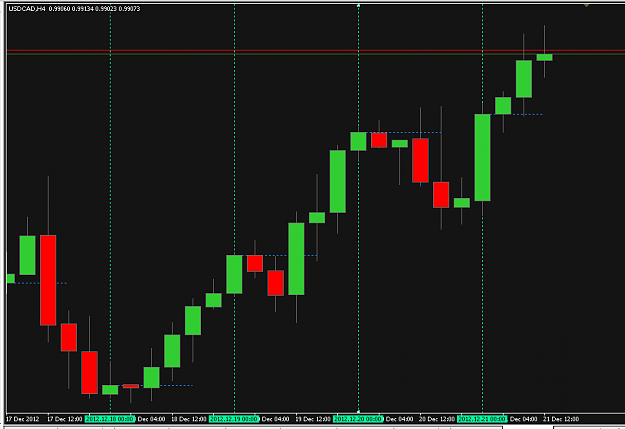
This is what I'm seeing and everything looks correct to me.
Attached Image (click to enlarge)
Click to Enlarge

Name: Zack1.PNG
Size: 28 KB
  • Post# 1,291
  • Quote
  • Dec 21, 2012 7:40am
  • cyber1
    Joined Jan 2011 | 592 Posts | Status: Member
Quoting krmo
Cyber1,
You are very generous in sharing your time.
I am able to tweak code but not start anything from scratch.
Would you be able to put the basic guts together for something like this? - Chart Below
I want an arrow (I should be able to setup the extern for type, color and size) at the Open, High, Close and Low.
I would like the close to show the change from an up bar vs a down bar (red or green).
It would help if it shows on all past bars (or an X amount that can be adjusted to save CPU?).
Lastly I would like to make sure this will show...
Kris-

If you're not in a huge hurry for it I'll see what I can do, probably this weekend.
  • Post# 1,292
  • Quote
  • Dec 21, 2012 8:06am
  • zackery
    Joined Nov 2011 | 268 Posts | Status: Member
Quoting cyber1
Zack-
This is what I'm seeing and everything looks correct to me.
Attachment 1104270
May I ask which price your lines are shown in your Chart if you go with the mouse over the line?

Please have a closer look The lines shows definetly not the same Price as you compare it with the CLOSING-Price of the 20.00 o'clock Candle directly.
That's with my Borker and I would really wonder if this different with your Broker.

To me it looks like that the Indi is not so exact as it have to be .Especially that the lines just show the 4-digit-CLOSING-Price and not the 5-digit-CLOSING-Price.

Thanks for any help.

Greeds Zack
  • Post# 1,293
  • Quote
  • Dec 21, 2012 10:38am
  • ~bull.bear~ ● Online
    Joined Sep 2012 | 437 Posts | Status: Trade Smart !!!
Hi guys!

Is there any heikin ashi SR indicator?
Thanks.
**Keep Simple**
  • Post# 1,294
  • Quote
  • Dec 21, 2012 11:58am
  • krmo
    Joined May 2006 | 218 Posts | Status: Be in the 5%
Quoting cyber1
Kris-

If you're not in a huge hurry for it I'll see what I can do, probably this weekend.
Hey there,
You are helping me so it is on your time!
I really appreciate you taking a look!

Thank you
Attitude can reflect outcome in life and trading!
  • Post# 1,295
  • Quote
  • Dec 21, 2012 3:53pm
  • ahdts
    Joined Dec 2012 | 36 Posts | Status: Ninja#XAUUSD
need modified helps thanks
Attached File
File Type: mq4 Ahdts.mq4   6 KB | 41 downloads
ahdts
  • Post# 1,296
  • Quote
  • Dec 21, 2012 4:25pm
  • ayoknights
    Joined Apr 2009 | 2 Posts | Status: Junior Member
please i have this indicator i will like to be coded to an EA, to get ready buy when the first blue bar color comes up, buy when the second comes up, and get ready to exit when the first red bar comes up,exit buy at the appearance of the second red bar and enter sell simultenously and vice versal for sell
  • Post# 1,297
  • Quote
  • Dec 22, 2012 7:51am
  • cyber1
    Joined Jan 2011 | 592 Posts | Status: Member
Quoting krmo
Cyber1,
You are very generous in sharing your time.
I am able to tweak code but not start anything from scratch.
Would you be able to put the basic guts together for something like this? - Chart Below
I want an arrow (I should be able to setup the extern for type, color and size) at the Open, High, Close and Low.
I would like the close to show the change from an up bar vs a down bar (red or green).
It would help if it shows on all past bars (or an X amount that can be adjusted to save CPU?).
Lastly I would like to make sure this will show...
Kris-

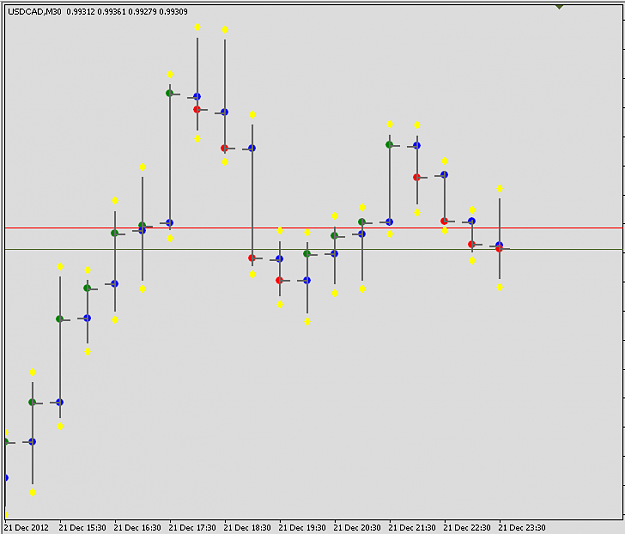
Try this. There is one user input, MaxBars plus color and style. If you set it to 0 will show on all past bars, set it to anything else will show only on those bars. There is very little chance that this will be a drag on your processor but the option is there if you want.

Attached Image (click to enlarge)
Click to Enlarge

Name: KRMO1.PNG
Size: 21 KB
Attached File
File Type: mq4 FXPT_OHLCinColor.mq4   3 KB | 43 downloads
  • Post# 1,298
  • Quote
  • Dec 22, 2012 8:07am
  • cyber1
    Joined Jan 2011 | 592 Posts | Status: Member
Quoting zackery
May I ask which price your lines are shown in your Chart if you go with the mouse over the line?

Please have a closer look The lines shows definetly not the same Price as you compare it with the CLOSING-Price of the 20.00 o'clock Candle directly.
That's with my Borker and I would really wonder if this different with your Broker.

To me it looks like that the Indi is not so exact as it have to be .Especially that the lines just show the 4-digit-CLOSING-Price and not the 5-digit-CLOSING-Price.

Thanks for any help.

Greeds Zack
Zack-

Have you tried different settings on the TimeZoneOfData input?

As far as the 4 digit or 5 digit that is the indicator doing that. The lines you see are drawn by the indicator buffer. The lines are not objects such as trend line, rectangle etc. which seem to show five digits, whereas lines drawn by the indicator buffer on some indicators only draw 4 digits. Y Ifou'll have to ask somebody much smarter than me as to why that is.
  • Post# 1,299
  • Quote
  • Dec 22, 2012 9:02am
  • Orly
    Joined Nov 2012 | 87 Posts | Status: Teach Me What You Know...
I would like to have an EA coded, please.

It is very simple but it requires two indicators that are not common but they are free.

It should work on every time-frame and on any pair. Basically. it is a trend-change with confirmation EA.

For the indicator DoubleLine, please change the colours to "Gold, Gold, Gainsborough, Gainsborough."
For the Indicator SuperTrend, please change the colours to "Gainsborough, Gold."

Create an EA such that when both indicators are the same colour, it enters a trade with variable lot size.
When the colours change and are different, it exits the trade. (That way, there is a built-in stop-loss mechanism...)

Have the algo enter a trade long with variable lot-size when both indicators are "Gainsborough."
Have the algo enter the trade short when both indicators are "Gold."

Please let me know what you think.
Attached Files
File Type: ex4 Double Line.ex4   4 KB | 41 downloads
File Type: ex4 SuperTrend.ex4   6 KB | 42 downloads
  • Post# 1,300
  • Quote
  • Dec 22, 2012 9:19am
  • krmo
    Joined May 2006 | 218 Posts | Status: Be in the 5%
Quoting cyber1
Kris-

Try this. There is one user input, MaxBars plus color and style. If you set it to 0 will show on all past bars, set it to anything else will show only on those bars. There is very little chance that this will be a drag on your processor but the option is there if you want.

Attachment 1104759
Cyber1,
Perfect! Does and looks exactly as I wanted.
I read through the code and understand it all. I just can not write it from scratch. Wish I had the time to spend learning to.
Thank god for you and the other coders who are willing to help.
Thank you very much!

Kris

P.S. - Do you also trade? Thanks again!
Attitude can reflect outcome in life and trading!
Thread Tools Search this Thread
Show Printable Version Show Printable Version
Email This Thread Email This Thread
Search this Thread:

Advanced Search

  • Platform Tech
  • /
  • I will code your EAs and Indicators for no charge
  • Reply to Thread
    • 1 6364Page 656667 117
4 traders viewing now, 1 is a member: Stompe
  • More

©2013 Forex Factory, Inc. / Terms of Use / Privacy Policy

Forex Factory® is a registered trademark.

Connect

  • Facebook
  • Twitter
  • RSS

Company

  • About FF
  • FF Blog
  • Careers at FF
  • Advertising
  • Contact FF

Products

  • Forums
  • Trades
  • Calendar
  • News
  • Market
  • Brokers
  • Trade Explorer

Website

  • Homepage
  • Search
  • User Guide
  • Member List
  • Online Now
  • Report a Bug