Forex Factory
  • Login

  • Username: Password:
  • 1:36am

  • Search
  • Home

  • Forums

  • Trades

  • Calendar

  • News

  • Market

  • Brokers

Options

Search
Search
Search

Subscribe to Thread

Bookmark Thread

First Page First Unread Last Page Last Post

Printable Version

Similar Threads

Simple 3 order GBPUSD EA 1042 replies

Experiment with "Simple H1 GBPUSD EA" 4 replies

Simple 5m GBPUSD trade system 10 replies

SIMPLE EA for a simple method needed!! 1 reply

  • Trading Systems
  • /
  • Reply to Thread
  • 680

Simple H1 GBPUSD EA

  • Last Post
  • First Unread
  •  
  • 1 488489490Page 491492 493
  •  
  • Post# 9,801
  • Quote
  • Jun 24, 2012 3:45pm
  • Eureka
    Joined Aug 2006 | 340 Posts | Status: Member
Happy birthday, Geoff. I hope you are having a great one. I also hope it's cool where you are.

Thank you so much for all the work you put into this thread. I know it had helped many people.

Enjoy the rest of your day and eat lots of cake and ice cream.

Carol
  • Post# 9,802
  • Quote
  • Jun 25, 2012 2:15am
  • sanyhuis
    Joined Jun 2009 | 510 Posts | Status: Member
Happy Birthday Sir Geoff. Wishing you all the best for this day.

s
  • Post# 9,803
  • Quote
  • Jun 29, 2012 12:50am
  • pipyoda
    Joined Jan 2012 | 7 Posts | Status: Member
Happy birthday to you Geoff and thanks for your hard work - and the great input from all the other traders on this forum - in creating this impressive EA.
  • Post# 9,804
  • Quote
  • Jul 3, 2012 8:48am
  • geoffb65
    Joined Apr 2009 | 2,025 Posts | Status: Member
Many thanks for the good wishes for my birthday, I appreciate that!

I'm afraid my trading days are over, I was diagnosed with lung cancer
last summer and the chemo-therapy and radio-therapy left me with
poor concentration, not good with forex trading!

But I'm still breathing and another year older, so I can't complain!

I have heard from a few people who are still using the EA which is good!

Best Wishes

Geoff
  • Post# 9,805
  • Quote
  • Jul 3, 2012 2:06pm
  • MacMG
    Joined Oct 2008 | 280 Posts | Status: Another beginner
Quoting geoffb65
Many thanks for the good wishes for my birthday, I appreciate that!

I'm afraid my trading days are over, I was diagnosed with lung cancer
last summer and the chemo-therapy and radio-therapy left me with
poor concentration, not good with forex trading!

But I'm still breathing and another year older, so I can't complain!

I have heard from a few people who are still using the EA which is good!

Best Wishes

Geoff


Hi Geoff.

Never give up and keep going!
Best wishes to you Sir.

Mac.
  • Post# 9,806
  • Quote
  • Jul 3, 2012 5:14pm
  • Paulus
    Joined Dec 2007 | 2,439 Posts | Status: Member
Quoting geoffb65
Many thanks for the good wishes for my birthday, I appreciate that!

I'm afraid my trading days are over, I was diagnosed with lung cancer
last summer and the chemo-therapy and radio-therapy left me with
poor concentration, not good with forex trading!

But I'm still breathing and another year older, so I can't complain!

I have heard from a few people who are still using the EA which is good!

Best Wishes

Geoff
Thoughts are with you Geoff

P
  • Post# 9,807
  • Quote
  • Jul 4, 2012 9:13am
  • benlayton512
    Joined Dec 2011 | 3 Posts | Status: Member
I just installed 2 eas off of this thread last night the v9 and the v17a on two different brokers. I just want to make sure my settings are correct. Neither one executed a trade last night. Was that everyone elses experience.

Thanks
Ben
  • Post# 9,808
  • Quote
  • Jul 4, 2012 5:08pm
  • MacMG
    Joined Oct 2008 | 280 Posts | Status: Another beginner
Quoting benlayton512
I just installed 2 eas off of this thread last night the v9 and the v17a on two different brokers. I just want to make sure my settings are correct. Neither one executed a trade last night. Was that everyone elses experience.

Thanks
Ben
Hi Ben.

What is your broker?
What is your setting to each broker?
Those EA's sometime need few days to kick!

Post #1, can be very useful to you, and be patient.

Good lack

Mac.
  • Post# 9,809
  • Quote
  • Sep 13, 2012 2:40am
  • mazkot4u
    Joined Oct 2010 | 1 Post | Status: Junior Member
Hello,

When i do back test of this EA ver. 17a, the error is occurred at the time of back test.

log file is attached herewith.

please guide me properly.

thanks in advance..

mk
Attached File
File Type: txt error.txt   1 KB | 41 downloads
  • Post# 9,810
  • Quote
  • Oct 3, 2012 5:10am
  • misc
    Joined Oct 2012 | 1 Post | Status: Junior Member
Hi,

encountered same problems with "invalid stops' with an oanda us-account (Tokyo_GBPUSD_v17a). Who knows if it's necessary to change the ECN Value to true ? Any help would be very kind.
Thanks
misc

@MacMG - would be glad if you are able to give me a hint on this


P.S, see error here :

2012.10.03 02:14:25Tokyo_GBPUSD_v17a GBPUSD,H1: Tokyo_GBPUSD_H1_v17 Error submitting order: Tokyo_GBPUSD_H1_v17_S1 Error # 130 : [ERR_INVALID_STOPS] invalid stops
  • Post# 9,811
  • Quote
  • Oct 7, 2012 3:30pm
  • MacMG
    Joined Oct 2008 | 280 Posts | Status: Another beginner
Quoting misc
Hi,

encountered same problems with "invalid stops' with an oanda us-account (Tokyo_GBPUSD_v17a). Who knows if it's necessary to change the ECN Value to true ? Any help would be very kind.
Thanks
misc

@MacMG - would be glad if you are able to give me a hint on this


P.S, see error here :

2012.10.03 02:14:25 Tokyo_GBPUSD_v17a GBPUSD,H1: Tokyo_GBPUSD_H1_v17 Error submitting order: Tokyo_GBPUSD_H1_v17_S1 Error # 130 : [ERR_INVALID_STOPS] invalid stops

Hi Misc

Very sorry for so late response.
I hope you try this EA with demo acc. a specially for Oanda broker.
In the past I experienced some problems with Oanda because of very bad connection in rush hours. In my point of view there is to long time to execute order at particular price, or I am wrong.
Try to change the ECN and see what happen, it may help.

Will be in touch.

Good luck!

Mac
  • Post# 9,812
  • Quote
  • Oct 7, 2012 4:23pm
  • MacMG
    Joined Oct 2008 | 280 Posts | Status: Another beginner
Hi

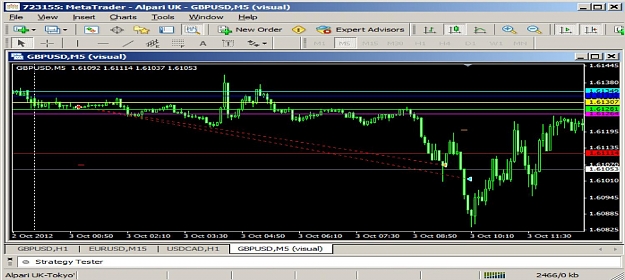
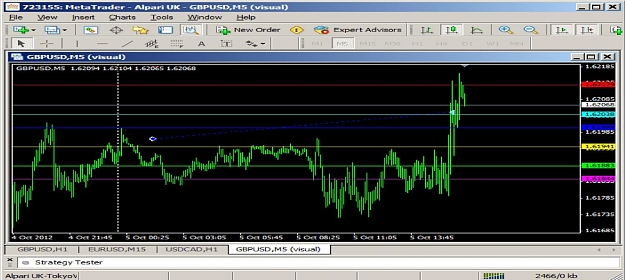
I do prefer to use SimpleH1_v9 or Overnight_v9 apart to Tokyo_GBPUSD_H1_v17
therefore I done for you test on 03.10 and 05.10.12, so please see below how it is behave.
As you can see my broker is Alpari UK.

Mac.

on 03.10.2012.
Attached Image (click to enlarge)
Click to Enlarge

Name: Misc_1.jpg
Size: 147 KB
  • Post# 9,813
  • Quote
  • Oct 7, 2012 4:25pm
  • MacMG
    Joined Oct 2008 | 280 Posts | Status: Another beginner
on 05.10.2012.
Mac.
Attached Image (click to enlarge)
Click to Enlarge

Name: Misc_2.jpg
Size: 146 KB
  • Post# 9,814
  • Quote
  • Oct 7, 2012 4:29pm
  • MacMG
    Joined Oct 2008 | 280 Posts | Status: Another beginner
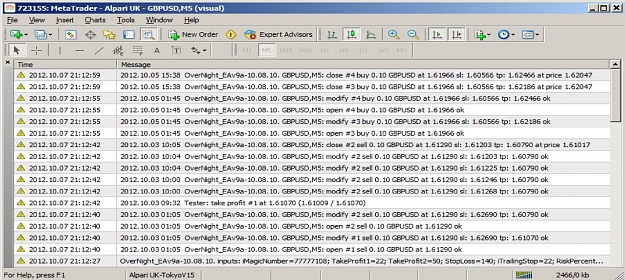
and journal for both trades.
I can't see any error.
The "engine" for all of those EA's is mainly the same.

Mac.
Attached Image (click to enlarge)
Click to Enlarge

Name: Misc_3.jpg
Size: 249 KB
  • Post# 9,815
  • Quote
  • Oct 7, 2012 4:36pm
  • MacMG
    Joined Oct 2008 | 280 Posts | Status: Another beginner
and finally be so kind Misc and share with us your settings for Tokyo_GBPUSD_H1_v17 which you use, please.


Mac.
  • Post# 9,816
  • Quote
  • Oct 7, 2012 4:56pm
  • MacMG
    Joined Oct 2008 | 280 Posts | Status: Another beginner
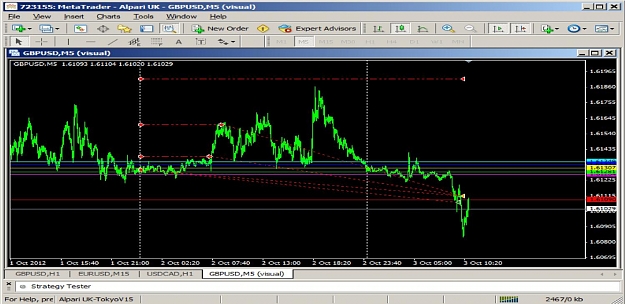
Dear Misc

Here are some GMT offset examples:

Alpari: GMT +2

Oanda GMT -5
try to play out with GMT offset and see the result.
I played out a bit with GMT for AlpariUK and that is what happen.
on 02.10.2012.
the trade is taken on different day.

Mac
Attached Image (click to enlarge)
Click to Enlarge

Name: Misc_4.jpg
Size: 149 KB
  • Post# 9,817
  • Quote
  • Dec 21, 2012 1:46am
  • ridge
    Joined Mar 2009 | 11 Posts | Status: Member
Sorry for the silly question but how can i change the time inthe oanda metatrader 4 to adjust it to the 23gmt thanks in advance
Even a clock that doesnt work is right twice a day
  • Post# 9,818
  • Quote
  • Dec 21, 2012 10:37pm | Edited at 10:53pm
  • oswin
    Joined Oct 2012 | 5 Posts | Status: Member
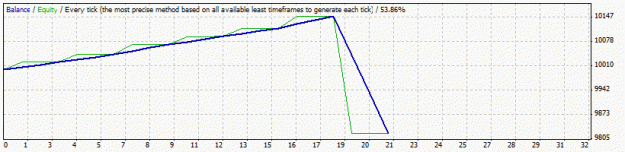
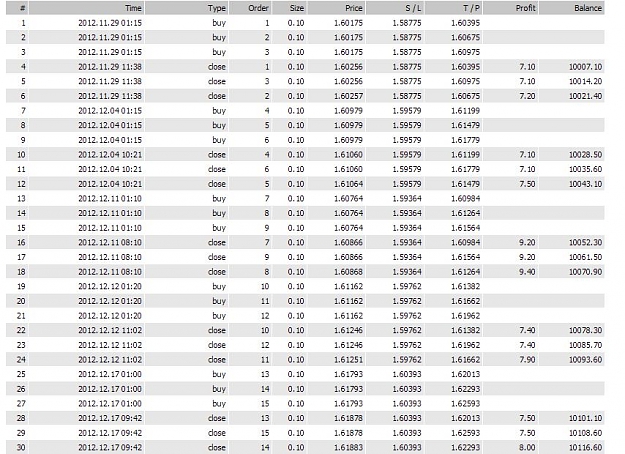
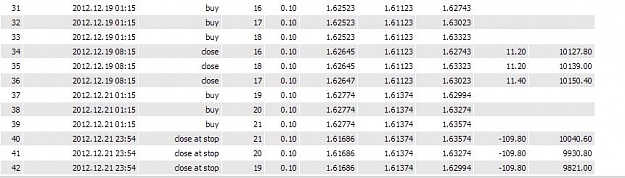
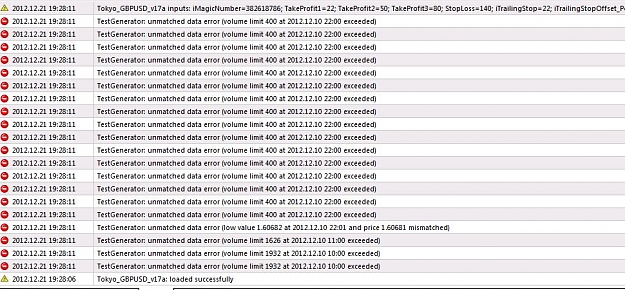
any setting problem for this??
Attached Images (click to enlarge)
Click to Enlarge

Name: StrategyTesterGU.gif
Size: 8 KB Click to Enlarge

Name: 1.JPG
Size: 131 KB Click to Enlarge

Name: 2.JPG
Size: 55 KB Click to Enlarge

Name: 3.JPG
Size: 48 KB
Click to Enlarge

Name: 4.JPG
Size: 152 KB
  • Post# 9,819
  • Quote
  • Dec 22, 2012 1:38pm
  • MacMG
    Joined Oct 2008 | 280 Posts | Status: Another beginner
Quoting ridge
Sorry for the silly question but how can i change the time inthe oanda metatrader 4 to adjust it to the 23gmt thanks in advance
Hi Ridge

Sorry for late response.
All you need you can find on page #1.


However;

""""" SETTING THE GMT OFFSET.

1. Broker time is offset from GMT by + or - x hours

So set the GMT offset to this + or - x hour value.

Thus you have compensated for the difference between your brokers time and GMT,
so you can now specify all times as GMT.

2. The Tokyo session starts at 0:00 GMT but I use the candle before this i.e. 23:00 GMT.

So the start time is set in the code to 23.

___________________________________ ___________________________________ __________

For information on GMT goto http://wwp.greenwichmeantime.com/

Here are some GMT offset examples:

Alpari: GMT +2
Axisodl: GMT
ACTbrokers: -4
CFGTrader: GMT +2
CoesFX: GMT +3
Fibo Group: GMT +2
Forex.com: GMT
Forex LTD: GMT +2
FXCM Trader 4: GMT -4
FXCM MT4 powered by BT: GMT +1
FXDD: GMT +3
Gomarkets GMT +2
IBFX: GMT
Marketiva GMT
MetaQuotes: GMT +2
MoneyTec: GMT +3
Netdania Charts GMT -8
North Finance: GMT +2
Oanda GMT -5
Orion: GMT +4
Real Trade: GMT +2 """"""


Try this EA on demo acc to find correct setting for all parameters first.
Good lack.

Mac.
  • Post# 9,820
  • Quote
  • Dec 22, 2012 1:51pm
  • MacMG
    Joined Oct 2008 | 280 Posts | Status: Another beginner
Quoting oswin
any setting problem for this??
Hi Oswin.

No, at all.
You trade reached StopLoss setted and accepted by you already.
There maybe is optimization problem but this is different story.
The EA works as optimized setting allowed it to react.
Try to find setting which give you acceptable result.
Will be nice if you be so kind and share it with us.

I strongly suggest you to do so on demo account first.
Please read page #1, which can be very helpful.


Mac.
Thread Tools Search this Thread
Show Printable Version Show Printable Version
Email This Thread Email This Thread
Search this Thread:

Advanced Search

  • Trading Systems
  • /
  • Simple H1 GBPUSD EA
  • Reply to Thread
    • 1 488489490Page 491492 493
0 traders viewing now
  • More

©2013 Forex Factory, Inc. / Terms of Use / Privacy Policy

Forex Factory® is a registered trademark.

Connect

  • Facebook
  • Twitter
  • RSS

Company

  • About FF
  • FF Blog
  • Careers at FF
  • Advertising
  • Contact FF

Products

  • Forums
  • Trades
  • Calendar
  • News
  • Market
  • Brokers
  • Trade Explorer

Website

  • Homepage
  • Search
  • User Guide
  • Member List
  • Online Now
  • Report a Bug