Forex Factory
  • Login

  • Username: Password:
  • 2:53pm

  • Search
  • Home

  • Forums

  • Trades

  • Calendar

  • News

  • Market

  • Brokers

Options

Search
Search
Search

Subscribe to Thread

Bookmark Thread

First Page First Unread Last Page Last Post

Printable Version

Similar Threads

SRDC level 1 revisited 20 replies

Opto123 Revisited 0 replies

Fozzy Revisited 1 reply

  • Trading Systems
  • /
  • Reply to Thread
  • 242

123PatternsV6 revisited

  • Last Post
  • First Unread
  •  
  • 1 Page 23456 23
  •  
  • Post# 21
  • Quote
  • Nov 18, 2011 7:15am
  • porfirio
    Joined Jul 2009 | 565 Posts | Status: Member
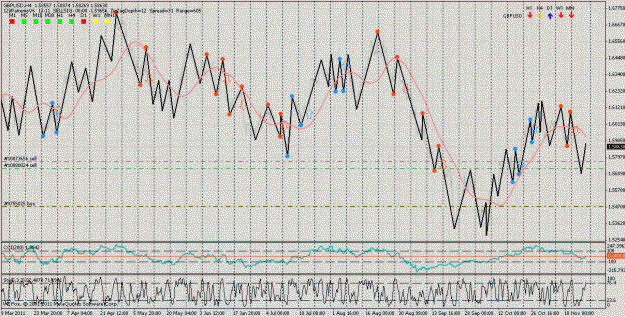
hi JULES

indicators is a SIMPLE ZIGZAG
Attached Image (click to enlarge)
Click to Enlarge

Name: zz.-.-..gif
Size: 51 KB
  • Post# 22
  • Quote
  • Nov 18, 2011 7:20am
  • porfirio
    Joined Jul 2009 | 565 Posts | Status: Member
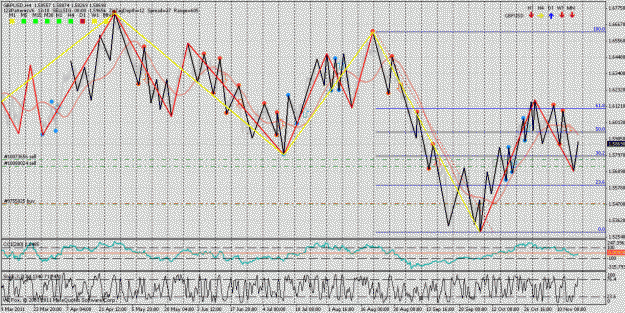
I put the multizigzag if anyone wants to investigate a little operation
Attached Image (click to enlarge)
Click to Enlarge

Name: zz.-.-..gif.-.gif
Size: 56 KB
  • Post# 23
  • Quote
  • Nov 18, 2011 7:40am
  • porfirio
    Joined Jul 2009 | 565 Posts | Status: Member
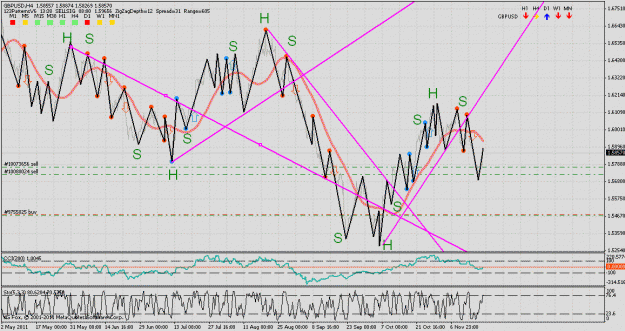
the zigzag has great potential ... have to play with the
Attached Image (click to enlarge)
Click to Enlarge

Name: hombro-cabeza-hombro.gif
Size: 44 KB
  • Post# 24
  • Quote
  • Nov 18, 2011 8:49am
  • porfirio
    Joined Jul 2009 | 565 Posts | Status: Member
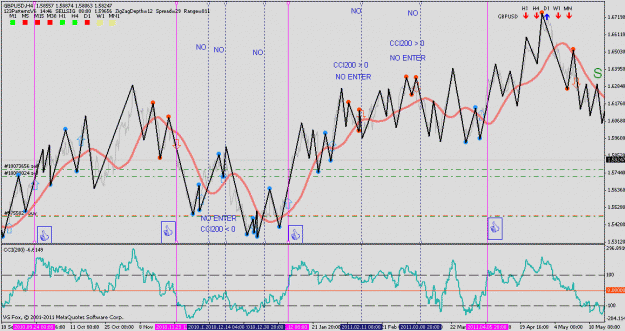
Hi Friends ...
AS SUCH ... THE ZIGZAG has great potential

FILTER .... CCI 200
Attached Image (click to enlarge)
Click to Enlarge

Name: filter zz-cci200.gif
Size: 35 KB
  • Post# 25
  • Quote
  • Nov 18, 2011 1:22pm
  • cmac0351
    Joined Jul 2010 | 82 Posts | Status: Member
I will be following this thread with interest. Thank you for the 123 indi!
  • Post# 26
  • Quote
  • Nov 18, 2011 4:30pm
  • porfirio
    Joined Jul 2009 | 565 Posts | Status: Member
if it is a good indicator ...but... if anyone knows how to determine the trend .... I do not like to wear something that I do not understand
  • Post# 27
  • Quote
  • Nov 19, 2011 1:53am | Edited at 1:20pm – please rate this thread
  • robdee
    Joined Jul 2006 | 475 Posts | Status: Mighty Mooloo Country
A few people have been asking about audio alerts for 123PatternsV6.

There is an add-on called 123Alarms. It can be downloaded from the old thread.

Download 123Alarms

Please note that it does not require rangebars. Just 123PatternsV6 on normal charts will give 123Alarms everything it needs.

The chart must be in the active window (active MT4 profile) for processing to occur and the alarm to activate. If you switch away to a different MT4 profile then the alarm will be mute because that chart is not being processed any more.

You can make your own .WAV sound files to be used with the alarm.

Hope that all makes sense ?

Robdee

PS Please take a moment to vote use the Rating: dropdown (all the way at the top of the thread reader on the right hand side). This is a simple way for readers to participate - Thanks.
  • Post# 28
  • Quote
  • Nov 19, 2011 4:53am
  • davidtrader ● Online
    Joined Feb 2011 | 79 Posts | Status: Member
Hi Robdee
thanks for good thread
question: how we draw(or select) sell zone?
  • Post# 29
  • Quote
  • Nov 19, 2011 1:13pm
  • robdee
    Joined Jul 2006 | 475 Posts | Status: Mighty Mooloo Country
Quoting davidtrader
how we draw(or select) sell zone?
Welcome davidtrader, thanks for your question.

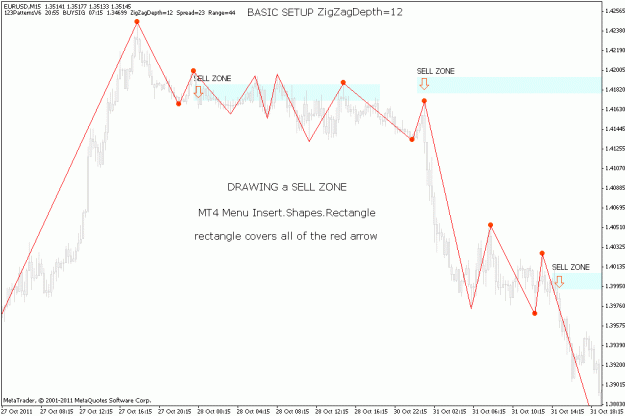
A sell zone is not an exact price line. Rather it is a broad 'zone' or range of prices roughly 10 pips high. I like to think of it as colouring with a crayon. It is not a precise to the pip area, it is a 'zone'.

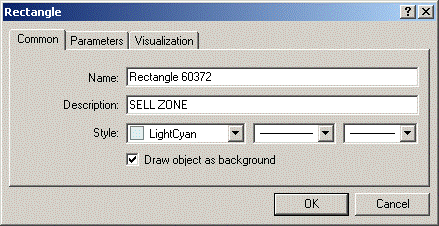
Use the MT4 menu Insert.Shapes.Rectangle. Start drawing just above and to the left of a red arrow, drag the rectangle down to cover all of the arrow and across to the right to form a long thin horizonal rectangle.

I set the rectangle properties as below

Attached Image


Here is an example of three sell zones at the end of October.

Attached Image (click to enlarge)
Click to Enlarge

Name: eurusd-2011-10-31-sell-zones.gif
Size: 20 KB


The most successful sell zones will occur after the bulls have had a successful run up to a new high. They still think they are winning even after the first bearish 123-break. That is when they (the overconfident bulls) are going to push back into the sell zone filling my sell limit orders.

Robdee

PS Support questions about my custom indicators and EAs should not be posted in this thread. Please contact me by FF private message or email.
  • Post# 30
  • Quote
  • Nov 19, 2011 4:59pm
  • spyderman
    Joined Nov 2010 | 1,025 Posts | Status: Snaggin' Some Pips
Subscribed and interested to see where this thread goes.

D1 20/50 All Time Return: 31.8%
  • Post# 31
  • Quote
  • Nov 20, 2011 8:57am
  • billbss
    Joined Apr 2006 | 3,459 Posts | Status: Member
Hey Guys,

Robdee has requested that no custom indicators or range bars be discussed in this thread.

Let's respect his wishes. This looks like an interesting system and I'd like to see more of it.
  • Post# 32
  • Quote
  • Nov 20, 2011 1:42pm | Edited Nov 21, 2011 1:09am – underline more terms, no content changed
  • robdee
    Joined Jul 2006 | 475 Posts | Status: Mighty Mooloo Country
Thanks JulesvH cmac0351 spyderman and billbss for your comments. I see your experience and welcome your input.

Also welcome two junior members xalson and davidtrader. Your very first post was made in this thread. Looks like something here motivated you to join FF and make a post - great

At this early stage of the thread I am describing the basic ideas that went into the indicator when we were developing it a year ago. These concepts should appear in most any discussion of 123 patterns. Different authors will use different terms to describe what is essentially the same price behaviour and the same analysis. This can be confusing.

What I have been trying to do is use clear and consistent terms that then provide a foundation for our further discussion. If you use the same terms that I do then confusion (in this thread) will be avoided.

Summary of Terms
Terms used in the first four main posts are underlined below.

Using Zigzag only post #5
  1. 123 patterns are an important feature of price action
  2. Looking back in time you will always see three previous price points
  3. Zigzag draws our attention to the most important price points
  4. Charts with Zigzag alone provide a lot of information
  5. Two categories of patterns, ideal and distorted
Basic Setup post #7
  1. basic setup highlights ideal patterns only, not distorted patterns
  2. add 123PatternsV6 on top of Zigzag with matching depths
  3. turn off ShowAllLines ShowAllBreaks and ShowTargets
  4. red dots and arrows for bearish patterns
  5. blue dots and arrows for bullish patterns
When are 123 patterns useful? post #14
  1. 123 patterns are not always useful
  2. 123 patterns are useful in some situations
  3. an important goal of this thread is to understand what makes the difference between successful and failed 123-break patterns
Basic Setup Sell Zones post #17
  1. Following a bearish 123-break pattern a decision is required about a time and a price for selling
  2. An aggressive decision sells immediately after a break (no wait)
  3. A conservative decision waits for price to retrace up into a sell zone
  4. Consistent sell zone pricing is provided by the red arrow
  5. Sell zones are interesting because they are remembered by both bears and bulls as old battle lines
  6. Sell zones are useful because they offer buying volume to fill limit orders
  7. Sell zones are not an exact price line, they are a small range of prices roughly 10 pips high
OK, that is all I can think of this morning. Have I missed anything?

Now is a good time for feedback and questions on these terms and concepts before we carry on.

Robdee
  • Post# 33
  • Quote
  • Nov 20, 2011 4:31pm
  • spyderman
    Joined Nov 2010 | 1,025 Posts | Status: Snaggin' Some Pips
Quoting robdee
Now is a good time for feedback and questions on these terms and concepts before we carry on.

Robdee

Robdee,

I noticed that the sell zones are seem to be higher (on a short) then the price you would have entered on an aggressive break entry. Is that correct.

And in post #30 the 2nd sell zone is even above point #3. Will we be discussing the mechanics of the sell zone placement later?

Thanks,
D1 20/50 All Time Return: 31.8%
  • Post# 34
  • Quote
  • Nov 20, 2011 7:25pm
  • robdee
    Joined Jul 2006 | 475 Posts | Status: Mighty Mooloo Country
Spyderman, great questions. You have found a weak area that I was unwittingy being rather too vague about. Thanks.

Quoting spyderman
I noticed that the sell zones seem to be higher (on a short) then the price you would have entered on an aggressive break entry. Is that correct.
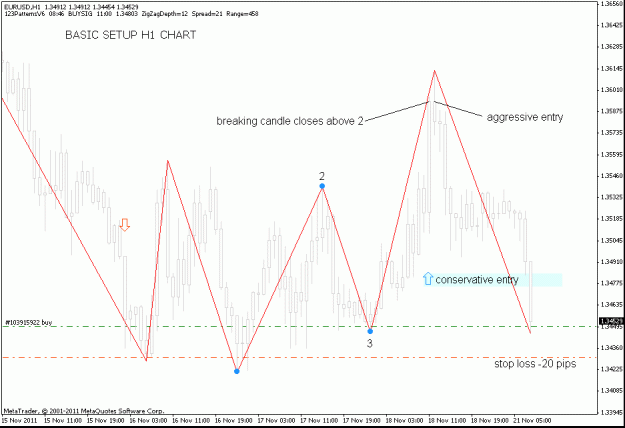
Yes that is correct. Aggressive entry prices are below 2. The red arrow points to the very first candle to close below price point 2. I see an aggressive entry as the open price of the following candle. Break candle closes, arrow has printed, market order now - no hesitation.

Conservative entries wait for price to break and then move higher into the range above 2 (and normally below 3). This is what the sell zone represents. An area of future selling interest as opposed to immediate selling interest. As the charts show, there are many situations where price action does not return into the sell zone and the conservative entry is not achieved. This can usually be explained by strong bearish pressure overwhelming the bulls.

Quoting spyderman
Will we be discussing the mechanics of the sell zone placement later?
I'm going to discuss this right now because it is an area of weakness and certainly needs improving. Determining a good price level for the sell zone has been problematic. Last year I tried all sorts of ideas for the placement of the arrows (which act as a guide for the sell zones).

123PatternsV6 prints arrows using the following calculation.

SellArrow[shift] = High[shift]+(High[shift]-Low[shift])/3;

In other words look at the breaking candle. Calculate the range (size) of that candle (range=high-low). Divide that range by 3. Add that value to the high and print the arrow at that price.

In effect the arrows are printed above the breaking candle at a variable distance from the candle (1/3 of the candle height).

If the candle size is large then arrow will be further above. If the candle size is small the arrow will be lower. In other words if there is a lot of momentum we expect a stronger pullback. Assuming that the bulls don't give up the fight.

Blue arrows are the mirror image of this. They are printed below the breaking candle at a variable distance (1/3 of the candle height).

Why am I so interested in sell zones? The reason is I can see a time when I'm going to be searching for liquidity. If I can find a place where the bulls are overconfident and buying into my sell orders for significant periods of time then liquidity will not become a limiting factor.

OK, any more questions?

Robdee

Note: I have been out on my own with this sell zone thing because most participants in the old thread (last year) were using aggressive entries.
  • Post# 35
  • Quote
  • Nov 21, 2011 3:09am
  • davidtrader ● Online
    Joined Feb 2011 | 79 Posts | Status: Member
Hi Robdee
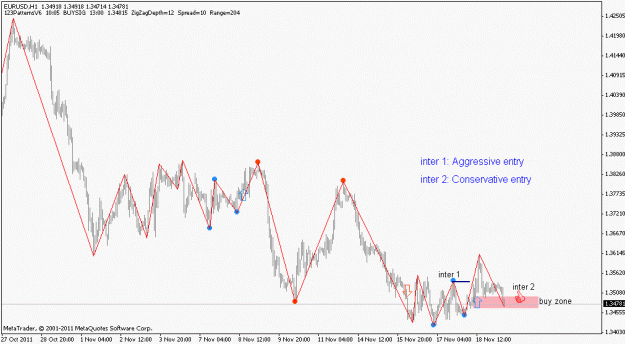
Is these entries in pic ok?
Where is stop loss in both entries?
Attached Image (click to enlarge)
Click to Enlarge

Name: eurusd h1.gif
Size: 15 KB
  • Post# 36
  • Quote
  • Nov 21, 2011 4:11am
  • robdee
    Joined Jul 2006 | 475 Posts | Status: Mighty Mooloo Country
Quoting davidtrader
Is these entries in pic ok?
Where is stop loss in both entries?
Davidtrader, good to see your chart posting. What I notice right away is your chart is one hour (H1) timeframe. That means the distance between 123 price points is huge, like 100+ pips. Which means in theory that appropriate stops are going to be pretty large too, so as to fit the pattern size of H1.

As a learning exercise I suggest using 5 min timeframe. You'll get a lot more practice because patterns come along more frequently. Plus you will not need more than 20 pip stops operating at that level.

See below my labels on the EURUSD H1 pattern that you posted.

Attached Image (click to enlarge)
Click to Enlarge

Name: eurusd-2011-11-21-h1-basic.gif
Size: 20 KB


Stop Losses - What I do

Stop losses are best left to personal preference. Your stop management needs to match your own trading personality. However, I will explain what I do.

My approach to stops is to take me out fast if I am wrong. So I simply use a 20 pip stop in all situations. If I haven't selected the right entry price (within a 20 pip margin of error) then I want to be taken out quickly. This clears my mind of the bad trade and allows me to re-evaluate without the emotional pressure of being stuck in a losing position.

Often I will chase an entry down getting taken out at 20 pip intervals until I find a better entry that holds. Although this cuts into profits pretty deeply it is the way I like to operate. That is, keep pruning out bad trades until I find a place where I can "buy and hold" for 100 pips.

Now there are a couple of other things I do with stops. As soon as price moves to +20 above my entry price I move the stop from -20 to breakeven. This means that if price bounces back against me I lose nothing.

When price moves to +50 above my entry price I start trailing pip for pip. This means my stop keeps moving up (trailing) 50 pips below the most recent high. This means if my TP target is not reached I'll still bank some pips.

Hope that helps. Would be good if experienced traders share their own stop loss rules in this thread.

Robdee
  • Post# 37
  • Quote
  • Nov 21, 2011 10:58am
  • Neksus
    Joined Jun 2009 | 11 Posts | Status: Member
perhaps someone will be able to add audio and text signals the appearance of the arrows?
  • Post# 38
  • Quote
  • Nov 21, 2011 1:06pm
  • Joeyd
    Joined Jul 2009 | 63 Posts | Status: Member
Thanks for starting this no-frills thread. Amazing little indicator that cuts through the "fog" of trading.
  • Post# 39
  • Quote
  • Nov 21, 2011 1:26pm
  • robdee
    Joined Jul 2006 | 475 Posts | Status: Mighty Mooloo Country
Quoting Neksus
perhaps someone will be able to add audio and text signals the appearance of the arrows?
Welcome Neksus, great minds think alike

Link to 123Alarms (add on for 123PatternsV6)
  • Post# 40
  • Quote
  • Nov 21, 2011 3:36pm
  • davidtrader ● Online
    Joined Feb 2011 | 79 Posts | Status: Member
Hi Robdee and every body
123 alarm indicated for zigzag depth=1 set uo not for zigzag depth=12
how i can change 123 alarm indicator set up for zigzag depth=12?
Thread Tools Search this Thread
Show Printable Version Show Printable Version
Email This Thread Email This Thread
Search this Thread:

Advanced Search

  • Trading Systems
  • /
  • 123PatternsV6 revisited
  • Reply to Thread
    • 1 Page 23456 23
4 traders viewing now, 1 is a member: Phx62
  • More

©2013 Forex Factory, Inc. / Terms of Use / Privacy Policy

Forex Factory® is a registered trademark.

Connect

  • Facebook
  • Twitter
  • RSS

Company

  • About FF
  • FF Blog
  • Careers at FF
  • Advertising
  • Contact FF

Products

  • Forums
  • Trades
  • Calendar
  • News
  • Market
  • Brokers
  • Trade Explorer

Website

  • Homepage
  • Search
  • User Guide
  • Member List
  • Online Now
  • Report a Bug