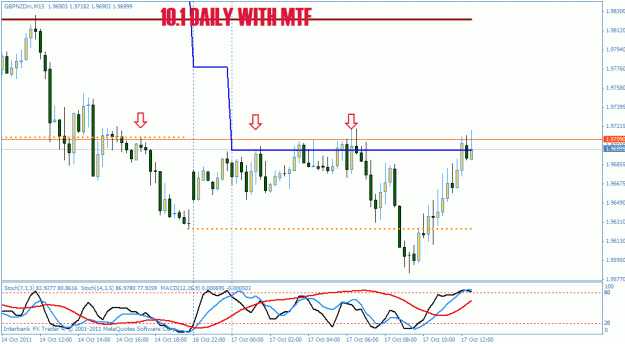
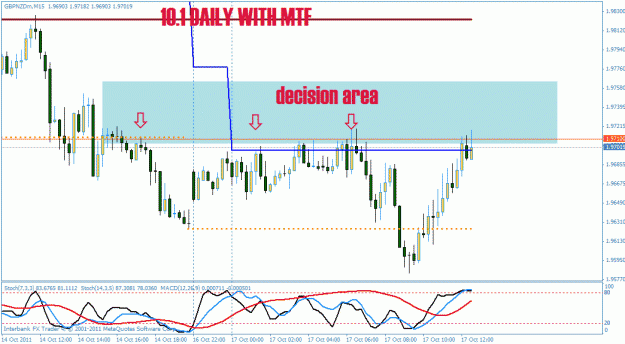
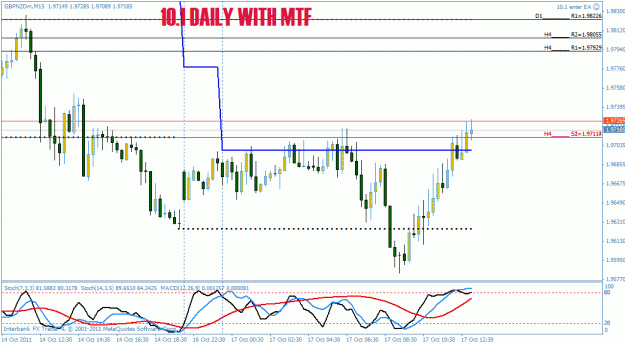
This is the 10.1 update practice version. Put the templates in the template folder and the 3 indicators into the indicators folder. There are not EAs for this at this time.
Ignored
Thanks Bob for the update. Ive been away for a couple of days reading about Relative strenght of whole currency indexes and that kept me busy. Anyway, ill get back testing your method starting this week again.
|
Joined Jan 2011
|
Status: eager to learn
|131 Posts
Bob,
there is one thing I dont get (maybe i missed something). Why the NB10 Daily 4H SR is showing different values on 4h TF and d1 TF? isnt it supposed to be the same?
Bob,
there is one thing I dont get (maybe i missed something). Why the NB10 Daily 4H SR is showing different values on 4h TF and d1 TF? isnt it supposed to be the same?
Let me check but are you sure the 4H is showing on the Daily I had not set it up that way. I only showed the Daily S/R on the Daily. That is how I have it on my screen. I also am not using the update by Squalou yet I am using the older version. I didnt have time to check his out this weekend fully.
Let me check but are you sure the 4H is showing on the Daily I had not set it up that way. I only showed the Daily S/R on the Daily. That is how I have it on my screen. I also am not using the update by Squalou yet I am using the older version. I didnt have time to check his out this weekend fully.
Ignored
I took only what was inside your 10.1 zip and loaded it up (with template)
[ EDIT: i renamed the indi to avoid confusion with templates posted by Bob...
]
Here is a new release of the indicator i posted earlier.
This one now draws the N S/R lines that are nearest to the current price (N lines above and N lines below price).
They are drawn as single Fibo lines, with a label giving the timeframe and type of SR line, and its price.
N is selectable per timeframe, with the "Num_Nearest_**_SR" inputs; Setting to 0 will not show the nearest SR lines for the corresponding timeframe.
Default is to show the 2 nearest Daily and H4 SR lines above and below price.
I have replaced the "BarsBack" input with "DaysBack" so that the SR lines will not change when switching the chart's timeframe: the calculated S/R lines will all start from the same day inthe past, giving the same SR lines whatever chart's timeframe is being used.
A note about "moving" (not "repainting"...) nearest SR lines:
you will observe that they will change while PA traverses them.
This is because the indi will always try to show the same number of lines above and below PA.
I do not recommend displaying the "nearest" H1 or M15 S/R lines, as they will most often come from very old PA compared to the timeframe itself, and therefore be totally irrelevant to current PA.
This is because the "nearest" SR lines are searched in the full list of SR lines collected over the DaysBack period, regardless of their relative "age", and therefore regardless to their relevance to current PA.
DaysBack defaults to 60 days (~2 months), which gives rather "relevant" D1 and H4 SR lines.
Going further back in history will start giving less relevant H4 (and possibly D1) "nearest" SR levels.
However it can be useful when you are running out of SR lines.
For instance, AUDNZD would require to go back at least 120 days from now to spit decent "nearest" D1 Resistance lines.
Caution when increasing "DaysBack": this will likely make "new" SR lines emerge from the far past, and start "polluting" your current PA with irrelevant H4 and possibly even D1 SR lines.
IMO, the relevance to current PA is the main issue with the indicator as it is defined today, and we should work on this aspect to collect and get more relevant, and therefore more powerful, SR lines.
Many times, recent H4 SR lines would appear more relevant than old D1 levels.
It will be a trade-off between age, distance, and timeframe of SR levels.
We need some method to "promote" recent SR lines over outdated nearest SR levels.
I took only what was inside your 10.1 zip and loaded it up (with template)
Ignored
Aha here is the problem. Squalou probably solved that problem when he change this:
I have replaced the "BarsBack" input with "DaysBack" so that the SR lines will not change when switching the chart's timeframe: the calculated S/R lines will all start from the same day inthe past, giving the same SR lines whatever chart's timeframe is being used.
Here is a new release of the indicator i posted earlier.
This one now draws the N S/R lines that are nearest to the current price (N lines above and N lines below price).
They are drawn as single Fibo lines, with a label giving the timeframe and type of SR line, and its price.
N is selectable per timeframe, with the "Num_Nearest_**_SR" inputs; Setting to 0 will not show the nearest SR lines for the corresponding timeframe.
Default is to show the 2 nearest Daily and H4 SR lines above and below price.
I have...
Ignored
Yes testing and gaining experience would be valuable. Thanks for this and working on learning how to use it. So far today I have had some really nice trades, especially on the gbp/nzd. I picked up +40+40+40 today moving my SL up into profit Looking at a 4th one possible now. Missed the big move to the bottom but the 3 trades made up for it. HMMMMM.
Aha here is the problem. Squalou probably solved that problem when he change this:
I have replaced the "BarsBack" input with "DaysBack" so that the SR lines will not change when switching the chart's timeframe: the calculated S/R lines will all start from the same day inthe past, giving the same SR lines whatever chart's timeframe is being used.
Ignored
Hi Bob,
Well, i am still playing with the inputs at the moment, so you should expect some changes in that area.
I should have renamed the indicator to avoid confusion, sorry about that!
People using the thread's paperclip to find the latest version of the indicator will fall into this trap...
Sorry about that, guys!
I'll try to EDIT my post and rename the indicator if i can.
Well, i am still playing with the inputs at the moment, so you should expect some changes in that area.
I should have renamed the indicator to avoid confusion, sorry about that!
People using the thread's paperclip to find the latest version of the indicator will fall into this trap...
Sorry about that, guys!
I'll try to EDIT my post and rename the indicator if i can.
Joined Jun 2007
|
Status: Teach men to fish
|7,383 Posts
Here is a preliminary EA for 10.1 When you bring the EA on the screen go to the tab that says Imputs. You will see sell level and buy level. Put the price in when you want to sell or buy and the EA will enter at that price. It will only work within 5 pips of that price. If you use a 5 digit broker you must put a 5 digit price in. 4D use 4. You also must put the entire price in. If you use the 5 digit EA with a 4 digit broker then the EA will enter within 50 pips and I dont think you want that.
5D price = 1.05248 you must subtract -100 to enter a sell 1.05148 for 10 pips under the line. add 100 to go 10 pips above the line 1.05348
4D brokers if you want 10 pips add 10 or subtract 10 depending on what you want to do. Have fun. This way you dont have to set pending orders and you can get back in on a rebound like I did with GBP/NZD today. Of course that can work against you also.
the gbp/jpy shows no S/R lines nearby so I have no reason to trade it at this time.
Ignored
Hello Bob,
It looks like you got's it guy. I just dropped by to say hello and wishing you luck. I see my buddy squalou is helping you code my simple target trader system. He's a great coder and you're lucky to have him helping. Although this is under your trend trading system you'll find in time it can do it all.
Breakout, trend, range and hedge all in one little package. At some point in time you'll also find the indicators below the chart are becoming more and more just decorative art work as you will look at them less and less.
This system keeps your eyes on the chart and looking for the next target. I'm glad I could teach you something Bob and looking forward to your progress.
I might make just make one little suggestion. When you don't see any targets above the PA as in your post here shows is when a big one you didn't see hits you over the head. Always look to the next higher timeframe to find the S&R's before they find the PA. When you find them draw a horizontal line so they show up clearly on the lower timeframes. These will be your next targets.
[quote=AaronWard;5042985]Backtesting works...somewhat. Same problem... it tells you what was, not what will be. But I promise you that it will work much better on some pairs than others and in some time frames and not others.. And in a heavily trending market you make a lot of cash.
Hello AaronWard,
I noticed your posts so thought I'd comment.
My guess about Johnny's system is that there is an element of intuition (call it experience if you like) that he uses. Otherwise he would not need to place live trades.
Not need to place live trades you say? How else do you make pips? I think you had a little brain thingie there. Same thingie as one gets after eating too many beans. LOL. I'm sure that's not what you meant to write.
Remember I showed a small piece of my system and method of how to trade it. My goal was to get a light bulb in Bob's head to turn on and see the advantage of trading this way. It obviously worked as he's running with the idea. Just showing the key elements lit the flame. I actually found a thread originator that shows promise.
I must say Bob's the very first thread originator that actually listened and most just hit the BAN button. Their loss I'm afraid. Ego plus arrogance plus ignorance equals poverty. Hurrah for Bob and ultimately Miss Principal.
I do play a lot of games here on FF and other sites as trading is rather a boring thing. I've played a newb trader and a Professional trader. I've played the guy with a chart full of indicator panels to one who trades naked. I've debated the use of stops and also the no stop side. I've played the nice guy to the bad guy depending on the mood. I've let only a few into my real trading world except for a few students.
Knowledge is king in this game and that knowledge is what governs my trading. If Bob doesn't screw with the method too bad then you will see what I see in time. You will know when to close the trade or at best know when not to gamble the pips away you already have made. Closing a trade is the only sure way to bank those pips and lock in those profitable trades.Knowing how to reenter a trade becomes as natural as breathing.
This is NOT a breakout system. It is a trading system. A breakout system as demonstrated throughout FF is either based on time or based solely on the breakout of price from consolidation or a crossing of a trendline. They all trade from the Median Line although they are clueless to the fact. They are trading with blinders on and are no different from the player at a casino crap table.
This system makes you think about where the PA is heading but more importantly to where has it been. Breakout systems do not trade this way as the large majority of traders are directionally challenged.
They take vacations without a map with no plans for a destination. They never no when they get there or if they are already there. Their kids like all kids say "Daddy are we there yet" as he drives 70 MPH down the highway. He has no answer and his kids are left wondering if they'll see their hometown again. They drive across deserts without water or a spare tire and the thought that their cell phones are out of range never enters their head.
You will see breakout opportunities using this style of trading. Maybe at first you won't know how to trade it but I already showed you that little game if you were paying attention.
I will let Bob learn as he goes. Too much information all at once can be confusing. So far so good as he's running for a touchdown in the right direction. Score Bob 7, Dummies 0.
Have a great day,
Johnny
I see some of the Beagle Team were over here. It must have been a slow rabbit hunting day. They do like to bark a lot. I see Bob put up the no hunting in the park sign.
Here is another pic using the decision area for the 4th time 3rd time today and one from last Friday. Looking forward to using the new indicator.
Ignored
It would be helpful for the newbs to tell them what that little line is I think. H1 Upper or Daily Lower? Mmmm maybe squalou could add a label to make it easier. How about it squalou old buddy.
Johnny
Update: Well I see squalou is on the ball and already did that done that thing. Great minds think alike they say.
[ EDIT: i renamed the indi to avoid confusion with templates posted by Bob...
]
Here is a new release of the indicator i posted earlier.
This one now draws the N S/R lines that are nearest to the current price (N lines above and N lines below price).
They are drawn as single Fibo lines, with a label giving the timeframe and type of SR line, and its price.
N is selectable per timeframe, with the "Num_Nearest_**_SR" inputs; Setting to 0 will not show the nearest SR lines for the corresponding timeframe.
Default is to show...
Ignored
Hello squalou,
How are things in beautiful southern France?
On the discussion of SR lines you are correct that the most recent are the current places of TP's and PA reversals. Your past thoughts of the heat map may come into play here as the most recent SR lines and old SR lines that match up become stronger SR lines. Maybe the lines could turn a different color such as bright red and/or bright green.
Depending on the timeframe and time itself, not showing the H1 SR lines will lead to orphaned trades. This is especially true during the Asian session on GBPUSD and EURUSD. There are other ways to catch orphaned trades such as the Bols-20-2 center line. Any cross and retrace triggers a close of the trade. The downside is this can be a head fake if the time of this occurrance is during high volume. I would place a time of trade on the whole EA and only trade it from two hours before the London Open to one to two hours after the London close if trading the GBPUSD or EURUSD.
Obviously trading the AUD or Yen is a different time period.
There are other things that work well with this style of trading which you have full knowledge. One is your breakout indicator which will alert to ranging or consolidation and subsequent breakout of the PA. The other is time based which you did on Mer's thread along with the background chart TP levels.
Time of the Opens and closes is critical as these are strong price turning points. At some point in time on any given pair the upper SR lines are breached and no further TP's are available. Only a trailing stop or visual TP lines in the back ground will assist you in closing the trade when the PA reverses. This trailing stop cannot be used up to this point however as then you would be closed out of the trade too early. The PA needs a little room to run. You would have to have a switch to turn it off and on based on available targets and/or user option.
If you stick around here long enough I'll show you how to avoid the many head fakes that your consolidation indicator produces. You may have seen the light already. After trading the target trading system you will realize that most threads have systems that actually trade back-ass-wards.
I haven't viewed the indicator or EA for this yet so really can't say to much more at this time. I will download it tonight and check it out.
the gbp/jpy shows no S/R lines nearby so I have no reason to trade it at this time.
Ignored
Bob,
My reaction to your comments and chart was oh crap. By now you realize the line to your left was an H4 line of resistance and a H4 break through and reverse is time to get the heck out of Dodge. Yes I now have the ability to bring up the chart but the result was really no surprise to me.
Keep working at it Bob and you'll get it. Nobody ever learned a thing about swimming until they got their feet wet. It's the swimming against the current that's difficult. The sharks and I thank you for you contribution but realize you'll be swimming like us before long.




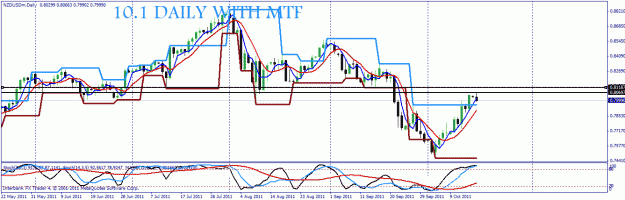
 Missed the big move to the bottom but the 3 trades made up for it. HMMMMM.