Forex Factory
  • Login

  • Username: Password:
  • 11:34am

  • Search
  • Home

  • Forums

  • Trades

  • Calendar

  • News

  • Market

  • Brokers

Options

Search

Subscribe to Thread

Bookmark Thread

First Page First Unread Last Page Last Post

Printable Version

Similar Threads

copy and move experts/files to another folder 6 replies

What do you experts think of this trade? 8 replies

Question for the Experts 2 replies

Little code help from the experts :) 13 replies

  • Platform Tech
  • /
  • Reply to Thread
  • 1

experts advisor file not in experts folder

  • Post# 1
  • Quote
  • First Post: May 9, 2010 3:09pm
  • neomn
    Joined Jan 2010 | 76 Posts | Status: Member
I am in the process of writing some EA for experiment. However, when I launched the metaEditor by pressing F4 key, select File -> New, create file, save as in the experts folder. It compiled oK, and it can be attached to the chart with no problem.

However, if you try to look for the file with windows explorer, under c:\program files\metatrader 4\experts folder, there is no such EA file which I just created.

I can actually see the EA from the navigator pane, only problem is when I trying to locate it, it is not in the expert folder.

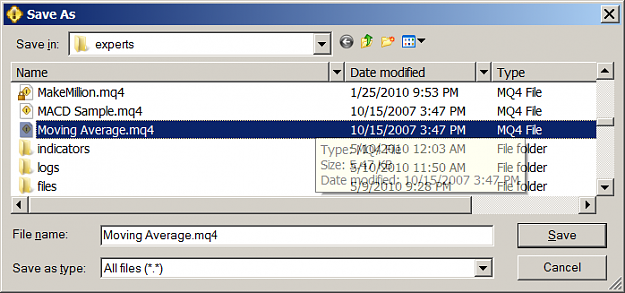
If I click file, save as, and walk down to experts folder, I can actually see this EA file, but its icon has an lock on top, different from other EA file I manually copied into the experts folder.
Anyone know what's the problme and where the metatrader save the ea file?
  • Post# 2
  • Quote
  • May 9, 2010 3:55pm
  • TJPLD
    Joined Jan 2008 | 2,104 Posts | Status: Inertial Member
Have you tried Windows searching for your file?
Maybe you have multiple MT4s on your PC (made a copy to run 2 instances at the same time) and the compiler is linked to another folder.
  • Post# 3
  • Quote
  • May 9, 2010 10:12pm
  • neomn
    Joined Jan 2010 | 76 Posts | Status: Member
I did a search on these file but none of these file is found. That is really weird.
I don't think metatrader save these files with hidden attributes, since I changed my windows explorer to show hidden files.

Or maybe my windows 7 need a reinstall. It have undergone multiple upgrade from vista to window 7 beta, then windows 7 RC, and then finally to window 7 professional. So there might be bug for that.
  • Post# 4
  • Quote
  • May 10, 2010 6:50am
  • eagle4x
    Joined Sep 2005 | 620 Posts | Status: pip my ride
Did you change "Files of Type" from "Programs" to "All Files"? Individual files will appear only after "All Files" is clicked. If you tried that already, and you still don't see your file, just go to Navigator, right click on the EA, click modify - then copy and try saving again with new file name (_2, etc.).
  • Post# 5
  • Quote
  • May 10, 2010 9:27pm
  • neomn
    Joined Jan 2010 | 76 Posts | Status: Member
Not sure what you mean by changing "File of Type". But I did select All file when I tried to save the file.

I can open or edit the file by right click the file in the Navigator pane without any problem. I can also save the file as a different file name, but it just not visible under windows explorer when try to look for it. It seems like the MetaTrader program save this file somewhere hiding from you.

As seen the screenshot as attached, The MACD sample.mq4 file is manually created in the experts folder, There is no lock on the file icon, however, MakeMillion.mq4 is created by MetaEditor, by using File -> Save As menu, you can see the lock on the file icon, and you have no way of finding it if you dig into the experts folder.

It is really odd. The other thing is when I try to take a screenshot of the chart with WindowScreenshot function, I can see the function return no error, but it does not create the screenshot file. You would think metaTrader can access the program file folder, even though only administrator can modify this folder under windows 7 security level.

I am guessing I need to wipe this machine clean and reinstall the whole system.

Quoting eagle4x
Did you change "Files of Type" from "Programs" to "All Files"? Individual files will appear only after "All Files" is clicked. If you tried that already, and you still don't see your file, just go to Navigator, right click on the EA, click modify - then copy and try saving again with new file name (_2, etc.).
Attached Image (click to enlarge)
Click to Enlarge

Name: Untitled.png
Size: 31 KB
  • Post# 6
  • Quote
  • May 10, 2010 10:00pm
  • lmyyyks
    Joined Mar 2010 | 198 Posts | Status: it's an "L", not an "I"
Quoting neomn
Not sure what you mean by changing "File of Type". But I did select All file when I tried to save the file.

I can open or edit the file by right click the file in the Navigator pane without any problem. I can also save the file as a different file name, but it just not visible under windows explorer when try to look for it. It seems like the MetaTrader program save this file somewhere hiding from you.

As seen the screenshot as attached, The MACD sample.mq4 file is manually created in the experts folder, There is no lock on the file icon, however,...
mq4 file can not be used in the metatrader4,
you have to compile the mq4 file to ex4 file through the "compile" function in the metaeditor, you can do this by simply pressing F5 in metaeditor.
  • Post# 7
  • Quote
  • May 10, 2010 10:36pm
  • neomn
    Joined Jan 2010 | 76 Posts | Status: Member
the compiled ex4 is not shown either.

Quoting lmyyyks
mq4 file can not be used in the metatrader4,
you have to compile the mq4 file to ex4 file through the "compile" function in the metaeditor, you can do this by simply pressing F5 in metaeditor.
  • Post# 8
  • Quote
  • May 12, 2010 9:06pm
  • eagle4x
    Joined Sep 2005 | 620 Posts | Status: pip my ride
I did a test using same method you used, and I could find the file in my experts folder. Did you create this file yourself? Reason I'm asking is that I don't see how the file could become locked unless intentionally programmed to do so. Saw an ad for s/w that costs $1K to lock EA's. I wouldn't wipe your machine clean and start over just to try to get the file unlocked - I don't think it would work. May consider finding a programmer you trust that is willing to look at it by doing remote access.
  • Post# 9
  • Quote
  • May 17, 2010 2:47am
  • neomn
    Joined Jan 2010 | 76 Posts | Status: Member
This file is create my myself, but I do think it is related to the machine cause it has other kind of funky problem like it would not create log file and screenshot. Thanks for the suggestion though.
Quoting eagle4x
I did a test using same method you used, and I could find the file in my experts folder. Did you create this file yourself? Reason I'm asking is that I don't see how the file could become locked unless intentionally programmed to do so. Saw an ad for s/w that costs $1K to lock EA's. I wouldn't wipe your machine clean and start over just to try to get the file unlocked - I don't think it would work. May consider finding a programmer you trust that is willing to look at it by doing remote access.
  • Post# 10
  • Quote
  • May 22, 2010 12:57pm
  • neomn
    Joined Jan 2010 | 76 Posts | Status: Member
Finally find the problem. I post this just for reference in case anyone has similar problems.

It turned out windwows 7 default UAC on, so if you logon is not administrator, even your windows user belong to administrator group, when you launch metatrader, metatrader will not be able to create file in program file directory, rather, the files are created under c:usersyourusernameappDataLocalVirt ualStore.

To enable the program create file under program files directory, you have to disable UAC, or you can launch metaTrader with administrator right.

Microsoft UAC is pretty much a hindrance to productivity, and not really make your system more safer.
  • Post# 11
  • Quote
  • Sep 10, 2010 9:55am
  • amam08
    Joined Sep 2010 | 1 Post | Status: Junior Member
neomn - thank you so much for sharing this! I was almost spaz'ing with my mq4 file that I just edited and saved with another name not showing in the Windows explorer - but it was showing in the MQ navigator. Isn't it crazy how we still (have to?) use mr. softy...sigh...sigh...

Thanks for sharing your wisdom!
  • Post# 12
  • Quote
  • Oct 7, 2010 8:07pm
  • schindawg
    Joined Feb 2009 | 1 Post | Status: Junior Member
And thank goodness for search engines. Was having this exact same issue. Turned off UAC and now back to bliss.
  • Post# 13
  • Quote
  • Last Post: Nov 27, 2010 1:32pm
  • netwel
    Joined Nov 2010 | 6 Posts | Status: Member
Yes! So happy you solved this one for me. As I was runing into the same problem, it was getting more and more annoying.

Thanks a lot, neonm!
Thread Tools Search this Thread
Show Printable Version Show Printable Version
Email This Thread Email This Thread
Search this Thread:

Advanced Search

  • Platform Tech
  • /
  • experts advisor file not in experts folder
  • Reply to Thread
0 traders viewing now

©2013 Forex Factory, Inc. / Terms of Use / Privacy Policy

Forex Factory® is a registered trademark.

Connect

  • Facebook
  • Twitter
  • RSS

Company

  • About FF
  • FF Blog
  • Careers at FF
  • Advertising
  • Contact FF

Products

  • Forums
  • Trades
  • Calendar
  • News
  • Market
  • Brokers
  • Trade Explorer

Website

  • Homepage
  • Search
  • User Guide
  • Member List
  • Online Now
  • Report a Bug