



My name is Boris Sedov. I have been developing trading tools for MetaTrader since 2008. For the last 18 years, I have been refining
my local trade copier — RS Trade Copier. And only when it became truly convenient and lightning-fast did I release it on the MQL5 Market.
 Why Did I Build This Tool?
If you have ever used trade copiers, you know the pain:
 Endless list of 200+ cryptic settings in the "Inputs" tab
 Manually typing account numbers (and praying you don't make a typo)
 Slow trade closing: one by one, with a 0.2–0.6 second delay per trade
I watched this for years and eventually built a new product from scratch.
 What Is RS Trade Copier?
It is a fully local trade copier between MT5 and MT4 with a full graphical interface and an asynchronous engine.
 Interface
RS Trade Copier: Step-by-step visual wizard. Everything is set up with a mouse.
Other Solutions: 200+ cryptic parameters.
 Languages
RS Trade Copier: Interface in English. Tooltips in 11 languages.
Other Solutions: No tooltips. Requires reading lengthy manuals.
 Speed
Speed
RS Trade Copier: Asynchronous operations. Closing a batch of 50 positions takes only ~1 second.
Other Solutions: Sequential closing ~25 seconds.
 Flexibility
RS Trade Copier: Per-symbol settings (separate multiplier for XAUUSD, for example).
Other Solutions: One multiplier for all symbols.
 Auto-Discovery
RS Trade Copier: The client automatically finds active providers. No manual entry of account numbers.
Other Solutions: Account numbers must be typed manually.
 Compatibility
RS Trade Copier: MT5 ⇔ MT4 in any combination.
Other Solutions: Often only MT4→MT4 or MT5→MT5.
 Video: Speed and Cross-Platform Copying
See it in action:
Video #1 (2 min) — Speed demo: asynchronous closing/deletion of a batch of positions/orders ultra-fast.
Video #2 (2 min) — Cross-platform demo: copying trades between different platform versions (MT5 ⇔ MT4).
 Free Demo Version (24 Hours, All Features)
You can test ALL features without limitations on demo accounts.
Demo files are attached to this post (see attachments below). Up-to-date versions are also always available on the product pages in the Market.
Attached demo files:
How to install the demo (step-by-step guide)
 Installation Guide (60 Seconds)
- Download the demo file from the attachments to this post
- Open MetaTrader → File → Open Data Folder → MQL5 (or MQL4) → Experts
- Copy the downloaded file to the Experts folder
- Restart the terminal
- Find "RS Trade Copier" in the Navigator and drag it onto any chart
- Select your language in the "Inputs" tab → OK → Follow the visual wizard
That's it. Setup takes about 1 minute. No need to type account numbers — the client finds providers automatically.
 Full Version
The product is available in the Market.
ALL combinations are supported: MT5→MT4, MT4→MT5, MT5→MT5, MT4→MT4.
For copying between different platform versions (MT5 ⇔ MT4), both versions are required:
 How Many Times Do You Need to Purchase RS Trade Copier to Start Copying?
Once.
A single purchase of RS Trade Copier gives you 20 activations. Each activation is one computer or Windows VPS.
Important: this refers to a classic Windows VPS. The built-in "Virtual Hosting" service from MetaQuotes (renting a virtual terminal directly in MT5) is not suitable for trade copying. To copy trades, you need a computer (desktop PC or laptop) or a full Windows VPS where you can install your own software and configure terminals manually.
How it works in practice:
You purchase the product once. That's it. Now you can install RS Trade Copier on 20 different computers or Windows VPS. On each of those devices, you can run any number of MT5 terminals from any brokers. In each terminal — any number of accounts: real, demo, or contest.
All these accounts will work. One purchase covers everything.
The only requirement: each terminal must be logged into the MQL5 community account (the one you used to purchase the product). It takes a minute: enter your login and password in the terminal settings, and all your purchases become available.
Why 20 activations?
You can use them all at once — install the product on all your computers and Windows VPS. Or keep some as a reserve. This is useful when you change a computer, replace a motherboard or processor, or reinstall the operating system. Each such change counts as a new device and requires a new activation. With 20 activations, you have a large reserve for years ahead.
In short:
1 purchase = 20 activations = 20 different computers or Windows VPS = unlimited terminals and accounts on each device.
Free Migration from Another Trade Copier
If you already use another trade copier purchased on the MQL5 Market, you can get RS Trade Copier for free for one year.
The number of free migrations is limited: 10.
What you need to do:
- Contact me via private messages in the MQL5 community.
---
What the Client Manual Setup Looks Like
The step-by-step visual wizard guides you from selecting providers to the final launch. No more 200+ input fields — only what you need, with helpful tooltips.
Here are the main steps:
1. Selecting Providers
The client automatically finds all active providers on your computer or Windows VPS. You just need to select the ones you want and move them to the selected providers list. No manual entry of account numbers.

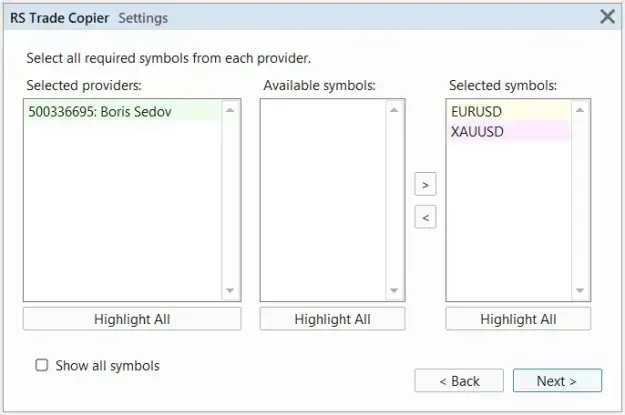
2. Selecting Symbols from Each Provider
For each provider, you can choose which symbols to copy trades from. Hotkeys (Shift, Ctrl) let you quickly select groups of symbols.
3. Symbol Mapping
Automatic symbol mapping adapts names to your broker. If needed, you can manually change the prefix/suffix or rename the symbol.

4. Opening Positions
Configure market and pending orders. Per-symbol settings: shift, range, slippage, pending order expiration.

5. SL/TP Levels
Configure Stop Loss and Take Profit: level shift, spread compensation, deferred sending. Everything can be set individually for each symbol.

6. Protection Strategies
Safe Stop Loss, Breakeven, and Trailing Stop — three levels of protection for your positions. Configured separately for each symbol.

7. Trading Targets and Limits
Daily and weekly profit targets. Automatic closing when a specified profit or loss is reached. Email and Push notifications.

 A Request for Those Who Test the Demo
I have been building this tool for 18 years. I would be extremely grateful if, after testing, you could leave your feedback right here in this thread.
Honest feedback is the best reward for a developer.

Any questions? Feedback? Ideas? Post them right here — I reply personally.
---

