{quote} I wonder how you changed these parameters, especially the 'trigger' one? You open the currency pair on the 4h TF and then let it run? {image}
Ignored
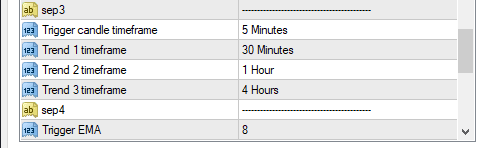
It makes no difference which TF you open it on - click the down arrow in the inputs window and select what you want. The timeframe options control which three TFs you want the EMAs to be active on, i.e. all aligned UP or DOWN. The EMA option is where you selected which EMAs you want to be working with on your three TFs, eg 8/21/100.
Alistair, sorry but not clear to me: I see 4 parameters with TF, you say you changed 3, so I suppose 30m becomes 1h, 1h becomes 4h and 4h becomes 1d, you leave the 'trigger TF' at 5 minutes? And the trigger EMA at 8?
Alistair, sorry but not clear to me: I see 4 parameters with TF, you say you changed 3, so I suppose 30m becomes 1h, 1h becomes 4h and 4h becomes 1d, you leave the 'trigger TF' at 5 minutes? And the trigger EMA at 8? {image}
Ignored
The first item in each section is a trigger. If you read my requirements the trigger is described there. So the Trigger EMA might be the 8 EMA (that's what I was asking for, but it's an option) and the Trigger TF is where that crossover will take place. The default is 5M. So in that case a 5-minute candle must open one side of the 8 EMA and close the other side of the 8 EMA. So if all three EMAs are aligned on all three of your TFs, then as soon as the trigger process happens, it will place a trade.
So far it is working well for me, but on small lots. I might increase to 0.02 in the next few days and more later, hoping it continues working well. The danger is that just as one gains confidence in an EA, conditions change and it makes a mess.
added:
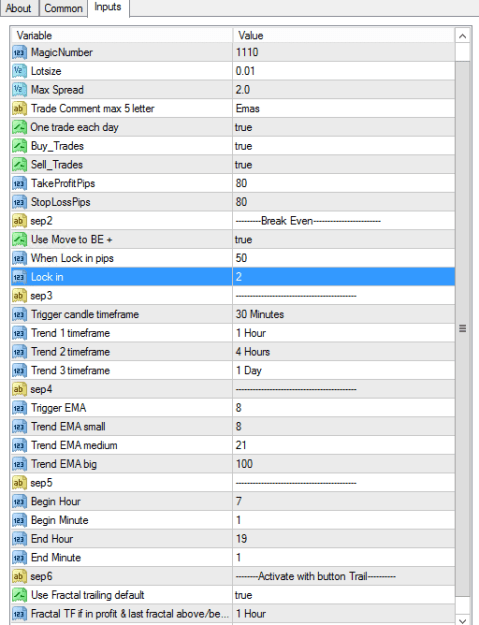
-one trade a day option in menu
-buy trades, sell trades or both in true = default
-trail with last fractal, time frame selectable in menu
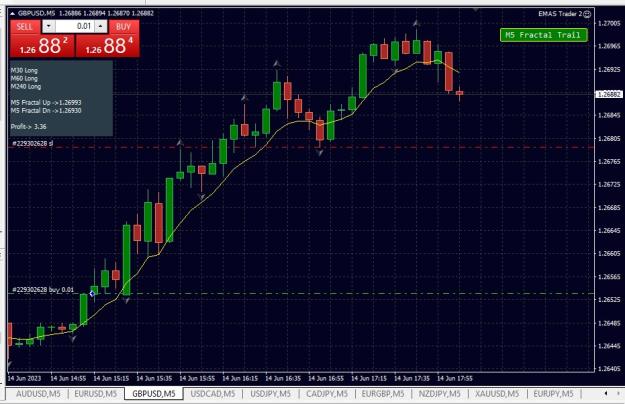
-trail to activate with button on screen, default in off
-changing timeframe or restart meta puts it again in off
-trial period 180 days, no mq4 source this time, costs a lot of time making
Trends have a higher probability of continuing than not.
{file} added: -one trade a day option in menu -buy trades, sell trades or both in true = default -trail with last fractal, time frame selectable in menu -trail to activate with button on screen, default in off -changing timeframe or restart meta puts it again in off -trial period 180 days, no mq4 source this time, costs a lot of time making
Ignored
Nice work.
Some requests:
If I set "buy trade" or "sell trade" to false, could you put a note on-screen as a reminder?
It would be good to be able to set the trailing stop default to true using an input setting, with the on-screen button being a manual override.
{quote} FF tells me that type of file is not supported for adding as an attachment. Is there a way around that? In the meantime, I have attached a screenshot. {image}
Here's a tool to give you a view of trend behaviour across time-frames at "one glance". It comes from a fellow FF member, zoheb01 https://www.forexfactory.com/thread/...dicator-system who produces some very useful One Glance Trader (OGT) tools. It provides a dashboard showing when the three MAs you have selected are all aligned (a green or red block) or grey when they are not aligned fully yet. The dashboard lets you know when trend (as defined by the three EMAS you have selected) is up, down or neutral across...
Ignored
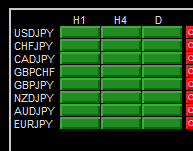
I posted about the OGT dashboard a while back. It is easy to set it to match eur-thijs's EA. Using the settings that suit us, this is what it looks like on-screen:
Attached Image (click to enlarge)
This shows that the three EMAs it has been set to follow (8/21/100 EMA) are all aligned on three TFs (H1, H4 and D1). Now you can trade manually the exact system that the EA is following. All you must go looking for is the trigger candle on those pairs that are displayed. So if you set that as the 5-minute candle, life will be rather busy!
Everything you need to know is in the screenshot (those settings are what I used yesterday, you are free to play with it to make it suit you). Which TF you place it on makes no difference. It is controlled by the EA.
{quote} I posted about the OGT dashboard a while back. It is easy to set it to match eur-thijs's EA. Using the settings that suit us, this is what it looks like on-screen: {image} This shows that the three EMAs it has been set to follow (8/21/100 EMA) are all aligned on three TFs (H1, H4 and D1). Now you can trade manually the exact system that the EA is following. All you must go looking for is the trigger candle on those pairs that are displayed. So if you set that as the 5-minute candle, life will be rather busy!
{quote} Everything you need to know is in the screenshot (those settings are what I used yesterday, you are free to play with it to make it suit you). Which TF you place it on makes no difference. It is controlled by the EA.


 MA Crossover System that works for me